• Some users have recently had their accounts hijacked. It seems that the now defunct EVGA forums might have compromised your password there and seems many are using the same PW here. We would suggest you UPDATE YOUR PASSWORD and TURN ON 2FA for your account here to further secure it. None of the compromised accounts had 2FA turned on.
    Once you have enabled 2FA, your account will be updated soon to show a badge, letting other members know that you use 2FA to protect your account. This should be beneficial for everyone that uses FSFT.

Althon MP temps

Phil_needs_help

Weaksauce
Joined
Apr 6, 2005
Messages
124
right this motherboard of mine is getting on my nerves...tyan 2640

idle my processors are 42C and 45C, during a game they can go up to 48C and 50C, should i be worried? I heard Athlon MP's usually get hot like this...this true?

another thing, one of my processor fans (the hotter one) runs 200rpm slower than the other fan, even tho they are the same type of fan, i got no software controlling this sooo they should be running at 100%......?? helppppppppppppppp

these fans are rated 3400+ and i got that arctic silver on the heatsinks

Phil
 
Phil_needs_help said:
should i be worried? I heard Athlon MP's usually get hot like this...this true?

Nope...the temperatures are well with operating parameters...

Here's my handy dandy checklist...

MD's Temperature related standard checklist.

Check the following for overheating or perceived overheating:

- Is the heatsink correctly installed ?
--> Verify it is correctly installed.

- Is the heatsink filled with dust and crud ?
--> Clean with compressed air in a can.

- Is the heatsink fan operating ?
--> Replace defective fan with similar or better unit.

- Is the heatsink adequate for that application/CPU ?
--> Verify it meet the requirements for the CPU being used.
--> RETAIL heatsink? May require lapping and better TIM.

- Is thermal interface material used between heatsink and cpu ?
--> Verify it is used, and is applied according to the manufacturers guidelines.
--> Recommended PCM's, thermal pads from "AMD Thermal, Mechanical,and Chassis Cooling Design Guide #23794.PDF.
- Bergquist HF225UT Phase Change
- Chomerics T725 Phase Change
- Honeywell PCM45 Phase Change
- Power Devices Powerfilm Phase Change
- ShinEtsu PCS-TC-11T-13 Phase Change
- Thermagon T-pcm905C Phase Change
--> Recommended thermal interface material aka: grease, gel etc.
- Arctic Ceramique.
- Arctic Alumina.
- Arctic Silver, 3, 5 etc.

- Is the TIM pad cover removed from heatsink before installation, if using supplied TIM pad ?
--> Remove the cover before installation, failure to do so will insulate the cpu from the heatsink.

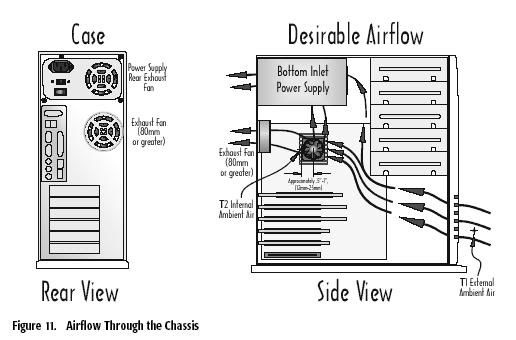
- Is there adequate airflow or case ventialation ?
--> Verify airflow, add case fans if required.

airflow.jpg


- Is the Vcore set higher than specified by the manufacturer ?
--> Verify the Vcore is set to the manufacturers specification in the mainboards bios.

- Is the temperature read via the internal temperature diode. Is the tremperature read via the socket thermistor ?
--> Temperatures read at the diode can and will be higher than an external reading.

- Is the temperature sensor properly calibrated ?
--> Several boards have this problem, check manufacturers bios revision history for calibration fix.
--> Does the heatsink feel warm or HOT, if it's warm it could be a miscalibration error.

- Outside temperature high ?
--> If the external temperature is high, then the case fans will be drawing in hot air, especially during summer months. Remeber, when it's Winter in the Northern Hemi-sphere, it's Summer in the Southern Hemi-sphere & vice-versa.

Have fun

MD
 
ok thanks, out of interest when should i start getting worried? wot temp?


if i don't have space on the front of my tower can i put more fans on the side and top?
 
Phil_needs_help said:
ok thanks ;-)

out of interest just wondered, how the hell can HP, dell etc make PC's with Pentum 4's that run really really really fast and yet they only have small fans round the back of the case, and are able to keep temps of 35C?
 
They use huge heatsinks and wind tunnels...

The environment inside their cases is prone to component failure because off the heat...

I've tossed out a couple of HP sante-fe mainboards because the system components became so hot that they failed.

MD
 
Back
Top