Advice for a home NAS

Joined
Oct 19, 2002
Messages
618
I am currently looking into the Drobo 5N. I am needing access my files from 2 PC's and 2 laptops in my home. I currently have 3TB of music, movies, and TV shows and roughly 500GB of family photos that I never want to lose due to a hard drive failure. I was running mirrored drives for the photos and sharing it, but anytime my wife wants to access the files, my PC must be running to access the shared drive.

My reasoning for leaning toward Drobo is its simplicity, and the ability to mix and match different brand drives and sizes. On Amazon they are currently $569, and that would pretty much be my max price point.

Currently I would be able to install 2 Seagate 2TB drive and 1 Hitachi 3TB drive and would add a couple of 4TB drives when the need arrived.

I know when these drives are installed to the unit it wipes and formats them. Would I be able to install the 2 x 2TB drive, move my data over and then insert the 3TB drive last?
 
What is problem with leaving your PC on? The Drobo needs to be left on.

I believe that the Drobo does a non-standard format of your dirves. If the Drobo dies, you need to buy a new one to access your files or they are lost and gone forever.

You can most certainly build something like a Drobo for less than $569. It will have a standard file system.
 
Please search this forum for user experiences before you purchase a drobo.

I read some of the slow speed issues, but most were people running them on 100m ports.

What is problem with leaving your PC on? The Drobo needs to be left on.

I believe that the Drobo does a non-standard format of your dirves. If the Drobo dies, you need to buy a new one to access your files or they are lost and gone forever.

You can most certainly build something like a Drobo for less than $569. It will have a standard file system.


My PC is loud, mainly because the Antec 920 fan noise. I understand the Drobo would make noise too but I can stuff it over with my network equipment and not have to worry. Plus it only draws ~60watts where my PC draws 200ish. PLus if visiting family I could take the Drobo with me to share photos where my PC is a hassle to move.

I am open to alternatives though. I need something that supports different size hard drives and hot swap capable in the event of a failure. Low power consumption would be nice too, as when I move into my next home solar will be installed on it and naturally the lower the better.
 
Around here it is always encouraged not to purchase these devices as they are not only historically notoriously slow, but many other competing products from Synology, QNAP or even building your own is not only cheaper but grants better performance and flexibility. I know Synology has SHR which allows the use of different drive sizes, and there are several 'roll-your-own' solutions like unRAID that allow that same functionality.

To answer your question, yes, you can grow your array on the fly. As long as you keep in mind that once a drive goes in its wiped, you can add drives one by one until all of your data has been migrated to that pool.
 
Around here it is always encouraged not to purchase these devices as they are not only historically notoriously slow, but many other competing products from Synology, QNAP or even building your own is not only cheaper but grants better performance and flexibility. I know Synology has SHR which allows the use of different drive sizes, and there are several 'roll-your-own' solutions like unRAID that allow that same functionality.

To answer your question, yes, you can grow your array on the fly. As long as you keep in mind that once a drive goes in its wiped, you can add drives one by one until all of your data has been migrated to that pool.

I didn't know Synology supported mix match drives. I will look a little deeper into them. I know in those you have to secure the drives to a bracket, but that's no big deal since it is in theory a permanent install.

The Synology is a bit more expensive, but I may could settle for the DS411 which is a 4 bay and eventually up it to 4x4TB drives over time. And for the savings difference I could add a 4TB drive right off the bat.
 
Unless you're talking ebay or other used outlet I don't see much reason to get the 411 over the 413, they seem to give 4-5 years worth of DSM upgrades, no reason to rob yourself of 2 of those just to save 50 bucks
 
I meant to say the 413. I really wish they made a 5 bay version though without having to spend $800.

On these Synology units, can I just add a hard drive and it automatically provision it like the Drobo does? I saw where it supported different drives, but never clearly stated it it was as dynamic as the Drobo.
 
You have to tell it to add the new drive to the volume, but it only takes a few clicks in their UI.
 
I have a 2-bay and 4-bay Synology at home and I LOVE the simplicity of the OS and the ease of setup. You can also access everything remotely like the Drobo and they have great support. i researched Drobo and Synology extensively before deciding on Synology, but they also seem to cost a bit more than the competition. The Synology has a similar dynamic RAID setup as the Drobo and duplicates data for a 1-disk tolerance of data loss for your data. I have had awesome speeds out of the newer unit I got too and it streams like a dream to PS3(Plex), computers, and my phone(with Plex or DS Video).

I have the 211j(2-bay, 2-2tb drives) and a 411+ii(4-bay 4-3tb drives) currently.

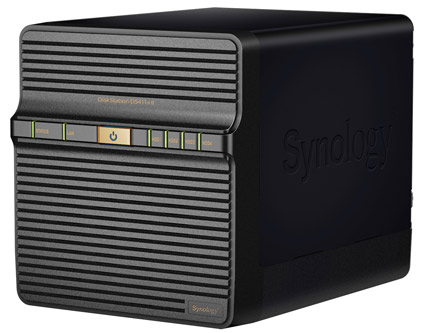
Synology-DS411-II.jpg
 
The thing about the $800 5 bay unit is you can hook up 2 more $500 5 bay units to it for 15 total drives
 
I purchased a Patriot S4, crammed it full of 4TB hard drives and love it.
 
The thing about the $800 5 bay unit is you can hook up 2 more $500 5 bay units to it for 15 total drives

Nice, I did not know that, and I'm glad I read that before pulling the trigger on a DS412+. I was looking into the 413 but it appears it did not offer DLNA support or transcoding options due to the weaker processor.
 
Back
Top