
Navigation
Install the app
How to install the app on iOS
Follow along with the video below to see how to install our site as a web app on your home screen.
Note: This feature may not be available in some browsers.
More options
You are using an out of date browser. It may not display this or other websites correctly.
You should upgrade or use an alternative browser.
You should upgrade or use an alternative browser.
Adobe InDesign CS5... ram usage?
- Thread starter cloudpost
- Start date
Hey [H] im building a computer for my gf who uses InDesign CS5 alot. Does anyone know if InDesign is like photoshop in regaurds to ram usage?
Thanks!
It's not quite as Ram hungry as photoshop, but it can get up there...
it also has a setting
View>Display Performance>Fast
Typical
High Quality
Where you can tone down the quality of the images you use (fast is just grey boxes) typical is low res displayed images usually I have mine on typical until fine tuning at the end. With typical it is very responsive even with large files, though once you start getting into several gigs it starts to slow.
Having said that, the more Ram the better and also the faster the better, on my work mac I have 8gb DDR2 800 and it is frustrating to work on any files larger than 1gb in photoshop and about 3 gigs of images linked in indesign. At home I have 8gb 1600 DDR3 and that is much much better.

- Joined
- Oct 23, 2007
- Messages
- 6,105
No.
I rarely ever see InD use more than 2GB of ram, and that's with files with either a) a lot of pages, b) a lot of high res links, or both. 4GB of total system RAM should be fine.
I work with large spreads quite often...sometimes 5k pages with a high res TIF or PSD linked image on the master page, along with auto page numbering. I don't think I've ever seen it go above 2GB, maybe 3GB at most (and I really don't recall it ever being that high).
As stated earlier....InD is not like Ps; there are no options to allow InD to use more RAM or to be able to adjust how much it's allocated. Ps is really one of the only CS apps that does this (I believe After Effects is another one). I'm surprised Illustrator doesn't let you do it, actually. Regarding the display options in InD and setting it to use High Quality....IME that hasn't been a factor on RAM use either.
That being said - if you've got the money, it's worth paying the small amount now to get 8GB instead of 4GB with RAM prices as cheap as they are.
Generally your processor and HD are going to be bigger factors on performance in CS, other than some of the more optimized apps like Ps, AE or Premiere. In those cases, more RAM and/or a GPU that CS will use for acceleration are more important.
The cheap system I put together to use at work (to replace a 1.8 single processor G5 w/ 1256MB of DDR400) runs CS5 very well. Athlon II X4 640 (stock speed), 8GB of Crucial DDR3 1333, using onboard Radeon HD4250 chipset for graphics. Definitely go with a quad, 4GB as a minimum should be ok, but yeah, 8GB would be worth the extra $10 or so with the RAM prices so cheap nowadays. Ps will allow you to use GPU acceleration on basically any modern card; it'll even use the integrated 4250 on my work system. If you want to get a cheap GPU for her, you could....but unless she's using Premiere or After Effects (both which can use CUDA), it wouldn't be worth a dedicated GPU for Ps alone. I recently put together an X6 for a friend who uses CS5 and I ended up getting her a GT440 because it was one of the cheapest 1GB nVidia cards that had decent CUDA performance.
Last edited:
No.
I rarely ever see InD use more than 2GB of ram, and that's with files with either a) a lot of pages, b) a lot of high res links, or both. 4GB of total system RAM should be fine.
I work with large spreads quite often...sometimes 5k pages with a high res TIF or PSD linked image on the master page, along with auto page numbering. I don't think I've ever seen it go above 2GB, maybe 3GB at most (and I really don't recall it ever being that high).
As stated earlier....InD is not like Ps; there are no options to allow InD to use more RAM or to be able to adjust how much it's allocated. Ps is really one of the only CS apps that does this (I believe After Effects is another one). I'm surprised Illustrator doesn't let you do it, actually. Regarding the display options in InD and setting it to use High Quality....IME that hasn't been a factor on RAM use either.
That being said - if you've got the money, it's worth paying the small amount now to get 8GB instead of 4GB with RAM prices as cheap as they are.
Generally your processor and HD are going to be bigger factors on performance in CS, other than some of the more optimized apps like Ps, AE or Premiere. In those cases, more RAM and/or a GPU that CS will use for acceleration are more important.
The cheap system I put together to use at work (to replace a 1.8 single processor G5 w/ 1256MB of DDR400) runs CS5 very well. Athlon II X4 640 (stock speed), 8GB of Crucial DDR3 1333, using onboard Radeon HD4250 chipset for graphics. Definitely go with a quad, 4GB as a minimum should be ok, but yeah, 8GB would be worth the extra $10 or so with the RAM prices so cheap nowadays. Ps will allow you to use GPU acceleration on basically any modern card; it'll even use the integrated 4250 on my work system. If you want to get a cheap GPU for her, you could....but unless she's using Premiere or After Effects (both which can use CUDA), it wouldn't be worth a dedicated GPU for Ps alone. I recently put together an X6 for a friend who uses CS5 and I ended up getting her a GT440 because it was one of the cheapest 1GB nVidia cards that had decent CUDA performance.
It depends what you use it for. I use indesign all day long at work, we do print ads, billboards iPad apps etc
When you have the adobe cs suite open (and you are likely to have photoshop, illustrator and indesign open at the same time) and you are working on large files in the gigabytes you need RAM, like I said I have 8gb on my mac and I find myself getting very frustrated more and more with how slow it is becoming. Photoshop especially is RAM hungry.
With the price of 1600mhz DDR3 I see absolutely no reason not to stick in 8GB at least.
You say you do 5k pages using 1 Hi res link on the master page? That isn't going to use much RAM. 5000 pages with 1 hi res link isn't 5000 hi res links.
Right now I'm working on an ad. I have indesign open, there are around 6 hi res images in it, I have photoshop open with one of the images to make adjustments to it and I have illustrator open with a logo. Activity monitor reports my Ram usage at 5.5 GB (oh and I have my email and this website open too).
That's everyday use for me, often I'm working on much larger documents. I did some printouts around 72" x 36" for work and that killed my machine. I had a dozen pages open each with a different hi res image on it and it would give me the spinny wheel of doom for 5 minutes every time I adjusted anything.
It depends what the OP poster is using it for, if they want to make large hi res stuff they need RAM. And faster RAm is better, I'd get the fastest possible. Photoshop can make use of video cards but as you said, I don't think you need that great of one to get the benefit
Last edited:
- Joined
- Oct 23, 2007
- Messages
- 6,105
It depends what you use it for. I use indesign all day long at work, we do print ads, billboards iPad apps etc
I also work in the print industry (and have for over 10 years).
When you have the adobe cs suite open (and you are likely to have photoshop, illustrator and indesign open at the same time) and you are working on large files in the gigabytes you need RAM, like I said I have 8gb on my mac and I find myself getting very frustrated more and more with how slow it is becoming. Photoshop especially is RAM hungry.
Usually I have Ai, Ps, Id and Acrobat X all open under 7x64.
This is on my 8GB machine at work. I have no problems.
Maybe you tweak things more than I do. If I have to edit an Id link in the link's native app, I do that and close the file; I don't leave them open. I do leave the apps themselves open, but since they have no open files, their ram use is low (generally around 100-200MB). Even with all 4 apps open, along with Firefox, Thunderbird, VMware Player running a 512MB allocated VM of XP32, I rarely ever see my available RAM (according to the 'All CPU Meter' gadget) go below 900MB.
Secondly the Mac CS is not (and has not been) as optimized as the Windows one....this dates back to probably CS4 when they finally added in the 64bit support only on the Windows side. That's not flame bait, but it's damn sure been my experience.
With the price of 1600mhz DDR3 I see absolutely no reason not to stick in 8GB at least.
Agreed, but that wasn't his question. His question was "is 4GB enough?". Depending on his girlfriend's use of Id, she may not need more than 4GB.
You say you do 5k pages using 1 Hi res link on the master page? That isn't going to use much RAM. 5000 pages with 1 hi res link isn't 5000 hi res links.
I never said it was 5k high res links; I said I work with high res links and high page # documents. Just because a link is on a master page and then duplicated x the # of pages doesn't mean it doesn't use RAM. Sure, it's less ram (because rather than being separate files, it's just duplicating a link x times), but it still does use up quite a bit with a 600+dpi TIF or PSD.
That's everyday use for me, often I'm working on much larger documents. I did some printouts around 72" x 36" for work and that killed my machine. I had a dozen pages open each with a different hi res image on it and it would give me the spinny wheel of doom for 5 minutes every time I adjusted anything.
I wouldn't work on anything bigger than 12"x18" in Id, I'd use Ai.

Any time I've ever done anything large format, it's automatically done in Ai.
Id and Ps both suck for large format. Even if the file has multiple layers, effects, and transparency, Ai has always seemed to handle LF better for me than anything else.
Last edited:
I think were on the same page really, no reason not to stick in 8GB unless OP really can't afford it, girlfriend unlikely to be doing massive hi res stuff.
Whereabouts do you work? vendor? magazine? ad company?
I often can't use illustrator for the big stuff, has to be indesign files, plus I don't like working with type so much in illustrator.
But when I do work on hi res big files I can't begin to describe how frustrating it is when the spinny wheel of doom pops up every fricking time. So difficult to work, hopefully soon I will get a new Mac, this ones from 2009.
- Joined
- Oct 23, 2007
- Messages
- 6,105
I think were on the same page really, no reason not to stick in 8GB unless OP really can't afford it, girlfriend unlikely to be doing massive hi res stuff.
Whereabouts do you work? vendor? magazine? ad company?
Small printing company, have been here almost 6 years. Before that, spent 5 years at FexEx Kinkos. As soon Kinkos got their HP DesignJet and the 24x36 and 36x48 print+mount+laminate promos, man we were cranking out large format every day.
We had to do everything in Photoshop though and it sucked....HARD. Old machines too....they were P3 866's w/1GB of RAM + Win2k (Dell of course), man those things would choke for 10+ minutes trying to spool over to the printers. Eventually we started running all the large stuff through Illustrator when we started doing banners and prints on vinyl, canvas, and backlit film. I often can't use illustrator for the big stuff, has to be indesign files, plus I don't like working with type so much in illustrator.
In general - type in Illustrator isn't too great, at least when you're trying to format, justify, and wrap text....you really have to draw your type box first (and then adjust it accordingly afterwards). But otherwise, the thing I love about Illustrator's ability to handle large type is that if you just type (without doing a text box), it will keep increasing the size of the text boundary as the font size increases. In InDesign (and Quark), if you try to make the type larger than the text box, it clips it, acts like it's runoff text, and stops displaying it. It's a major PITA.
But when I do work on hi res big files I can't begin to describe how frustrating it is when the spinny wheel of doom pops up every fricking time. So difficult to work, hopefully soon I will get a new Mac, this ones from 2009.
I hear you man! When I started here at my current job, they had just upgraded to the G5 single 1.8Ghz....and it only had 256MB of RAM! It was horrible. I had to close EVERYTHING except the app I was actually using. And we only had CS1. Eventually I got them to get me another gig of RAM and we got CS2 and upgraded to Tiger (10.5). As soon as I could though, I put together a computer and brought it in. First I was just running an E7200 w/4GB of RAM, and then I got my X4/880GM combo, got 4GB, then another 4GB.....I've been happy ever since. The Mac sits idle now.
But I hear you....damn spinning beachball used to piss me off quite a lot. Yeah, things have improved so much in the last 5-7 years. We have two plotters at work they are blazing fast compared to the ones 7 years ago...
People at my work were talking about photoshop before it had layers this morning, a bit before my time but I can't imagine how the job was done 10 years ago...
Well, better than using a letterpress I guess
People at my work were talking about photoshop before it had layers this morning, a bit before my time but I can't imagine how the job was done 10 years ago...
Well, better than using a letterpress I guess
My gf is a sr. in college not quite sure what she does. She doesent have a lot of money right now (i built the machine for $194 haha) so its only got 2 ram slots. Maybe i'll give her a 2x4 pack of ram for her bday or something if i hear her complaining about it.
Thanks you two!
Thanks you two!
We only have 4gb in our machines at work (limited by 32bit software requirements) and I cant stand it. I'm using 2.4 gigs with just outlook, indesign and firefox open. My active document only has three high resolution photos/aerials too. Throw photoshop and illustrator into the mix and its a slug fest; I can barely preview my PDFs at that point. Your GF may not notice having only 4gb from the get go, but if she ever starts doing more production, giving her 8gb will be a very kind gesture.
I'd skip eating out or entertainment a few times and buy the extra ram. Spring for an SSD if you have anything left over.
I use ID all day and my work system is not the best. Got it in 2009, HP desktop machine with 2GB, E8500, Quadro 290. I'm due up for a lease refresh this year and it will be an Intel i7 based with 8GB ram. One person already got this machine. I'm going to beg for an SSD.
Current machine opens files a little slowly. My home machine is in my signature. It's awesome in IN. Program opens in 5 seconds, can handle anything thrown at it. Files opens up quickly also.
I do mainly document with text and some illustrated graphics, not anything graphical heavy but I can still feel the strain on my work system.
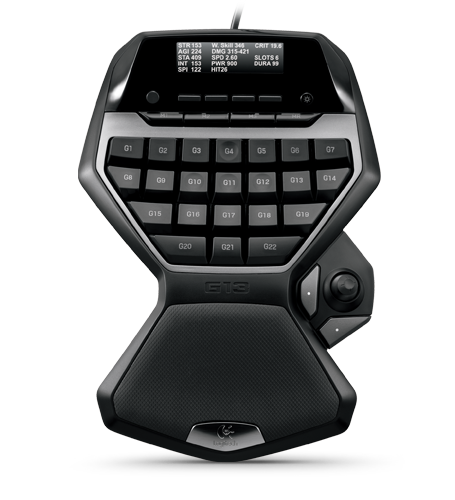
Here is a tip for Indesign pros. Get a Logitech G13 keypad. This cuts my workflow down a significant amount of time. I set macros/shortcuts to each of the buttons. There's about 29 buttons, then you have profiles you can switch increasing it to 29 buttons x3. Can find it on sale for $60 all the time. I bought 1 for home and 1 for work.
I use ID all day and my work system is not the best. Got it in 2009, HP desktop machine with 2GB, E8500, Quadro 290. I'm due up for a lease refresh this year and it will be an Intel i7 based with 8GB ram. One person already got this machine. I'm going to beg for an SSD.
Current machine opens files a little slowly. My home machine is in my signature. It's awesome in IN. Program opens in 5 seconds, can handle anything thrown at it. Files opens up quickly also.
I do mainly document with text and some illustrated graphics, not anything graphical heavy but I can still feel the strain on my work system.
Here is a tip for Indesign pros. Get a Logitech G13 keypad. This cuts my workflow down a significant amount of time. I set macros/shortcuts to each of the buttons. There's about 29 buttons, then you have profiles you can switch increasing it to 29 buttons x3. Can find it on sale for $60 all the time. I bought 1 for home and 1 for work.
- Joined
- Oct 23, 2007
- Messages
- 6,105
People at my work were talking about photoshop before it had layers this morning, a bit before my time but I can't imagine how the job was done 10 years ago...
After using layers for several versions.....(and seeing Adobe basically throw layers into damn near every other CS app).....I don't know how we (of the creative community) ever functioned without layers before. Surely wasn't this easy, that's for sure.
Layers are arguably the greatest thing Adobe ever invented (or implemented, if they weren't the originator). A close 2nd (especially to me) would be Live Trace in Illustrator, which (for those that don't know) lets you use Illustrator to automate and "trace" a raster object and therefore convert it into a vector object. In general, it takes some tweaking (and sometimes a lot of touchup/cleanup in Photoshop to get a good 'source' object). But when it works....it's sheer brilliance and it saves me a lot of time.
Here is a tip for Indesign pros. Get a Logitech G13 keypad. This cuts my workflow down a significant amount of time. I set macros/shortcuts to each of the buttons. There's about 29 buttons, then you have profiles you can switch increasing it to 29 buttons x3. Can find it on sale for $60 all the time. I bought 1 for home and 1 for work.
Just curious what exactly you're needing macros/shortcuts for that aren't already handled by keyboard shortcuts?
I'd consider myself at least a novice on keyboard shortcuts, and most of the other stuff I do is usually handled by Actions (especially in Illustrator). In that regard, I can't really say I've come across anything that I've said to myself "I wish I could shortcut this/do it easier".
Any new purchase for me for design would be a 2nd tablet to take to work. Have a Wacom Graphire4 8x10 tablet at home....would love to have one of the smaller Bamboos for work (even though in all actuality, most of the freehand/logo stuff I do at home anyway, as a part of my freelance/night job work for the client I've had for going on 3 years now).