A.I. local, start up question by newbie

narsbars

2[H]4U
2FA
Joined
Jan 18, 2006
Messages
3,349
Here is hoping I can ask a question without getting trashed for knowing nothing. I want to run a local model A.I. I have the time to wait for answers and want to run a 70b model. I do not have endless cash so telling me to buy a server and ten grand worth of vid cards won't help. I am looking to start easy, maybe built on a desktop pc beginning and run no more than two vid cards, best budget maybe one used 3090 or two 3060 12 gig models. I currently have a trial but the unit only has an 8 gig 3070 and I am looking not to make a super computer but just something noticeably better than what I have. I have been into PCs for way long enough to recognize the depths of my ignorance and hoping I might get some help here to take just the first steps. Current set up 5900X, 64 gig, X570, NVMEs, Win 11, (Happy to partition to Linux) 1000W pwr suppl, 3070 vanilla. Thank you for any input.
 
Last edited:
Here is hoping I can ask a question without getting trashed for knowing nothing. I want to run a local model A.I. I have the time to wait for answers and want to run a 70b model. I do not have endless cash so telling me to buy a server and ten grand worth of vid cards won't help. I am looking to start easy, maybe built on a desktop pc beginning and run no more than two vid cards, best budget maybe one used 3090 or two 3060 12 gig models. I currently have a trial but the unit only has an 8 gig 3070 and I am looking not to make a super computer but just something noticeably better than what I have. I have been into PCs for way long enough to recognize the depths of my ignorance and hoping I might get some help here to take just the first steps. Current set up 5900X, 64 gig, X570, NVMEs, Win 11, (Happy to partition to Linux) 1000W pwr suppl, 3070 vanilla. Thank you for any input.
Have you determined how you are going to run locally? There's a couple different paths and that may make a difference.

I had a 5950X with 64G RAM and a 4090 running Ollama via WSL. It gave an out of RAM error when trying to run a Llama 3.3 70B model. It ran the 7B -11B models well. I could even run a couple at the same time and compare results side by side. I didn't bother trying to squeeze the daylights out of the RAM to tweak it, as I like the way it's setup now. I use the system for a lot of different things, not just AI. So, it might work. But, not in my case.

Late last month I put together a 9950X system and chose to get a 96GB RAM kit for it and try the 70B Llama 3.3 model, again. I moved the 4090 to this new build and now have a 3090ti in the 5950X. Since this is a fresh new system with W11P I decided to try LM Studio versus Ollama. It runs the 70B model, but it is slow. There are plenty here that would be irritated by it's thinking time and output display speed. But, it runs.

Ollama seems faster to me on the smaller models. Currently, I like their interface and features better, too. But, I'm not an intermediate Linux user. If I were more familiar with Linux and could move all my day to day use there I'd say running Ollama in Linux, not WSL, is the way to go, for now. Especially if you are fine using the CLI and are ok with text only output. That would likely be the fastest and use the least resources. Ollama has some nifty features for running locally via WSL such as the local web server interface, side x side models running using the same input and integration with stable diffusion. Once you work all the bugs out during installation and integration and remember to start everything up again after a reboot, it's pretty cool.

I'm still playing around with LM Studio, so, I don't want to write it off just yet. It's so easy to install and get running. In that area it outdoes Ollama, in my opinion. Pretty much fool proof. I have it installed on a laptop, too, since it seems more resource friendly. The laptop has an 8 core cpu and an 8GB gpu. I went to 64G RAM on it to accommodate the larger models. I don't think it can handle a 70B, however. Resource wise, system RAM seems to be my first real bottleneck with larger models.

Good luck getting things set up. You may want to try a couple models with what you have. Then see what issues you run into running a 70B and adjust from there.

I use AI mostly for research. It's quirky and the larger models are not necessarily better for my use case. Having a couple models answer the same query is interesting. As always with this hobby YMMV.


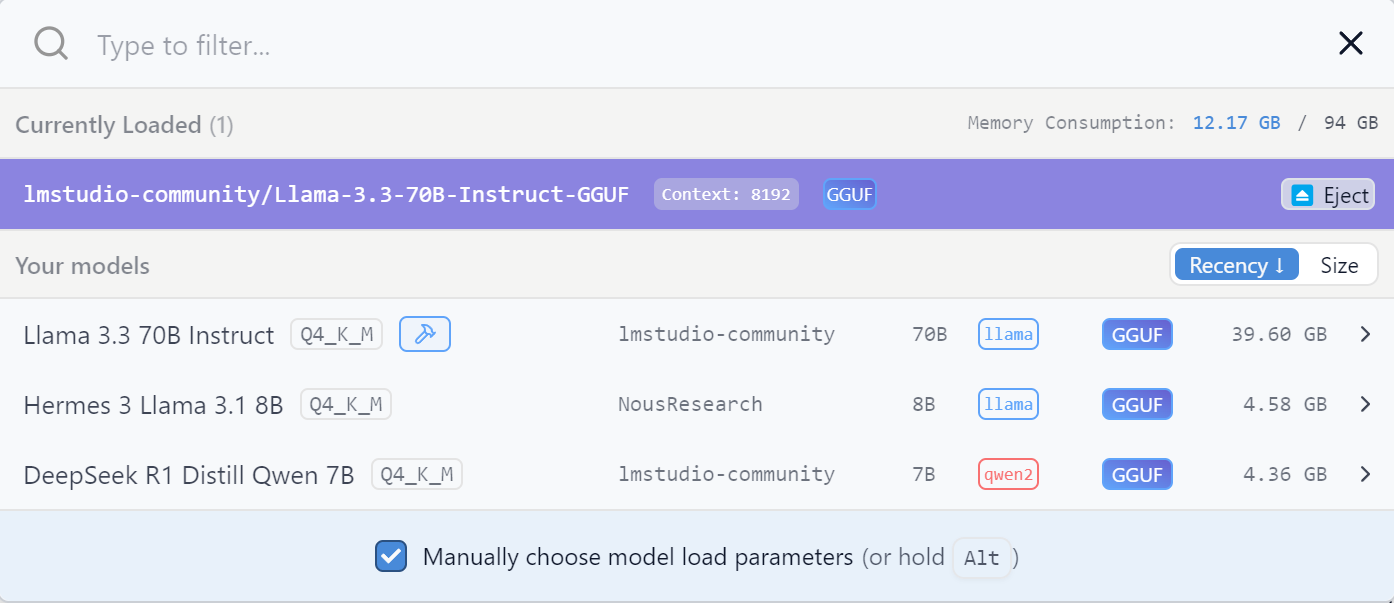
LM Studio models installed:
1739123254073.png
 
I have a few models I want to try and as I don't need 24x7 or instant answers I am thinking a local of Chat Gpt 4. It seems to hallucinate less than even the newer version based on online paid testing. I am leaning towards a 3090 if I can find one. I keep hearing conflicting advice about RAM, "Doesn't matter" "Get all you can", "Only the VRAM on the vid card matters". I would be happy to go from my current 64 gig using 4x16 DDR4 16gig to 128 gig if I thought it would help. Current DDR 4 prices make this easy if there is a bang for the buck.
 
First, look into open webui. It gives a webgui to ollama so you can manage it and give it prompts easily. I believe it can run on both windows and linux. However, seeing as you said you want to run a 70b, I'd suggest a stripped down linux. For reference, I use ubuntu server, so no gui.

Next for the system itself. A 70b model is going to take a lot of ram/vram.

Running some tests. I have a 5950x but only passing through 30 threads from proxmox to ubuntu.

llama 3.1:8b takes about 6.4GB of ram
Dolphin mixtral 8x7b takes about 25GB ram
llama 3.3:70b takes about 46GB of ram

llama 3.1:8b with no gpu 7.8 tokens/sec
llama 3.1:8b with a single 3070 70 tokens/sec
llama 3.1:8b with single 3090 115 tokens/sec

llama 3.3:70b with double 3090s 15 tokens/sec
llama 3.3:70b with a single 3090 1.63 tokens/sec
llama 3.3:70b with a single 3070 1.0 tokens/sec
llama 3.370b with no gpu 0.9 tokens/sec

Dolphin mixtral 8x7b with double 3090s 75.1 tokens/sec
Dolphin mixtral 8x7b with 3070 and 3090 67.3 tokens/sec


What matters...vram, ram and load speed of the model. For each run, the entire model has to be read an transferred into ram/vram. What doesn't matter much are lanes on the gpus. I once ran a test comparing pcie throughput to the gpu...it didn't really matter when it came to the compute.
Thanks you. Step one, go to 128 gig RAM. Easy, cheap. Step 2 convince my wife she needs my 3070 for performance and replace my 3070 with a 3090. I will be doing her a big favor.
 
I have the time to wait for answers
If this is really literal, that change everything, the challenge is balancing speed and money.

If you are ready to have 0.1 token/s, because you will have very small question-answer or the system can take hours to answer that open the door to even running them on a CPU instead of a GPU.

According to AMD, DeepSeek-R1-Distill-Llama-70B, could run on a 64GB of ram system:
https://community.amd.com/t5/ai/exp...distilled-reasoning-models-on-amd/ba-p/740593

Some have found some tricks to run quite large version of Deepseek of 20GB of ram system (because it work with sub-agents and do not need to use the whole model all the time):
https://unsloth.ai/blog/deepseekr1-dynamic

What the goals here can also be the question, learning about how to run local AI or how to use it ? If it is how to use it, going for something made to be small and run well on your 3070, like the new Phi-4 models family:
https://techcommunity.microsoft.com...language-model-specializing-in-comple/4357090

It can also have image as input, can save good amount of time-money versus trying to run 70b or bigger model. Phi-4, 14.7billion parameter in 4-bit run well on a 8GB vram card.

Smaller and less bits model are getting better and better fast (the unslothai version of phi-4 take 4.4gb of vram and I get 10 token per second from my 3070).
 
You are right.
What the goals here can also be the question, learning about how to run local AI or how to use it ? If it is how to use it, going for something made to be small and run well on your 3070, like the new Phi-4 models family:
https://techcommunity.microsoft.com...language-model-specializing-in-comple/4357090
I want both. I have run the 70b version and watched the answer trickle out word by word. The problem is really the learning curve to then correct my input to adjust the output. I am going to boost to 128 gig RAM for whatever tiny increase that will give me. I am having an issue trying to figure out it the downsides of a 12 gig 3060 outweigh the increased memory. So far only the paid for version of Chat GPT has given me any consistency in what I am doing, the same or modified prompts in smaller models does not seem able to "get it". It certainly is a strong possibility that it is my admitted lack of knowledge but I have gained a couple of small steps so far. Move to 128gig, figure out the best way to get some more VRAM weighing bandwidth, speed, and total amount.
 
Thanks you. Step one, go to 128 gig RAM. Easy, cheap. Step 2 convince my wife she needs my 3070 for performance and replace my 3070 with a 3090. I will be doing her a big favor.
I forgot to mention, my 5950x has 64gb of ram.

To run a 70b model, a single 3090 isn't going to help you very much. Heck, with llama 3.3 70, it clocks in at 46GB. That almost puts it in the terrirory of needing three gpus. And mixtral 8x22b does need three or maybe it is four...I can't remember. but back to llama 3.3, Half the model will be off loaded into system ram and run on the cpu at which point your CPU is going to be what slows it down. I could probably optomize it a bit better by disabling SMT or something. Point is, you're current 5900x with 64gb of ram is fine as is for llama 3.3. It will just be slow until you want to get twin 3090s.
 
Heck, with llama 3.3 70, it clocks in at 46GB
you can run more "aggressive-smaller" quantization, lot of option:
https://huggingface.co/lmstudio-community/Meta-Llama-3-70B-Instruct-GGUF

1, 2, 4 bits, will require less vram the high bits one, Q2 use around 20-21GB and should fit on a single 3090, the 1.5 could maybe fit well enough of 16GB gpus

According to this for example:
https://huggingface.co/spaces/NyxKrage/LLM-Model-VRAM-Calculator

Deepseek r1-distill-llama-70B, gguf-IQ2_XS fit in 19GB, leaving enough room for a ~11k context window on a 3090.
 
Last edited:
I forgot to mention, my 5950x has 64gb of ram.

To run a 70b model, a single 3090 isn't going to help you very much. Heck, with llama 3.3 70, it clocks in at 46GB. That almost puts it in the terrirory of needing three gpus. And mixtral 8x22b does need three or maybe it is four...I can't remember. but back to llama 3.3, Half the model will be off loaded into system ram and run on the cpu at which point your CPU is going to be what slows it down. I could probably optomize it a bit better by disabling SMT or something. Point is, you're current 5900x with 64gb of ram is fine as is for llama 3.3. It will just be slow until you want to get twin 3090s.
Not knowing anything when my wife asked me what it would take to get "functional" I told her twin 3090s. At least I would have one room heated all winter.
 
Depending on what one need to do, I would look at API pricing...

If you get 20 token per second on a 3090, it will take about 50,000 seconds to make a million token, thats 13-14 hours of a gpu running.

If your 3090 run at 300 watt during inference, that's 4 kWh to make 1 million tokens.

The much better and so much faster than what you can run at home Gemini Flash 2.0 cost 40 cent per 1 millions of output tokens, if you marginal electricity cost is over 10 cent per kWh you risk to pay more running something significantly inferior, much slower (without even getting into the cost of buying those gpus), what you can do via an API for less than 1 cent now is impressive, those hyperscaler are hard to beat.
 
Last edited:
Depending on what one need to do, I would look at API pricing...

If you get 20 token per second on a 3090, it will take about 50,000 seconds to make a million token, thats 13-14 hours of a gpu running.

If your 3090 run at 300 watt during inference, that's 4 kWh to make 1 million tokens.

The much better and so much faster than what you can run at home Gemini Flash 2.0 cost 40 cent per 1 millions of output tokens, if you marginal electricity cost is over 10 cent per kWh you risk to pay more running something significantly inferior, much slower (without even getting into the cost of buying those gpus), what you can do via an API for less than 1 cent now is impressive, those hyperscaler are hard to beat.
I may have misunderstood you, I plead ignorance. I am determined to run local and in my state we pay the 3rd highest rate in the country. Ten cents a KW would seem like a dream. I will just put in some solar to service my PC equipment and call it good. Since I don't need 24x7 it is doable.
 
I am easily able to run ollama deepseek 70b with 2 3090s with nvlink. Works great.

System is running latest Ubuntu 24.04 and latest nvidia drivers. 5950x 128gb ram.

I usually get over 17 tokens/s eval rate at about 720 watts at the wall.
 
I am easily able to run ollama deepseek 70b with 2 3090s with nvlink. Works great.

System is running latest Ubuntu 24.04 and latest nvidia drivers. 5950x 128gb ram.

I usually get over 17 tokens/s eval rate at about 720 watts at the wall.
My budget stinks but I just bought two 24 gig Quadro M 6000s generally rated as about 80% of a 3090. They draw about 250 watts. Thanks for letting me know I need NVLINK
 
My budget stinks but I just bought two 24 gig Quadro M 6000s generally rated as about 80% of a 3090. They draw about 250 watts. Thanks for letting me know I need NVLINK
Im not 100% if you need nvlink. In nvidia smi i see the memory being used on both and I see both running at about 300 watts and 98% memory.

I had nvlink for other reasons before this. It has definitely helped in those specific use cases but it's 200 bucks. I would try running the 70b models without using nvlink before spending the cash.
 
I'm not 100% if you need NVlink. In nvidia smi i see the memory being used on both and I see both running at about 300 watts and 98% memory.

I had NVlink for other reasons before this. It has definitely helped in those specific use cases but it's 200 bucks. I would try running the 70b models without using nvlink before spending the cash.
Well I just bought two Quadro M6000s. I believe from what I read at YouTube University, they only have an SLI connector, not a real NVlink connection. Will be testing one, benchmark, then try two. Live and learn.
 
These models are quantized (they use int8 and fp16 types) and I don't know what all architectures support those? There's probably a table somewhere.

I am super curious how it goes for you. If you get stuck post here and I can try and help you (not an expert but ive spent a lot of years figuring things out).

edit: did some research and i suspect you're gonna be good.
 
Last edited:
yoyu don't need nvlink. I don't' use it.
So, just pop two in and let it rip? Remember, I am just a wannabe so do I need to specifically tell any of the models to use two cards? I am hoping some models might have the capability to recognize both cards and do it automatically or is that too crazy?
 
So, just pop two in and let it rip? Remember, I am just a wannabe so do I need to specifically tell any of the models to use two cards? I am hoping some models might have the capability to recognize both cards and do it automatically or is that too crazy?
over simpolifying it a tiny bit, in my open webui stack on portainer, i just say use gpu 1 and 3 as those are the 3090s. Then I said 1 and 2 for the 3070 and 3090. It splits the model.

If I said only use gpu 2, then it would spill into system ram and use the cpu.
 
over simpolifying it a tiny bit, in my open webui stack on portainer, i just say use gpu 1 and 3 as those are the 3090s. Then I said 1 and 2 for the 3070 and 3090. It splits the model.

If I said only use gpu 2, then it would spill into system ram and use the cpu.
Scribble, scribble, webui stack, use gpu 1, scribble, scribble, smile like I have a clue. I keep finding out how much I don't know.
 
over simpolifying it a tiny bit, in my open webui stack on portainer, i just say use gpu 1 and 3 as those are the 3090s. Then I said 1 and 2 for the 3070 and 3090. It splits the model.

If I said only use gpu 2, then it would spill into system ram and use the cpu.
You don't just run ollama? I literally (to within an approximation) just run:

ollama pull deepseekr1:70b
ollama run deepseekr1:70b

and then set any parameters from there. It's not fancy, but so what? I don't have to do anything to get full use of both gpus.

(don't take my syntax literally but that's approximately right).

Step 1: get models working
Step 2: use ollama rest api if desired

I have no desire to pull some random webgui docker image.

edit: https://ollama.com/ download and install that and read some documentation. It's crazy easy
 
You don't just run Ollama? I literally (to within an approximation) just run:

Ollama pull deepseekr1:70b
Ollama run deepseekr1:70b

and then set any parameters from there. It's not fancy, but so what? I don't have to do anything to get full use of both gpus.

(don't take my syntax literally but that's approximately right).

Step 1: get models working
Step 2: use Ollama rest api if desired

I have no desire to pull some random webgui docker image.

edit: https://ollama.com/ download and install that and read some documentation. It's crazy easy
I have been using Docker, and playing with Ollama and Chat GPT 4.
 
I don't understand what the docker gets you? Maybe my environment is already setup so i don't have any issues, but it was stupid easy for me to get going.
Openwebui gets you a nice interface to manage the models. It also allows for separate users. And then each user has saved chats, much like chatgpt.

My new one I'm playing with tonight is forge ui for images.
 
Openwebui gets you a nice interface to manage the models. It also allows for separate users. And then each user has saved chats, much like chatgpt.

My new one I'm playing with tonight is forge ui for images.
Openwebui will be tested. I am fumbling along and have no local community to share with so the H is my go to resource. Just bought two Quadro M6000 24 gb cards blindly hoping I can use them without NVlink. The help I am getting here is helping me to move forward.
 
Back
Top