![[H]ard|Forum](/styles/hardforum/xenforo/logo_dark.png)
cyberslag5k
Limp Gawd
- Joined
- Jun 29, 2004
- Messages
- 277
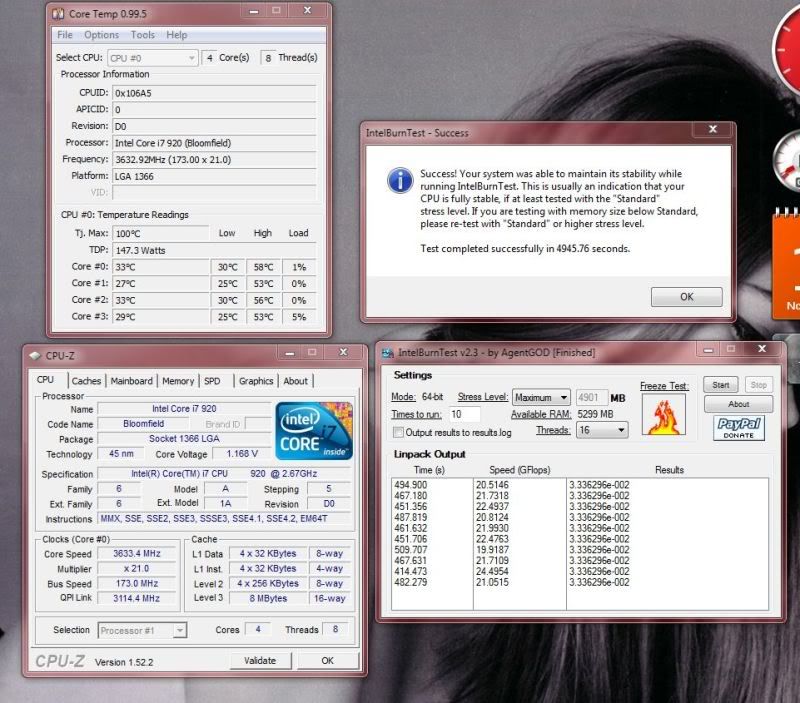
I overclocked my 920 to 3.6GHz last night, and I have a couple of quesitons.
1. I'm amazed at how easy it all was. All I did was set the BCLK to 180, and it did everything else for me. It set the memory frequency, the QPI, the uncore, and one other thing. It runs perfectly stable, so I think I did it right, but was there anything else I should have adjusted? I didn't play with voltages or anything.
2. The only other thing that I did was to set the memory to what should be the proper timings. It detected something like 7-7-7-20, but I know the memory I bought is 8-8-8-24, so I set it to that. Should I have left it to auto detect?
3. Speaking of memory, even though the BCLK set everything for me, can/should I increase my memory frequency as high as it will stably go? Does all of that stuff need to be proportionate or something? Or can I just increase what the BCLK setting gave me to up my RAM performance?
4. Now that I know that I'm stable, should I enable turbo mode? I'd probably turn it off for benchmarking and stuff, but if I'm stable without it, will I be stable with it?
5. I read somewhere that you should try and keep your QPI as low as possible, and that they recommended a setting of 4.8. Adjusting the BCLK, though, set the minimum to higher than that. Is that okay?
6. I'm working on some heating issues, and if I get them resolved I'm going to push for 3.8-4.0GHz. If I do lose stability at that point, do I lower my memory frequency, increase my memory voltage, increase my CPU voltage? I'd imagine it's some combination of the 3, and if so, what's the order? And it's a little unclear in the ASUS BIOS which settings exactly correspond to which, they're labeled very technically. Can anyone point out which are the correct settings to tweak?
Specs are in my signature.
Thanks!
1. I'm amazed at how easy it all was. All I did was set the BCLK to 180, and it did everything else for me. It set the memory frequency, the QPI, the uncore, and one other thing. It runs perfectly stable, so I think I did it right, but was there anything else I should have adjusted? I didn't play with voltages or anything.
2. The only other thing that I did was to set the memory to what should be the proper timings. It detected something like 7-7-7-20, but I know the memory I bought is 8-8-8-24, so I set it to that. Should I have left it to auto detect?
3. Speaking of memory, even though the BCLK set everything for me, can/should I increase my memory frequency as high as it will stably go? Does all of that stuff need to be proportionate or something? Or can I just increase what the BCLK setting gave me to up my RAM performance?
4. Now that I know that I'm stable, should I enable turbo mode? I'd probably turn it off for benchmarking and stuff, but if I'm stable without it, will I be stable with it?
5. I read somewhere that you should try and keep your QPI as low as possible, and that they recommended a setting of 4.8. Adjusting the BCLK, though, set the minimum to higher than that. Is that okay?
6. I'm working on some heating issues, and if I get them resolved I'm going to push for 3.8-4.0GHz. If I do lose stability at that point, do I lower my memory frequency, increase my memory voltage, increase my CPU voltage? I'd imagine it's some combination of the 3, and if so, what's the order? And it's a little unclear in the ASUS BIOS which settings exactly correspond to which, they're labeled very technically. Can anyone point out which are the correct settings to tweak?
Specs are in my signature.
Thanks!