
9.4 Game Issue list L4D, UT3 others?

SonDa5

Supreme [H]ardness
2FA
Joined
Aug 20, 2008
Messages
7,437
system set up.
2 HD4850s in Xfire with Q9550 E0 stepping
PSU Corsair TX650
Note that these problems happen with system at "stock" speeds. Default speeds on the GPU as well. The "Overdrive" tune feature shouldn't keep the games from playing but rather improve their performance.
OS: XP SP3

Time with system:
Over 6 months


UT3 never has worked well. Touchy. have seen improvements with drivers over last 6 months but overall the game is still unstable.


L4D was stable till i installed the new 9.4 drivers. Now the game starts up and after the opening scene the game freezes and I have to turn the power off to reboot. Sucks.


Post related problems and fixes.
 
Last edited:
Is your system overclocked? Or maybe your video cards (or one of them) is defective and locks up under particular loads.

None of those issues here.
 
Is your system overclocked? Or maybe your video cards (or one of them) is defective and locks up under particular loads.

None of those issues here.

Are you running Xp 32 bit?

To answer your question.

I edited my first post to reflect that these problems happen at stock system settings.
The ATI "overdrive" should be stable if it works.
 
UT3 used to work fine until STEAM completely screwed it up for me. I basically had to reinstall my OS to get it to work.

But on topic, I haven't had any problems with 9.4s on vista x64 other than breaking VBO in openGL in some applications. Maybe you should try downloading the march 2009 directx update?

What exactly happens? Do you get a BSOD or do you get a grey/red screen with darker lines in it? Does it just hard lock? A little more info would be helpful.
 
What exactly happens? Do you get a BSOD or do you get a grey/red screen with darker lines in it? Does it just hard lock? A little more info would be helpful.

No blue screen (BSOD).

Right after the opening scene at the first screen where game options begin the game freezes up.

I'm able to do open up the task manager but I can't I can't see it. I can't see my desktop because L4D screen is in the way.

I bet I could close the window if I had a dual monitor set up in dual view.

I had to do a totally clean install of STEAM and UT3 before I was able to get CD version of UT3 to work on STEAM. Had it was tricky. I think Steam has fixed most of the problems.
But yeah. I recall UT3 worked better before the big Titan Pack Maps. So UT3 needs some patches. The 9.4 drivers open up more 3d options with stability for UT3 but overall the game is still unstable. Every time UT3 freezes I send ATI one of those emails. It happens every time I play it.
 
Can you alt-tab or alt-control-delete?

Also are you missing any drivers. Check in the device manager for objects with that yellow ? by it.
 
Can you alt-tab or alt-control-delete?

Also are you missing any drivers. Check in the device manager for objects with that yellow ? by it.


You mean go into my task manager? Read above. I posted that I couldn't.

I've installed drivers many, many times on my machines. ATI and NVIDIA drivers. It's not hard to do because of my experience.

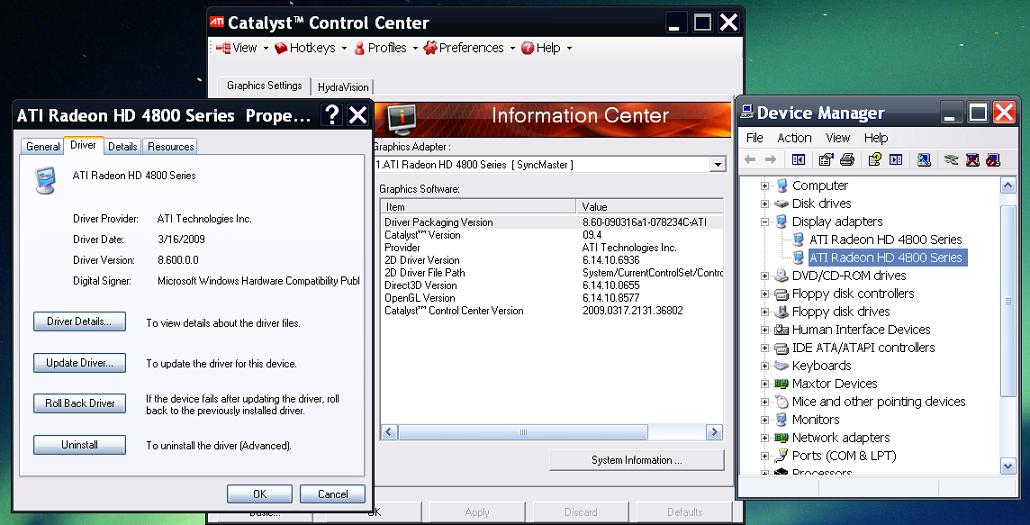
To answer your question and move on to other possible solutions here is a screen shot from my system.

9_4_ATI_installed.JPG


I
 
I notice when playing games on my powercolour 4890 I had to rename the exe file and they work. Otherwise they freeze at the loading screen. I tried warhead crysis, and half life 2. Maybe turning off AI?
 
Mega2 could you explain how you did that?


I'm using steam for most of my games.
 
Mega2 could you explain how you did that?


I'm using steam for most of my games.

Yeah just tested it out. Disabling catalyst AI in control panel if the game freeze at loading screen. If I didn't disable warhead would stop loading at 89% and hold there indefinitely.
 
Yeah just tested it out. Disabling catalyst AI in control panel if the game freeze at loading screen. If I didn't disable warhead would stop loading at 89% and hold there indefinitely.

holy crap, the EXACT same thing happened to me with Warhead when i was using a 4850x2 a few months back, least i know it wasn't just my computer lol.
 
Turned off a bunch of 3d settings and was able to play L4D.

Added ATI tray and made some more adjuestments and I'm gaming. :)
9.4 drivers appear to be geared towards tuning the Hd4890. My little HD4850s are having a tough time hanging.
 
9.4 is very touchy.

I just cleaned out furmark, ATItools, Traytools and the 9.4 drivers. I'm going to keep the 9.4 drivers pure.

My Xfire wasn't working right after trying the above.

After I go with the clean 9.4 driver I'll be able to figure out what is going on and report to ATI so they can make improvements for the future.
 
Furmark and AtiTools have jack to do with your drivers. TrayTools might have done something, but it's not very likely.
 
Back
Top