• Some users have recently had their accounts hijacked. It seems that the now defunct EVGA forums might have compromised your password there and seems many are using the same PW here. We would suggest you UPDATE YOUR PASSWORD and TURN ON 2FA for your account here to further secure it. None of the compromised accounts had 2FA turned on.
    Once you have enabled 2FA, your account will be updated soon to show a badge, letting other members know that you use 2FA to protect your account. This should be beneficial for everyone that uses FSFT.

8800GT 3 displays

roofio86

n00b
Joined
Nov 10, 2007
Messages
7
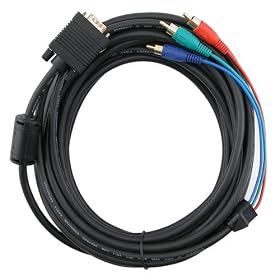
Im thinking about getting 2 addtional monitors for my rig and was wondering if I could run all 3 off my 8800GT, 2 off the DVI outputs and 1 via the S-video using the supplied s-video to RCA then using my own RCA to VGA. Would this work and has anyone got a similar setup?
51X34C6bCrL._AA280_.jpg


This would be ideal then I could use all three for gaming afaik, whereas with the alternative, a cheap PCI card for the 3rd monitor, that monitor would be conisgned to purely browsing, messaging and surfing which wouldnt be ideal :p

Cheers
 
The SVideo out will display the same as one of the DVI outputs.
 
For AMD/ATI cards, the second DVI will cut out as soon as you plug the Svideo cable in. You have your choice of two outputs, not three.

Your best bet is to get a second card, and put the two new monitors on it. Hopefully you have an SLI motherboard for the second PCIe 16x slot. If not, you need to find a PCI video card.
 
You will need another nvidia card, (pci or pci-e 1x is fine, pci-e preferably), but you will be able to play games on all of your monitors (though you will need software supporting that).
 
Also, S-video can do 640x480 max.

I've used both ATI and NVidia cards at 1024x768 with SVideo.
Gaming at 1024 res does look a tad clearer.
1024 res inst really good enough to read but 800x600 res is very readable.
 
Ah thanks for all the help guys, looks like Ill be getting a new GPU then :(

For AMD/ATI cards, the second DVI will cut out as soon as you plug the Svideo cable in. You have your choice of two outputs, not three.

Your best bet is to get a second card, and put the two new monitors on it. Hopefully you have an SLI motherboard for the second PCIe 16x slot. If not, you need to find a PCI video card.

I currently have a p5k-e, so i do have a second 16x PCIe slot but i wouldnt be able to run SLi. So running monitor 2 and 3 would benefit from a PCIe over a PCI card but is there any advantage of using a high end GPU against using an entry level?

All the help so far is much appreciated :D
 
Back
Top