• Some users have recently had their accounts hijacked. It seems that the now defunct EVGA forums might have compromised your password there and seems many are using the same PW here. We would suggest you UPDATE YOUR PASSWORD and TURN ON 2FA for your account here to further secure it. None of the compromised accounts had 2FA turned on.
    Once you have enabled 2FA, your account will be updated soon to show a badge, letting other members know that you use 2FA to protect your account. This should be beneficial for everyone that uses FSFT.

7950 OC

Lloydsword

n00b
Joined
Jan 9, 2013
Messages
24
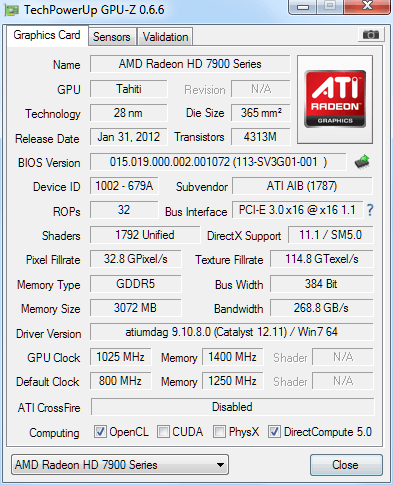
Im completely new to gaming pc's and i bought a gaming computer from cyberpowerpc. i have a 7950 icq in it and tried overclocking it a bit. the games would crash when i tried putting the memory clock speed to 1500... is this normal? it wasn't getting that hot...
fcf.png
 
You may need more voltage, what utility are you using to overclock and what is your best stable overclock.
A couple of loops of Unigine 3.0 is usually a good test of stability.
Also some say that a ASIC score (use GPU-Z to get this) may give you clues on your overclock to voltage performance.
 
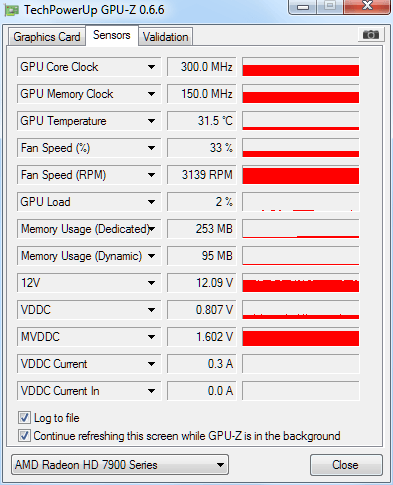
thanx for the quick response, i'm using his software that came with my video card. what would you recommend i use? my highest overclock was 1050/1450. i tried memory at 1500 like i said, but it would freeze in furmark. which i found strange since it only got to about 68*c

heres more info... dunno if it helps

9pc.png
 
Last edited:
MSI Afterburner is a popular choice, but I'm sure your card manufacturer's software would do just about the same job. Looks like you may need a higher voltage to get a higher clock.
If you do alter voltages, do keep an eye out for the GPU and VRAM temps.

Also my observation has been that the core clock has a bigger say on the performance versus the memory clock.
 
ya i found that to. honestly memory clock hardly seemed to matter as core clock increast from 800 to 1025 seems like about a 25% boost to my performance. do i need to change my vddc and mvddc?
 
Focus on core clocks. they have a directly linear relation to performance scaling. with voltage increase you should be able to get to 1150 mhz. at those clock speeds you would be faster than HD 7970 Ghz. memory overclock really does not matter. the HD 7950 has massive 240 Gb/s bandwidth with a 384 bit memory bus. after you have reached fastest stable core clocks maybe you can run memory at 1400 mhz. if it causes instability just leave memory at 1250 mhz stock speeds. :)
 
That is a 7970 GHz at stock right?
Mine goes to 1135 Core and 1590 Mem on Stock Voltage, but I guess I'm nowhere near a 7970 GHz, which I've seen typically score about 12K P points on Graphics in 3DMark11, while I do a lowly 10.2 K on my clocks.

I tried upping voltages as much as 1.18V but to no avail. I cannot get to 1150 on core, and I guess at this point I'm happy with what I've managed so far.
 
That is a 7970 GHz at stock right?
Mine goes to 1135 Core and 1590 Mem on Stock Voltage, but I guess I'm nowhere near a 7970 GHz, which I've seen typically score about 12K P points on Graphics in 3DMark11, while I do a lowly 10.2 K on my clocks.

I tried upping voltages as much as 1.18V but to no avail. I cannot get to 1150 on core, and I guess at this point I'm happy with what I've managed so far.

you are on par or faster than HD 7970 Ghz at 1050 mhz. here is a ASUS HD 7970 Matrix at 1100 mhz

http://www.legitreviews.com/article/2068/10/

3D Mark 11 performance GPU score - 10349

your HD 7950 at 1135 Mhz is definitely on par with HD 7970 Ghz :)
 
I got p8300 on 3d mark 11 with these OC settings dunno if that's good or bad. Would my processor be making those scores worse? it's a intel i5-3570k
 
Back
Top