![[H]ard|Forum](/styles/hardforum/xenforo/logo_dark.png)
I do not know where to start with this one...
Rig is in sig so I wont type out all of my components.
I tested my PSU its good.
My rig is 100% stable forever until I play games.
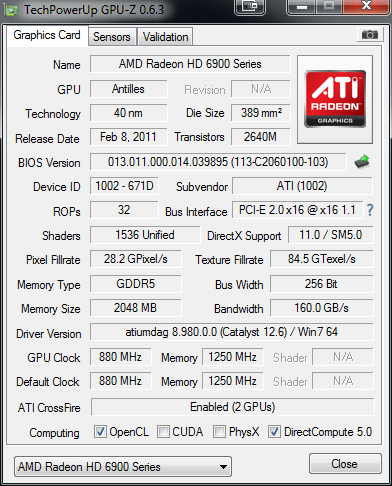
I have a powercolor AX6990LCS
When I play any game, especially bf3, in single screen or eyefinity after a few mins the game crashes my whole system and my monitors simply power down.
I am also getting weird artifacts, like names in bf3 at the bottom of the screen.
My system was stable on 12.7 cat/12.7 cap for days on end without an issue. It seems that I am either running out of VRAM and crashing. I do not go back to windows, all 3 of my displays simply go to sleep mode as if the signal stopped working.
I am perplexed. I have completely cleaned my system of all AMD drivers over 3 to 4 times using AMD uninstall followed by Driver Sweeper and Driver Cleaner software. I reinstalled different versions of catalyst drivers etc...
I am beginning to think that my card is going bad under full load. Trust me when I say cooling is not an issue as it is underwater and idles at 100f (summer right now where I am) and it loads to get no hotter than 135f. I would convert to C but thats not important.
I have more than enough PSU with my AX1200 and one single card in the motherboard.
As I said my system is 100% stable in 2d modes but 3d just sends the LCD to sleep after a little while.
Any thoughts or suggestions?
Rig is in sig so I wont type out all of my components.
I tested my PSU its good.
My rig is 100% stable forever until I play games.
I have a powercolor AX6990LCS
When I play any game, especially bf3, in single screen or eyefinity after a few mins the game crashes my whole system and my monitors simply power down.
I am also getting weird artifacts, like names in bf3 at the bottom of the screen.
My system was stable on 12.7 cat/12.7 cap for days on end without an issue. It seems that I am either running out of VRAM and crashing. I do not go back to windows, all 3 of my displays simply go to sleep mode as if the signal stopped working.
I am perplexed. I have completely cleaned my system of all AMD drivers over 3 to 4 times using AMD uninstall followed by Driver Sweeper and Driver Cleaner software. I reinstalled different versions of catalyst drivers etc...
I am beginning to think that my card is going bad under full load. Trust me when I say cooling is not an issue as it is underwater and idles at 100f (summer right now where I am) and it loads to get no hotter than 135f. I would convert to C but thats not important.
I have more than enough PSU with my AX1200 and one single card in the motherboard.
As I said my system is 100% stable in 2d modes but 3d just sends the LCD to sleep after a little while.
Any thoughts or suggestions?