• Some users have recently had their accounts hijacked. It seems that the now defunct EVGA forums might have compromised your password there and seems many are using the same PW here. We would suggest you UPDATE YOUR PASSWORD and TURN ON 2FA for your account here to further secure it. None of the compromised accounts had 2FA turned on.
    Once you have enabled 2FA, your account will be updated soon to show a badge, letting other members know that you use 2FA to protect your account. This should be beneficial for everyone that uses FSFT.

5970 Overclocking

PrincessFrosty

Supreme [H]ardness
Joined
May 6, 2009
Messages
5,905
Ok so I'm still waiting on my 5970 so have been reading all about them, and something that has greatly interested me is their actual overclocking potential.

Now I know their overclocking with no overvolting is pretty good but nothing special, in fact they wont reach 5870 clocks for the most part, but with overvolting it's pretty trivial to reach 5870 clock speeds and above.

However how are they overclocking with higher voltages than allowed with the default ATI overvolt tool? Has anyone had any experience with this or read about anyone who has (links?) For the most part the memory overclocks like crazy since the stuff is rated for 1250/5000Mhz anyway. I'm interested about the cores being hand picked and potentially being able to reach 1000Mhz. I know a lot of people are getting their 5870s over 1Ghz core.

Does anyone even know if a board partner has released an overvolt tool not limited to 1.1625v and 1.15v? [edit - MSI tool allows custom voltages]

Default 5970 clocks 725/1000
Default 5970 voltages 1.05v and 1.10v
Default 5970 overvolt 1.1625v and 1.15v

Overclocks from reviews using overvolt capped to 1.1625 vCore and 1.15 vMem

Hardocp @ 900/1350
Guru3d @ 935/1240
Neoseeker @ 935/1235
Tomshardware @ 924/1300
Techspot @ 900/1250

Overclocks with higher/custom voltages

Gerardfraser @ 1000/1150 using 1.212v for core and default mem (not maximum clock, still testing)
 
Last edited:
I'm also interested in this. I have a new system coming with a couple of these. OCed performance on these cards looks outstanding.
 
I've seen some pretty hot temps reported using overclocked cards under load.

I think temperature is going to dictate throttling; once you near 100C, expect throttling.

Which is why I'm waiting for water-cooling blocks for the 5970s.

Even at stock temps, at full load, HardOCP reported 87C. If you have bad case airflow or high ambient temperatures that could, by itself, account for temps close to or surpassing 100C, even with stock clocks.
 
NO it would not reach 100c w/o oc sorry that's hardly possible. Got 2x5870 in crossfire temps never go higher then 74c with fans on 40% so you got the idea. My ambient temps are around 23-25c.
 
Well the cooling should spin up faster to deal with higher temps, I know several review sites did report bad overclocking because they'd hit 100 degrees and it would throttle to below stock speed 550Mhz core I think which is really slow.

One review I read said max clocks they were getting was something like 78% fanspeed about 87 degrees load temps, so if you're prepared for the noise that can go higher.
 
Well the cooling should spin up faster to deal with higher temps, I know several review sites did report bad overclocking because they'd hit 100 degrees and it would throttle to below stock speed 550Mhz core I think which is really slow.

One review I read said max clocks they were getting was something like 78% fanspeed about 87 degrees load temps, so if you're prepared for the noise that can go higher.

78% fan speed is way loud, 37% works for me...then I don't have 5970s
 
What OC tools are people using for the 5970?
I thought ATI provided overvolting tools/software to all their AIB partners.
However I can't seem to find an overvolt utility on my HIS disk that came with the video card?
 
Any ideas on where to get fan control from? My Sapphire works great and seems to hit 5870 speeds on stock voltages, but there is no fan control in my CCC and the MSI Afterburner slider is grayed out.
 
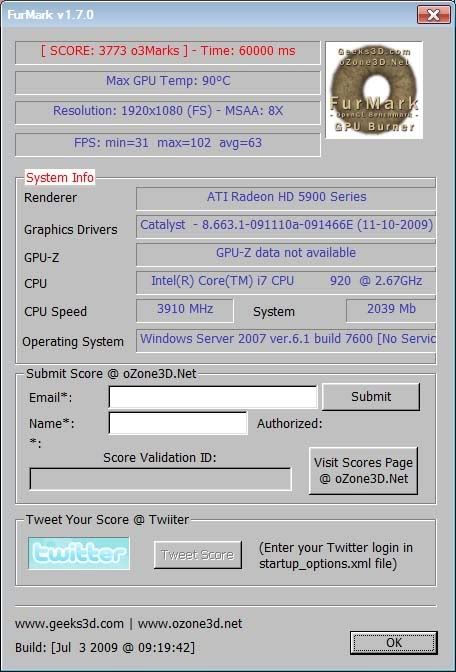
Ok so far I've overclocked my 5970 to 800/1100 and then 850 core/1200 memory without even having to change voltages. There is minor flicker issue though which I suspect as usual will be fixed by upping the juice a bit. It ran the furmark benches without problem though.

5970 stock volt @ 850/1200
Furmark5970_850_1200_8xaa.jpg


5970 @ 900/1250 Overvolt to 1.1625v engine, 1.15v memory
Furmark5970900_1250_8xaa.jpg


5970 @ 950/1200 Overvolt to 1.1625v engine, 1.15v memory
Furmark5970_950_1200_8xaa.jpg
 
Last edited:
not seeing much gain out of 50 Mhz on the core to 900 is surprising. on 5870 CF I see "large" gains by going up by 50's..could just be a furmark thing though.

if you do not see FPS improvements in games it's obviously not worth the extra 6c increase in temps with the overvolt. try some Heaven benches with the increase in core speed...You should see results.
 
I just realized that I was only overclocking ONE of the cores.
I knew the numbers looked a bit weird... LOL.

Here are the OC results when overclocking both cores:

5970 @950/1150 x2 ATI Standard Overvolt
Furmark5970_950_1150x2_8xaa.jpg


5970 @ 950/1200 x2 ATI Standard Overvolt.
Furmark5970_950_1200x2_8xaa.jpg
 
The last post show that 85-90c is average load temp for oc 5970, thanks Vjcsmoke. Great temps/card i'm impressed! great job Ati!
 
Hey there Vjcsmoke is there a plugin for temp reading on furmark,looks like a good overclock test tool.
 
Core 2 throttles back and forth on me at 5870 speeds in Furmark with the standard overvolts. Temperatures were a constant were 85 & 86. I need to look into the Everest beta for monitoring those hot VRMs.

meh.png


For now I've settled on only overclocking the memory to 1200 with the stock voltage. The card stays in the low 70s where the fan doesn't make its presence too known.

The upcoming EK block with a water pathway over all 9 VRMs is looking better by the minute.

attachment.jpg
 
Generic ATI HD 5970 Overvoltage Utility for the memory
http://www.techpowerup.com/downloads/1699/ATI_HD_5970_Overvoltage_Utility.html

MSI AfterBurner 1.4 for higher voltages than 1.1625 the gpu
http://downloads.guru3d.com/MSI-AfterBurner-1.40-download-2410.html

Thanks for the links, has anyone confirmed that the MSI overvolt tool does actually allow you to exceed 1.1625v on the core? I'm specifically looking for benchmarks which exceed this preset voltage.

Has anyone tested this MSI Afterburner 1.4 tool on non-MSI 5970 boards to see if you can overclocks non-MSI cards with it?

It seems 5870 overclockers have been pushing vCores to 1.3v to get over 1Ghz on the GPU, just wondering if this is something we're likely to see with the 5970, these were so called "cherry picked" cores yet most 5870s will exceed the 5970 overclocks because we're still voltage limited by AMDs default overvolt presets.

And also thanks to vjcsmoke for posting results, good lesson for everyone overclocking these cards, make sure you up both GPUs when overclocking!
 
Core 2 throttles back and forth on me at 5870 speeds in Furmark with the standard overvolts. Temperatures were a constant were 85 & 86. I need to look into the Everest beta for monitoring those hot VRMs.

meh.png


For now I've settled on only overclocking the memory to 1200 with the stock voltage. The card stays in the low 70s where the fan doesn't make its presence too known.

The upcoming EK block with a water pathway over all 9 VRMs is looking better by the minute.

You wouldn't really need a waterblock if you had control over your fan. By default it runs too low to keep things cool. I installed a fixed Sapphire bios that allowed me to control my fan and with your overclock on that screenshot, it hardly reaches 70C.
 
You wouldn't really need a waterblock if you had control over your fan. By default it runs too low to keep things cool. I installed a fixed Sapphire bios that allowed me to control my fan and with your overclock on that screenshot, it hardly reaches 70C.

Did you find out if the bios HAS to be flashed to allow fan control? Or is it possible for a driver update to fix it?
 
Did you find out if the bios HAS to be flashed to allow fan control? Or is it possible for a driver update to fix it?

Had to flash to a different bios that sapphire sent out which fixes the fan control issue. I'm sure there will be a driver update to fix it as well, but who knows when that will be. For me, not going to wait for that to happen. Once it does come out, I will flash back to my original bios. However with the Sapphire bios, it is their o/c version that gives you a little more Mhz.
 
Wait the 5970 doesn't have manual fan control? Can somoene provide links to a source for this unofficial bios mod for the sapphire card please, got mine arriving tomorrow with luck.
 
Last edited:
Just flashed my BIOS for the Sapphire, esay as pie and could be done from a USB stick, going to give overclocking to simple 5870 clocks a go :)

Oh yeah and it fits *just* into a Antec 1200 case, had to budge some HDD's around though :)


Some initial overclocking results.

Putting the vcore up to 1.162 like the ATI tool does, reaching 850Mhz on the core is a trivial task, the GPUs are in the mid 80's temp wise, the fan is set to auto and is only on 40%, the memory was happy at 1200Mhz with no change to voltage since the MSI afterburner doesn't have that.

Pics with all GPU/Mem/Fan stats showing on screen while running Unigine Engine, enjoy.

 
Last edited:
I'm pretty sure my core could hit 1000 if i had fan control, but i can't for the life of me get the flashing to work. Some sort of combination of Win7 64, running my new SSD in ahci, possibly bad usb sticks, the eccentricities of my P6T, and my own incompetence is keeping it from working. I just get a blinking cursor while it's accessing the stick, DOS never loads, and then Windows starts.

My core does 925 on the 1.162 setting, with memory unfortunately only hitting 1175 on stock volts. Memory really does have to be done on stock or you can run into a lot of problems since there's currently no way I know of to keep the higher memory voltage during reboots. Either you turn your OC off when youre done with it, or on a reboot it's a race to turn down your clocks/turn up the voltage before windows crashes. And clearing a failed overclock can be EXTREMELY annoying. At least that SSD takes the sting out of all those damn reboots I've had to do.
 
I'm pretty sure my core could hit 1000 if i had fan control, but i can't for the life of me get the flashing to work. Some sort of combination of Win7 64, running my new SSD in ahci, possibly bad usb sticks, the eccentricities of my P6T, and my own incompetence is keeping it from working. I just get a blinking cursor while it's accessing the stick, DOS never loads, and then Windows starts.

My core does 925 on the 1.162 setting, with memory unfortunately only hitting 1175 on stock volts. Memory really does have to be done on stock or you can run into a lot of problems since there's currently no way I know of to keep the higher memory voltage during reboots. Either you turn your OC off when youre done with it, or on a reboot it's a race to turn down your clocks/turn up the voltage before windows crashes. And clearing a failed overclock can be EXTREMELY annoying. At least that SSD takes the sting out of all those damn reboots I've had to do.

You can try this.Unplug all USB stuff,unplug hard drives,boot with the USB stick.I actually used my Camera.For the memory defaault is fine for 1150,need some people to upload there XFX black edition BIOS or wait for an unlocked one.
 
I need some help guys. :)

Asus 5970. There is a bios firmware for my card on Asus site (exact P/N number). So I did it... and it brick my card. After 2 hours of fighting with it (flash never works, freeze and reboot computer), I went ahead and flash it with the Saphire bios.

Everything is now working fine (can boot and get in Windows), but I can't install ATI beta-5 drivers anymore. ''INF not found''. So if I find the inf manually and install, then I can't get in Windows anymore... :(
 
I'm pretty sure my core could hit 1000 if i had fan control, but i can't for the life of me get the flashing to work. Some sort of combination of Win7 64, running my new SSD in ahci, possibly bad usb sticks, the eccentricities of my P6T, and my own incompetence is keeping it from working. I just get a blinking cursor while it's accessing the stick, DOS never loads, and then Windows starts.

My core does 925 on the 1.162 setting, with memory unfortunately only hitting 1175 on stock volts. Memory really does have to be done on stock or you can run into a lot of problems since there's currently no way I know of to keep the higher memory voltage during reboots. Either you turn your OC off when youre done with it, or on a reboot it's a race to turn down your clocks/turn up the voltage before windows crashes. And clearing a failed overclock can be EXTREMELY annoying. At least that SSD takes the sting out of all those damn reboots I've had to do.

I have Win7 x64 and mine worked, the OS isn't even loading at that point anyhow so it shouldn't matter.

I set the boot device order to "External devices" which was the only option in the BIOS for non-HDD and non-optical boot media, and it didn't boot. However using the quick boot menu (F8 for me) allowed me to simply select that boot device (recognized as a USB stick) and that worked fine, the BIOS flash was a breeze, for the Sapphire it does 4 main commands which you can see in the batch file you're asked to run, make sure all 4 complete before you reboot, a message saying to restart actually flashes up after the 3rd stage is done but you should wait for the 4th to finish as well.

As for mem overclocking, I believe you can use multiple tools to up the voltage, while the MSI doesn't have mem overvolt you can actually skip loading the custom clock settings after windows loads by holding Ctrl down I believe (check the tool tips) i dont think the memory runs full speed idle anyway so changing it shouldn't be a problem before it fails? Anyway hopefuly someone will make a feature complete tool, I must say MSIs one is very good.
 
Just flashed my BIOS for the Sapphire, esay as pie and could be done from a USB stick, going to give overclocking to simple 5870 clocks a go :)

Oh yeah and it fits *just* into a Antec 1200 case, had to budge some HDD's around though :)


Some initial overclocking results.

Putting the vcore up to 1.162 like the ATI tool does, reaching 850Mhz on the core is a trivial task, the GPUs are in the mid 80's temp wise, the fan is set to auto and is only on 40%, the memory was happy at 1200Mhz with no change to voltage since the MSI afterburner doesn't have that.

Pics with all GPU/Mem/Fan stats showing on screen while running Unigine Engine, enjoy.


Nice pics. I *heart* the 30 incher. so are you going to try 3x30" Eyefinity? =0

Just a thought flickered through my brain for a sec. Is having 2x5970 overkill? *shoots errant thought* Naah, can't be! 4xcypress cores at your command! *g* I would really appreciate it if ATI would get 2x5970 Eyefinity working though. Shouldn't they cater a bit to their ultra high end setups as well?

PS You need to give your PSU a good dusting. :p
Gosh I wish I could get back home and start overclocking the heck out my rig, but I'm stuck in another state for a while.
I still have stuff I need to do like gettng my cpu to 4.2, and then testing out if the heat problem is solved with the extended bridge.
And then Ocing all 4 gpus for MOAR speed!

PPS 5970 appears to go to 1000/1100 willingly when you set voltage to 1.3v and fans to 100%. I'm not sure what fan setting is good enough to keep me sane at 1Ghz core, but I wasn't about to risk melting down my new $600 video card at that time. =)
 
Last edited:
Nice pics. I *heart* the 30 incher. so are you going to try 3x30" Eyefinity? =0

Just a thought flickered through my brain for a sec. Is having 2x5970 overkill? *shoots errant thought* Naah, can't be! 4xcypress cores at your command! *g* I would really appreciate it if ATI would get 2x5970 Eyefinity working though. Shouldn't they cater a bit to their ultra high end setups as well?

PS You need to give your PSU a good dusting. :p
Gosh I wish I could get back home and start overclocking the heck out my rig, but I'm stuck in another state for a while.
I still have stuff I need to do like gettng my cpu to 4.2, and then testing out if the heat problem is solved with the extended bridge.
And then Ocing all 4 gpus for MOAR speed!

PPS 5970 appears to go to 1000/1100 willingly when you set voltage to 1.3v and fans to 100%. I'm not sure what fan setting is good enough to keep me sane at 1Ghz core, but I wasn't about to risk melting down my new $600 video card at that time. =)

Haha I wish I had the money for 2 more 30" monitors, that's like £2200 ($3600) worth of monitors :p

2x 5970 is overkill there is nothing that can use that setup right now, there is only 1 game that requires more power than a single 5970 and that is Crysis in 2560x1600 if you want to enable AA.

Crossfire performance is diminishing returns past 2 GPUs, you could probably just about justify 3 GPUs but not 4, the scaling is so bad it's just not worth adding the 4th.
 
Haha I wish I had the money for 2 more 30" monitors, that's like £2200 ($3600) worth of monitors :p

2x 5970 is overkill there is nothing that can use that setup right now, there is only 1 game that requires more power than a single 5970 and that is Crysis in 2560x1600 if you want to enable AA.

Crossfire performance is diminishing returns past 2 GPUs, you could probably just about justify 3 GPUs but not 4, the scaling is so bad it's just not worth adding the 4th.


if you can get a resolution high enough then the 4th gpu shows benefit.. except in crysis since the crossfire support is horrendous and sli is just a tad bit better yet still fails miserably with quad sli as well.. i really wish people would quit using crysis as a comparison for gfx cards.. especially in crossfire and SLI..
 
if you can get a resolution high enough then the 4th gpu shows benefit.. except in crysis since the crossfire support is horrendous and sli is just a tad bit better yet still fails miserably with quad sli as well.. i really wish people would quit using crysis as a comparison for gfx cards.. especially in crossfire and SLI..

Well i am prepping to do 3240x1920 Eyefinity with 3x1080p monitors. I would like it very much if I could use all of the horse in the 2x5970 to run those displays. Does ATI have an ETA on new/updated crossfire+eyefinity drivers yet? For that matter, are there any 5970 Eyefinity benchmarks available yet? *peers in Kyle's general direction*
 
Well, Puget is finally shipping my water-cooled 5970s, so I guess we'll see what sort of difference that makes to these puppies. Once it arrives I'll post a system review in the Computers subforum, and GPU related info in this forum.

Their graphics testing only got the cards to 40 C under load, but I'm not sure they used the most heat-inducing benchmarks. I'll test with Furmark, Linx, etc.

 
Last edited:
Well i am prepping to do 3240x1920 Eyefinity with 3x1080p monitors. I would like it very much if I could use all of the horse in the 2x5970 to run those displays. Does ATI have an ETA on new/updated crossfire+eyefinity drivers yet? For that matter, are there any 5970 Eyefinity benchmarks available yet? *peers in Kyle's general direction*


people have been posting 5970 eyefinity benches here and there in the forum.. its just become a confusing mess because people are just posting them in random threads on the forum so good luck finding them..

my guess is ATI wants to get crossfire eyefinity right the first time instead of having to constantly fix it which is probably why its taking so long for crossfire eyefinity support to be released.. but my guess is we will have it before fermi's hit the shelf at the latest..
 
Back
Top