• Some users have recently had their accounts hijacked. It seems that the now defunct EVGA forums might have compromised your password there and seems many are using the same PW here. We would suggest you UPDATE YOUR PASSWORD and TURN ON 2FA for your account here to further secure it. None of the compromised accounts had 2FA turned on.
    Once you have enabled 2FA, your account will be updated soon to show a badge, letting other members know that you use 2FA to protect your account. This should be beneficial for everyone that uses FSFT.

5800XT Overclocking and Undervolting Thread

Joined
Nov 24, 2021
Messages
3,300
So I got my 5800xt and wanted to see what I could do with it. ITX case with a crappy cooler (NH-L12s missing pieces at the moment) so focus is on efficiency. Started benching with Cinebench 20.

First run was bone stock, JDEC ram. 5882 Multi and 623 Single. Temps were 90* and 71*. Ouch. That's not going to do.
Next I turned on 65w eco as well as XMP. 5346 and 623 points. Temps for both at 71*. Better, but I want to maintain performance.
Then tried above with x43 multiplier. 5627 and 551 with. Temps 69* and 51*. Definitely not wanting to lose single core performance so on to curve optimizer.
Tried stock with with -25 offset. 5924 and 630. Better than stock but temps were still 90* in multi. Going back to Eco...
This time with -20 offset and +200 MHZ. 5415 and 628. Temps both 73*. Best temp/performance combo so far, but need some more work...
 
You need a better cooler, one that will manhandle that CPU. Doesn't have to be expensive, but it should be a little more substantial.
 
all within spec. if you want cooler, then that ^^^, get a TR ps120/pa120
 
You need a better cooler, one that will manhandle that CPU. Doesn't have to be expensive, but it should be a little more substantial.
From the wall, i draw 200w then it drops to 185w when thermally limited at STOCK setting. Modified the eco settings and now get similar to stock performance at 135w, again from the wall so massive percentage savings of cpu power if i could isolate that. And at 71* I still have thermal headroom.

Gonna focus on ram not to see how it compares to the 5700g in gaming power usage.
https://hardforum.com/threads/my-3050-6gb-sff-build-series-s-replacement.2037620/
 
Last edited:
So the 65w eco mode is basically a macro..
These are the typical values for AM4 CPU's:

45w CPU - PPT = 60W, TDC = 45A, EDC = 65A
65w CPU - PPT = 87W, TDC = 60A, EDC = 90A
95w CPU - PPT = 128W, TDC = 90A, EDC = 125A
105W CPU - PPT = 142W, TDC = 95A, EDC = 140A

Try using customized values such as the ones that would be for a 95W CPU..along with the best offset value possible ( better binning might get you -25 or even-30 )
This should drop temperatures but not neuter the performance as much as the 65w values.
 
I've been thinking of getting this 5800xt to replace the ryzen 5 2600 that is on the B550 board I just got. But I calculated the heatsink has to have a mass to dissapate 280 watts with 100 watts continuous. So you will need a heat sink with about twice the mass (Weight) as the NH-L12s.

What I picked out for that brand was a NH-D15 G2
 
So the 65w eco mode is basically a macro..
These are the typical values for AM4 CPU's:

45w CPU - PPT = 60W, TDC = 45A, EDC = 65A
65w CPU - PPT = 87W, TDC = 60A, EDC = 90A
95w CPU - PPT = 128W, TDC = 90A, EDC = 125A
105W CPU - PPT = 142W, TDC = 95A, EDC = 140A

Try using customized values such as the ones that would be for a 95W CPU..along with the best offset value possible ( better binning might get you -25 or even-30 )
This should drop temperatures but not neuter the performance as much as the 65w values.
I did and i got much better results, again using my crappy round aluminium thermaltake.

110w, 85a, 120a with -25 offset (-30 crashes) and +200 mhz.

Multi cb20 of 6020 at 84* and 162w from wall
Single of 642!

So now better MT, ST, power/heat than stock on a small cooler.

Xmp settings with 1600 fclock.
 
You are limiting its performance by running neutered power settings. These CPUs thrive with extended power limits, boost override, and the curve.

If you cant cool it at stock, then you have some issues.
 
You are limiting its performance by running neutered power settings. These CPUs thrive with extended power limits, boost override, and the curve.

If you cant cool it at stock, then you have some issues.

What are you talking about? Show me this cpu pushing out way more power than stock by dumping more power in it. I've already achieved over 6000 on CB 20 using around an 85w ppt according to jlbendict's chart.

And the CPU was a replacement for my light gaming Series S build, https://hardforum.com/threads/my-3050-6gb-sff-build-series-s-replacement.2037620/, where low power was one of the focuses.

I also got over 12k cpu score on timespy without getting into memory adjustments.
 
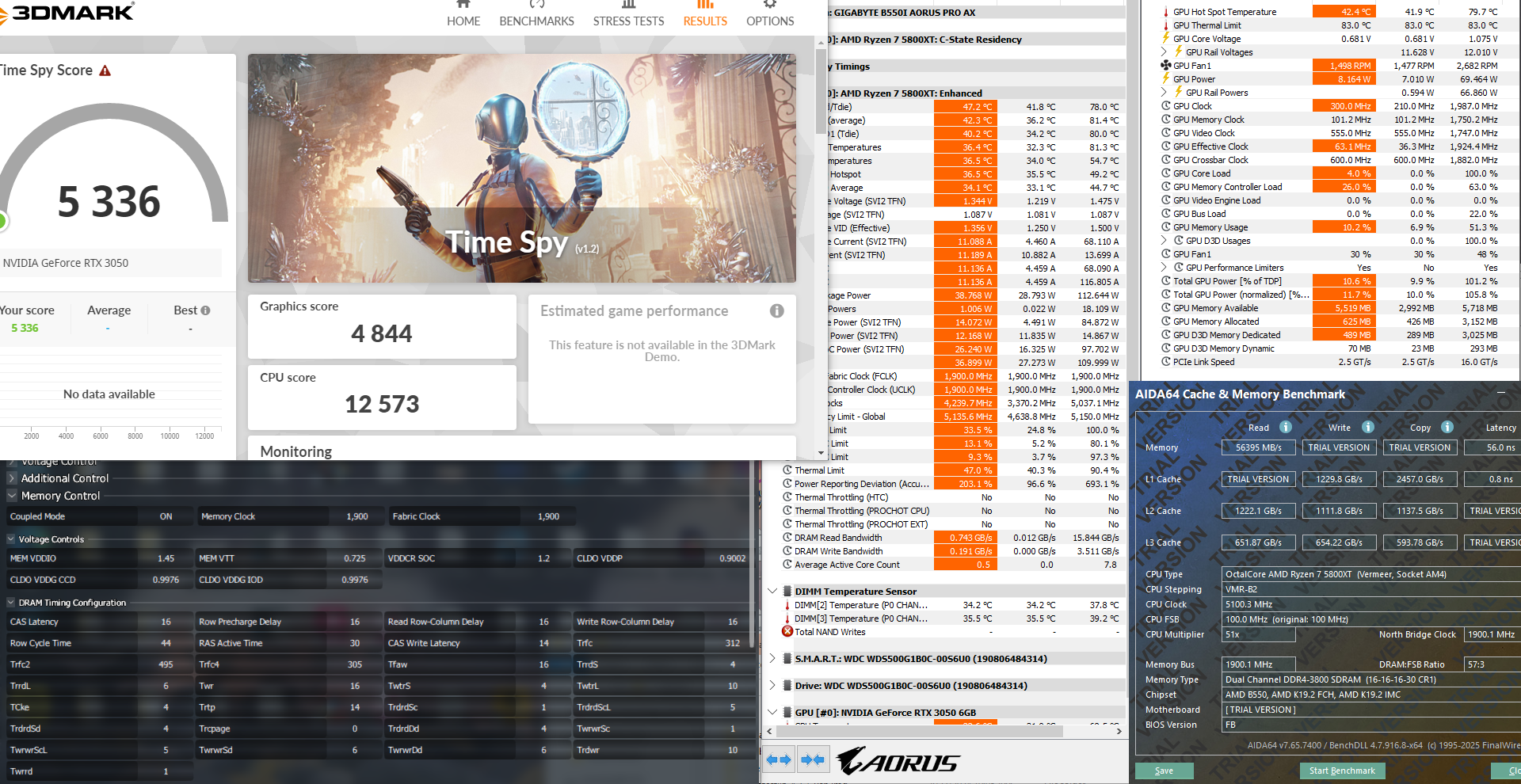
Started playing with the memory some and got over 12,500 on Timespy CPU. Little more tweaking and I might hit 13,000. Very pleased given the power draw numbers. 56ns memory latency is pretty cool too.

Memory is capable of higher speeds (4400 mhz with my 5700g) but this cpu needed 1.15v soc to make 1966mhz Fclock stable. I didn't expect it to go as high as Renoir but happy with cas 16 at 3800mhz with these voltages.
58xt +200 3800 TS 1.PNG
 
GFlops my man. You can try it for yourself with Linpack Xtreme. I run the 10GB load.
 
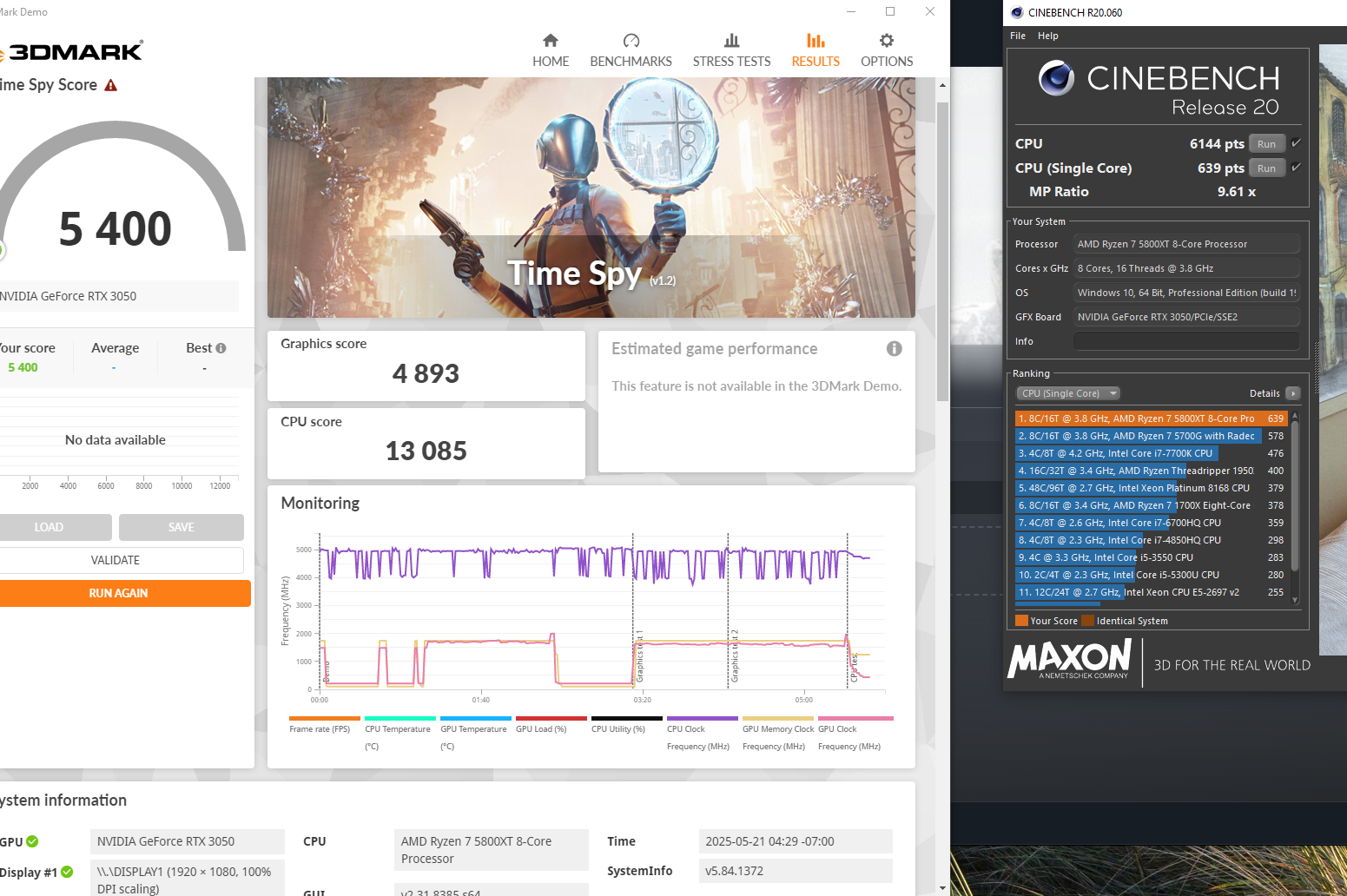
Woohoo, 13k+ on Timespy CPU! A little toasty but I am working in a small case. I even needed to shave the cpu fan a bit to let it fit between I/O panel and ram.

Infinity fabric seems to be a hard limit of 1900 mhz before spitting whea errors, regardless of voltages and timings. I tried them all and its definately a cpu thing as the 5700g went far above this without issues.

Gonna do a bit more tweaking to get sc back to 640+ while keeping similiar mc. Ive never quite been able to 650 though.

5800xt CB.PNG
5800xt 13085.PNG
20250519_195337.jpg
 
Last edited:
Just grabbed one of these to tinker with.
Using stock Wraith Prism, with Thermalright TF8 thermal paste instead of the stock stuff.
Set the PPT = 128W, TDC = 90A, EDC = 125A and +200 to the boost
-15 all core curve optimizer

1 hour of OCCT... couple of core cycles it hit 80c ..but remainder held slightly under 80c.
Two best cores boosted to 5.0 ghz.. next 4 best slightly over 4.9 and last two boosted a little over 4.8ghz.

I tried -20 on curve optimizer but got the ole crash reboot when the system became idle. Gonna assume those 2 "best" cores don't like the -20..

So I could leave it -15 or dig in deeper and isolate which cores could be pushed further via tweaking..

Not all too bad with the stock cooler. 👍
 
Last edited:
Just grabbed one of these to tinker with.
Using stock Wraith Prism, with Thermalright TF8 thermal paste instead of the stock stuff.
Set the PPT = 128W, TDC = 90A, EDC = 125A and +200 to the boost
-15 all core curve optimizer

1 hour of OCCT... couple of core cycles it hit 80c ..but remainder held slightly under 80c.
Two best cores boosted to 5.0 ghz.. next 4 best slightly over 4.9 and last two boosted a little over 4.8ghz.

I tried -20 on curve optimizer but got the ole crash reboot when the system became idle. Gonna assume those 2 "best" cores don't like the -20..

So I could leave it -15 or dig in deeper and isolate which cores could be pushed further via tweaking..

Not all too bad with the stock cooler. 👍
heck yeah, my almost launch day 5800x can barely do 4.4-4.5 all core with a 150w limit and -20 CO offset. Man, AMD has quite a bit of silicon quality inconsistency, even up to Ryzen 9000 I have read.
 
heck yeah, my almost launch day 5800x can barely do 4.4-4.5 all core with a 150w limit and -20 CO offset. Man, AMD has quite a bit of silicon quality inconsistency, even up to Ryzen 9000 I have read.
Benchmarks are really what matter, not max frequency numbers.

Just remember, all 8 core Zen 3 cpus are more capable than any of the console cpus, including what the PS5 pro has.
 
Just grabbed one of these to tinker with.
Using stock Wraith Prism, with Thermalright TF8 thermal paste instead of the stock stuff.
Set the PPT = 128W, TDC = 90A, EDC = 125A and +200 to the boost
-15 all core curve optimizer

1 hour of OCCT... couple of core cycles it hit 80c ..but remainder held slightly under 80c.
Two best cores boosted to 5.0 ghz.. next 4 best slightly over 4.9 and last two boosted a little over 4.8ghz.

I tried -20 on curve optimizer but got the ole crash reboot when the system became idle. Gonna assume those 2 "best" cores don't like the -20..

So I could leave it -15 or dig in deeper and isolate which cores could be pushed further via tweaking..

Not all too bad with the stock cooler. 👍

Tried some real world usage and got some reboots while gaming...so definitely -15 not gonna be the final settings for CO offset.
Spending some time today to try to get more stable numbers
 
I don't have a 5800XT.

You clearly have no idea what you are talking, but carry on.
I got that so why are you here then? But in any case, run some benchmarks on your uber supreme settings and we can compare to 'nuetered' 5600x settings.

I showed a successful Timeapy of 13k on the cpu which is better than 90% of 5800X/Xt users get so pretty sure sure I do know what Im talking about.
 
I am on HWBOT with my 5600X, my 58X3D is installed right now, as it is my kids system.

https://hwbot.org/users/freeagent/
Ok great, so where are you getting this awesome real world performance in your 5600x? Your all core CB scores are good but those are all core suicide runs and your single core scores likely suffered, which matter more in gaming (and are missing on your submissions).
 
I saw this a few days ago when I couldn't figure out why my shitty ASUS BIOS was limiting the clock speed on my 5700X3D to 3.2 GHZ. It would never boost under single or multi core loads and was killing performance.


View: https://youtu.be/xmQV1ZM_WmU?si=_M1gh62oYhRGxSw8


5700X3D will lock to its base clock if you set any boost override....
There isn't much to do on the "X3D's".. someone on the forum pretty much summarized them up.. they are boring CPU's... set it and forget it
 
5700X3D will lock to its base clock if you set any boost override....
There isn't much to do on the "X3D's".. someone on the forum pretty much summarized them up.. they are boring CPU's... set it and forget it.
Mine would lock all cores to 3.2 GHZ regardless of single or multi thread but once I actually cleared CMOS with the jumper on the mobo it now will boost to just over 4.1 GHZ depending on load.
 
Ok great, so where are you getting this awesome real world performance in your 5600x?
What? Awesome and 5600X do not belong in the same sentence. As I said earlier. I am running my 58X3D in my other system. But the PPT/TDC/EDC values that I gave you earlier are early settings from what I used on my 5900X. The 5600X cannot use all of that power.

I just gave you some number to try and you got all bent out of shape.
 
What? Awesome and 5600X do not belong in the same sentence. As I said earlier. I am running my 58X3D in my other system. But the PPT/TDC/EDC values that I gave you earlier are early settings from what I used on my 5900X. The 5600X cannot use all of that power.

I just gave you some number to try and you got all bent out of shape.
Not bent out of shape, its just a bad method for Zen 3 outside of exotic cooling. Stock PPT is typically too high and you get better real world performance with a negative offset and a pbo freq boost.

You are the one claiming my cpu is nuetered with nothing to back it up.

Again, you tried to show off your 5600x settings a being able to max out Zen 3, but all of those benchmarks are just all core CB runs.

Obviously you are now deflecting as I wasn't really infering that Zen 3 is awesome at gaming. It was you running your mouth about how awesome your settings are.
 
Just grabbed one of these to tinker with.
Using stock Wraith Prism, with Thermalright TF8 thermal paste instead of the stock stuff.
Set the PPT = 128W, TDC = 90A, EDC = 125A and +200 to the boost
-15 all core curve optimizer

1 hour of OCCT... couple of core cycles it hit 80c ..but remainder held slightly under 80c.
Two best cores boosted to 5.0 ghz.. next 4 best slightly over 4.9 and last two boosted a little over 4.8ghz.

I tried -20 on curve optimizer but got the ole crash reboot when the system became idle. Gonna assume those 2 "best" cores don't like the -20..

So I could leave it -15 or dig in deeper and isolate which cores could be pushed further via tweaking..

Not all too bad with the stock cooler. 👍
Try everything the same at 105w. You are showing 80* but I bet your primary cores are pushing above 90* causing a crash.

You should be able to do -20 on that cooler.
 
I have not tried messing with my sons 5800xt yet, but it did hit 90 degrees running Cinebench but it is using a CoolerMaster Hyper 212 Halo White. During normal gaming it never gets out of the low 60's with that small cooler so I am not too concerned. I will probably try a bit of an under volt but with it running that cool during gaming I don't think it is really necessary.
 
You are the one claiming my cpu is nuetered with nothing to back it up.
Run some Linpack Xtreme. Select the 10GB load. Mark down your results, then boost power limits. See the numbers go up, even under a punishing load like that. I am not singling you out, but a lot of people have no idea how PBO works. Best part is you wont hurt anything like you could with static clocks.
 
Back
Top