4890 + 4870 512 crossfire

abirdie4me

n00b
Joined
Sep 13, 2008
Messages
23
I have a 4890 in my gaming rig and my brother gave me his 4870 512. 3 questions:

1) Would I see substantial improvement in Crysis, Crysis Warhead, or Far Cry 2 if I added the 4870?

2) Would the 'downgrade' of memory from 1 gig to 512 in my 4890 cause issues?

3) When not gaming, is there a way to turn off one of the cards?

Thanks.
 
Last edited:
the 3rd one is a definite yes not sure about the others and it probably depends on resolution.
 
Well, only one way to tell... give it a shot and let us know what the gameplay experience is like :D I'd bet you'll notice that it's better in most games, but who knows.
 
Thanks for the quick reply. Here's more info on my setup:

Q9650 @ 4.05ghz
Vista Ultimate 64
8 gig RAM
First monitor (gaming) BenQ E2400HD 1920x1080
Second monitor (not on during gaming) Samsung T240HD 1920 x1200
Currently using Catalyst 9.7 drivers (and the horrible CCC)
 
Last edited:
Why not use the higher res Samsung monitor for gaming?

Just got the Samsung and use it as a TV while I'm messing around on the computer (the Samsung has a direct cable input running from the wall). Also have it hooked up as a second monitor on my work laptop, so it's pulling triple duty! I only use it on my gaming rig when I have a ton of things open...like right now. I've never been able to calibrate it correctly and the colors don't look very good.

The BenQ E2400HD was probably a poor choice for use with my ATI cards. There's a bug with ATI/1920x1080/dx10 that I didn't find out about until it was too late. So I have to play all my games in dx9. I did hook up the Samsung to test out dx10 on Crysis and it worked ok, but I couldn't tell any difference in performance and the Samsung picture looked terrible compared to the BenQ.
 
I think the 512 MB issue might become a problem in some games if you crank up the settings in these reolutions...
 
I tried this on an I7 @ 3.8ghz.

3dmark06 scores went from around 17-18k up to 25k cards not overclocked, motherboard screwed up before i could test any games though.

I think in a lot of games you would see a decent increase, but those memory hoggers wont run any better.

Also it overclocked my 4870 to 4890 speeds and crashed the first time i ran 3dmark, had to manually specify the correct values + it runs the cards at the lowest of the 2 clocks.
 
Input lag with a 4ghz Q9550, 8gb ram, and dual 4870/4890? I play at 1920x1200 on a 3.25ghz Phenom II and GTX 260 just fine.
 
I don't think it'll be worth it

I have a 4870 512 (stock) with a E8500@4.2GHz

playing at 16*10, in a variety of games I play, there are noticeable FPS hits when running 8xAA and sometimes 4xAA

I would think a 4890 running by itself would be able to handle 8xAA at 16*10. if you were to crossfire a 4870 512 with the 4890, then I think you might get a FPS boost if you run with low AA settings. so it's a trade-off between high AA or low AA for possible FPS gain
 
I would think a 4890 running by itself would be able to handle 8xAA at 16*10. if you were to crossfire a 4870 512 with the 4890, then I think you might get a FPS boost if you run with low AA settings. so it's a trade-off between high AA or low AA for possible FPS gain

What does AA do for Crysis / Warhead? Does it make a big difference in picture quality?
 
What does AA do for Crysis / Warhead? Does it make a big difference in picture quality?

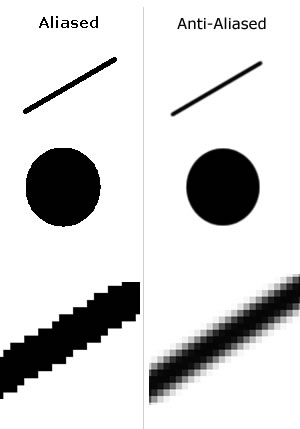
AA stands for anti-aliasing

aliasing = 0x AA setting & jaggies. the image below is an example of aliasing versus anti-aliasing. the higher AA setting you have the more smoother 3D geometry in a game will look.

Anti-aliasing.jpg


in terms of Crysis performance, I don't have the game, but I believe being able to run Crysis at 2xAA and max graphics settings at >30 FPS is supposed to signify a very good system.
 
AA stands for anti-aliasing

in terms of Crysis performance, I don't have the game, but I believe being able to run Crysis at 2xAA and max graphics settings at >30 FPS is supposed to signify a very good system.

Thanks for the reply. I'm guessing I'd want to do at least 2xAA, which seems to require more GPU memory...meaning the crossfire setup might actually hurt me in Crysis since I would only have the 512 mb memory available instead of the 1gb from the 4890. Hmmmm....
 
Thanks for the reply. I'm guessing I'd want to do at least 2xAA, which seems to require more GPU memory...meaning the crossfire setup might actually hurt me in Crysis since I would only have the 512 mb memory available instead of the 1gb from the 4890. Hmmmm....

You're probably better off just using the 4890 and either selling the 4870 or using it a spare / dual monitor card. I don't think the performance gain would be huge. Not to mention some games don't scale well at all with crossfire.
 
It's an interesting scenario, for sure. I hope the OP gives it a try and reports his findings. It would also make a great [H]ardOCP test *wink wink Kyle*
 
My 4870X2 (2GB though) can play Crysis @ 1920x1200 Very High with 8x AA no problem with the new drivers (9.7). 9.6 and below had much worse performance, so even if you liked the earlier CCC, you should stay with 9.7

If I were you, I would sell the 4870 and save up for another 4890 like thatsnasty2 posted...
 
My 4870X2 (2GB though) can play Crysis @ 1920x1200 Very High with 8x AA no problem with the new drivers (9.7). 9.6 and below had much worse performance, so even if you liked the earlier CCC, you should stay with 9.7

If I were you, I would sell the 4870 and save up for another 4890 like thatsnasty2 posted...

I've never done crossfire before, so what the hell....I'll throw the 4870 512 in there tonight after work and see what happens. If the memory issue hurts the AA performance I can always sell it and buy another 4890. Any tips on the installation?

I've never known my actual FPS in Crysis, I just know it has lots of slow downs, jaggies, and stutters at random times. Since I'd like to share results with you guys, how do I capture my frame rates / visual quality? How do I take the screen captures? I've seen some comments on some forums about Fraps, but I've never used it. Is there a better utility I should use? Any particular Crysis sceens I should benchmark?

Thanks for all the advice, I'll let you know how it turns out.
 
... so even if you liked the earlier CCC, you should stay with 9.7...

I use my machine quite a bit for watching HD-DVD's on PowerDvd 7.3, and every Catalyst version between 8.11 and 9.6 caused me massive issues on playback of Blu-Ray and HD-DVD. The new 9.7 drivers work flawlessly, so I'll be sticking with that even though I HATE the new CCC layout.

Of course, HD-DVD playback in Windows 7 isn't supported so I've got to find a good hack for that before I can upgrade off of Vista. :(
 
Bummer....the 4870 has an Accelero S1 attached and it hits my power supply when I try to install it. I'll have to reconfigure some stuff this weekend and try again.
 
Ok..I gave it a shot, but having major issues. Crysis Warhead Benchmark runs slower with Crossfire enabled than with the single 4890, and 3dMark06 and Vantage both have horribly stretched and jittery screens. I shut off 3dMark and Vantage right after they start running, but I can see that the fps in 3dMark06 is running around 130fps on the first scene where it normally runs around 100 fps with just my 4890 installed.

And now Warhead is totally screwed up, even when I disable Crossfire and go back to single 4890. Far Cry 2 seems to be working ok with Crossfile enabled, but I just got the game and haven't figured out how to see fps yet.

Any suggestions?
 
Not sure what I did, but crossfire seems to be working great now. I'll post screenshots shortly, but 3dMark06 was 19,100ish with single 4890, now over 22,000! Vantage is running now, I think it will post nice improvements as well.

The only thing I can think of that I did differently than the 2 times I tried last night, is that I was playing Far Cry 2 and Fallout 3 for about an hour before retrying the FutureMark benchmarks. Both of those games seem to be able to play sucessfully in dx10 mode on my BenQ monitor, while the Crysis games don't. Very strange.
 
Here are my Vantage results, Crossfire on the left and 4890 solo on the right:

crossfire-Vantageand4890.jpg


Here was the 3dMark06 result with my single 4890:

4890solo3dmark06results.jpg


Here was the 3dMark06 result with 4890 / 4870 512MB crossfire:

crossfire-3dmark06results.jpg


So far, so good....my Crysis / Warhead installations are all hosed up, so I'm going to try to find a Far Cry 2 or Fallout 3 benchmark to post next.
 
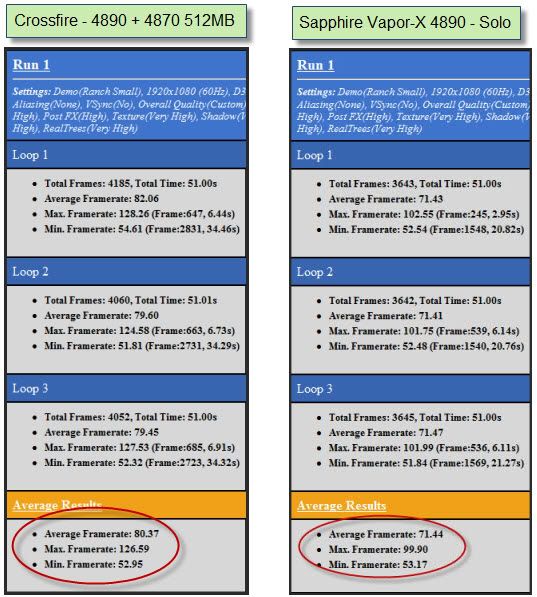
I ran the Far Cry 2 benchmark with all settings pretty much maxed out:

FryCry2benchmarksettings.jpg


Here are the results:

FaryCry2-crossfire.jpg


Only 9 more fps on average, and actually had 1 fps DROP in minimum framerate using mixed Crossfire. Looking to me like the limitations of the 4870 512MB don't allow for big gains in actual games that I play, only in the Futuremark tests. Oh well, at least I got some nice screen shots of high Vantage and 3dMark06 scores! I think I'll pick up another 4890 once the prices drop (when the 5xxx series cards are released). Maybe that extra memory capacity will help in Crysis / Warhead.
 
Last edited:
Thanks so much for the minireview! I wish I could have that setup to run a few real-world tests. The Crysis engine isn't a big fan of Crossfire, don't think. It'd be interesting to see some more benchies in other games.
 
I ran the Far Cry 2 benchmark with all settings pretty much maxed out:

http://i259.photobucket.com/albums/hh299/abirdie4me/Crossfire/FryCry2benchmarksettings.jpg


Here are the results:

http://i259.photobucket.com/albums/hh299/abirdie4me/Crossfire/FaryCry2-crossfire.jpg

Only 9 more fps on average, and actually had 1 fps DROP in minimum framerate using mixed Crossfire. Looking to me like the limitations of the 4870 512MB don't allow for big gains in actual games that I play, only in the Futuremark tests. Oh well, at least I got some nice screen shots of high Vantage and 3dMark06 scores! I think I'll pick up another 4890 once the prices drop (when the 5xxx series cards are released). Maybe that extra memory capacity will help in Crysis / Warhead.
once you actually use AA you will lose even more fps with that crossfire setup. for Far Cry 2 512mb is NOT enough for ultra settings and more than 2x AA at 1920. please just sell that 4870 512mb and buy another 4890 1gb. better yet just enjoy that 4890 for a few months and then sell it for a 5870.
 
once you actually use AA you will lose even more fps with that crossfire setup. for Far Cry 2 512mb is NOT enough for ultra settings and more than 2x AA at 1920. please just sell that 4870 512mb and buy another 4890 1gb. better yet just enjoy that 4890 for a few months and then sell it for a 5870.

Agreed. This was just a little experiment since I already had the cards and I wanted to see how much hassle is involved in setting up Crossfire. I've already reassembled my gaming rig to it's original configuration and I'm going to put the 4870 into another machine to replace my 8800 gts 320. Now I've somehow gotten interested in water cooling, that may be my next 'for the hell of it' project.
 
Back
Top