3 LCD Setup, or NO?

Rockinfella2k

Weaksauce
Joined
Oct 4, 2005
Messages
91
Well I have some spare money from my company I work for....I'm debating what to do right now, I love gaming, I have a quad core, 9800GX2 and just want more screen.

I currently have a 24 inch lcd which is great but i've been with this 24 inch since the first dells came out.

Wondering, should I go 3 LCD setup? What is the biggest size I want to go with if I want to utalize it...I mostly play WoW and COD4.


I was thinking 3 x 20 inch dells but would that be to much resolution?


Or should I go with a Dell 30 inch ?


Any suggestions, I just want the most bang, that will work without distorting the picture and stretching it :)


Thanks!!!
 
You probably won't be able to span on all three monitors when playing games unless you get a matrox triplehead2go
 
One 30" would be better for gaming, movies and all that stuff.

I think the part where multiple monitors really shine is multitasking.

I think its much easier to have things maximized to a window than it is to move them around within the same monitor.

For that reason, for a gaming computer, or one where you will be watching movies, I would go with one 30"

For a work computer, I would go with 3 20". Also, I would imagine 3 20" monitors to be cheaper. Just my Opinion.

The only obvious solution is to get 3 30" monitors. Man that would be nice.
 
I just noticed it wasn't in the compatibility list on the site.

Thanks for clearing that up.
The compatibility list there isn't the "end all be all" for SoftTH, it's actually very compatible with a lot of games :)

Only downside to SoftTH is that it only works with DirectX 8 and DirectX 9 games (DirectX 10 support is coming). Older versions of DirectX aren't supported and the OpenGL version is pre-alpha (buggy).
 
I have to agree with the centralized monitor for gaming and two or three panel setup's side panel monitors for multitasking in general, however I disagree that the central monitor should be the lcd resolution typical to 30" lcds. In my opinion 30" monitors are not a wise choice for a gaming and HD movie displaying solution. They unnecessarily tax your hardware and your wallet for a native resolution of 2560x1600 for those tasks. You should always display things at the native resolution for clarity on lcds. Games look very high def at 1920x1200 or x1080 resolution. The native resolution of true HD movies is 1080p also (1920x1080). With a 30" monitor you would be upconverting all of your HD movie content so it would not be per-pixel 1:1 unless you ran it in a window or with black bars around all four sides. In addition to the cost of the monitor you would have to blow more money in trying to keep the frame rates acceptable at that resolution.. quite unnecessarily as 1920x1200(or x1080) looks great on games Typically the 30" displays have poor response times as well. Therefore I don't see it as a wise choice for a gaming and movie playback monitor considering the native resolution and the response time... not as the central monitor with those display roles.

I do think that 24" - 30" lcds are the perfect size display for a desk though. 30" monitors with 2560x1600 resolution sound great as side panels for application workspace. I would love to have one on each side of a 24" to 30"(~32" max) 1920x1200 gaming display in the middle (I own a hannspree hf289h 28"/27.5" 1920x1200). I wouldn't use anything above 2ms-3ms response time. I think the new 30" dell is 11ms, The 30" gateway is 6ms, and is supposed to have video processing to scale and deinterlace non-native resolutions signals but I would have to look into it. Often post processing on high speed content can cause screen artifacts or signal lag in games. Scaling vs native resolution is usually a bad idea on lcds. On the gateway the scaling is reportedly good, but high speed on non native resolution reportedly causes 'smearing'. The 30" hp is 6ms and is reported to have pixel lag worse than the dell.

Triple-head 2 go and the software version stuff is neat but limited in resolution and game support. You would have to buy three monitors with x1024 resolution I think, at least for the hardware version. The software version will cause a performance hit vs the hardware version, and on both versions and the bezels could get annoying. The softTH still looks intriguing though--- thanks for those links.

Since you mentioned WoW - once nice thing about WoW with side panel monitors being used as application space rather than extending the gaming screen is that you can run WoW windowed+maximized on one monitor which allows you to move the mouse off the game screen seamlessly to applications you are using on the side panel application monitor(s). There is a performance hit for doing this if your system specs aren't far above the level the game is taxing it. Still I wish more games allowed this 'mouse freedom'.

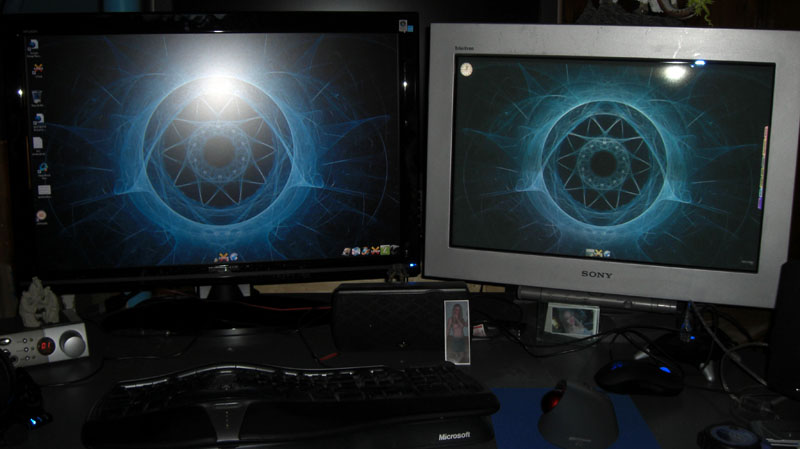
So in summary I would suggest a fast response time lcd for your gaming monitor, 24" or larger with 1920x1200(or x1080) resolution, and getting a side panel monitor or two of your choice at some point (30"rs would be sweet for lots of app space and the color gamut). Here is a pic of my current desk setup.

monitors_27.5in-LCD_24in-crt_walls-1.jpg
 
well a 3 lcd setup has many advantages. plus your games will just kill. but as people said i wouldnt go above 24" if your gonna go with 3. youd save alot of money going with 3 x 22" and still get alot of space and effect. im really thining of doing this as well, but to add another 2 lcds will cost me in the$1000 range as i have an LG L246WP. i love driving games though so i'm probly gonna substitute an upgrade for this idea within the year.
 
someone in the other thread has a 30" monitor with 2 20" monitors in portrait mode on the sides of the 30"
 
Well I meant going 3 x 19s...My 9800GX2 won't have a problem rendereing all three screens...I found a deal on a 3007 Dell monitor for 850 that i'm picking up tomorrow....So looks as though im going that route.
 
Back
Top