• Some users have recently had their accounts hijacked. It seems that the now defunct EVGA forums might have compromised your password there and seems many are using the same PW here. We would suggest you UPDATE YOUR PASSWORD and TURN ON 2FA for your account here to further secure it. None of the compromised accounts had 2FA turned on.
    Once you have enabled 2FA, your account will be updated soon to show a badge, letting other members know that you use 2FA to protect your account. This should be beneficial for everyone that uses FSFT.

2005 Post Your Workstation

Status
Not open for further replies.
compslckr said:
looks like one of those 2 to 3 pin adapters you use in an old house that does not have the ground "hole" on the bottom of the outlet
yup, damn old houses. :eek:

Keep up the good work, THATSOUNDGUY. :)
 
jen4950 said:
Holy f'n smokes!

How do you like your Dual Xeon? That's my next project after the desk is finished, and after I buy a Canon 1D Mark II with all related equipment..


Good luck with your Dual-X project! I use a D20 for my digital photography. Photoshop was killing my old workstation when I moved from 4MP to 8MP, and trying to work those huge RAW files was an exercise in futility. I had to shut everything else down and wait, and then wait some more. Also, when I moved from Vue to Maya, model rendering times shot up.

Time is money, so I had to shoot my old horse and get a faster ride. With my new workstation's 4 logical processors, 3GB and RAID0 storage, I can quickly render a 3D model, edit lots of RAW images in Photoshop, cut footage in Avid, burn a DVD, watch cable TV and cruise the Web all at the same time-- and nothing chokes.

Yes!
 
maxedoutcc said:
dig'z whorehouse?

HAHAHA I knew someone would see that!

www.whorehouze.com

Its a website dedicated to Unreal Tournament 99/04 to find cheaters, post servers, talk about clan stuff and that kinda thing - and a forum. Its a very nice area to find hints and tricks to setting up servers like www.unrealadmin.org has. Oh and theres some "other" stuff there as well ;)

ISP - Until all our men and women are home I will always continue my efforts to make life better for all our soldiers. I can promise you that! :) Ill be heading to the USO office two weekends from now to welcome troops home, cant wait, awesome poeple. Take care all.


Edited ---- typing + me = failure
 
isp said:
yup, damn old houses. :eek:

Keep up the good work, THATSOUNDGUY. :)
If it's not up to date, then I'm pretty sure your power company will do it....I don't know about for free, but I think it's free-it IS a standard, so, they should do it...give 'em a call.... :)
 
boneca said:
my setup

mysetupnew2002005.jpg

why do you need 3 monitors for? Moreover, is it possible for your neck to turn that far to the right and left?
 
Happy Hopping said:
why do you need 3 monitors for? Moreover, is it possible for your neck to turn that far to the right and left?
WTF?! It's possible they're not ALL to the same computer. Also, it's not that far of a stretch to look at...its only a few inches to each side....not that much of a big deal. Look around more....he's not the only person to have more than 2 monitors. A monitor setup like that would be badass for racing games and such.

EDIT: I see 2 OSes in that picture. Mac, and Windows. I also see a Mac Mini.
 
I switched some things around, obtained another computer, etc.
Before you call BS these pics were not staged; I keep my workstation clean.

IMG_4423.jpg


My desk is an O’Sullivan “L” Workstation which seems to be pretty popular around here. This desk looks great with the deep red walls of my room and has a beveled edge, a feature that gives my wrists great relief. I chose not to install the included keyboard tray because I don’t use them. The blank side of the desk is reserved for paperwork and dinner plates.

IMG_4428.jpg


My main computer. Everything is black/silver, even my cell phone.

IMG_4420.jpg


Good peripherals are the key to getting use out of an auxiliary computer. This is why mine has a Logitech Elite keyboard and a Microsoft Explorer 3.0 mouse—both very nice products.

IMG_4424.jpg


“Big box” software collection and proof that not all home users of 3ds max are pirates.
biggrin.gif


IMG_4427.jpg


Network drops in closet (coming from garage and 2 other bedrooms), which actually go through a hole in the wall to my dad’s desk in the front room, which has the routing equipment. That fatty coax cable is pro grade antenna cabling, and went to a yagi style WiFi antenna years ago when I was trying to set up a link to a friend’s house 800 feet away.

teapot.jpg


This is my wallpaper, wireframe and shaded views were rendered in 3ds max, effects done in Photoshop 5.0. Anyone who does 3d modeling will instantly understand.
tongue.gif
 
Need some opinions:

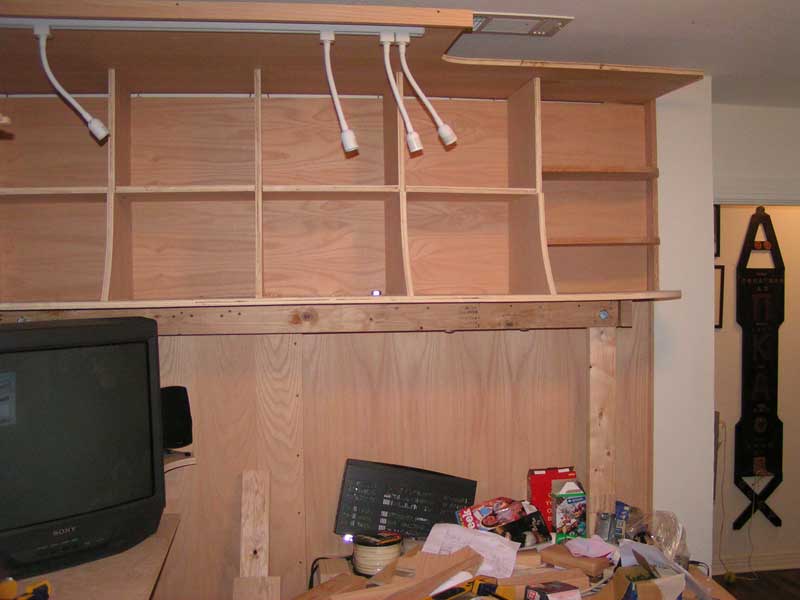
Here is the wall that I have been working on..

PICT8333.jpg


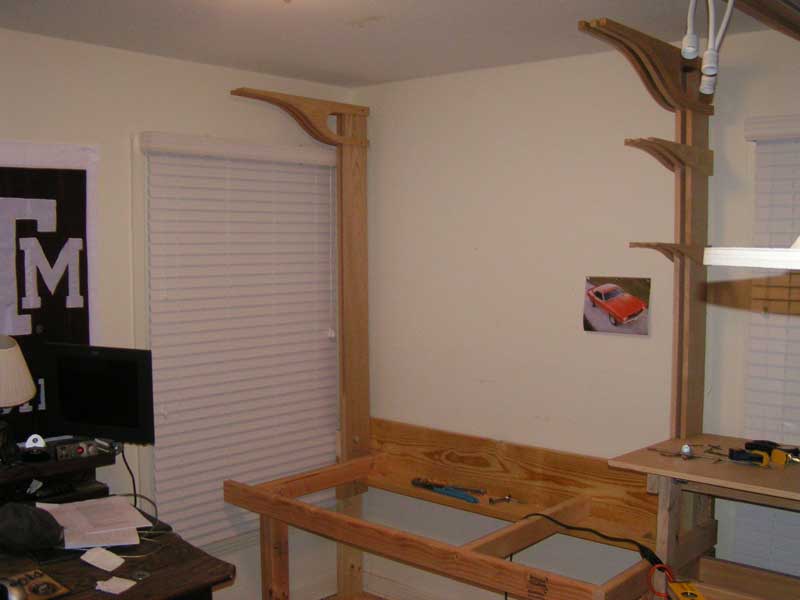
Here is the next wall that I am working on..
PICT8334.jpg


The question is do I install the hardwood backboard like I did on the other side, or do I leave the drywall exposed?

see the whole thread here: http://www.hardforum.com/showthread.php?t=871623

Keep in mind the stain will be a deep red.. mohogany or red oak..
 
I'd say go with covering the drywall. Just make sure you move the pic of that lovely muscle car to somewhere else so it can still be viewed :)
 
jen4950 said:
Shrinkwrap on OS/2 :D
I'm tempted to open and use it but I need to confirm that it's worth nothing before I go through with it. I got it for 3 bucks at an electronics fleamarket, so I guess it can't be too incredibly valuable right?
 
corebreach said:
I'm tempted to open and use it but I need to confirm that it's worth nothing before I go through with it. I got it for 3 bucks at an electronics fleamarket, so I guess it can't be too incredibly valuable right?


I would leave it wraped.
 
The question is do I install the hardwood backboard like I did on the other side, or do I leave the drywall exposed?


Hardwood...Drywall (White) shows every little nick and scratch. The wood will look sweet and you can hide wires,powerstrips ect. behind it.
 
Well, I'm just an E-3 in the military, so I don't make the big bucks like some of you guys do :eek: but here's my current set up:

workstation1qb.jpg

workstation21ks.jpg

workstation36hd.jpg

desklitup0qh.jpg


Excuse the Compaq barely visible in one picture...it's not mine and it's going back to its owner tomorrow... :rolleyes:

Hoping to add a Shuttle XPC (AMD 64 of course!) Linux box and 17" LCD in a few months. :)
 
SonicAgamemnon said:
Thanks. The graphics accelerator is a Quadro FX4400 with stock cooling, which does a good job. There are at least five heat sinks along with the usual GPU fan. My average GPU core temperature is 51C with an ambient temp of 40C, which isn't great but good enough for me. Besides, I don't want to void my 3-year warranty by modifying the card. Here is a tighter shot of the GPU:


Wait, you mean the stock cooling and the 5 heat sink and the GPU fan comes standard with the card? Or did you add those on?

What brand name is it? IS it PNY?
 
Happy Hopping said:
what is the sound card box system that is inside your computer and what sony headphone is it?
thats a creative live drive, comes with the platinum version of the creative sound cards
 
Does the platinum ver. better than the audigy?

Does this box c/w a 5.1 optical digital output for sound like the ones coming out of a integrated digital amp. 5.1 sys? Or is it just analog?
 
How do those sound drives work? Is it hooked up through IDE and controlled by drivers, or what? :confused: Please let me know! ;) :)
 
On the Audigy2s, there was a ribbon cable that went from the sound card to the box. This one probably works the same.
 
well got some updated pic's ...

Before
SANY0107.JPG


i threw away my old desk, lousy samsung crt monitor and my crappy creative speakers ...

After
SANY0210.JPG

SANY0226.JPG


now im just gonna threw away my camera to so i will get better pics...
 
kaemaril said:
I don't think it's a chair. I think it's a moai on castors :)


well it is a chair, its called the "UllmanChair" and is developed by Dr Johan Ullman. I didnt get it for the good looks but for the great ergonomics, you can easily sit a few hours in a row without getting your back and neck in trouble.

for more information ...
 
Soon to get a nice 19" Samsung / Viewsonic CRT / Flat keyboard / MX510 / speakers / headphones / and an L shaped glass desk to fit all my stuff on one desk.


workstation.jpg
 
chair looks like the lockness monster

or something Yao Ming/Shaq would have.
 
Happy Hopping said:
Wait, you mean the stock cooling and the 5 heat sink and the GPU fan comes standard with the card? Or did you add those on?


What brand name is it? IS it PNY?

This card is from PNY and it is completely stock. I took another look and there are actually four heat sinks: the main/fan and two others on one side, with another large, rectangular heat sink on the flip side. With this card, 3D render times are good-- no more temptation to pick up a book and start reading while waiting, etc. Of course, this stuff helps too:

 
Status
Not open for further replies.
Back
Top