• Some users have recently had their accounts hijacked. It seems that the now defunct EVGA forums might have compromised your password there and seems many are using the same PW here. We would suggest you UPDATE YOUR PASSWORD and TURN ON 2FA for your account here to further secure it. None of the compromised accounts had 2FA turned on.
    Once you have enabled 2FA, your account will be updated soon to show a badge, letting other members know that you use 2FA to protect your account. This should be beneficial for everyone that uses FSFT.

2.4 A or 2.4 C?

darkecho

Weaksauce
Joined
Jul 9, 2004
Messages
106
I have both processors, 2.4c and a prescott 2.4 A

I do gaming, thats it.. My main reason for asking is because of overclocking, but i think in order to get a better understanding, I need to talk to you guys first about the actual processor...


I know the 2.4c has hyperthreading, 800mhz fsb, and L1/12K+8K; L2/512K cache, and the 2.4 A doesnt have hyperthreading, it has a lower 533 fsb, L1/12K+16K, L2/1MB cache..

i have Corsair XMS Extreme Memory Speed Series, (Twin Pack) 184 Pin 1GB(512MBx2) DDR PC-3200 ram with this system in an Abit max 3 mobo

My question is... i want the most performance out of my system for gaming only, zero multitasking. either music is open with a few folders or HL2 Cs:source or some game... so I want the most fps i can get..

I also am interested like i said in overclocking whichever processor you guys help me choose, I dont know but i have heard that running at anything other than 1:1 ratio sucks, so I dont know if the fsb is going to help me out or not... what do you guys think i should do with my system? thanks a lot ppl... i have a koolance exos cooling the cpu btw.
 
p4s love that memory bandwidth so that 2.4c is definitly appealing. Hyperthreading will marginally help your gaming performance as well, by allowing the game to use one logical cpu and windows to use the other

however those 2.4e's have been ocing well, if you could get that to 800mhz FSB

that would give you 18x200 = 3600mhz, obviously this would be a hell of an overclock
 
P4C

There is no other choice!!!! Northwood core baby with Hyperthreading. The best of the best right now when dealing with intel...
 
USMC2Hard4U said:
P4C

There is no other choice!!!! Northwood core baby with Hyperthreading. The best of the best right now when dealing with intel...


why do you say that???? i am driven to obey your sugggestion purely based on your entusiasm, but please, enlighten me.
 
BigTaf said:
p4s love that memory bandwidth so that 2.4c is definitly appealing. Hyperthreading will marginally help your gaming performance as well, by allowing the game to use one logical cpu and windows to use the other

however those 2.4e's have been ocing well, if you could get that to 800mhz FSB

that would give you 18x200 = 3600mhz, obviously this would be a hell of an overclock


I do believe that I will go home immediately and attempt this 3600 oveclock you speak of.. that would be at 1:1 ram ratio correct? I am beginning to remember why i purchased that cpu now... damn why is it sitting on the dresser.. i need to max out that badboy!!! wonder if thats possible with my watercooling and some voltage tweaking...
 
With a 1:1 ratio that would be DDR400 speed, so its safe to assume your ram will handle it
 
Clock for Clock, the Northwood was the Fastest, lowest latency Pentium 4 that exists... it is concidered "the best" netburst core... and it has Hyperthreading. Something that is so beautiful its hard to describe in words lol :)
 
If you have both the processors, why don't you overclock them both, see which performs better in your favorite apps, and tell us which is better? It seems to be that in general it's better features on the 2.4c (HT, 800 FSB) vs the chance of a slightly higher max overclock with the 2.4a.
 
USMC2Hard4U said:
Clock for Clock, the Northwood was the Fastest, lowest latency Pentium 4 that exists... it is concidered "the best" netburst core... and it has Hyperthreading. Something that is so beautiful its hard to describe in words lol :)

Northwood was definitly a nice cpu, but I personally dont get the prescott bashing, i got one, it ocs nicely and aside from needing water to get it to acceptable temperatures it performed quite well.

We can argue about how the longer pipelines offset the performance gained from the 1mb cache, but at the end of the day, any differences between the two I have seen (and yes ive owned both) are a couple of points in 3dmark 2k1. Tested a 2.8c@3.4 against my prescott when it was @ 3.4 and most games were 1-4fps difference, sometimes for the prescott sometimes against. If cpu inferiority is determined by 3dmark 2k1 (where the northwood saw the biggest gain) I guess ive had computers wrong all these years,

Put down that word processor and start benchmarking damnit

PS. Sorry for the rant but its been the same argument for almost 1.5years now,.
 
Jonsey said:
If you have both the processors, why don't you overclock them both, see which performs better in your favorite apps, and tell us which is better? It seems to be that in general it's better features on the 2.4c (HT, 800 FSB) vs the chance of a slightly higher max overclock with the 2.4a.


Now thats a comment I can agree with :)

Advice is always great, but nothing compares to personal expirimentation
 
ah, very good suggestion, i should stop asking you guys and get up off my lazy ass and try it. lol... hmmm maybe ill make a little HL2 demo and record the fps with both overclocked to my liking. THAT aughta do the trick. Thanks dudes for the info however i must say, ultimately you all confused me much more than I was in the beginning lol... but that just goes to show "the more you know, the more you know, you dont know.."
 
My 2.4C overclocks to 3.4 and still runs cool. I would say go with 2.4C because it has hyperthreading, runs cooler, and higher fsb which may lead in more memory bandwidth.
 
My 2.4C can't do over 247FSB stable with 1.6v. Yes i have exhaustively traded and changes parts, it is the cpu max.


LKS
 
I doubt there are many Northwoods that will do this and on air. Hyperthreading isnt needed if your doing gaming. This is my Lan machine, I got the CPU for free and the motherboard was a $50 RMA return from a friend who owns a puter store. Can't beat that!

lanmachine.jpg
 
=lks= ka druma said:
My 2.4C can't do over 247FSB stable with 1.6v. Yes i have exhaustively traded and changes parts, it is the cpu max.


LKS

Sorry to hear that.

In most cases you can put a 2.4C to 250FSB or over virtually idiot-proof. If you tweak it a bit, WC etc, it usually goes significantly higher.

Of course as this case shows, like any OC, you may only get what you paid for.

If you're seriously going to do ZERO multitasking, just leave HTT off...experiment both ways though, it might suprise you what counts as more than one task.
 
ok so, i spent about an hour OCing my 2.4c (it was already in the computer, my 2.4A is on the dresser still lol)

here are my results...

currently running 260 fsb at 5:4 so ram is at 208 seems to run stabily so far... but its only at 3.12 gigahertz so not that impressive compared to the pix above me... but i have never really been able to get this cpu very fast... maybe i just got one thats not too quick.. good news is that the cpu is running at 37 degrees celsius.

i got it to boot at 285 with more voltage but ultimately it would crash on just opening IE and AIM...

anything I could be doing wrong? i mean, i want to believe that I can make this processor faster but reality could be tht its just not a fast processor.

I will try my 2.4A tomarrow maybe and see if I can make it any more of a success...

i got water cooling, ppl have gotten these processors more overclocked on just air!! whats the deal!?

oh and another question involving ram...

If i wanted to make sure that RAM wasnt my bottle neck, can I run my fsb at like 200 and have faster ram thats set for 250, without any asynchronization?

from what i understand, asynch only happens when you change up the ratio when the fsb is too high for the ram, kinda like shifting gears in a car summwhat...

so if i have a fsb lower than the rams rating, It will just run underclocked right? I think im confusing myself... my ram right now is ddr400, so it runs at 200, my processor is 800 fsb, so it runs at 200 fsb. so they are matched,, but if i had ddr 500, what would happen between my ram and my cpuy, since the cpu is still 200 and the ram is 250, would the ram get underclocked to 200 or what... bah i need to go to sleep.. any of you have AIM? I would like to talk a little bit about this thanks
 
All my 2.4 would do is 260 FSB, so don't feel too bad. You won't see much performance difference running your RAM faster than 1:1, so I wouldn't get faster RAM. You might try setting your ration to 3:2, because your RAM DDR400 RAM might be your limiting factor at 208 MHz.
 
try the 3:2 ratio....

@ 1:1 I can only get to about 214
@ 5:4 I can only get to about 260
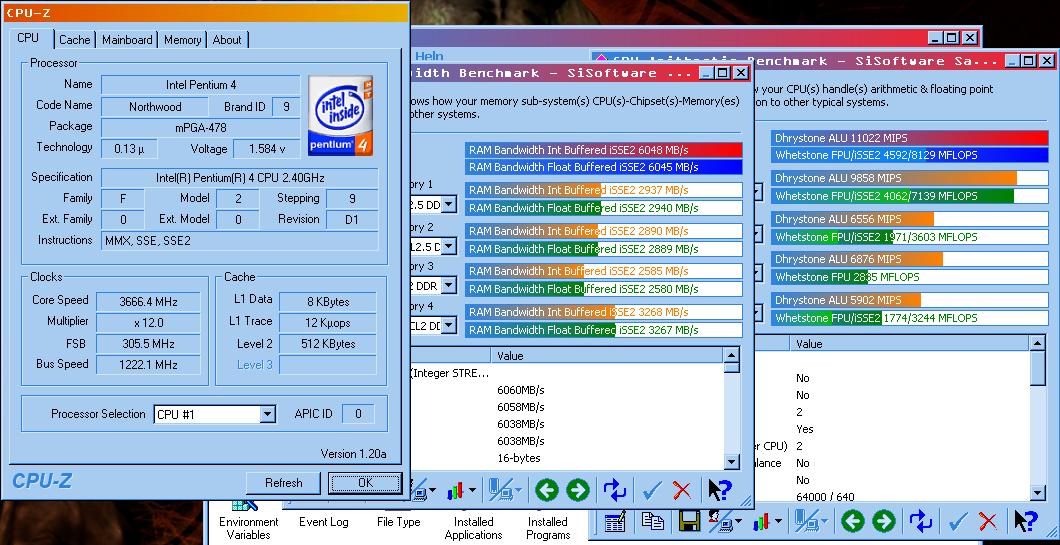
@ 3:2 I can get to 300FSB = 3.6Ghz!!
 
My 2.4C will do 290FSB but only on an Abit IC7-Max III - Anyother Mobo i can only get around 265ish, give or take. Im not really sure why... I think it has something to do with the voltages. In the Bios on my IC7 it reports them all alittle higher than what I set them to. I think I just get a more stable better flow of electricity.

Also , this is not 1:1 of course
 
USMC2Hard4U said:
My 2.4C will do 290FSB but only on an Abit IC7-Max III - Anyother Mobo i can only get around 265ish, give or take. Im not really sure why... I think it has something to do with the voltages. In the Bios on my IC7 it reports them all alittle higher than what I set them to. I think I just get a more stable better flow of electricity.

Also , this is not 1:1 of course

Abit IC-7's are the shizzle for rizzle!

mine hits 300+ ;)
 
ok so if im not running 1:1 I take a performance hit right? how severe is it to be asynch with your ram and not running 1:1? cause here is what i have come up with

Both processors seem to run up to basically the same speed 3.2 gigaherts...

the Canterwood fsb got to 260~ but of course i couldnt run 1:1 at that speed, but the prescott2.4a got an fsb of 180 at 1:1 so im running 1:1 and my speed is 3.2 gigahertz, which one is better? i havent really benchmarked yet, just seeing where they hit the wall...

so basically they both have the same speed in megahertz, but the canterwood has to run at a different ratio with a higher overall bus speed and the 2.4a has a lower bus but can run at 1:1 from that information, which woudl you guys choose? thanks!
-Hawk
 
Canterwood is a motherboard chipset, fwiw.

My 2.4c does 281fsb at 1:1 ratio with memory timings of 2.5-3-3-7 and PAT off on my Neo2 with Springdale 865PE chipset. The same chip does low 270's at 1:1 on my IC7-MAX3 with PAT enabled and the same mem timings on good TCCD RAM. The chip itself will do at LEAST 285fsb with the right RAM.

Since I am temporarily using some 'cheapstuff' RAM that will only go 221fsb at those timings, I set the divider on the Abit to 5:4 and it now runs at 3.3GHz (275fsb), and the RAM only runs at 220MHz (ddr440). It still gets over 6,000 mem bandwidth in Sandra and games well.

With that said.. my 2.8c craps out around 248fsb on any mobo, it does better with lower fsb & a 1:1 ratio.

I compared the 2.4A vs. 2.4C scenario too for a second machine, got a 2.4c that was a known quantity and glad I did.
 
the performance hit is minor for running a divider on your ram on Intel chipsets. And MANY benchmarks have shown.....

with a choice of 250Mhz FSB 1:1 with loose timings vs. 250FSB @ 5:4 (DDR400) with tight timings..... the ratio won most of the benchmarks, and that was with the CPU at the same speed, usually a ratio will let you run at a higher total CPU speed.

trust me ratios are your friends on an intel board.

Just benchmark it each way and see. (ex: 3dMark or game bench)
Sisoft will show a little less memory bandwidth, but the faster CPU speed will greatly outweigh the mem bandwidth.
 
Dividers do give a performance hit...but if it lets you get your CPU running much faster at all, it makes up for it. Same concept with memory timings...tighter timings are nice, but if loosening them lets you increase the clock much, it makes up for it fast.

Just took my new A64 Winchester 3000 up to 2.4 since we're choosing among 2.4 clocked chips...my 2.4C is going to my girl to replace her 2.4 Celeron so it can play games released this millennium just as soon as she gets some RAM that can do 250 or better. HTT was nice but throw enough speed at the apps and it doesn't matter much. At stock it still lagged a bit where the 2.4C would have, but OCed it is plenty smooth.
 
ashmedai said:
Dividers do give a performance hit...but if it lets you get your CPU running much faster at all, it makes up for it. Same concept with memory timings...tighter timings are nice, but if loosening them lets you increase the clock much, it makes up for it fast.

Just took my new A64 Winchester 3000 up to 2.4 since we're choosing among 2.4 clocked chips...my 2.4C is going to my girl to replace her 2.4 Celeron so it can play games released this millennium just as soon as she gets some RAM that can do 250 or better. HTT was nice but throw enough speed at the apps and it doesn't matter much. At stock it still lagged a bit where the 2.4C would have, but OCed it is plenty smooth.

You're comparing an A64 at 2.4 ghz, which is about a 3700-3800 rating, to a 2.4 ghz P4. If the A64 didn't beat up that P4, you have a serious problem.
 
ashmedai said:
Dividers do give a performance hit...but if it lets you get your CPU running much faster at all, it makes up for it. Same concept with memory timings...tighter timings are nice, but if loosening them lets you increase the clock much, it makes up for it fast.

Just took my new A64 Winchester 3000 up to 2.4 since we're choosing among 2.4 clocked chips...my 2.4C is going to my girl to replace her 2.4 Celeron so it can play games released this millennium just as soon as she gets some RAM that can do 250 or better. HTT was nice but throw enough speed at the apps and it doesn't matter much. At stock it still lagged a bit where the 2.4C would have, but OCed it is plenty smooth.

chrisf6969 said:
trust me ratios are your friends on an intel board.

And actually your performance can be BETTER with a ratio and tighter timings... AT THE SAME FSB!!
 
Timings help noticibly, but not THAT much usually.

Me though, I'm using some of the earlier OCZ memory that came out...doesn't handle tight timings very well. Will replace it eventually, too busy and too broke right now.
 
2.4c, they rock....check my sig. Also, I am running about 88*F at full load. I ran a prescott in this rig, ran a good bit warmer.
 
BigTaf said:
Northwood was definitly a nice cpu, but I personally dont get the prescott bashing, i got one, it ocs nicely and aside from needing water to get it to acceptable temperatures it performed quite well.

This here is reason enough for me NOT to purchase one :p
 
I don't get it, people always bash the prescotts for thier high temps, but if you look at intels website, they are rated to withstand a much higher temperature than the northwoods are. My 2.80A runs F@H all day 100% and never goes higher than 140F. Thats using stock cooling in a mid-tower antec case with 3 case fans.
 
Peach said:
I don't get it, people always bash the prescotts for thier high temps, but if you look at intels website, they are rated to withstand a much higher temperature than the northwoods are. My 2.80A runs F@H all day 100% and never goes higher than 140F. Thats using stock cooling in a mid-tower antec case with 3 case fans.

They'd have to be.
 
Yeah, so they can withstand higher temps, but can the rest of your computer?

All I know, is that next time I need a space heater, I'll get a prescott.
 
Now I'm wishing I'd gone for one of those instead of my new A64, it'd keep my feet warm! Damn A64 never heats up much at all and my feet keep getting cold now. :(
 
Back
Top