• Some users have recently had their accounts hijacked. It seems that the now defunct EVGA forums might have compromised your password there and seems many are using the same PW here. We would suggest you UPDATE YOUR PASSWORD and TURN ON 2FA for your account here to further secure it. None of the compromised accounts had 2FA turned on.
    Once you have enabled 2FA, your account will be updated soon to show a badge, letting other members know that you use 2FA to protect your account. This should be beneficial for everyone that uses FSFT.

120Hz@1920x1200?

knightsilver

Limp Gawd
Joined
Aug 5, 2008
Messages
197
Will there be 1920x1200/24" 120Hz LCD Monitors out soon?

And will my 250/1Gb push it? Or would I need to get a 285?

thanks,
shane c.
 
I don't know if it'll work due to micrisofts shitty DX10 refresh rate policy. Many dx10 games work at 60hz and that's it. This is why there was such an outcry from crt users.
 
1920x1200 @ 60Hz x 24 bits per pixel = 3.317 Gb/sec
I'll show my work:
1920x1200 = 2,304,000 pixels
2,304,000 x 60 = 138,240,000 pixels per second
138,240,000 x 24 = 3,317,760,000 bits per second, or 3.317 Gb/sec

Single-link DVI maximum speed: 3.96 Gbit/s
As you can see, 1920x1200 at 60Hz is near the limit of single-link DVI, which is why you need to go dual-link DVI to do 2560x1600.

1680x1050 @ 120Hz x 24 bits per pixel = 5.08 Gb/sec
This is why the Samsung 2232rz and Viewsonic 2265wm require dual-link DVI.

1920x1200 @ 120Hz x 24 bits per pixel = 6.63 Gb/sec
Dual-link DVI maximum speed = 7.92 Gbit/s
So, 120Hz 1920x1200 could be done on dual-link DVI.

2560x1600 @ 60Hz x 24 bits per pixel = 5.90 Gb/sec
Falls about midway between 120Hz 1680x1050 and 120Hz 1920x1200.

Therefore, whatever video card solutions you see recommended for 60Hz 2560x1600, you need more than that for 120Hz 1920x1200. A GTX 285 would be an absolute minimum, and you really should look at SLI/Crossfire solutions. As others have already posted, though, don't actually build a computer planning on 120Hz 1920x1200 until you see a monitor like that actually released.

If you're wondering "but LCD monitors are 6-bit or 8-bit, not 24-bit!", well, I don't understand enough to explain but that's how RGB works.

See also:
List of digital video interconnect bandwidths
DVI clock and data relationship
24-bit RGB representation
 
I don't know if it'll work due to micrisofts shitty DX10 refresh rate policy. Many dx10 games work at 60hz and that's it. This is why there was such an outcry from crt users.

I know you can Bypass the dx10 limit with ATI tray tools.

Worked like a charm for 4870
 
1920x1200 @ 60Hz x 24 bits per pixel = 3.317 Gb/sec
I'll show my work:
1920x1200 = 2,304,000 pixels
2,304,000 x 60 = 138,240,000 pixels per second
138,240,000 x 24 = 3,317,760,000 bits per second, or 3.317 Gb/sec

Single-link DVI maximum speed: 3.96 Gbit/s
As you can see, 1920x1200 at 60Hz is near the limit of single-link DVI, which is why you need to go dual-link DVI to do 2560x1600.

1680x1050 @ 120Hz x 24 bits per pixel = 5.08 Gb/sec
This is why the Samsung 2232rz and Viewsonic 2265wm require dual-link DVI.

1920x1200 @ 120Hz x 24 bits per pixel = 6.63 Gb/sec
Dual-link DVI maximum speed = 7.92 Gbit/s
So, 120Hz 1920x1200 could be done on dual-link DVI.

2560x1600 @ 60Hz x 24 bits per pixel = 5.90 Gb/sec
Falls about midway between 120Hz 1680x1050 and 120Hz 1920x1200.

Therefore, whatever video card solutions you see recommended for 60Hz 2560x1600, you need more than that for 120Hz 1920x1200. A GTX 285 would be an absolute minimum, and you really should look at SLI/Crossfire solutions. As others have already posted, though, don't actually build a computer planning on 120Hz 1920x1200 until you see a monitor like that actually released.

If you're wondering "but LCD monitors are 6-bit or 8-bit, not 24-bit!", well, I don't understand enough to explain but that's how RGB works.

See also:
List of digital video interconnect bandwidths
DVI clock and data relationship
24-bit RGB representation

nice post, well explained
 
I don't know if it'll work due to micrisofts shitty DX10 refresh rate policy. Many dx10 games work at 60hz and that's it. This is why there was such an outcry from crt users.

And we are caring about DX10 because? I'm happy with 3D DX9.
 
I can't find the few reviews where I saw people bench the 120hz agaisn't a normal LCD and CRT. First, correct if I'm wrong, but the 120hz LCDs aren't even true 120hz. In the tests I've been, yes they somewhat better than most LCDs. But still don't compare to a CRT, if that's what your wanting it for. Personally, a good TN has never bothered me with gaming.

In my honest opinion, on the reading I've done, they're just not worth the price tag compared to ther LCDs on the market. I'd say if you didn't want care about the 3D, I 'personally' see no point in getting one. Just my two cents.
 
First, correct if I'm wrong, but the 120hz LCDs aren't even true 120hz.

If you are talking about the 120Hz, 240Hz and 480Hz LCD TVs, you are correct. If you are talking about the Samsung 2232rz and Viewsonic 2265wm, you're wrong - those two monitors (and ONLY those two monitors) are true 120Hz - they take 120Hz from the video card and display it.
 
Do you think the 3D is worth the drop in res from 1920x1200?
 
Do you think the 3D is worth the drop in res from 1920x1200?

for me no, but I would imagine that is a loaded question. some people think physx is the shit and I am meh at best. 3d would be awesome, but given the drop in visual quality you have to get ( lower resolutions, having to have twice the normal FPS to be playable and so one) that I have to say that its not worth it, If I could get a dual linked 24-28" monitor at 2.3mp with a true 120hz refresh rate it would be worth it to run sli or other high end setups. (hell I would probably go tri sli if necessary.) but til then I just can't see it.

one other though is to get one of the older 24" CRT if that would work, you can set though to such specs
 
Waiting for the GT300, I've got the Viewsonic, and I mostly play CS:Source, so my 8800 GTS 320mb is alright for now. I say wait for those next generation 120hz panels to come out ( might be cheaper in the future ) and buy the latest card at that time, which will probably be a long time from now.

I'm also assuming that those future 120hz LCD monitors will have higher native resolutions, so you'll have to buy a card that can continuously provide you 120 fps at that high of a resolution.
 
I also would like a 24" 1920x1200 120hz monitor. 1920x1080 is just too wide for computer use and rts games. If not I might get the Acer GD245HQ.

And yes, 120hz WTF! (For The World :)


- First of all, the difference between 120 and 60Hz is perceptible even in the OS interface. The movements of the mouse pointer and application windows get much smoother, especially in Windows XP and Windows Vista Home Basic. Third, 120Hz makes a difference for games if your graphics card is able to render so many frames per second. I wouldn’t say that it is a dramatic breakthrough (although hardcore gamers may talk about a few milliseconds’ advantage over the opponent), but it is much more fun to play at 120Hz than at 60Hz thanks to the smoother motion and the lack of RTC artifacts. Frankly speaking, I had not expected the difference between the refresh rate of 60Hz and 120Hz to be so conspicuous. It is indeed clear to a naked eye and is always in favor of the higher value. Smoother motion and the lack of RTC artifacts leave a highly positive impression, making you unwilling to return to 60Hz.
http://www.xbitlabs.com/articles/monitors/display/samsung-sm2233rz_5.html


- As you might know, we prefer to examine the responsivess of a monitor by counting the number of frames of ghosting, those traces that take too long to disappear and end up on top of images that are currently on show, rather than in milliseconds. That's because you can't really compare figures for response time from one display technology to another. Even on two typical 2 ms TN monitors, the results aren't identical.And as we hoped, the GD245HQ did better than all of them: [0.15 colour frame, 0.15 transparent frames]
Even more surprisingly, it also beats the two 120 Hz that are already available. The gap isn't huge, with just half a frame less of ghosting in each case, but it's enough to displace the VX2268wm from the podium, which itself had lead the 2233rz by a similar margin. The icing on the cake is that the input lag is on average only a single frame: taken together, these two scores make this monitor any gamer's new best friend.
http://www.digitalversus.com/acer-gd245hq-p357_7352_38.html


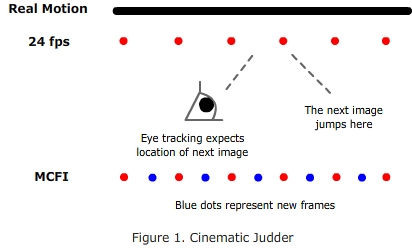
If the motion is faster then 60 pixels per second, or is variable, it is much better with more Hz I think. Then the frames can "hit" a screen refresh twice as close, and you get less judder in variable fps (which applies to both pcs and consoles today).

http://www.hdtvtest.co.uk/news/100120-hz-lcd-why-should-you-take-a-look-2007042354.htm


frame_judder.jpg


120Hz_LCD_vs_CRT_comparison.jpg
 
Last edited:
They aren't going to restart the 1920x1200 lines. It's just so much easier for them to standardize on 1920x1080 as it corresponds with HD perfectly.
 
They aren't going to restart the 1920x1200 lines. It's just so much easier for them to standardize on 1920x1080 as it corresponds with HD perfectly.
I don't wanto downgrade to this:

16-10_16-9_black_bars_aspect_ratio_small.jpg


search for 1920x1200 120hz, there is definitely a market for this ;)
 
search for 1920x1200 120hz, there is definitely a market for this ;)

And that market is absolutely tiny.

16.10 is dying because of stupid HDTVs. The average consumer either could care less about a few more vertical pixels, but mostly they see 1080p and automatically assume it's the best and they must have it.

The "market" for it is tiny, there's roughly what. 70 times the number of 16:9 monitors these days?
 
Personally I would love to see them make a double 24" panel at 3840x1200. It would be a perfect custom size for gamers who want eyefinity/surround like experience for a lower cost. Also, no bezels. Which would just make it sweet. Also since it would be a single screen, regular crossfire and sli profiles should work, without the scaling issues eyefinity has seen.

Not gonna happen though. The money is at 1080p, that is where they will manufacture.
 
Waiting for the GT300, I've got the Viewsonic, and I mostly play CS:Source, so my 8800 GTS 320mb is alright for now. I say wait for those next generation 120hz panels to come out ( might be cheaper in the future ) and buy the latest card at that time, which will probably be a long time from now.

I'm also assuming that those future 120hz LCD monitors will have higher native resolutions, so you'll have to buy a card that can continuously provide you 120 fps at that high of a resolution.

you are going to be waiting a long time my friend :D. Nvidia skipped from 200 series to 400 series
 
you are going to be waiting a long time my friend :D. Nvidia skipped from 200 series to 400 series

Bleh :) Sometime between the time I posted that and now (year and 8 months later) I went from an E6600 to an E8400, then 8800 GTS to GTX275

Last week, I upgraded to a Core i7-2600K and GTX580, and still have the same monitor :)

I've had no issues with my ViewSonic VX2265wm with regards to input lag. It probably doesn't have the best viewing angles and picture quality since it's a TN, but this is not what I bought the monitor for.

Still waiting on the Asus PG276H 27" 120hz monitor (almost a year after it was announced). I got excited when I saw that LG announced some 240hz 23in. IPS monitor, but was disappointed to see that they will be utilizing the same crappy "120hz"/black frame insertion techn for this.

Maybe we can foresee LG coming out with a true 120hz IPS panel before anyone else? Who knows.
 
They aren't going to restart the 1920x1200 lines. It's just so much easier for them to standardize on 1920x1080 as it corresponds with HD perfectly.

Well they will be higher tier displays like 1920x1200 already is. As 120Hz is.
 
I also would like a 24" 1920x1200 120hz monitor. 1920x1080 is just too wide for computer use and rts games. If not I might get the Acer GD245HQ.

And yes, 120hz WTF! (For The World :)


- First of all, the difference between 120 and 60Hz is perceptible even in the OS interface. The movements of the mouse pointer and application windows get much smoother, especially in Windows XP and Windows Vista Home Basic. Third, 120Hz makes a difference for games if your graphics card is able to render so many frames per second. I wouldn’t say that it is a dramatic breakthrough (although hardcore gamers may talk about a few milliseconds’ advantage over the opponent), but it is much more fun to play at 120Hz than at 60Hz thanks to the smoother motion and the lack of RTC artifacts. Frankly speaking, I had not expected the difference between the refresh rate of 60Hz and 120Hz to be so conspicuous. It is indeed clear to a naked eye and is always in favor of the higher value. Smoother motion and the lack of RTC artifacts leave a highly positive impression, making you unwilling to return to 60Hz.
http://www.xbitlabs.com/articles/monitors/display/samsung-sm2233rz_5.html


- As you might know, we prefer to examine the responsivess of a monitor by counting the number of frames of ghosting, those traces that take too long to disappear and end up on top of images that are currently on show, rather than in milliseconds. That's because you can't really compare figures for response time from one display technology to another. Even on two typical 2 ms TN monitors, the results aren't identical.And as we hoped, the GD245HQ did better than all of them: [0.15 colour frame, 0.15 transparent frames]
Even more surprisingly, it also beats the two 120 Hz that are already available. The gap isn't huge, with just half a frame less of ghosting in each case, but it's enough to displace the VX2268wm from the podium, which itself had lead the 2233rz by a similar margin. The icing on the cake is that the input lag is on average only a single frame: taken together, these two scores make this monitor any gamer's new best friend.
http://www.digitalversus.com/acer-gd245hq-p357_7352_38.html


If the motion is faster then 60 pixels per second, or is variable, it is much better with more Hz I think. Then the frames can "hit" a screen refresh twice as close, and you get less judder in variable fps (which applies to both pcs and consoles today).

http://www.hdtvtest.co.uk/news/100120-hz-lcd-why-should-you-take-a-look-2007042354.htm


frame_judder.jpg


120Hz_LCD_vs_CRT_comparison.jpg

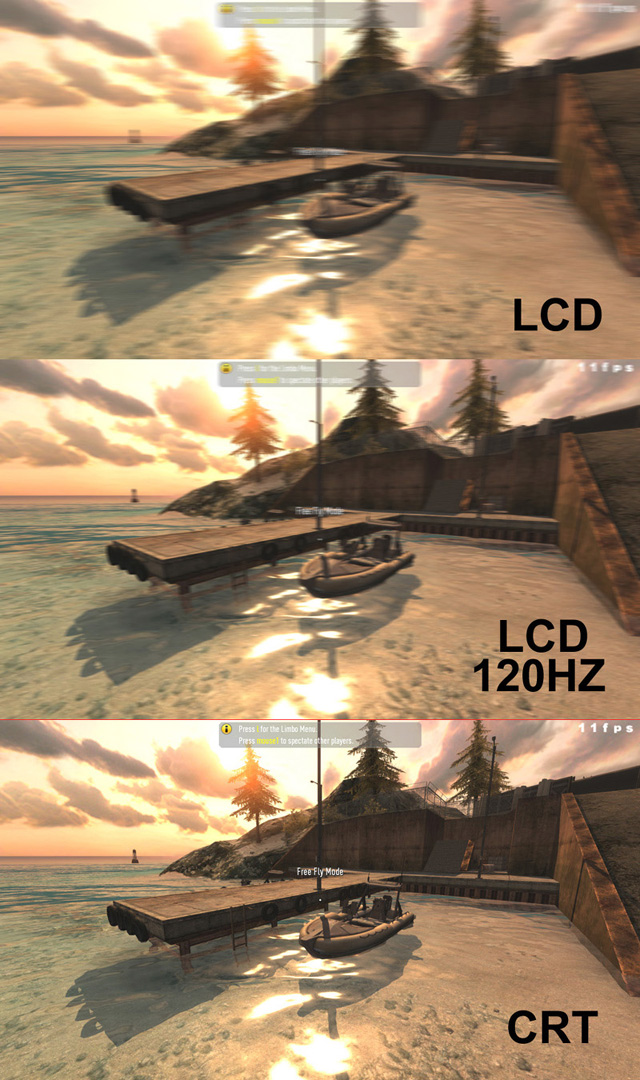
LCD's still look awful @ 120 like your pic shows. I can't stand mines blur and it's supposedly good. What review did you get that last image from?
 

Thanks for the link. Even though it's a TV I have yet to find a computer monitor in LCD form that does not blur or have lag compared to CRT. Just an imperfect technology for games if you're sensitive to those two inputs. Most people it does not bother, especially office users who are not gaming, so technology is not going anywhere but I wish it would. Hated it for about 4 years now. (since shelving my diamondtron)
 
I also would like a 24" 1920x1200 120hz monitor. 1920x1080 is just too wide for computer use and rts games. If not I might get the Acer GD245HQ.

And yes, 120hz WTF! (For The World :)


- First of all, the difference between 120 and 60Hz is perceptible even in the OS interface. The movements of the mouse pointer and application windows get much smoother, especially in Windows XP and Windows Vista Home Basic. Third, 120Hz makes a difference for games if your graphics card is able to render so many frames per second. I wouldn’t say that it is a dramatic breakthrough (although hardcore gamers may talk about a few milliseconds’ advantage over the opponent), but it is much more fun to play at 120Hz than at 60Hz thanks to the smoother motion and the lack of RTC artifacts. Frankly speaking, I had not expected the difference between the refresh rate of 60Hz and 120Hz to be so conspicuous. It is indeed clear to a naked eye and is always in favor of the higher value. Smoother motion and the lack of RTC artifacts leave a highly positive impression, making you unwilling to return to 60Hz.
http://www.xbitlabs.com/articles/monitors/display/samsung-sm2233rz_5.html


- As you might know, we prefer to examine the responsivess of a monitor by counting the number of frames of ghosting, those traces that take too long to disappear and end up on top of images that are currently on show, rather than in milliseconds. That's because you can't really compare figures for response time from one display technology to another. Even on two typical 2 ms TN monitors, the results aren't identical.And as we hoped, the GD245HQ did better than all of them: [0.15 colour frame, 0.15 transparent frames]
Even more surprisingly, it also beats the two 120 Hz that are already available. The gap isn't huge, with just half a frame less of ghosting in each case, but it's enough to displace the VX2268wm from the podium, which itself had lead the 2233rz by a similar margin. The icing on the cake is that the input lag is on average only a single frame: taken together, these two scores make this monitor any gamer's new best friend.
http://www.digitalversus.com/acer-gd245hq-p357_7352_38.html


If the motion is faster then 60 pixels per second, or is variable, it is much better with more Hz I think. Then the frames can "hit" a screen refresh twice as close, and you get less judder in variable fps (which applies to both pcs and consoles today).

http://www.hdtvtest.co.uk/news/100120-hz-lcd-why-should-you-take-a-look-2007042354.htm


frame_judder.jpg


120Hz_LCD_vs_CRT_comparison.jpg

lmao...did that guy really just compare 120Hz LCD TV to CRT? LCD Tvs are generally not true 120Hz therefore his comparison is invalid.
 
lmao...did that guy really just compare 120Hz LCD TV to CRT? LCD Tvs are generally not true 120Hz therefore his comparison is invalid.

That's pretty much what happened... *facepalm*

I'm wondering what's going on with other true 120hz monitor owners who are experiencing input lag? I certainly don't feel any on mine.
 
Should the fps in the top right corner of those pics be blurred even though they arent moving like the rest of the scene?
 
Should the fps in the top right corner of those pics be blurred even though they arent moving like the rest of the scene?

It would appear that jackoff posted simulated pictures of supposed 60/120/CRT ghosting quality

Put picture into photoshop, run motion blur filter, post on forum, stake false claims. Good job right.

edit: thread necro, anyways.
 
If you are talking about the 120Hz, 240Hz and 480Hz LCD TVs, you are correct. If you are talking about the Samsung 2232rz and Viewsonic 2265wm, you're wrong - those two monitors (and ONLY those two monitors) are true 120Hz - they take 120Hz from the video card and display it.

Those are NOT the only true 120 hz monitors I have 3 Asus (see sig) that have a true 120hz refresh and take it from the card and display it.

http://www.newegg.com/Product/Produ...36104&cm_re=asus_VG236-_-24-236-104-_-Product

Other than that I agree 100% with everything else in your post.
 
Last edited:
Okay damn LOL. didn't notice that LOL :p

It is actually hilarious. Look at the post dates. This is a double necro. It was resurrected the first time on 7/16/2010, then again on 1/22/2011

If a single necro is a Lazurus, what should we a call a double necro? ;)
 
Necroganger? Doppelnecro? I have to say I can't see how that CRT vs LCD image was generated, so I'm calling BS on it :p
 
Necroganger? Doppelnecro? I have to say I can't see how that CRT vs LCD image was generated, so I'm calling BS on it :p

It is BS, mostly. It is an image altered to look like that for educational reasons. Or it would be educational for purposes of explaining to someone that had never used a real 120Hz monitor or a decent CRT, if the images were not so grossly exaggerated.
 
Back
Top