• Some users have recently had their accounts hijacked. It seems that the now defunct EVGA forums might have compromised your password there and seems many are using the same PW here. We would suggest you UPDATE YOUR PASSWORD and TURN ON 2FA for your account here to further secure it. None of the compromised accounts had 2FA turned on.
    Once you have enabled 2FA, your account will be updated soon to show a badge, letting other members know that you use 2FA to protect your account. This should be beneficial for everyone that uses FSFT.

PG32UQX - Worth it in 2025?

After research and this thread, I have decided to give the PG32UQX a try.
I have been using a M32UC with its VA panels to find a middle ground between OLED and IPS but of course it has its own issues too.
I cant stand IPS contrast and black levels nor I want to deal with OLED burn in since I use my monitor at least 10 hours a day most of the week and with photo and video editing tools.
The thought of having to babysit my display will drive me nuts.
So that is where the PG32UQX with its improved blacks and contrast vs IPS comes into play.
I am hoping I can leave with its own shortcomings.

This thread is slightly outdated as it does not mention that the TCL 32R84 is now available at Bestbuy for just $650 and is probably better: https://www.bestbuy.com/product/tcl...led-gaming-monitor-black-and-white/J36QYTQK9C

Been reviewed here, you can use google translate: https://chimolog.co/tcl-32r84/

I have the 27 inch version since that one has more dimming zones, but I'm doubting that 2304 zones vs 1400 makes a big difference. I'm going to stick with it over the 32 inch though since I don't quite have the space on my setup to fit an arm mounted 32 inch side monitor (my main display is a 55 inch Samsung S95F).

There's also a whole thread on the PG32UQX having more aggressive ABL if you have a later built one: https://hardforum.com/threads/pg32uqx-hdr-performance-and-potential-firmware-upgrade.2041852/
 
Last edited:
This thread is slightly outdated as it does not mention that the TCL 32R84 is now available at Bestbuy for just $650 and is probably better: https://www.bestbuy.com/product/tcl...led-gaming-monitor-black-and-white/J36QYTQK9C

Been reviewed here, you can use google translate: https://chimolog.co/tcl-32r84/

I have the 27 inch version since that one has more dimming zones, but I'm doubting that 2304 zones vs 1400 makes a big difference. I'm going to stick with it over the 32 inch though since I don't quite have the space on my setup to fit an arm mounted 32 inch side monitor (my main display is a 55 inch Samsung S95F).

There's also a whole thread on the PG32UQX having more aggressive ABL if you have a later built one: https://hardforum.com/threads/pg32uqx-hdr-performance-and-potential-firmware-upgrade.2041852/
But that TCL is VA panel so it will have the same issue as my m32uc and other va ones, wouldn't it?
 
But that TCL is VA panel so it will have the same issue as my m32uc and other va ones, wouldn't it?

Well what is your biggest concern with VA panels? If it's black smearing then the TCL has none, it's way faster than the PG32UQX. Viewing angles are not going to be as good but blooming is far worst on an IPS so that's a tradeoff.
 
Well what is your biggest concern with VA panels? If it's black smearing then the TCL has none, it's way faster than the PG32UQX. Viewing angles are not going to be as good but blooming is far worst on an IPS so that's a tradeoff.
so blooming on that particular model is not any better than regular IPS?

The TLC is tempting especially since its flat and a good price. Its been a while since my last IPS monitor though so maybe my brain is forgetting how much blooming bother or dont bother me.
But yeah viewing angles at my viewing distance bug me with VA as literally looking at this website and the red bards, I can see the color shift on the red and gray backdrop just shifting my head a little side to side. -The gray backdrop gets darker wherever my head is shifting to.
I am grabbing the PG32UQX and hope for the best. :D
 
so blooming on that particular model is not any better than regular IPS?

The TLC is tempting especially since its flat and a good price. Its been a while since my last IPS monitor though so maybe my brain is forgetting how much blooming bother or dont bother me.

By "regular" IPS, do you mean one that is not Mini LED? Those would not having blooming since it does not have FALD to begin with, but general backlight uniformity, edge bleeding, and piss poor contrast are what's particularly terrible about those. The PG32UQX's blooming issues is when you have a small bright object against a dark background on the screen causing a halo effect around that small object. I find it pretty distracting and VA has way less of it.
 
By "regular" IPS, do you mean one that is not Mini LED? Those would not having blooming since it does not have FALD to begin with, but general backlight uniformity, edge bleeding, and piss poor contrast are what's particularly terrible about those. The PG32UQX's blooming issues is when you have a small bright object against a dark background on the screen causing a halo effect around that small object. I find it pretty distracting and VA has way less of it.
Got ya. The other I saw that seems to be almost a clone of the Asus is the XG321UG .

PS I pulled the trigger on a PG32UQX . Lets see how it goes!
 
Last edited:
After research and this thread, I have decided to give the PG32UQX a try.
I have been using a M32UC with its VA panels to find a middle ground between OLED and IPS but of course it has its own issues too.
I cant stand IPS contrast and black levels nor I want to deal with OLED burn in since I use my monitor at least 10 hours a day most of the week and with photo and video editing tools.
The thought of having to babysit my display will drive me nuts.
So that is where the PG32UQX with its improved blacks and contrast vs IPS comes into play.
I am hoping I can leave with its own shortcomings.
Please report back once you’ve tried it. I’m pretty much in between trying the PG32UQX or going with the PG32UCDMR.
 
Please report back once you’ve tried it. I’m pretty much in between trying the PG32UQX or going with the PG32UCDMR.
I just got it and did a DisplayCal calibration.

1764891216947.png


and one with Mode 3 of the dimming:

1764891248132.png


HDR is freakling stunning with this monitor..giving me a whole new appreciation for the games :D

I had been using triple VA monitors all with a small curve....and this is the one thing annoying me...this monitor looks like concave..sort of a fish tank effect. It seems people that had curved monitors may take a few weeks for their brains to re-adjust to flat. LOL
Now, this one was used...in great shape and packed like new but I am not sure if that is why on the default settings, I had to tweak a lot of the RGB colors to match what DisplaCal wanted to see before starting the calibration.

Now the only other thing in my mind is the Samsung G9 57" ..after seeing the smaller 49", the idea of the 57" sounds intriguing
But other than that, this monitor looks amazing for everything so far. Yes you can see blooming but I dont care for it during desktop usage and in fact, when doing editing, the images look fantastic without it so I just use it for games or other media mostly.
Let me know if you have any specific Qs
 
HDR is freakling stunning with this monitor..giving me a whole new appreciation for the games :D
It really is a thing of beauty for good HDR games. Jedi Survivor makes great use of it if you want one to try. Main downside gaming wise is that it is a slow panel, you will see some blur particularly on bright-to-dark transitions so like a small light in a dark room.
 
It really is a thing of beauty for good HDR games. Jedi Survivor makes great use of it if you want one to try. Main downside gaming wise is that it is a slow panel, you will see some blur particularly on bright-to-dark transitions so like a small light in a dark room.
yeah my VA was not super good so it doesnt bother me, luckily. I just need my brain to make this look flat and I will be fine :D
 
yeah my VA was not super good so it doesnt bother me, luckily. I just need my brain to make this look flat and I will be fine :D
Took me about 2 weeks to get flat. I had an AW3821DW before it and so it looked a little bowed out when I first got it.
 
So I got a 2nd one and decided to calibrate both to see how they compare.
The first one I got is a late 2021 model (used) and this one is new from 2024.

OLD One No Dimming

1765039879754.png


NEW One No Dimming

1765040007290.png


The new one consistently measures higher in Native Contrast.


OLD One With Dimming Level 3

1765040076584.png


NEW One With Dimming
1765040103598.png


Interestingly enough the new one also keeps giving me an infinity result for contrast over and over.
I wonder if the fact that the old one has the biggest error on patch 02 is not letting it give me the same infinity reading.
I mean, running a black screen on both, I really cant tell them apart but still..is cool to have that infinity result :D

Brightness wise, with my Sekonic 858D the OLD one seems to always measure between 10 to 20fl higher than the NEW one.

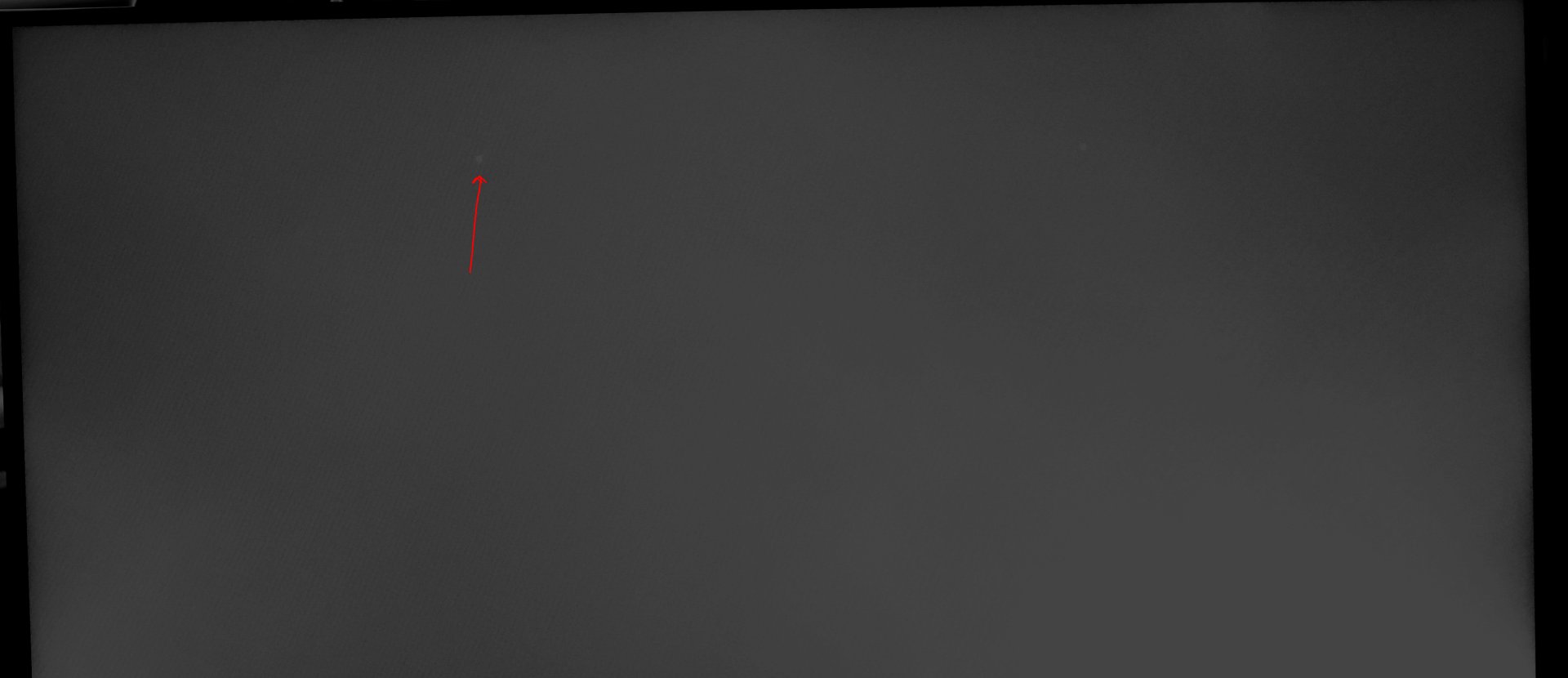
The NEW one thus have a flaw and I cant tell if its a dimming zone or what but is not on the outside part of the screen.


Here are a couple of shots showing it.
I tried mimicking how it looks in person as its pretty faint but still annoying. I can only see it in full black screens so far

R62_6673_FLAW.jpg


Spot.jpg


Here is a close up of the area
Closeup.jpg


In any case, with that thing looking at me on any black screen, my OCD will drive me nuts :D
 
Don’t think you ever need 450 nits full screen brightness sitting 1 foot away from the monitor.

I covered the brightness in my first post. That is only thing going for the monitor in question. Everything else is better on OLED. Even the brightness claims are over blown as I play on my monitor just fine even with 80% brightness and HDR as anything brighter hurts my eyes. It is definitely not for everyone but for me per pixel color accuracy, HDR, true blacks and near instant response times are far more important than brightness.

Different strokes I guess.
Do you have no arms? I sit a little over a meter from the monitors at my desk.
 
Don’t think you ever need 450 nits full screen brightness sitting 1 foot away from the monitor.

I covered the brightness in my first post. That is only thing going for the monitor in question. Everything else is better on OLED. Even the brightness claims are over blown as I play on my monitor just fine even with 80% brightness and HDR as anything brighter hurts my eyes. It is definitely not for everyone but for me per pixel color accuracy, HDR, true blacks and near instant response times are far more important than brightness.

Different strokes I guess.
Overblown? Is a night and day difference. The HDR experience with this monitor demolishes any OLED . And of course I can leave anything on my screen as long as I like without burn in enevitably happening 😁
You are clearly doing the usual bias confirmation..always a bad sign that one didn't make the right decision. Lol
 
LGabrielPhoto since you have a 2021 and 2024 build of the PG32UQX, you should probably check out this thread: https://hardforum.com/threads/pg32uqx-hdr-performance-and-potential-firmware-upgrade.2041852/

OP over there is claiming that 2021 units have less ABL than 2022's and up and since you are the only one with builds from 2021 and later you could put that theory to the test using his ABL test photos.
However the thing to do if you want to check that is to use Windows HDR calibration on them first. There's far too much "This is what the monitor reports without calibration" going on which isn't useful. They bake in numbers that are what they know all the displays can handle, not what your specific unit can handle. So, you run the Windows HDR calibration first to determine the actual capabilities of the monitor you are using.

Overblown? Is a night and day difference. The HDR experience with this monitor demolishes any OLED . And of course I can leave anything on my screen as long as I like without burn in enevitably happening
Yep. While I also understand the upsides and desire for OLED, clearly as I've bought one, man the brightness of HDR on a good MiniLED is something to behold. It has impact that you just can't get without said brightness.

The best comparison I can come up with that people might have experienced is sound in a theater or concert as opposed to small high quality home studio speakers. Those big speakers are not getting the best quality sound, they are built for volume, not low distortion. The amps likewise are usually built for power not low noise. If you listen to something at a moderate volume that is well recorded and subtle, it is nicer on some small high quality nearfield speakers. It sounds clearer, better defined, etc. Fair enough... but it doesn't have the raw impact that the 115dB a theater sub puts out does. That sound system may not be as high fidelity, but it can produce levels that just hit different.

Same kinda deal with OLED vs MiniLED on the desktop. Ya the lack of blooming, ghosting, etc from an OLED is nice. I like it. For low brightness content, no question the OLED looks better. It gets more contrast, better fine details between dark and bright areas. But it can't hit like the MiniLED. There's an impact in games you get when they can really push up the brightness. You can brag all you like on how the OLED image is "actually higher contrast" the MiniLED image looks more impactful because of the higher brightness.

I'm not going to shit on either technology or tell people they are wrong for having a personal preference for one or the other. I also really wish we had one that was both as precise as OLED and as bright (or brighter) than MiniLED.
 
However the thing to do if you want to check that is to use Windows HDR calibration on them first. There's far too much "This is what the monitor reports without calibration" going on which isn't useful. They bake in numbers that are what they know all the displays can handle, not what your specific unit can handle. So, you run the Windows HDR calibration first to determine the actual capabilities of the monitor you are using.

I don't think the Windows HDR calibration changes the monitor's ABL behavior but yeah I guess he can just do that for both monitors first before testing. I ran the same test that the OP of that thread did on my 27R94 with no Windows HDR calibration done to it and it did not show any ABL, at least just for 30 seconds. Every monitor apart from the Pro Art series with active cooling on the panel itself WILL have ABL at some point though, if not 30 seconds then probably after 5 or 10 minutes. I guess the real mystery is figuring out when ABL kicks in on the PG32UQX and the claims of 2021 vs later builds have different ABL algorithms.
 
FYI Asus has it for $1099 on their US store right now, might be trying to clear out the remaining stock.
 
I had one of these back in 2021... sold it in 2024..... did the whole oled thing.....have another pg32uqx coming Friday lol
 
I had one of these back in 2021... sold it in 2024..... did the whole oled thing.....have another pg32uqx coming Friday lol
I keep debating giving up on OLED too. I have a PG32UCDM3 and it's pretty great but it's still not bright enough for me. I've tried 55" TVs as monitors and go back and forth on them. They're significantly brighter and look amazing for gaming and watching content, and it's nice to use 4K at 100% scaling at that size, but they take up so much room that it's hard to manage a functional desk around them.

My favorite thing about OLED though are the perfect viewing angles, no backlight bleed, and color uniformity across the panel. I just wish they were 3x as bright as they are currently.
 
I keep debating giving up on OLED too. I have a PG32UCDM3 and it's pretty great but it's still not bright enough for me.....
I had the 45" LG 5k2k oled, sold it to a member here and then bought a PG32UCDM3.... I thought the UCDM 3 was fantastic but ultimately returned it back to Newegg for refund because it wasn't bright enough and the brightness boost option trashed contrast too much and annoyed me. I then bought a LG 39 5k2k oled but then returned that back to best buy because it wasn't immersive enough. Then I bought a LG 45" 5k2k oled again lmao.... NO RAGRETS!!!

I love the 45, its amazing. I also have a 57 Samsung 8k2k mini-led and innocn 27" 4k mini led for work productivity and they are great.

However, NONE of them can do what the PG32UQX can do and inversely the PEEEGEEEE can't do what they do.
I have long given up on the notion that one monitor will give me everything I want or need....and am slowly building a monitor museum.

I had a PG32UQX back in 2021 to 2024....regretted selling it ....and have missed it since.

So I ordered a refurbished PG32UQX from newegg for $972 and will see how it goes. The plan is to swap gaming duty between it and the 45 depending on content.

Fun fact, I drove over ONE THOUSAND MILES round trip from Central Florida to Deluth Georgia in 2021 to buy the PEEEGEEE because Microcenter was the only vendor who had them in stock for weeks. It was a big deal back then as it was the first 32" 4k capable faster than 120hz.

Another fun fact, the buyer I sold it to on Ebay left me positive feedback when he received it, but tried to file a CC charge back claim 150 days later saying "Item Arrived NOT as DESCRIBED" with a photo of what appeared to be a PEEEGEEE somebody dumped a massive cup of liquid down. I ended up winning the claim with Paypal / EBAY..... and now avoid selling anything of value there.
 
Last edited:
I had the 45" LG 5k2k oled, sold it to a member here and then bought a PG32UCDM3.... I thought the UCDM 3 was fantastic but ultimately returned it back to Newegg for refund because it wasn't bright enough and the brightness boost option trashed contrast too much and annoyed me. I then bought a LG 39 5k2k oled but then returned that back to best buy because it wasn't immersive enough. Then I bought a LG 45" 5k2k oled again lmao.... NO RAGRETS!!!

I love the 45, its amazing. I also have a 57 Samsung 8k2k mini-led and innocn 27" 4k mini led for work productivity and they are great.

However, NONE of them can do what the PG32UQX can do and inversely the PEEEGEEEE can't do what they do.
I have long given up on the notion that one monitor will give me everything I want or need....and am slowly building a monitor museum.

So I ordered a refurbished PG32UQX from newegg for $972 and will see how it goes. The plan is to swap gaming duty between it and the 45 depending on content.
Let me know how it goes. The PG32UQX I had was also used and I had to return it either way due to an annoying fan noise. I might have kept it otherwise. Brightness is my number one factor. Motion clarity is nice with higher refresh rates and faster response time, but ultimately I play single-player RPGs and CRPGs which don’t really require high refresh rates, or MMO’s where it also doesn’t matter.

I recently picked up a 55” S95H to try out but haven’t set it up yet. Keep debating whether I want to give the giant TV a go again since it takes up so much space. That said, using a 55” TV to game as a PC monitor is one of the more immersive experiences you can get.
 
Let me know how it goes. The PG32UQX I had was also used and I had to return it either way due to an annoying fan noise. I might have kept it otherwise. Brightness is my number one factor. Motion clarity is nice with higher refresh rates and faster response time, but ultimately I play single-player RPGs and CRPGs which don’t really require high refresh rates, or MMO’s where it also doesn’t matter.

I recently picked up a 55” S95H to try out but haven’t set it up yet. Keep debating whether I want to give the giant TV a go again since it takes up so much space. That said, using a 55” TV to game as a PC monitor is one of the more immersive experiences you can get.
I had a bright sammy qdoled 55" back when calisto protocol was released and it was BIG, BOLD, COLORFUL, BRIGHT and chock full of OLED deep black goodness. But I ended up returning it for a refund because the PPI was too low, even pushed ALL the way to the back of my desk.

I think the 45" 5k2k is the best option for RPGs....its supper immersive, bright enough, has an awesome curve.

The primary catalyst for me buying the PEEGEE is actually GTA 6 on my PS5 pro. Its looking like they are not going to have a 60hz mode and the prospect of playing 30fps on my living room oled is catastrophic. Also, watching the netflix preview got alot of negativity from the wife unit (OMG THE LANGUAGE, OMG THE VIOLENCE)..... so the peegeee will be a more discrete option in my office that will run 30fps as smooth as it can be run with eye searing HDR to make south florida POP
 
Got the PEEGEE today. You know I actually did not want to like it. I was hoping whatever it was I had for this display in the past was from rose tinted glasses and nostalgia, so I could initiate a return and get my thousand bucks back.

In SDR and windows I was feeling pretty good like ya this isn't that spectacular, my 45" oled looks way better here.

Then......

Then.... I fired up battlefield 6 in HDR.

HOLEEEEEE FUKKKKKKKKKKK!

UHHHHH MAYYYYZZZINNNNGGGG!!!!

Played a couple of matches bathing in the "COLOR & LIGHT OF GOD" on different levels.... WOW!
I cannot believe I ever sold this display.....what a friggin mistake!
I just ordered a spare backup lol.... WOW.....absolutely blown away!

When I owned this display originally.....we didn't have 5090 GPUs, 9950x3d CPUS and DLSS being as good as it is...WOW WOW WOW! I'm in love!
 
Back
Top