24" Widescreen CRT (FW900) From Ebay arrived,Comments.

Here we go. A Samsung QD-OLED running at 500Hz.
https://www.techpowerup.com/329212/...s-first-27-inch-500-hz-qd-oled-gaming-display

Think we will finally have unnoticeable mouse lag?
It will be very hard to hit 480 or 500fps in modern games though. I have 360Hz QD-OLED and it is nice and dandy but only in older games.
In modern games even if I butcher render resolution using temporal upscaling I am not able to utilize anywhere near monitor's full "capacity". And temporal anything means there will be some motion related blurring unfortunately.
Even the best GPU you can buy like RTX 4090 struggles with 240fps native. Best CPU with best GPU and all running at 720p - there is no chance in some games to get even 200fps...

Trying to brute force something that a CRT does so effortlessly. Doubt even a 5090 will be enough against 500Hz.
Yeah, and even with 500fps motion clarity in at least some aspects will still be superior on CRT even if it is just running 60fps game at 60Hz refresh rate.
Heck, in some aspects CRT at 60Hz is superior to CRT at 120Hz. There is this unreal feeling with CRT at low refresh rate - like motion is more clear than even in reality.
Of course in some other aspects even without any strobing/BFI etc. motion at very high refresh rate is clearer.
Input lag is also much better on modern displays. For competitive games modern OLEDs are already better than CRT.

Doubt even a 5090 will be enough against 500Hz. And I imagine we can forget about ever getting true multi-scan back.

That said, an OLED can be nice on its own terms. Queue another plug for 4K combined with the late great OLED Motion Pro... :)
OLED is definitely very nice.
Heck, to my sensibilities when I get optimal 120fps on my 360Hz QD-OLED is for all intents and purposes enough where it comes to input lag and motion blur and motion clarity. 240fps I would say easily surpass CRT for actual gameplay. Motion isn't as sharp visually but it is better technically.

----
Personally where it comes to OLEDs I am waiting for something with actually good BFI/strobing implementation.
OLEDs can technically do so much better than what we see.

IMHO what we see is total BS
Som monitors have BFI but do it wrong. We should not draw full frames and then draw black frames because we need to first buffer the frame so add input lag and then are power/brightness limited. Instead frame should be drawn in thin horizontal bars which would allow lines to be drawn as they are received without lag and at much higher brightness.

Technically modern OLEDs should be able to hit 2ms or even 1ms "strobe time" with brightness easily surpassing CRTs and all without adding input lag.
All it would require is manufacturers actually focusing on this feature.

Another thing: for input lag reduction we should have BFI implemented on GPUs and not rely on monitors.
If GPU did BFI then we would at least skip the whole part where frame is fetched by monitor at longer frame times and instead it is displayed immediately at faster scan-out. Monitors when they do BFI not only fetch frame but also unnecessarily also fetch the whole frame where they only need half of it so BFI in this case adds input lag.
Also with GPU driven BFI it should be possible to have form of VRR - maybe not free from brightness fluctuations but we are already not free from brightness fluctuations with VRR anyways... besides: it is actually bad for input lag to run games without frame rate limiter anyways.

Anyways, IMHO GPUs should do BFI. It haven't made any sense when we used CRTs or LCDs but for OLEDs it is no brainer.

-----
BTW. After 3 years of sitting unused I started using my FW900
Not for PC but for PS5 for at least some games. If game runs at 60Hz and runs solid 60fps and the game has lots of scrolling and such it makes perfect sense to play it on CRT and then it looks glorious.
Also unfortunately where it comes to strobed displays something like VGA CRT is the only solution that is truly lag-less. Something like OLED monitors don't really have any (at least significant) input lag but each and every strobed solution has at least some input lag. Best case scenario it is like one frame of input lag on top of what given TV/monitor normally has. HDTV CRTs have unfortunately terrible processing and add lag, not to mention they tops at 720p/1080i and on the other hand HDMI to VGA converters and VGA CRTs have virtually zero lag - so in this sense in this case VGA CRT will be always superior.
 
Re-reading all this makes me think how the fate of PC Monitor market could’ve been completely altered if we transferred to SED/LPD/PDP route and kept experimenting with those 3 instead of TN/IPS/VA right after the end of CRT-era (circa 2004-2006).

2025, we would be having something totally alienated to FALDs and OLEDs.
 
Last edited:
Re-reading all this makes me think how the fate of PC Monitor market could’ve been completely altered if we transferred to SED/LPD/PDP route and kept experimenting with those 3 instead of TN/IPS/VA right after the end of CRT-era (circa 2004-2006).

2025, we would be having something totally alienated to FALDs and OLEDs.
That's everything though. Have you seen people use fuel vaporizers? Can you say 100 miles per gallon on regular fuel? What about the hydrogen fuel cell, whose emissions are water vapor?

So many "what if's" and most of it is driven by economy, politics, and control. And not necessarily the benefit of human beings. Am I saying that there would be world peace and no world hunger if CRT monitors and displays were still being made?

Yes. Damn right I am.
 
I think PC and console game enthusiasts should have stood their ground and kept buying CRT's instead of the latest garbage LCD. Video games always looked better on CRT and still do to this day (play a 60fps Nintendo Switch game on your OLED and on your CRT and see for yourself)

But instead they ditched picture quality in favor of larger screen sizes
 
I think PC and console game enthusiasts should have stood their ground and kept buying CRT's instead of the latest garbage LCD. Video games always looked better on CRT and still do to this day (play a 60fps Nintendo Switch game on your OLED and on your CRT and see for yourself)

But instead they ditched picture quality in favor of larger screen sizes
And no one knows what they're missing out on these days. They actually don't. I also find it interesting that Linus is doing videos on CRT technology but using the shittiest examples of said monitors. His FW-900 video, for example. That monitor only put out 50~ nits? It was clearly used beyond its useful service life. My old FW900 easily hit the Windas max of 105 nits at 6500k with no effort. 58 on the slider - around 25% of its adjustment headroom. 10,000:1 contrast and it was almost double the brightness of his example. And he based his conclusions on that shitty example.
 
And no one knows what they're missing out on these days. They actually don't. I also find it interesting that Linus is doing videos on CRT technology but using the shittiest examples of said monitors. His FW-900 video, for example. That monitor only put out 50~ nits? It was clearly used beyond its useful service life. My old FW900 easily hit the Windas max of 105 nits at 6500k with no effort. 58 on the slider - around 25% of its adjustment headroom. 10,000:1 contrast and it was almost double the brightness of his example. And he based his conclusions on that shitty example.

Yeah, if I recall some issues with that video. I don't believe there was any attempt at a recovery with Windas for example.

Fantastic display. One for the ages. Would still be my daily driver in a different reality where I didn't end up needing more real estate for work.
 
Yeah, if I recall some issues with that video. I don't believe there was any attempt at a recovery with Windas for example.

Fantastic display. One for the ages. Would still be my daily driver in a different reality where I didn't end up needing more real estate for work.
I miss my CRT soooooo much😍. The one thing I don't miss is how massively bulky it was.
 
Colorimeter most likely, you can get one suitable for hobby use relatively inexpensively. A spectro works as well but those are more expensive.
 
If only there was enough demand to warrant more research into CRT's and have a resurgence of screens that completely blow away the ones from their heyday.
 
If only there was enough demand to warrant more research into CRT's and have a resurgence of screens that completely blow away the ones from their heyday.
Wont ever happen, just making good CRT screens was an art as people did it back then more by feel and most of those people are long gone. Not to mention all the nasty chemicals that have to be used to make them, enviromenal groups would have collective fits if someone tried to start one up again. I would love to see new CRTs again, but it is unlikely it will ever happen.
 
Not to mention all the nasty chemicals that have to be used to make them, enviromenal groups would have collective fits if someone tried to start one up again.

You'd be surprised by all the nasty chemicals required to manufacture flat panels. It's a wild guess but it may be environmentally even worse than what was required for CRTs. Lead in tubes doesn't really count, it's mixed into the glass.
 
If only there was enough demand to warrant more research into CRT's and have a resurgence of screens that completely blow away the ones from their heyday.
No need to bother with CRT anymore because other technologies already surpassed CRT.
Something like QD-OLED is technically capable of almost the same things while being better in other aspects.

Black levels of OLED is vastly superior - there is not even comparison. CRT were good enough but it is totally different thing to not be bothered by black level and it being actually perfect.
Viewing angles of OLED are superior because even if technically CRT has perfect viewing angles at this point I can nitpick that CRT have thick glass which interfered with viewing angles.
There is no pixel response times. Resolutions are superior on OLED. Refresh rates are superior on OLED.
Pixels on CRT take time to dim - not an issue but still you get long bright trails you can at times see.
No geometry issues on OLED.
Text clarity is better on OLED also. Not as perfect on all panels but WOLED is improved and IMHO QD-OLED going normal RGB for computer monitors is just a matter of time. No technical reason to make QD-OLED like it is made and still desktop is quite clear compared to CRT.
Lastly OLED has VRR - buggy and no VRR + BFI implementation exists but still usable and helps. I barely noticed any VRR flicker on my WOLED and QD-OLED monitors in games.

Where CRT is superior is motion clarity and also you got this superior motion clarity without incurring any input lag.
OLEDs on the other hand have mediocre BFI implementations at best and incur input lag because frame is first buffered before drawing it at e.g. at twice the pixel/line rate.

Proper BFI implementation would not require buffering more than single line and by utilizing the fact only fraction of the panel would display image at a time and pixels would have lots of time to cool off we could drive pixels much brighter. It is all in the way lines are issued to the panel which is actually technically simple to do. If you made your own panel (say from RGB LEDs) you would require very little additional circuitry versus the most efficient way to drive panel connections-wise or no additional circuitry at all if you can already address where next line is drawn on the screen. Not even sure if any change in actual panels would be needed but if that feature was in the books it wouldn't be hard to implement it.

If I could get 100 nits at 1ms on QD-OLED then who would need CRT?
One could say: but CRT supports multiple resolutions...
My answer would be: it is all in the scaler. We know we can make amazing scalers in HDL (think FPGA so also ASICs) which are not only lag-less but also small (as in you can on MISTer FPGA fit whole PSX and still have room for fancy scaler) and support custom filters so you can simulate CRT scanlines almost perfectly. There are certain effects caused by how CRT makes scanlines thicker when brighter and that also changes how pixels look - this can be simulated with such scalers without adding lag.

Issue is we don't have these things but if we had money to think about making new CRTs it would be oh so much simpler and more economically viable to just improve OLEDs. Scaler you don't even need to modify OLEDs but make external scaler.
Heck, if someone develop such tech it would be something you could throw to gaming monitors and earn money from normal people versus someone willing to use CRT.

EDIT://
Did some minor changes.
 
Last edited:
No need to bother with CRT anymore because other technologies already surpassed CRT.
Something like QD-OLED is technically capable of almost the same things while being better in other aspects.

Black levels of OLED is vastly superior - there is not even comparison. CRT were good enough but it is totally different thing to not be bothered by black level and it being actually perfect.
Viewing angles of OLED are superior because even if technically CRT has perfect viewing angles at this point I can nitpick that CRT have thick glass which interfered with viewing angles.
There is no pixel response times. Resolutions are superior on OLED. Refresh rates are superior on OLED.
Pixels on CRT take time to dim - not an issue but still you get long bright trails you can at times see.
No geometry issues on OLED.
Text clarity is better on OLED also. Not as perfect on all panels but WOLED is improved and IMHO QD-OLED going normal RGB for computer monitors is just a matter of time. No technical reason to make QD-OLED like it is made and still desktop is quite clear compared to CRT.
Lastly OLED has VRR - buggy and no VRR + BFI implementation exists but still usable and helps. I barely noticed any VRR flicker on my WOLED and QD-OLED monitors in games.

Where CRT is superior is motion clarity and also you got this superior motion clarity without incurring any input lag.
OLEDs on the other hand have mediocre BFI implementations at best and incur input lag because frame is first buffered before drawing it at e.g. at twice the pixel/line rate.

Proper BFI implementation would not require buffering more than single line and by utilizing the fact only fraction of the panel would display image at a time and pixels would have lots of time to cool off we could drive pixels much brighter. It is all in the way lines are issued to the panel which is actually technically simple to do. If you made your own panel (say from RGB LEDs) you would require very little additional circuitry versus the most efficient way to drive panel connections-wise or no additional circuitry at all if you can already address where next line is drawn on the screen. Not even sure if any change in actual panels would be needed but if that feature was in the books it wouldn't be hard to implement it.

If I could get 100 nits at 1ms on QD-OLED then who would need CRT?
One could say: but CRT supports multiple resolutions...
My answer would be: it is all in the scaler. We know we can make amazing scalers in HDL (think FPGA so also ASICs) which are not only lag-less but also small (as in you can on MISTer FPGA fit whole PSX and still have room for fancy scaler) and support custom filters so you can simulate CRT scanlines almost perfectly. There are certain effects caused by how CRT makes scanlines thicker when brighter and that also changes how pixels look - this can be simulated with such scalers without adding lag.

Issue is we don't have these things but if we had money to think about making new CRTs it would be oh so much simpler and more economically viable to just improve OLEDs. Scaler you don't even need to modify OLEDs but make external scaler.
Heck, if someone develop such tech it would be something you could throw to gaming monitors and earn money from normal people versus someone willing to use CRT.

EDIT://
Did some minor changes.
oled is a fundamentally flawed technology from the getgo, when QDEL goes mainstream we will look back on OLED and laugh at the predictions we were making about improved OLED , the only remaining part of the world that fully bypassed the energy crisis was east asia, the western world is going through serious energy inbalance issues, to say nothing about south america, eastern europe and afrika , the idea that we'd have such a ridiculous manufacturing vacuum process for these OLEDS which are still not perfect was only astroturfed by these corporations because of the margins they get out of them, QDEL is going to anihilate them, QDEL functionally works like a modern reintrepretation of CRT , the electron gun is essentially replaced by actual electricity from a cathode plank being filtered by actual quantum dots, all of which can be manufactured from the same foundries as normal lcd screens, all of the advancements that zowie has made on TN panels can all be had but with the same infinite contrast perfect blacks and with all the brightness of IPS , we're never getting the proper native resolution reproduction of CRT back, that's never happening, it doesnt matter how good your scaler is, digital and analog signals are inherently different, but that aside, QDEL is the true pc gaming display of the future, it seems like the most logical conclusion of CRT brought to modernity, its certainly not perfect and i wish i could get a brand new multisync (10kHz - 100kHz) 16:9 CRT monitor , but this is real, sharp has already shown a working prototype to the public.
 
  • Like
Reactions: XoR_
like this
QDEL functionally works like a modern reintrepretation of CRT , the electron gun is essentially replaced by actual electricity from a cathode plank being filtered by actual quantum dots, all of which can be manufactured from the same foundries as normal lcd screens, all of the advancements that zowie has made on TN panels can all be had but with the same infinite contrast perfect blacks and with all the brightness of IPS
QDEL can be thought of as an inorganic version of OLED. It has nothing to do with CRT or any aspect of its technology.

Imho to call a panel technology CRT-like it needs at a minimum use the same type of phosphors because it is phosphors which give CRT its colors / light spectrum.

, we're never getting the proper native resolution reproduction of CRT back, that's never happening, it doesnt matter how good your scaler is, digital and analog signals are inherently different
CRT maybe don't have 'native' resolution but any resolution on CRT is quite blurry and you really need resolution being much smaller than dot pitch otherwise pixels don't align with shadow mask / aperture grille causing visual artifacts.
More precise is to say that CRT does not have native resolution than any resolution being native.

On matrix panels so with native resolution if you have high enough resolution to have more pixels smaller than eye can resolve them you can simulate CRT pretty much perfectly.
There are great CRT shaders and FPGA scalers like in MISTer FPGA or RetroTink 5x or 4K that can already do that to a degree - not perfectly simulate all effects but most effects which actually matter.

Besides integer scaling can be used to get number of lower resolutions displayed with perfect sharpness. The higher the native resolution the more more resolutions can be displayed like that. 8K panel can resolve all actually useful resolutions we normally use including 1080p, 1440p and 2160p.
 
QDEL can be thought of as an inorganic version of OLED. It has nothing to do with CRT or any aspect of its technology.

Imho to call a panel technology CRT-like it needs at a minimum use the same type of phosphors because it is phosphors which give CRT its colors / light spectrum.


CRT maybe don't have 'native' resolution but any resolution on CRT is quite blurry and you really need resolution being much smaller than dot pitch otherwise pixels don't align with shadow mask / aperture grille causing visual artifacts.
More precise is to say that CRT does not have native resolution than any resolution being native.

On matrix panels so with native resolution if you have high enough resolution to have more pixels smaller than eye can resolve them you can simulate CRT pretty much perfectly.
There are great CRT shaders and FPGA scalers like in MISTer FPGA or RetroTink 5x or 4K that can already do that to a degree - not perfectly simulate all effects but most effects which actually matter.

Besides integer scaling can be used to get number of lower resolutions displayed with perfect sharpness. The higher the native resolution the more more resolutions can be displayed like that. 8K panel can resolve all actually useful resolutions we normally use including 1080p, 1440p and 2160p.
The way in which each pixel will have 3 quantum dots filtering the electricity for Red Green and Blue colors does remind me a lot to the triads on a shadow mask.
 
Where CRT is superior is motion clarity and also you got this superior motion clarity without incurring any input lag.
OLEDs on the other hand have mediocre BFI implementations at best and incur input lag because frame is first buffered before drawing it at e.g. at twice the pixel/line rate.
Just want to give everyone a heads up about my new open source (MIT license) CRT beam simulator shader for high-Hz sample-and-hold displays.

Here's the github source code, and shader toy (240Hz demo version, flickers too much at 120Hz), or my article on blurbusters website.
MIT license, compatible with almost any license. Go crazy with your projects. Enjoy.

It's already in RetroArch, they ported it the same day.

It is reconfigurable to do any native:simulated Hz ratio of at least 2. Works best at 240Hz - 480Hz+, and looks way better on OLED than LCD. Still benefits 120Hz LCD too (just throttled to only 50% blur reduction).

crt-simulation-animated.gif


Up front - NO - at today's currently available refresh rates, it is not yet not as low blur as Sony FW900 CRT (only cherrypicked short-pulsewidth strobe backlights exceed FW900 CRT clarity, but with worse colors and brightness).

That being said, on the best displays, you still get still 80-90% motion blur reduction for 60fps content on 480Hz OLEDs.

And it does now already exceed plasma clarity on certain displays. When this CRT simulator is run on a 480Hz OLED at tweaked GAIN_VS_BLUR settings (0.12-0.25), it manages to have less 60fps-content motion blur than a 600Hz plasma display, but it gets slightly dim. When you use GAIN_VS_BLUR of about 0.33 (give or take 0.1) at 480Hz, it tends to become brighter than an average original CRT (YMMV), but it depends on your OLEDs' APL behaviors -- some surge brighter than others. You can tweak the sweet spot.

Calibration Tips, since this pushes a displays' color gamut limits due to all the simulated phosphor fade stuff:
- Configure your display to SDR, set display setting to Adobe sRGB, and configure gamma value to 2.2 or 2.4 (or adjust GAMMA to match any weird gamma)
Because of the Talbot-Plateau math formulas needed to eliminate banding from shingle-overlapping different-brightness scanlines, I stuck to predictable Adobe sRGB gamma curve for easy access to linear lightspace needed. Also
and set your Windows/Mac/displaymenu profile to "Adobe sRGB".
- Be noted, there's a minor bit of chroma ghosting with oversaturated material, but looks great at slightly lower color saturation, I've got a bugfix for that in January 2025.
- Adjust your black levels and white levels (e.g. TestUFO Black Levels (PLUGE) as well as TestUFO White Levels (Clipping) tests), then the CRT simulator shader works well without banding if your display co-operates properly with it.

Here's the github source code, shader toy, or my article on blurbusters website.

I am working with figuring out how to do refresh cycle hooks to the operating system, to make it work on any software.

(That require penetrating the NVIDIA or AMD brick wall; I need a refresh cycle hook independent of content frame rate and simulated Hz. The CRT simulator can merrily handle any content frame rate and emulated Hz as long as native:emulated is at least 2, but shader must run every refresh cycle, no matter how low frame rate gets, so I need to find out how to get a graphics driver refresh cycle hook API added by the GPU vendors so I can open source my CRT simulator shader and my upcoming plasma-subfield simulator shader -- or simply do Windows-wide BFI superior to DesktopBFI -- or even simulated VRR -- or LCD overdrive algorithms better than most manufacturers' own LCD overdrive (yes, I can exceed average displays' LCD overdrive quality, most are only using crappy 17x17 overdrive lookup tables) -- I can pretty much emulate any retro display, given enough brute native Hz).

I hope I can penetrate the brick wall GPU bureaucracies (sigh) and gain a refresh cycle hook API by any of the GPU vendors to do it at the global-desktop level in the future...

But meanwhile, feel free to enjoy, play with it, share it, and get vendors to implement as an optional ON/OFF setting it into their software or hardware (even box-in-middle approaches).

Kudos to the RetroArch team for implementing it same day + kudo to Mr. Lottes for his help too.

All 0ms-GtG display technologies will look good with the CRT beam simulator (GtG 0, not GtG merely under a single refresh cycle, since figuratively GtG is like a camera shutter slowly opening/closing, while figuratively MPRT is the shutter fullopen time).

It should look good on QDEL and direct-view discrete LED too. Be warned certain FALD MiniLED has some problems due to FALD lag, though.
 
Last edited:
Up front - NO - at today's currently available refresh rates, it is not yet not as low blur as Sony FW900 CRT (only cherrypicked short-pulsewidth strobe backlights exceed FW900 CRT clarity, but with worse colors and brightness).
I really doubt you can exceed FW900 motion clarity with any of the current panel technologies. FW900 like any CRT has literally momentary illumination of pixels and motion clarity is such that it doesn't matter if image is stationary of moving - literally the same sharpness.

Otherwise shader looks exactly like idea I had long time ago - it is after all quite obvious idea. Nice to see it implemented.
I was thinking about it not as shader or program but something which could be done on FPGA.
Any plans to have this on RetroTink 4K? I guess you work with retrotink team for blur reduction modes?

When this CRT simulator is run on a 480Hz OLED at tweaked GAIN_VS_BLUR settings (0.12-0.25), it manages to have less 60fps-content motion blur than a 600Hz plasma display, but it gets slightly dim.
I really doubt you need 480Hz OLED to beat plasmas. Even those with 3D capabilities were not that amazing and at 240Hz OLED (be it 240fps or e.g. 60fps content with three black frames BFI) already surpass them easily. Some slower plasmas are only slightly better than 120Hz. 480Hz so slightly above 2ms strobe time should easily surpass any plasma as should 360Hz OLED. Of course this shader the way it works will add slight motion blur but still.
 
The way in which each pixel will have 3 quantum dots filtering the electricity for Red Green and Blue colors does remind me a lot to the triads on a shadow mask.
QD-OLED already is kinda reminiscent of CRT with all of its qualities and how subpixels are laid out on the screen.

QDEL being more direct as in not having quantum dot light "filter" only advantage can potentially be a screen color - if screen is purely black it should be improve on QD-OLED in that ambient light won't make black level rise so in this sense it might be more like LCD and WOLED.
Otherwise QD filter on QD-OLED doesn't affect viewing angles and color conversion seem almost perfect so I don't suppose gamut will improve on QDEL much if at all. There will be most likely some differences in gamut coverage but again probably not major.

What I wonder about with QDEL is if light from these panels will be polarized or not. Going polarizer light would actually be detrimental to image quality as polarizer causes Haidinger's brush - which maybe is not very visible when looking straight at panel but it is kinda visible at all times. Not a big issue but slightly picking light from ambient light vs polarized light - in this case at least at the levels 3rd generation QD-OLED picks up light I would say I would NOT want polarizer instead of slightly picking up light. And this comes from guy who slapped polarizer on FW900 but in this case it was to reduce this very effect of picking up light quite a lot and at levels where screen color totally ruined ability to use screen at anything than pitch black room.

Anyways, not holding my breath. Rather thinking about getting QD-OLED TV next year to replace WOLED.
Will be nice when we have more panel options though - especially if it really improves longevity and price doesn't kill wallets it will force Samsung and LG to reduce prices.
It will also be especially nice to see Japanese company entering the modern display market.
 
Any plans to have this on RetroTink 4K? I guess you work with retrotink team for blur reduction modes?
Yes. We are talking now.

It may, however be a choice between filters or scan emulation rather than both - due to limited memory bandwidth. Keep tuned.

But theoretically filters and scanning may be concurrently possible at lower 720p and 1080p resolutions due to the refresh rates needed for the scanning modes.

For having cake and eating it too, we'd need a theoretical RT8K that could do a 4K240+ to do scanning and phosphor-mask filters concurrently. It's a lot of bandwidth that requires a form of fast RAM.

Of course this shader the way it works will add slight motion blur but still.
Yes. You can adjust the GAIN_VS_BLUR constant. At best settings I still manage sub-3ms MPRT. Most 320x240 retro games will still be spectacularly clear scrolling.

We use a photon cascade algorithm to get more clarity per brightness, where most pixels can manage to peak in the first Hz, but only brightest pixels cascades to the subsequent Hz.

e.g. At some settings you would get RGB 0...187 stretch to 0.255 (brightboost) in first Hz and RGB 188...255 does two refresh cycles with similar bright-boosts in linear space (gamma2linear, compute photon budget, linear2gamma). This is oversimplified but illustrates the example. Real CRTs also slightly ghosted super bright colors too (whites with slight phosphor ghosting on blacks) and my simulator behaves with that similar perceptuals. That portion is the part that Timothy helped with.

A Tablot Plateau energy preserving algorithm. Variable MPRT algorithm. So it ends up brighter than traditional BFI with similar motion blur reduction (~75% of gamma space sRGB values). Brilliant algorithm.
 
Last edited:
I feel like everything everyone typed here during December equates to: Sell the FW900 while it's still worth something.
 
I feel like everything everyone typed here during December equates to: Sell the FW900 while it's still worth something.
I don't see any on eBay. (Probably the FW900 still has some unique charms.)
 
Last edited:
----------
Just want to give everyone a heads up about my new open source (MIT license) CRT beam simulator shader for high-Hz sample-and-hold displays.

Here's the github source code, and shader toy (240Hz demo version, flickers too much at 120Hz), or my article on blurbusters website.
MIT license, compatible with almost any license. Go crazy with your projects. Enjoy.

It's already in RetroArch, they ported it the same day.

It is reconfigurable to do any native:simulated Hz ratio of at least 2. Works best at 240Hz - 480Hz+, and looks way better on OLED than LCD. Still benefits 120Hz LCD too (just throttled to only 50% blur reduction).

View attachment 700276


Up front - NO - at today's currently available refresh rates, it is not yet not as low blur as Sony FW900 CRT (only cherrypicked short-pulsewidth strobe backlights exceed FW900 CRT clarity, but with worse colors and brightness).

That being said, on the best displays, you still get still 80-90% motion blur reduction for 60fps content on 480Hz OLEDs.

And it does now already exceed plasma clarity on certain displays. When this CRT simulator is run on a 480Hz OLED at tweaked GAIN_VS_BLUR settings (0.12-0.25), it manages to have less 60fps-content motion blur than a 600Hz plasma display, but it gets slightly dim. When you use GAIN_VS_BLUR of about 0.33 (give or take 0.1) at 480Hz, it tends to become brighter than an average original CRT (YMMV), but it depends on your OLEDs' APL behaviors -- some surge brighter than others. You can tweak the sweet spot.

Calibration Tips, since this pushes a displays' color gamut limits due to all the simulated phosphor fade stuff:
- Configure your display to SDR, set display setting to Adobe sRGB, and configure gamma value to 2.2 or 2.4 (or adjust GAMMA to match any weird gamma)
Because of the Talbot-Plateau math formulas needed to eliminate banding from shingle-overlapping different-brightness scanlines, I stuck to predictable Adobe sRGB gamma curve for easy access to linear lightspace needed. Also
and set your Windows/Mac/displaymenu profile to "Adobe sRGB".
- Be noted, there's a minor bit of chroma ghosting with oversaturated material, but looks great at slightly lower color saturation, I've got a bugfix for that in January 2025.
- Adjust your black levels and white levels (e.g. TestUFO Black Levels (PLUGE) as well as TestUFO White Levels (Clipping) tests), then the CRT simulator shader works well without banding if your display co-operates properly with it.

Here's the github source code, shader toy, or my article on blurbusters website.

I am working with figuring out how to do refresh cycle hooks to the operating system, to make it work on any software.

(That require penetrating the NVIDIA or AMD brick wall; I need a refresh cycle hook independent of content frame rate and simulated Hz. The CRT simulator can merrily handle any content frame rate and emulated Hz as long as native:emulated is at least 2, but shader must run every refresh cycle, no matter how low frame rate gets, so I need to find out how to get a graphics driver refresh cycle hook API added by the GPU vendors so I can open source my CRT simulator shader and my upcoming plasma-subfield simulator shader -- or simply do Windows-wide BFI superior to DesktopBFI -- or even simulated VRR -- or LCD overdrive algorithms better than most manufacturers' own LCD overdrive (yes, I can exceed average displays' LCD overdrive quality, most are only using crappy 17x17 overdrive lookup tables) -- I can pretty much emulate any retro display, given enough brute native Hz).

I hope I can penetrate the brick wall GPU bureaucracies (sigh) and gain a refresh cycle hook API by any of the GPU vendors to do it at the global-desktop level in the future...

But meanwhile, feel free to enjoy, play with it, share it, and get vendors to implement as an optional ON/OFF setting it into their software or hardware (even box-in-middle approaches).

Kudos to the RetroArch team for implementing it same day + kudo to Mr. Lottes for his help too.

All 0ms-GtG display technologies will look good with the CRT beam simulator (GtG 0, not GtG merely under a single refresh cycle, since figuratively GtG is like a camera shutter slowly opening/closing, while figuratively MPRT is the shutter fullopen time).

It should look good on QDEL and direct-view discrete LED too. Be warned certain FALD MiniLED has some problems due to FALD lag, though.
Very cool.
 
I feel like everything everyone typed here during December equates to: Sell the FW900 while it's still worth something.
They are only going to go up in price as they get rarer and rarer, as more die off. They only made so many, and CRTs have a finite lifespan before they die. I count myself lucky to have 2 of them, along with many other CRTs.
 
They are only going to go up in price as they get rarer and rarer, as more die off. They only made so many, and CRTs have a finite lifespan before they die. I count myself lucky to have 2 of them, along with many other CRTs.
And that’s what I’m worried about. Where is that tippling point where people decide they are all too old. Mine has sat for months without use since I’ve been doing other things which has led me to this should I point.
 
There is no way to know, but I think they will always be expensive as they are one of the most famous and well known CRTs. One other thing though was there was a point where old retro computer stuff was just considered old worthless junk, now a lot of that is worth crazy prices and has a huge thriving community. Heck I got a lot of my old retro computer stuff 20 to 30 years ago for free or really low prices, where if I wanted the same stuff today I couldnt afford most of it.
 
There is no way to know, but I think they will always be expensive as they are one of the most famous and well known CRTs. One other thing though was there was a point where old retro computer stuff was just considered old worthless junk, now a lot of that is worth crazy prices and has a huge thriving community. Heck I got a lot of my old retro computer stuff 20 to 30 years ago for free or really low prices, where if I wanted the same stuff today I couldnt afford most of it.
That NOS FW900 that went for the price of a nice car a couple years back. I wonder if that was the last true new one sold...

Went from a very expensive model inaccessible to most. Then as this thread documents something much more accessible as businesses and such sold them off and everyone could finally see how fantastic these displays were. And then now. At least OLED finally arrived...
 
I feel like everything everyone typed here during December equates to: Sell the FW900 while it's still worth something.
I'm still trying to get one locally (Toronto area). I've only had FW900 loaners, and I've given up trying to own one -- either they're too far away and freight shipping is a fortune -- or too expensive locally.

There is no way to know, but I think they will always be expensive as they are one of the most famous and well known CRTs. One other thing though was there was a point where old retro computer stuff was just considered old worthless junk, now a lot of that is worth crazy prices and has a huge thriving community. Heck I got a lot of my old retro computer stuff 20 to 30 years ago for free or really low prices, where if I wanted the same stuff today I couldnt afford most of it.
They will stay expensive. The number of working FW900s will decline.

One of the reasons I created the CRT simulation shader is to have something that still looks like a CRT in 2030s, when 1000Hz OLEDs become much cheaper than the escalating costs of CRTs. The look and feel will continue, long after CRT's death and long after my passing; as brute Hz allows emulation of lots. (Not just CRT, but one can also emulate plasma, DLP, slow-LCD on a ~1000Hz (+/-) of a fast-GtG type display such as OLED/QDEF/MicroLED display).
 
Last edited:
we need to get intel to support interlaced scan on their arc gpus again in displayport bros
You can also instead emulate interlaced, too.

I already do it at www.testufo.com/interlace -- zoom your browser 300-400% to get it closer to retro-style resolutions, then go to full scren and you can really see interlacing in action.. And there's an interlace shader available for RetroArch too.

In RetroArch you can combine an interlaced shader with the CRT beam shader (temporals) and a CRT spatials shader (phosphor mask). RetroArch lets you edit configuration files that serializes a series of shaders.

My recommendation of best practices is to "Think like a CRT", and do picture processing (brightness/contrast/saturation) and interlacing, then the electron beam (CRT shader) then the phosphor (CRT filters).

That's the orthographical sequence of what happens inside a real tube, too. It's also more efficient that way too, since you only need to beam-simulate the original retro resolution, not the post-filter resolution.
 
Not entirely sure how, but when I enabled GPU Scaling and Integer Scaling through Radeon Settings my text appears to be significantly clearer than without it at higher resolutions.
 
I don't think there are many scenarios where you'd want to emulate interlacing. Maybe for PS2 emulators?

But for a CRT monitor, interlacing is basically just a bandwidth-saving hack.

I personally just use it when I'm CPU limited to sub-60fps in a game. I'll cap to something like 45fps and run at 135hz interlacing, giving me a pretty smooth, low-lag output.
 
You can also instead emulate interlaced, too.

I already do it at www.testufo.com/interlace -- zoom your browser 300-400% to get it closer to retro-style resolutions, then go to full scren and you can really see interlacing in action.. And there's an interlace shader available for RetroArch too.

In RetroArch you can combine an interlaced shader with the CRT beam shader (temporals) and a CRT spatials shader (phosphor mask). RetroArch lets you edit configuration files that serializes a series of shaders.

My recommendation of best practices is to "Think like a CRT", and do picture processing (brightness/contrast/saturation) and interlacing, then the electron beam (CRT shader) then the phosphor (CRT filters).

That's the orthographical sequence of what happens inside a real tube, too. It's also more efficient that way too, since you only need to beam-simulate the original retro resolution, not the post-filter resolution.
Appreciate your help bro but i was talking about the real thing for pc gaming, my monitor just has 97kHz and i want to play both old AND modern games in it, with interlaced i can run up to 1920x1440i 120hz , 1920x1200i 144hz, actually since you obviously know way more than me about emulators, do you know if there's a way of using black frame insertion on PCSX2 ??? right now im just running iGPU of my i3 9100 , thru hdmi to vga adapter to my Samsung 997MB , it can do 640x480i 120hz easily, so i get real genuine 480i on PCSX2 running software rendering, but i would like to see Silent Hill 2 and 3 running with BFI to see if the motion clarity increasement is that noticeable on these games, if you know a way let me know!

Anyways, there's got to be a way we get intel to do us a solid on the DP interlaced scan stuff, they seem to be quite pro-community and this is 100% a software issue, the hardware definitely can do it because alchemist launch drivers and the brand new arc integrated gpus on core ultra could both do interlaced resolutions, there is no way Battlemage cant do it hardware wise.
 
Appreciate your help bro but i was talking about the real thing for pc gaming, my monitor just has 97kHz and i want to play both old AND modern games in it, with interlaced i can run up to 1920x1440i 120hz , 1920x1200i 144hz, actually since you obviously know way more than me about emulators, do you know if there's a way of using black frame insertion on PCSX2 ??? right now im just running iGPU of my i3 9100 , thru hdmi to vga adapter to my Samsung 997MB , it can do 640x480i 120hz easily, so i get real genuine 480i on PCSX2 running software rendering, but i would like to see Silent Hill 2 and 3 running with BFI to see if the motion clarity increasement is that noticeable on these games, if you know a way let me know!

Anyways, there's got to be a way we get intel to do us a solid on the DP interlaced scan stuff, they seem to be quite pro-community and this is 100% a software issue, the hardware definitely can do it because alchemist launch drivers and the brand new arc integrated gpus on core ultra could both do interlaced resolutions, there is no way Battlemage cant do it hardware wise.
97 KHz horizontal scan rate? Ah yes, that's a toughie, interlaced DOES help a CRT. It's actually possible to get 4K on a CRT achieved via interlacing means, even if the pixels are not resolvable.

Wish it was simple as doing 4:2:0 over DP. Some drivers still have a 4:2:0 mode that saves 50% cable bandwidth but it won't solve scanrate limit.

In Retroarch, enable subframe shaders, and try BFI on PCSX2 in the Retroarch. You can try CRT simulator too but that's not helpful for a CRT, as a real CRT does CRT better than CRT simulator, ha!

BFI on CRT is not always useful but it has some clever use cases like eliminating double images of half frame rate. BFI on CRT helps convert 120Hz to 60Hz, getting around other kinds of problems (e.g. unable to go below 120Hz on certain tubes when outputting 320x240 without scanline doubling because of inability to do less than 31KHz scanrate). Sometimes that's a clever workaround for doing 240p60 on those 480p60-only tubes by doing 240p120+BFI to get 240p60 (fixed horizontal scanrate 31.5Khz, as long as vertical deflector can keep up).

For PCSX2 480i60 (and even 480i120), you don't even need to do BFI, just black out 480p->480i by blacking out every other scanlines, and you stay within the scanrate range of a "31.5KHz minimum" tube. It looks like real 480i on a 480p-only CRT. That is easy via an interlace shader in Retroarch. Sequence it very early in the shader order for efficiency. Won't solve your high-rez use case, but conveniently solves your PCSX2 use case.

On the other hand, if your adaptor absolutely cannot do it, then yeah, there's a bit of a catch-22 unless you can encapsulate 480i120 in a 480p60 transport (piggyback off an external re-interlace circuit), or do 240p120 and hope the adaptor accidentally converts it to 480i120 via de-bobbing (vertical shifting up/down those 240p, turning them into interlaced fields again). Piggybacking off adaptor bugs for the win... You might need to do a shader to embed an interlaced field (even/odd's) into a 240p transport, for that to work. Don't think it will though.

While subframe mode is not absolutely essential for reliable BFI, some users told me it reduces random-flicker problems and you might get more reliability in subframe mode, and you even get BFI adjustability (number of black frames between real frames, e.g. 2 black frames for 48fps at 144Hz or for 50fps at 150Hz). For a CRT, you probably don't want to do that, but the improved timing precision of subframe mode MAY reduce erratic flicker of non-subframe BFI. YMMV, try both ways.

As always, BFI has limited utility for CRT tubes, used mainly to get around scanrate range limitations and double images, not for blur reducing the mere sample and hold mortals.
 
Last edited:
97 KHz horizontal scan rate? Ah yes, that's a toughie, interlaced DOES help a CRT. It's actually possible to get 4K on a CRT achieved via interlacing means, even if the pixels are not resolvable.

Wish it was simple as doing 4:2:0 over DP. Some drivers still have a 4:2:0 mode that saves 50% cable bandwidth but it won't solve scanrate limit.

In Retroarch, enable subframe shaders, and try BFI on PCSX2 in the Retroarch. You can try CRT simulator too but that's not helpful for a CRT, as a real CRT does CRT better than CRT simulator, ha!

BFI on CRT is not always useful but it has some clever use cases like eliminating double images of half frame rate. BFI on CRT helps convert 120Hz to 60Hz, getting around other kinds of problems (e.g. unable to go below 120Hz on certain tubes when outputting 320x240 without scanline doubling because of inability to do less than 31KHz scanrate). Sometimes that's a clever workaround for doing 240p60 on those 480p60-only tubes by doing 240p120+BFI to get 240p60 (fixed horizontal scanrate 31.5Khz, as long as vertical deflector can keep up).

For PCSX2 480i60 (and even 480i120), you don't even need to do BFI, just black out 480p->480i by blacking out every other scanlines, and you stay within the scanrate range of a "31.5KHz minimum" tube. It looks like real 480i on a 480p-only CRT. That is easy via an interlace shader in Retroarch. Sequence it very early in the shader order for efficiency. Won't solve your high-rez use case, but conveniently solves your PCSX2 use case.

On the other hand, if your adaptor absolutely cannot do it, then yeah, there's a bit of a catch-22 unless you can encapsulate 480i120 in a 480p60 transport (piggyback off an external re-interlace circuit), or do 240p120 and hope the adaptor accidentally converts it to 480i120 via de-bobbing (vertical shifting up/down those 240p, turning them into interlaced fields again). Piggybacking off adaptor bugs for the win... You might need to do a shader to embed an interlaced field (even/odd's) into a 240p transport, for that to work. Don't think it will though.

While subframe mode is not absolutely essential for reliable BFI, some users told me it reduces random-flicker problems and you might get more reliability in subframe mode, and you even get BFI adjustability (number of black frames between real frames, e.g. 2 black frames for 48fps at 144Hz or for 50fps at 150Hz). For a CRT, you probably don't want to do that, but the improved timing precision of subframe mode MAY reduce erratic flicker of non-subframe BFI. YMMV, try both ways.

As always, BFI has limited utility for CRT tubes, used mainly to get around scanrate range limitations and double images, not for blur reducing the mere sample and hold mortals.
yeah my samsung 997MB is a normal crt monitor , 30kHz minimum , now that im with uHD igpu i cant run 256x240p 120hz anymore, i have to use superres 2560x240p120hz on retroarch and i did notice that the games looked prettier with bfi , but retroarch doesnt really have a good ps2 emulator like pcsx2, so if there is no way to insert bf into pcsx2...how do i insert this crt filter into pcsx2??? i have never done that i had no idea this was possible.
 
Just want to give everyone a heads up about my new open source CRT beam simulator shader for high-Hz sample-and-hold displays.
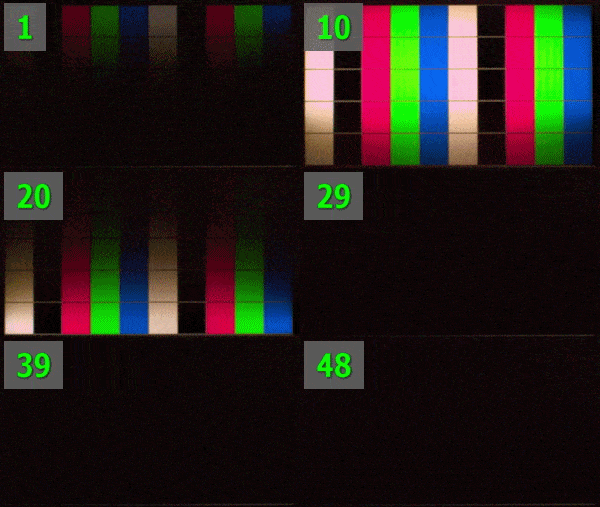
Was checking out a blog and saw a GIF captured at ~6k FPS of a Zowie XL2566X+ monitor (400Hz TN display) that surprisingly has a CRT effect built-in, as part of the monitor's 'DyAc2' motion blur reduction feature.

DyAc2.gif


I'd heard of DyAc before but wasn't aware this was what it was simulating (edit: the v2 at least, seems v1 just used regular BFI). Interesting to see it implemented at the monitor level.
 
Last edited:
Back
Top