New to me Freesync Info

Tanquen

[H]ard|Gawd
2FA
Joined
Feb 15, 2005
Messages
1,294
It's seemingly less and less cool now. No Crossfire, tearing if your frame rate outpaces the display and still needing to use V-Sync and in turn having mouse lag. :( Why can't V-Sync just generate frames in sync with the display? :( :(

"One problem that AMD has recognized with the technology, however, is that it can introduce a mouse lag when it is enabled together with V-Sync (which prevents tearing). For this reason, AMD has opted to allow you to have FreeSync enabled without V-Sync enabled, which will give you the benefit of smoother gameplay, but may introduce tearing when the game runs faster than the display's refresh rate."

"In total, there are currently 11 monitors that should be available now (or very soon) that support AMD's FreeSync. In terms of pricing, at present we know that the Acer XG270HU will go for $499, the BenQ XL2730Z will sell for $599, the LG 34UM67 will cost $649, and the LG 29M67 will be yours for $449."

"AMD also announced which of its graphics products support the technology. These are the AMD Radeon R7 260, R7 260X, R9 285, R9 290, R9 290X, and the R9 295X2. On the Desktop APU side, the A6-7400K, A8-7600K, A8-7650K, A10-7800 and the A10-7850K are supported."
 
Last edited:
Yeah, I just found out Crossfire won't work with FreeSync out of the gate either. Single GPU only. With AMD's recent track record in lacking CrossFire support for new games, and the 390x not being released until June...I hate to say it but at this point, I am seriously considering selling off my dual W/C 290's and just biting the bullet on a single Titan X and an Acer XB270HU, with the eventual goal of a second Titan X and the curved 34" 1440p Predator later this year/early 2016. Just can't seem to rely on AMD anymore, and I hate it 'cause I want them to do well.

I suppose I'll wait it out another month to see if AMD actually delivers CrossFire support for FreeSync, like they say they will... but I feel I cannot trust them to deliver what they say they will. I have been with AMD every new generation since the 5850 and would prefer to stay with them, so I hope I am wrong in being so pessimistic...
 
Last edited:
Yeah, I just found out Crossfire won't work with FreeSync out of the gate either. Single GPU only. With AMD's recent track record in lacking CrossFire support for new games, and the 390x not being released until June...I hate to say it but at this point, I am seriously considering selling off my dual W/C 290's and just biting the bullet on a single Titan X and an Acer XB270HU, with the eventual goal of a second Titan X and the curved 34" 1440p Predator later this year/early 2016.

I had forgotten about Crossfire and had seen that before but not heard it from AMD. I feel mostly the same but the Titan X will have issues too and cost lots more.
 
One problem that AMD has recognized with the technology, however, is that it can introduce a mouse lag when it is enabled together with V-Sync (which prevents tearing). For this reason, AMD has opted to allow you to have FreeSync enabled without V-Sync enabled, which will give you the benefit of smoother gameplay, but may introduce tearing when the game runs faster than the display's refresh rate."

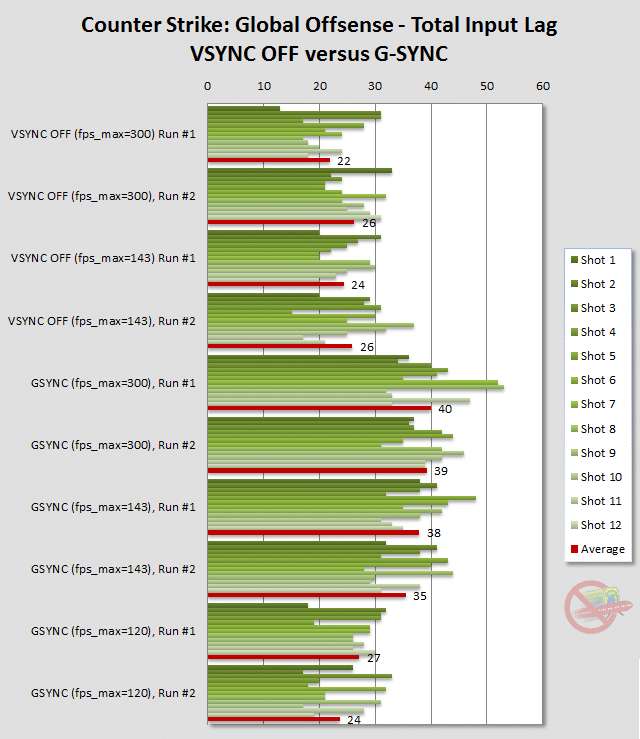
Uh, doesn't G-Sync have the same problem... if your fps is same / more as your monitor refresh rate, g-sync enables v-sync, which afaik can't be disabled. AMD is actually doing the right thing by allowing users to disable v-sync when you have higher fps than your refresh rate to reduce input lag.

This is what happens when you use g-sync with a game which pushes fps to hundreds and you cant disable v-sync:

lag-csgo.png
 
I don't understand, can someone explain to me.

I thought the whole idea of Free/GSync was that you wouldn't need to enable VSync because it's supposed to do monitor refreshes on the fly?
 
I don't understand, can someone explain to me.

I thought the whole idea of Free/GSync was that you wouldn't need to enable VSync because it's supposed to do monitor refreshes on the fly?

It won't stop tearing with V-Sync disabled because it cannot make the monitor itself refresh at a framerate ABOVE it's rated spec of 144/120/60Hz.
 
Uh, doesn't G-Sync have the same problem... if your fps is same / more as your monitor refresh rate, g-sync enables v-sync, which afaik can't be disabled. AMD is actually doing the right thing by allowing users to disable v-sync when you have higher fps than your refresh rate to reduce input lag.

This is what happens when you use g-sync with a game which pushes fps to hundreds and you cant disable v-sync:


Sure and it was just info on Freesync that I was disappointed to hear. You heard about this cool stuff to get rid of something that has always bugged you only to learn that it kinda sort of will fix it, maybe.

I still don’t get why they can’t just fix this on GPU. They know the frame rate of the display how is telling the display on the fly to hold an image longer easier/better than having the GPU send out the last completed frame again? Why is mouse lag with V-Sync an issue?
 
I don't understand, can someone explain to me.

I thought the whole idea of Free/GSync was that you wouldn't need to enable VSync because it's supposed to do monitor refreshes on the fly?

Freesync/GSync enables variable refresh rates instead of a static one, but only within the range of what a monitor can display.

On GSync, the refresh rate will become a static/Vsynced one if the refresh rate goes out of the range of Gsync, which have made many turn off Gsync on compatitive games, since it introduces lag.

On Freesync you can choose to have Vsync on or off without turning off Freesync.
 
It won't stop tearing with V-Sync disabled because it cannot make the monitor itself refresh at a framerate ABOVE it's rated spec of 144/120/60Hz.

Oh whoops, that's what I get for reading forums without drinking my morning caffeine yet. We're talking ABOVE rated spec. Hehe, thanks.
 
just get a monitor that the scaler works between 40-144hz and make sure u have enough gpu power to sit between those and you won't have to stress bout it. The 48-75hz range IPS monitors might be great for movies and shit but not so much for games with only 27hz window your more likely to fall under.
 
I don't think that GSYNC works with SLi yet. Got to wait for these technologies to mature. :)
 
just get a monitor that the scaler works between 40-144hz and make sure u have enough gpu power to sit between those and you won't have to stress bout it. The 48-75hz range IPS monitors might be great for movies and shit but not so much for games with only 27hz window your more likely to fall under.

According to Anandtech, depending on the quality of the scalar in the monitor, FreeSync has a range of 9Hz - 240Hz. First chart on that page. Personally if a game exceeds 144Hz then it just gave me a reason to VSR it to a higher resolution. You know. To stop the limit the tearing. :D :D :D
 
According to Anandtech, depending on the quality of the scalar in the monitor, FreeSync has a range of 9Hz - 240Hz. Personally if a game exceeds 144Hz then it just gave me a reason to VSR it to a higher resolution. You know. To stop the limit the tearing. :D :D :D

Lol :p Would be cheaper to just cap the framerate though.
 
and then you have to deal with a tiny HUD if it doesnt scale.

Try running DAO at 1800p and come back and talk to me.

lol
 
"We know gamers are excited to bring home an incredibly smooth and tearing-free PC gaming experience powered by AMD Radeon™ GPUs and AMD A-Series APUs."

And statements like this are just made for creating disappointment. "tearing-free" I guess it's ok, they did not say mouse lag free.
 
Lol :p Would be cheaper to just cap the framerate though.

Yeah why is this not a good way to solve the issue? I have all my games capped at 60 on my cheapo LG monitor anyway to stop the tearing when my 970 goes overboard on an old engine.
 
I have it enable to stop my room from becoming a blast furnace.

lol
 
A single 290 is enough to do that?!

When playing BF4 my 970s become 210W cards lol.
 
[L]imey;1041494730 said:
Yeah why is this not a good way to solve the issue? I have all my games capped at 60 on my cheapo LG monitor anyway to stop the tearing when my 970 goes overboard on an old engine.

Same here. On many graphic cards, extremely high frame rates can introduce coil whine.
 
there is no lag with freesync enabled and within spec.

It’s an AMD driver, AMD video card and a Freesync enabled monitor. What part is out of specification? Who are they telling? What is some average Joe going to know about that when buying in?
 
The out of spec part refers to going over the monitor's refresh rate. As somebody pointed out above:

Freesync/GSync enables variable refresh rates instead of a static one, but only within the range of what a monitor can display.

On GSync, the refresh rate will become a static/Vsynced one if the refresh rate goes out of the range of Gsync, which have made many turn off Gsync on compatitive games, since it introduces lag.

On Freesync you can choose to have Vsync on or off without turning off Freesync.

GSync has the exact same limitation.
 
It’s an AMD driver, AMD video card and a Freesync enabled monitor. What part is out of specification? Who are they telling? What is some average Joe going to know about that when buying in?

Lag is introduced IF Vsync is enabled when the framerate goes out of the Freesync range. Unlike Gsync, you have an option to disable vsync (at the chance of getting tearing) if framerate goes out of range. Its not Freesync or Gsync that introduces lag, but Vsync.
 
I don't think that GSYNC works with SLi yet. Got to wait for these technologies to mature. :)

It works, but it breaks other things instead (SLI with a G-Sync monitor does not allow you to use DSR/MFAA).
 
SLI excludes MFAA atm regardless of GSync or not.

But DSR not working with SLI+GSync is seriously annoying, and a major reason I put off getting a GSync monitor. Glad I did though, because now I'm not locked into a closed ecosystem.
 
The out of spec part refers to going over the monitor's refresh rate. As somebody pointed out above:


GSync has the exact same limitation.

Lag is introduced IF Vsync is enabled when the framerate goes out of the Freesync range. Unlike Gsync, you have an option to disable vsync (at the chance of getting tearing) if framerate goes out of range. Its not Freesync or Gsync that introduces lag, but Vsync.

That is understood. The statement is such that you are doing something wrong. You are not, it’s how it works. The user is not using any hardware or software or setting out side of the specifications.
 
That is understood. The statement is such that you are doing something wrong. You are not, it’s how it works. The user is not using any hardware or software or setting out side of the specifications.

If you think "out of specs" as a warranty issue, you are absolutely correct. You don´t invalidate warranty by not running the screen within the refresh rate range Freesync supports or should I rather say the Freesync range the monitor supports, since Freesync itself supports a larger range then what monitors out so far does.
 
Freesync specifications on a particualrs monitor are 38-120hz.

If frame latency is not within that range, its out of spec.

Why is this so difficult to comprehend?

im starting to smell a troll....
 
Welcome to "Concern Trolling", it is the standard on technology/videogames.

Expect to see it on pretty much every AMD thread, just as it happens on almost any Sony release :p

(I know that you know, but still ;) )


BTW Crossfire support will come next month according to either Guru3d or Anandtech.
 
Freesync specifications on a particualrs monitor are 38-120hz.

If frame latency is not within that range, its out of spec.

Why is this so difficult to comprehend?

im starting to smell a troll....

Fine, ignore all of said and call me a troll. But that is just how I see it.

You are so dumb. FU? Is that what we do now?

You are saying it like it works if you use it correctly.

“there is no lag with freesync enabled and within spec.”

No, there is nothing you can do about it. It’s a limitation of Freesync.

Here, I’ve fixed.

"We know gamers are excited to bring home an incredibly smooth and tearing-free (*) PC gaming experience powered by AMD Radeon™ GPUs and AMD A-Series APUs."

* Sometimes you’ll get mouse lag or tearing.
 
Freesync is awesome!* ** ***

* With vsync disabled.
** With only a single GPU.
*** When the stars align.

Another disappointment from AMD.
They'll add CrossFire support 6 months after you needed it originally.
 
Welcome to "Concern Trolling", it is the standard on technology/videogames.

Expect to see it on pretty much every AMD thread, just as it happens on almost any Sony release :p

(I know that you know, but still ;) )


BTW Crossfire support will come next month according to either Guru3d or Anandtech.

yeah, ive noticed a lot more that lately.
 
Freesync is awesome!* ** ***

* With vsync disabled.
** With only a single GPU.
*** When the stars align.

Another disappointment from AMD.
They'll add CrossFire support 6 months after you needed it originally.

per AMD, corssfire+Freesync will be available in the april "Phase 2" driver.
 
Freesync is awesome!* ** ***

* With vsync disabled.
** With only a single GPU.
*** When the stars align.

Another disappointment from AMD.
They'll add CrossFire support 6 months after you needed it originally.

I’d not go that far as I really do want V-Sync that works and now a select few of us know to wait for a good monitor with a high enough refresh rate to not worry about this aspect. In a year or so, after some detailed reviews on what it’s like to really live with.
 
According to Anandtech, depending on the quality of the scalar in the monitor, FreeSync has a range of 9Hz - 240Hz. First chart on that page. Personally if a game exceeds 144Hz then it just gave me a reason to VSR it to a higher resolution. You know. To stop the limit the tearing. :D :D :D

From the Techspot review's conclusion, unfortunately at least some monitors do considerably less than 9Hz - 240Hz, and that is especially a problem when the monitor's bottom end is 48Hz:

"The main problem is with manufacturers settling for a minimum refresh rate that's too high. Although the LG 34UM67 is otherwise a great monitor, a minimum refresh of 48 Hz doesn't give users the full benefits of adaptive sync, which has a golden zone of 40-60 Hz. You'll still have a better gaming experience on a 48-75 Hz FreeSync monitor, but monitors with a minimum of 40 Hz (like the aforementioned models from Acer and BenQ) are better options. 30 Hz, the minimum for G-Sync and the lowest refresh rate gamers will put up with, is an ideal minimum for adaptive sync monitors."
 
Fine, ignore all of said and call me a troll. But that is just how I see it.

You are so dumb. FU? Is that what we do now?

You are saying it like it works if you use it correctly.

“there is no lag with freesync enabled and within spec.”

No, there is nothing you can do about it. It’s a limitation of Freesync.

Here, I’ve fixed.

"We know gamers are excited to bring home an incredibly smooth and tearing-free (*) PC gaming experience powered by AMD Radeon™ GPUs and AMD A-Series APUs."

* Sometimes you’ll get mouse lag or tearing.

Shouldn´t you first make sure you get it before you try to fix it? :confused:

Freesync is not the limiting factor, but the monitor and scalar used is. When Freesync is active and fps is within the freesync (variable refresh) range the monitor supports, there is no mouse lag or tearing.

Freesync allows for Vsync to activate if framerate goes outside of the Freesync range, but as we all know, Vsync introduces input lag. However, unlike Gsync, Freesync allows you to deactivate vsync, so there is no input lag if framerate goes outside of the freesync range.

If your computer is capable of getting you above the minimum freesync refresh rate, you can cap the FPS on the maximum and you wouldn´t get mouselag or tearing.
 
Fine, ignore all of said and call me a troll. But that is just how I see it.

You are so dumb. FU? Is that what we do now?

You are saying it like it works if you use it correctly.

“there is no lag with freesync enabled and within spec.”

No, there is nothing you can do about it. It’s a limitation of Freesync.

Here, I’ve fixed.

"We know gamers are excited to bring home an incredibly smooth and tearing-free (*) PC gaming experience powered by AMD Radeon™ GPUs and AMD A-Series APUs."

* Sometimes you’ll get mouse lag or tearing.

What you described as a "limitation of Freesync" is just as much of a limitation for GSync as well.

Do you really think GSync gives you "tearing free" experience if you go higher than the monitor's refresh rate without turning on VSync?

The only true "imitation" is the usable FPS range of Freesync, and that remains to be seen atm.
 
"AMD also announced which of its graphics products support the technology. These are the AMD Radeon R7 260, R7 260X, R9 285, R9 290, R9 290X, and the R9 295X2. On the Desktop APU side, the A6-7400K, A8-7600K, A8-7650K, A10-7800 and the A10-7850K are supported."

so 280x/280 or the rebranded 7xxx series aren't supported? :rolleyes:

this is the last straw for me, first lack of VSR support for those cards and now free sync, sorry AMD but I've lost my trust in you.
 
Back
Top