Cheat Win XP Death: Tool to Save You from the XPocalypse

CommanderFrank

Cat Can't Scratch It
Joined
May 9, 2000
Messages
75,399
If you are going to be one of those do or die (hard) fans of Window XP and vow to keep it up and running as long as humanly possible. It seems counter intuitive to prolong the death knell for XP, but if you are dead set on keeping it alive, it's possible with some innovative and fancy footwork. You can get your XP up and running piggyback-style.

But there's another, little-known way to replace your old, unsupported OS with a new one that's safe, current, gets updates and comes free of charge. The answer: run Windows XP as a zombie OS on something else.
 
I hope Windows 9 comes out soon and we all just switch to that (because in this assumption Windows 9 is much better than either 7 or 8).
 
Yea i'm in this camp.. still using XP in vmware player.. just cause it's easy and fast enough.. of course have a few 7 vms as well
 
I hope Windows 9 comes out soon and we all just switch to that (because in this assumption Windows 9 is much better than either 7 or 8).

Windows 7 came out 8 years after Windows XP and even that didn't get everyone to move. There's simply large percentage of Windows users that have no desire or interest in upgrading or moving to new hardware no matter what. But like all things come the ravages of time, XP is more or less dead and buried and while it will be on the charts for years to come, it's about collapse in on itself for the most part.
 
If your Windows XP is running fine now.......why would it ever stop running?

lol @ all these people who actually believe that Windows XP will just suddenly STOP working.
 
If your Windows XP is running fine now.......why would it ever stop running?

lol @ all these people who actually believe that Windows XP will just suddenly STOP working.

I think the idea is so you can get off antiquated hardware as well.

I have a customer that fucking loves this stupid accounting software, but it was designed for 98, and the newest version of windows it actually works on is XP. Not only is XP support ended, the system he was running it on just ate shit. Bad Caps and a bad video card. He already has a new Windows 7 machine from us for everything else he does, so I just setup a VM on it for his single program. Now I don't have to kick his 9 year old machine along anymore, and he doesn't have to have two different computers sucking down electric at home anymore. Win Win if you ask me.

My mother is the same way. I bought her a new computer because I couldn't stand her complaining about her 7 year old WinXP box that kept crashing on her. So I found a win 7 gateway to put her on, as I thought she would get confused with Windows 8.

I set it up for her, and she tells me to install all of her 'old' programs on it. And I mean OLD!!! Quicken 99', Video Prof for Office XP, etc. I tell her that these programs probably wont work, and that she needs newer ones, as she now has office 2010, and she had me install them anyway......They barely work correctly. The icons didn't even install correctly! lol
Plus her idea of 'troubleshooting' is pulling the plug while its powered on and running, which is how she messed up her last PC!

Talk about stubborn.....
 
If your Windows XP is running fine now.......why would it ever stop running?

lol @ all these people who actually believe that Windows XP will just suddenly STOP working.

It isn't that it suddenly "stops working", it is that you are now running a computer without any security patches. Which by now it probably also is getting hard to find AV software that works under XP. Although for most people they are still on the 30 day trial they got when they got their computer and refuse to actually pay for AV software so are probably running with no patches and no AV software. No patches means that when the next security issue is found there will be no fix for it, your computer which already isn't very secure to begin with as it is XP is going to be even easier for somebody to hijack.

So to answer your question. It will stop running as soon as you start going to all the sites that randomly install shit on your computer and fully hijacks your computer.

And best believe this is the target right now. Good way to look at the issue.
 
What is funny is that I go to a number of different companies for deliveries, and from time to time I see a old dusty computer running Windows 95 or 98. :p
 
I think the idea is so you can get off antiquated hardware as well.

I'm typing this now from a rig I built based around Maximum PC's 2000 Dream Machine.. almost 14 years later and it's not even breaking a sweat posting here at [H] :D

While extremely far from bleeding edge, it actually runs circles around the many crapped-up 2010-era machines I've had the displeasure to work on. Weird, right?
 
We bought a robot dispense that had Windows XP on it in 2012. I told them to put Windows 7 on it, but the builders said they couldn't support such a "new" operating system. They just sent me a letter stating they need $5,800 to install Windows 7 and configure it so it'll be HIPAA compliant......Pffft. WTH?
 
We bought a robot dispense that had Windows XP on it in 2012. I told them to put Windows 7 on it, but the builders said they couldn't support such a "new" operating system. They just sent me a letter stating they need $5,800 to install Windows 7 and configure it so it'll be HIPAA compliant......Pffft. WTH?

Sounds like a bargain :rolleyes:
 
We bought a robot dispense that had Windows XP on it in 2012. I told them to put Windows 7 on it, but the builders said they couldn't support such a "new" operating system. They just sent me a letter stating they need $5,800 to install Windows 7 and configure it so it'll be HIPAA compliant......Pffft. WTH?

I've worked with equipment like that $5,800 isn't very much. That equipment is very complex and it has to work 100%, it's not like your desktop computer that can fail 0.1% of the time without you caring. That would be 1 in 1000 patients with the wrong dosage. Reliability costs money, as does the fact that it's custom equipment.
 
I have my old copy of Win XP now running in virtual pc as well. There are some old software that wouldn't even install correctly in Win 7
 
There's simply large percentage of Windows users that have no desire or interest in upgrading or moving to new hardware no matter what.
Actually there is a reason why they do it, because it works, and does so well, the end. Seriously, most people (aside from Apple cronies) have an operating system that they like, there is no reason to switch just because they company who made it says "Hey look it's newer and better, you'll want to switch!". Most people are not like Mozilla where a new version comes out every other week.
 
I had a guy the other day order ten 3.5" floppy drives for his coworkers as the testing equipment they are using still uses floppies, and you arn't going to replace 7 figure test equipment just because it uses floppies. I am sure there are still some Win 95 machines running in a lab somewhere, maybe even 3.1. Replacing that old equipment also requires new software (possibly even write it yourself) and that is very expensive. BTW anyone remember ZIP drives? Yep, still have them. :eek:
 
I know security patches are one part of computer security, but if there is an exposed vulnerability shouldn't an updated anti virus stop it? If my virus scanner detects an exploit it'll stop it weather or not I've gotten microsoft's hotfix.

I wonder if it'll be as big as a deal as it's being made out to be if there's still companies updating their definitions for XP virus/malware scanners. With updated anti virus, firewall, and decent computing habits I can't imaging all those XP machines exploding in the near future.
 
I think the idea is so you can get off antiquated hardware as well.

I have a customer that fucking loves this stupid accounting software, but it was designed for 98, and the newest version of windows it actually works on is XP.

Had the same problem at the company I work for. The old accounting system was tied into a custom application used by part of the company. They tried changing the custom app, but due to lack of documentation and some missing source code, that's not possible. I managed to moved the server off an old p3 box with windows 2000, to a virtual windows 2003 system. I had to disable several performance features in 2003 due to compatibility issues with the shared database used by the old system.

I even managed to get the custom app running under Windows 7 (even 64 bit), but the best I could do with the accounting app was Windows 7 32bit, due to some 16 bit code. One time we had someone call the vendor for support, and when asked they said it was running on windows 7. The vendor support person didn't know what to say except not supported.... Not like they actually provided any real supported on a 12 year old package anyways.

We had some management changes a couple years ago, and we finally got rid of the old software. Running a good SQL based accounting application. They are doing double entry for the custom app since the "connection" is no longer there, but hopefully that will be fixed as they are looking for a replacement package for that old software. I'll really be happy when I can shut down the last 2003 server.
 
[21CW]killerofall;1040765139 said:
I am sure there are still some Win 95 machines running in a lab somewhere, maybe even 3.1. Replacing that old equipment also requires new software (possibly even write it yourself) and that is very expensive. BTW anyone remember ZIP drives? Yep, still have them. :eek:

Wasn't that long ago, that I was the computer/register at a major brand auto shop rebooted, and the boot screen showed Windows ME :eek:
 
I run avast and the latest MWB 2.0 and XP pro and it should help along with the standard MS firewall, router firewall and IP wireless firewall.

Only a few programs I have won't run under 7 and they can be updated and a few older games [star wars] from the early 2000's won't work either. I believe they are 16bit so possible under 32 but not 64.

The only hardware is my beloved turtle beach santa cruz which still blows away any on-board.
It was disco before Vista so no drivers, no software thus it's useless.

I will say their last XP update was not MS signed and through the years I've had a few BSOD's and turtle beach driver was the issue.

It happened maybe 4 times in 10 years, go figure.
 
I know security patches are one part of computer security, but if there is an exposed vulnerability shouldn't an updated anti virus stop it? If my virus scanner detects an exploit it'll stop it weather or not I've gotten microsoft's hotfix.

I wonder if it'll be as big as a deal as it's being made out to be if there's still companies updating their definitions for XP virus/malware scanners. With updated anti virus, firewall, and decent computing habits I can't imaging all those XP machines exploding in the near future.

no, you are looking at only a small part of how people can be attacked. Antivirus software only stops a virus. That does nothing for other means of getting into your computer.

Lets put it this way and make it will make more sense to you. Lets say that your house is a computer. Inside of your house you have documents with your SSN, your bank account information, your credit cards.. all the stuff you expect to normally have. You also have a security system for your house. State of the art, windows have bars on them, doors have triple dead bolts with 3 inch long 2 inch think metal pegs. You feel safe in your house, you know that nobody can get in unless you let them in. After awhile you start to notice that one of the curtain rods next to your desk in the den is starting to break, but you ignore that as you don't want to spend money on new curtain rods till those ones actually break. One day you leave to go to work and leave your bank information and SSN information on your desk. While away the rod breaks and the curtain falls right as somebody happens to be outside of your house. through the window they are able to see your information just sitting there, take a few pictures and away they go. At no time did they break into your home, or do anything that would set off your alarm. And yet due to a security flaw (no curtain) being found they were able to steal your information.

The same holds true for your computer. You are looking at somebody using a program to do something. But a security flaw could be more along the lines of you are given a pdf file and when you open it there is a command in there that starts up a process that gives somebody full access to all files on your computer. Or you go to a web site and a java script function on it runs a bad process on your computer. That isn't the type of stuff that your antivirus software will stop, nor is it something that a firewall would stop. That can ONLY be prevented by a security update. There could be a process that normally runs that if you sent a certain type of packet at it will cause it to return something it shouldn't. Like the heartbleed issue with SSL. That wouldn't be caught by any antivirus software, that wouldn't be stopped by a firewall. There is just a flaw in how the software handles a certain type of packet. In the case of heartbleed it caused it to return whatever was last sent to the server. Lets say for windows they find a new flaw that if you send a bad packet to a computer making it appear to be a DNS entry it will cause windows to send all web traffic to not only the site that it is supposed to, but also a dummy one. Your AV software wouldn't catch that, nor would a firewall.

Safe surfing will help. But lets be honest, the average person doesn't do that. Nor do they run up to date antivirus software and antimalware. They are going to have a computer like swiss cheese to start with. This just helps add a few extra holes.
 
..snip..
The same holds true for your computer. You are looking at somebody using a program to do something. But a security flaw could be more along the lines of you are given a pdf file and when you open it there is a command in there that starts up a process that gives somebody full access to all files on your computer. Or you go to a web site and a java script function on it runs a bad process on your computer. That isn't the type of stuff that your antivirus software will stop, nor is it something that a firewall would stop.
..snip..
.

I have to disagree, but I get plenty of alerts from anti-virus software that is blocking websites, lovely little red popup with a scary sounding alarm that says it was blocked for whatever nasty thing was trying to happen. Isn't someone giving you a nasty pdf exactly the thing that anti virus scanners are suppose to do? Here's a blog post from avast in 2011 saying how they found a pdf bug and that was exploited and they now scan for it: https://blog.avast.com/2011/04/22/another-nasty-trick-in-malicious-pdf/ (that was just the first search hit i got, I'm sure there are more examples).
 
XP is great for VMs. Heck I use 2000 sometimes if whatever app I need to run will work in it. MS OSes become more and more bloated over time and in a VM this matters more.

MS needs to make a "lite" version of windows specifically for VMs and low power computers. Basically a win32/64 engine with a minimal desktop.

Our hospital still has NT4 machines. The problem with using proprietary software is when that company ceases to exist or your warranty is up, there is ZERO support and you are completely locked into a platform. The hospital's finances also run on a Sco Unix box that is virtualized in a VMware server 1.0 VM, which itself is virtualized in ESXi. It was the only way, because it so proprietary nobody can do anything. Can't even access the file system because it's non standard and nobody knows the root password (or any account for that matter). Glad I don't work there anymore. Some of the proprietary stuff is downright scary.
 
Where i work we are still installing Windows XP still lol. I installed XP on a machine and tried to install microsoft security essentials and it wouldn't install if you had it plugged into the internet. It would give a message saying your copy of windows is not genuine it was. I think they did that because the deadline has passed. Everything was original. Eventually it will be phased out after people stop requesting it.
 
I have to disagree, but I get plenty of alerts from anti-virus software that is blocking websites, lovely little red popup with a scary sounding alarm that says it was blocked for whatever nasty thing was trying to happen. Isn't someone giving you a nasty pdf exactly the thing that anti virus scanners are suppose to do? Here's a blog post from avast in 2011 saying how they found a pdf bug and that was exploited and they now scan for it: https://blog.avast.com/2011/04/22/another-nasty-trick-in-malicious-pdf/ (that was just the first search hit i got, I'm sure there are more examples).

Your AV is blocking the specific payloads that take advantage of known and analyzed flaws. It still cannot detect the flaws themselves because they are in legitimate processes. Change up the payload a little and the AV is again ineffective until the new file is discovered and analyzed and an update is pushed out.

It's a whole other issue when an exploit doesn't even have to download anything to gain access to a system or its data. Send in a packet to a legitimately running process and the AV will never even see it before the data has been compromised.
 
I'm typing this now from a rig I built based around Maximum PC's 2000 Dream Machine.. almost 14 years later and it's not even breaking a sweat posting here at [H] :D

While extremely far from bleeding edge, it actually runs circles around the many crapped-up 2010-era machines I've had the displeasure to work on. Weird, right?

I'll take that challenge lets rip some DVDs and transcode them for use on a tablet. Let's see who finishes first and who gives up all hope of living.;):D

I'll even just use my old 2008 PC, though it is a dual quad core workstation...
 
I can't believe we are even talking about this, UPGRADE ALREADY!!! just to 7 not 8. :D
 
I'll take that challenge lets rip some DVDs and transcode them for use on a tablet. Let's see who finishes first and who gives up all hope of living.;):D

I'll even just use my old 2008 PC, though it is a dual quad core workstation...

In all fairness, it's a dinosaur SMP rig.. it'll transcode any movie just fine. Might take a few hours to half a day, depending on settings, but it can do it! :D
 
In all fairness, it's a dinosaur SMP rig.. it'll transcode any movie just fine. Might take a few hours to half a day, depending on settings, but it can do it! :D

But you stated that your computer would run circles around any other computer. That is what he is getting at.
 
Actually there is a reason why they do it, because it works, and does so well, the end. Seriously, most people (aside from Apple cronies) have an operating system that they like, there is no reason to switch just because they company who made it says "Hey look it's newer and better, you'll want to switch!". Most people are not like Mozilla where a new version comes out every other week.

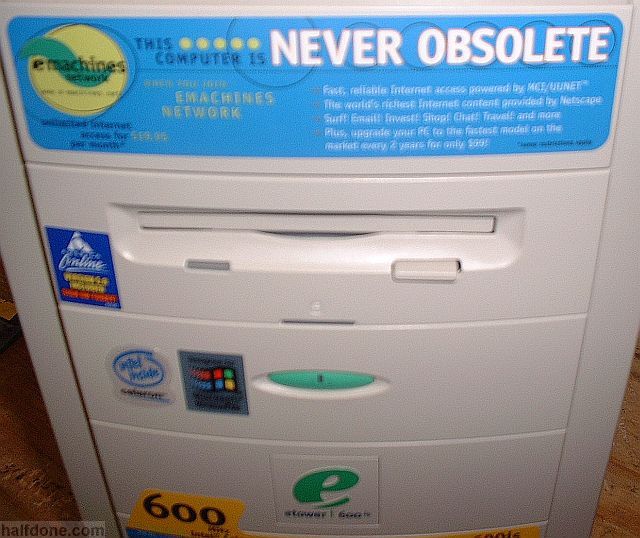
Even basic e-machines suffer with the richness of todays web content. It's not like you can play farmville at 60fps on a machine from 2001. Any PC running XP is also running old hardware. Old hardware is slow, at everything. It is probably worth it for someone to upgrade to something Win7 ready just so they can load up Thunderbird or Facebook faster.
 
Even basic e-machines suffer with the richness of todays web content. It's not like you can play farmville at 60fps on a machine from 2001. Any PC running XP is also running old hardware. Old hardware is slow, at everything. It is probably worth it for someone to upgrade to something Win7 ready just so they can load up Thunderbird or Facebook faster.

HAHAHAHA! You are so wrong. Wow. I am surprised someone at [H] didn't know this -

Never_obsolete_emachine.jpg


NEVER OBSOLETE, man. NEVER!
 
I don't get this article. Basically, it says "upgrade your OS to 7, and run XP in a VM"

1) A lot of people on XP are probably there because their machines are old and can't handle 7
2) Assuming the machine can handle 7 - the VM is still just as vulnerable as a full install.

Are they saying that the ability to roll back to a prior "good" snapshot is your saving grace? They also say "don't go on the internet with your XP VM" Well then, if it's not connected to the internet, then it doesn't need to be upgraded.

Stupid article is stupid? I don't get it...
 
If I have to leave XP and waste a month of my life setting up and getting used to new things I am going to linux.

What I really want to do is run my XP inside Ubuntu.

But from what an hour of research shows, I cannot leave files in place to do this, I would have to encapsulate my current XP install into a container.

I don't understand why vmware cannot run XP on the native hard drive? Or am I missing something

XP can't run on anything besides a FAT32 or NTFS -formatted HD. Linux uses it's own file system that isn't compatible, so you have to either set up a virtual HD (through VMware), or a completely separate physical HD, formatted as NTFS.
 
I run avast and the latest MWB 2.0 and XP pro and it should help along with the standard MS firewall, router firewall and IP wireless firewall.

Only a few programs I have won't run under 7 and they can be updated and a few older games [star wars] from the early 2000's won't work either. I believe they are 16bit so possible under 32 but not 64.

The only hardware is my beloved turtle beach santa cruz which still blows away any on-board.
It was disco before Vista so no drivers, no software thus it's useless.

I will say their last XP update was not MS signed and through the years I've had a few BSOD's and turtle beach driver was the issue.

It happened maybe 4 times in 10 years, go figure.

Excluding hardware, there is nothing I have that wouldn't run under Windows 7 64 Bit. This includes some 16 bit apps from the Windows 3.11 days. Needing to keep Quickbooks '98 isn't a barrier to installing Windows 7.
 
But you stated that your computer would run circles around any other computer. That is what he is getting at.

No. I said it runs circles around many newer crapped-up machines that *I've* worked on. Never once said my 14 year old SMP rig would run circles around any machine, let alone his 6 year old SMP rig. Lol, that would just be silly ;)

My point was just that it's completely ancient hardware, and it's still capable of doing most tasks just fine and often does so better than some machines over a decade newer (not anyone's here, I would hope).
 
Back
Top