Radeon Bios Editor v1.28 (now with 6950 to 6970 unlock)

well that was pretty easy. It worked, shaders unlocked only.

Edit:
This is how I did it. Only thing I changed was shaders. No voltage, memory changes, core changes.

Save current bios with GPU-Z
Load Saved bios into RBE, and only check the unlock 6970 shaders. Save
I flashed with Winflash

 
Last edited:
correct, just the shaders, no overclock or voltage changes. There's a new check box under additional features. Just check unlock 6970 shaders. Save bios and you're ready to flash.
 
Is it really worth it to just unlock the shaders and not overclock it though? I thought the shader unlock was like a 1fps boost or something small.
 
I think it's like 4% but every bit you overclock will give you a considerably better overall speed with those shaders unlocked.
 
How well does the 6950 OC when only the shaders are unlocked? Could someone post a screenshot of the GPU Clock and Memory after they've overclocked? Sorry for all the questions but I want to make sure I get the best video card for my money.
 
the 6950 is still an incredible value even when not unlocked or overclocked.
 
How well does the 6950 OC when only the shaders are unlocked? Could someone post a screenshot of the GPU Clock and Memory after they've overclocked? Sorry for all the questions but I want to make sure I get the best video card for my money.

For a lot of information on not only unlocking, but overclocking as well, and a combination of the two, please read the original article's comments:

http://www.techpowerup.com/forums/showthread.php?t=137136
 
Quick one. I already have used RBE to unlock my shaders on the original BIOS.. worked great! However, I'd like to modify the original BIOS using RBE to increase the GPU (not VRAM) voltage to 1.175 like a stock 6970. I had issues getting my GPU up to speed and found it was probably due to low volts. Someone was nice enough to point me in the direction of a ASUS BIOS that supposedly had the shaders unlocked and GPU set to 1.175. The new BIOS did allow me to gte my GPU to higher clocks... but not quite to 880. I'm stuck at 870 and feel it should go higher. The GPU barely goes over 70c under load and I've got the power control settings in CCC set to 20%. Unfourtinately the latest GPUZ will not report the voltage correctly so I want to do the mod myself on the original BIOS to be sure.

This is the ASUS BIOS I'm currently using:
RBEASUSBIOS1175shaders.gif


^^^ No mention of 1.175 volts anywhere. I expected to see it under clock info 3 as the card defaults to 810/1250 with this BIOS.

This is the original MSI:
MSIOriginalBIOS.gif


^^^ Where would I enter 1.175 for the GPU? Under clock info 00 just under the 800/1250 entries?

Thanks in advance
-scoot
 
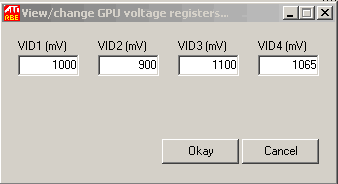
You click "GPU registers", then go to the "MV" area and find the proper default 3d voltage, which idk what it is on the 6950, 1050? 1175 is for the 6970.
 
Scooter:

As stated you can change the voltage by clicking on the "GPU Registers" button. You'll be presented with four voltage registers (VID1 thorugh VID4). I know for my card (XFX6950 w/ ASUS bios) VID4 is the 3d voltage when running a single card. I recommend changing VID4, flashing your card, then using afterburner to monitor the card's voltage while running furmark. If you're running at the voltage you assigned VID4 you're all good. If not, then VID3 is the one you need to change.
 
^^^ Thanks for the replies. I'll give it a go a lil later with my already modified ASUS BIOS. One more quick question, I notice several people stating:

VID4 is the 3d voltage when running a single card

I currently only have one MSI Flashed/unlocked with an ASUS BIOS 6950 installed... but another is already ordered and on it's way. If I modify the BIOS using RBE the exact same way as the first (taking into consideration that I do not run into any stability issues while testing it as a single card) will I need to do anything different to run two of these in xfire? I scanned the Tech Power Up forums but could not find any information on the voltage mods. The FAQ is very limited also. Is there a readme file or specific site where I can get a lil more information?

Thanks in advance
-scooter
 
Ok... been doing some more reading. Here are the VID values for the ASUS BIOS I'm currently using:
ASUSmodifiedGPUregisters.gif


Here are the VID values for the stock MSI BIOS:
StockMSIGPUregisters.gif


My best guess after reading about as some seem to think different OEM's have VID 3&4 reversed.

VID1: bootup voltage.
VID2: 2D voltage
VID3: 3D voltage. as it's higher than VID4.
VID4: intermediate voltage mode (between 2D and 3D).

I'm going to adjust VID3 to 1.175 and unlock the shaders on my original MSI BIOS and see if anything changes. Worst case scenario is I might have to flash back to the ASUS BIOS. At the very least it might run a lil cooler in the intermediate mode with lower volts. Here is where I'm currently running:
ASUSBIOSshaders1175v.gif


Again.. thanks again for all your help guys!
-scoot
 
Can you please update this thread when you get it done? I have my 2nd MSI 6950 2GB ordered today. I unlocked the first one two nights ago. Have not overclocked it yet.
 
For me VID3 is the 3D voltage when using multiple cards. Like I said before, you can test it by monitoring with afterburnrer while running a 3D program.
 
For me VID3 is the 3D voltage when using multiple cards. Like I said before, you can test it by monitoring with afterburnrer while running a 3D program.

I responded in the other thread.. quick Q&P:

I'm trying to figure out specifically what VID3 and VID4 are doing also as I plan on setting up xfire as soon as my second 6950 arrives and I mod it. I read elsewhere that:

VID4: possibly the voltage at "intermediate" mode (between 2D and 3D). Sometimes you'll see your card clock in at 500MHz, then this voltage is used.

Here is what the stock VID registers look like on my MSI 6950:

StockMSIGPUregisters.gif


Not saying you are wrong at all here and thanks for the input. But why would it be set to run at 1.065v (VID4) as a single card when from what I've read 1.1v is the stock voltage? Does it make sense to run at 1.1v only when configured in xfire (VID3)? It simply does not make sense to me that each card would require more volts simply it's running in tandem with another card. :confused:
 
With my Reference 5850 I can do 775/1125. Would it be worth it to use the RBE? Any danger of burn out over time?
 
Not saying you are wrong at all here and thanks for the input. But why would it be set to run at 1.065v (VID4) as a single card when from what I've read 1.1v is the stock voltage? Does it make sense to run at 1.1v only when configured in xfire (VID3)? It simply does not make sense to me that each card would require more volts simply it's running in tandem with another card.

Can you test your registers out like I did and report your findings?
 
Can you test your registers out like I did and report your findings?

Not until my second card arrives in a few days. But I'll be sure to give it a go. Maybe I'll find an answer between now and then. I'll report back earlier if so.

As an aside I notice you are running at 1.2v, did you need the extra .025v to get 880+? I'm at 1.175 and I've hit a stability wall. Max I can get 100% stable at that voltage is 870. 880 runs for a bit no artifacting or other tale~tale signs, then just locks up applications like futuremark and BFBC2 after a bit. I might just have a lower binned GPU.. who knows. I'm perfectly happy at 870/1375, just curious.
 
1.175V got my cards up to 925MHz stable. I've just been playing around with voltages recently (trying out 1.3V) right now, but haven't really had time to up the clocks and test them. I'm also water cooling.
 
1.175V got my cards up to 925MHz stable. I've just been playing around with voltages recently (trying out 1.3V) right now, but haven't really had time to up the clocks and test them. I'm also water cooling.

Thanks for the info. I'm going to re-install Smartdoctor to verify the voltages again. I checked when first installed and it reported 1.175v. RBE shows both the VID3&4 on the current BIOS at 1.175v also:

ASUSmodifiedGPUregisters.gif


The only thing that makes me think it might be still be undervolting are the temps and low GPU clock stability. With the stock cooling the highest temp I've seen is 73c after hours of BFBC2. And the fan never seems to exceed 30% or so... I barely hear it at all during boot up and never again after that. My 5870's were much more noticeable under load by comparison. Most reviews put the temps of the 6950 and 6970 much..much higher under load. Just seems odd that my GPU tops out at 10mhz under the stock 6970 speed and runs so cool. I could just have a slower binned GPU. But most people OC'ing the 6950's seem to hit limits with their memory.. not GPU. I could just have a slower binned GPU...I just want to be sure.
 
still not working at 880mhz evil? :(

Nope.. the ram ramps up to 1375 effortlessly. BTW I've underclocked the ram before to ensure it was not the issue when testing the GPU limits. The GPU hits that proverbial "wall" at 880. It will run for some time at 880 in games and even benchmark fine for some time.. then the video freezes. After a short while the desktop usually reappears. Step it back to 870 and it resolves all issues. 100% stable at 870/1375/1.175v. Not really a complaint as it's only 10 short of a full on 6970.. I just find it odd that nearly no one has issues getting to 880 even at 1.1v. I could go 1.2v but I doubt the performance gains are worth the added heat. I'm within V spec for the GPU and memory so no worries about burning up the hardware. It runs cool and quite while it works. All things considered I should simply shut the heck up. I got a good performance bump for the cost of a little research. Reminds me of the x800 days. Dunno why that extra 10mhz puts such a bug up my butt... but there it is. Prolly the old skewl OC'er in me. :p
 
lol. i feel ya.

i'm using hte overclock.net guide. i haven't made a custom bios. i set both of mine to 880/1375. only bug is the sensor for hte second card doesnt' report in catalyst sometimes, just says 0 for speed etc lol. gpuz shows correctly though.

any idea if this is a good 3dmark11 score?

http://3dmark.com/3dm11/842856;jses...m11/842856?key=k6WpDcshReMZLhKVc8dmJYDw473N2e


sometimes my video freezes and it says the display driver stopped responding. but, i do run seti on the video card. i'm sure that has something to do with it. did it on other vid cards that are not overclocked :p
 
Evil scooter I have the same "issue" (not really an issue as im still very happy with my cards) one of my 6950's will do 880 100% stable at 1.175v but anything over that regardless of voltage is unstable. I think alot of the first gen 6950's are 6970's that would have made it as 6970's but were still on the lower end therfore they will tend to hit a wall right around there some people probaly got a little luckier and got chips that were mor middle of the road 6970 level (IE can do 920) but hey it's still amazing performance at an amazing price so no complaints I guess. :)
 
I can get somewhere around 920Mhz with my card, but 930Mhz hard-locks every time even at 1.3 vcore. Frustrating considering some are saying they break 1Ghz easily with unlocked 6950s. RAM is fine up to 1375, no artifacts, but I generally just leave it all stock anyway.
 
lol. i feel ya.

i'm using hte overclock.net guide. i haven't made a custom bios. i set both of mine to 880/1375. only bug is the sensor for hte second card doesnt' report in catalyst sometimes, just says 0 for speed etc lol. gpuz shows correctly though.

any idea if this is a good 3dmark11 score?

http://3dmark.com/3dm11/842856;jses...m11/842856?key=k6WpDcshReMZLhKVc8dmJYDw473N2e


sometimes my video freezes and it says the display driver stopped responding. but, i do run seti on the video card. i'm sure that has something to do with it. did it on other vid cards that are not overclocked :p

Score looks good to me. My single unlocked 6950 scores 5416@870/1375. Same rig in my siggy.. just a single 6950 instead of the 5870 xfire. I can hardly wait for my second to arrive, probably tomorrow. :D
 
Evil scooter I have the same "issue" (not really an issue as im still very happy with my cards) one of my 6950's will do 880 100% stable at 1.175v but anything over that regardless of voltage is unstable. I think alot of the first gen 6950's are 6970's that would have made it as 6970's but were still on the lower end therfore they will tend to hit a wall right around there some people probaly got a little luckier and got chips that were mor middle of the road 6970 level (IE can do 920) but hey it's still amazing performance at an amazing price so no complaints I guess. :)

Nice to not be alone. :D But as we're both saying... it's an incredible deal on a really nice card either way. Probably just a binning issue. If they have a really good production run everyone gets a 6970+. If it's a bad process week.. more 6950 parts. :p

I'm just hoping my second will clock at least as fast as the one I already have. With my luck it will be an awesome overclocker. Wonder how similar cards running at different clocks effect xfire if at all?
 
Wonder how similar cards running at different clocks effect xfire if at all?

I thought it downclocks to the lowest card's clocks.

btw I'm at 1000MHz on both GPUs right now. BC2 performed flawlessly. Going to furmark it for a while now.
 
Back
Top