![[H]ard|Forum](/styles/hardforum/xenforo/logo_dark.png)
I guess this could either be in this forum or the storage forum. I don't believe there is an issue with the EqualLogic. It appears to be the ESXi host, but it is a bit odd. Here is the setup.
Two Dell PowerEdge R620 servers using a Broadcom BCM57810 10Gb NIC (2 ports for storage)
Two Dell N4032 10 Gb switches that are stacked
One EqualLogic PS6210X SAN with 10 Gb
The customer has a Server 2008 R2 VM with an application installed that does some conversations. The application and the data are run on drive D which is simply just a VMDK that resides on the EqualLogic. When the app is run on host A, it runs fine and takes about two minutes. If you move the VM to host B and try to run the app again, it freezes a bit and usually takes 6-10 minutes to run. They migrated all VMs except for the test one off of host B to ensure there was no contention.
I ran a simple disk speed test and both hosts and below is the results.
Host A
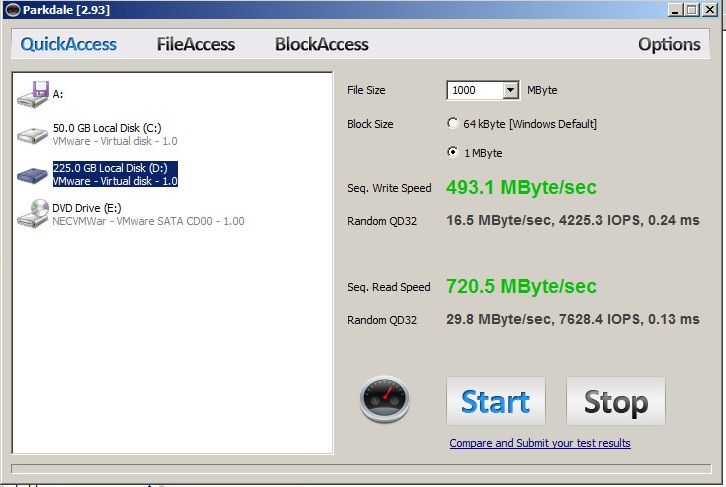
Host B

I ran the tests several times and the results were always about the same. Clearly host B is not performing as well especially with the sequential and random reads. Multipathing is setup correctly, but I decided to try each 10 Gb NIC individually to see what happens. Same results. All the settings are the same, MTU, port speed, etc. I really couldn't find anything different between the two hosts.
I logged into the hosts directly to run "vmkping 10.51.0.13 -c 10000 -s 8000 -d". That is the IP address of the EqualLogic for the iSCSI connection. Below are the results.
Host A
8008 bytes from 10.51.0.13: icmp_seq=10 ttl=255 time=0.189 ms
8008 bytes from 10.51.0.13: icmp_seq=11 ttl=255 time=0.216 ms
8008 bytes from 10.51.0.13: icmp_seq=12 ttl=255 time=0.169 ms
8008 bytes from 10.51.0.13: icmp_seq=13 ttl=255 time=0.196 ms
8008 bytes from 10.51.0.13: icmp_seq=14 ttl=255 time=0.231 ms
8008 bytes from 10.51.0.13: icmp_seq=15 ttl=255 time=0.188 ms
8008 bytes from 10.51.0.13: icmp_seq=16 ttl=255 time=0.228 ms
8008 bytes from 10.51.0.13: icmp_seq=17 ttl=255 time=0.145 ms
8008 bytes from 10.51.0.13: icmp_seq=18 ttl=255 time=0.156 ms
8008 bytes from 10.51.0.13: icmp_seq=19 ttl=255 time=0.182 ms
8008 bytes from 10.51.0.13: icmp_seq=20 ttl=255 time=0.188 ms
8008 bytes from 10.51.0.13: icmp_seq=21 ttl=255 time=0.149 ms
8008 bytes from 10.51.0.13: icmp_seq=22 ttl=255 time=0.192 ms
8008 bytes from 10.51.0.13: icmp_seq=23 ttl=255 time=0.155 ms
8008 bytes from 10.51.0.13: icmp_seq=24 ttl=255 time=0.217 ms
Host B
8008 bytes from 10.51.0.13: icmp_seq=10 ttl=255 time=0.280 ms
8008 bytes from 10.51.0.13: icmp_seq=11 ttl=255 time=0.369 ms
8008 bytes from 10.51.0.13: icmp_seq=12 ttl=255 time=0.245 ms
8008 bytes from 10.51.0.13: icmp_seq=13 ttl=255 time=0.322 ms
8008 bytes from 10.51.0.13: icmp_seq=14 ttl=255 time=0.240 ms
8008 bytes from 10.51.0.13: icmp_seq=15 ttl=255 time=0.254 ms
8008 bytes from 10.51.0.13: icmp_seq=16 ttl=255 time=0.283 ms
8008 bytes from 10.51.0.13: icmp_seq=17 ttl=255 time=0.271 ms
8008 bytes from 10.51.0.13: icmp_seq=18 ttl=255 time=0.412 ms
8008 bytes from 10.51.0.13: icmp_seq=19 ttl=255 time=0.241 ms
8008 bytes from 10.51.0.13: icmp_seq=20 ttl=255 time=0.290 ms
8008 bytes from 10.51.0.13: icmp_seq=21 ttl=255 time=0.274 ms
8008 bytes from 10.51.0.13: icmp_seq=22 ttl=255 time=0.204 ms
8008 bytes from 10.51.0.13: icmp_seq=23 ttl=255 time=0.364 ms
8008 bytes from 10.51.0.13: icmp_seq=24 ttl=255 time=0.248 ms
Both are good response times, but host B is taking 67% longer. Not sure if that matters...
Any ideas on what may be causing the performance issue on host B, or what else I can check?
Two Dell PowerEdge R620 servers using a Broadcom BCM57810 10Gb NIC (2 ports for storage)
Two Dell N4032 10 Gb switches that are stacked
One EqualLogic PS6210X SAN with 10 Gb
The customer has a Server 2008 R2 VM with an application installed that does some conversations. The application and the data are run on drive D which is simply just a VMDK that resides on the EqualLogic. When the app is run on host A, it runs fine and takes about two minutes. If you move the VM to host B and try to run the app again, it freezes a bit and usually takes 6-10 minutes to run. They migrated all VMs except for the test one off of host B to ensure there was no contention.
I ran a simple disk speed test and both hosts and below is the results.
Host A

Host B

I ran the tests several times and the results were always about the same. Clearly host B is not performing as well especially with the sequential and random reads. Multipathing is setup correctly, but I decided to try each 10 Gb NIC individually to see what happens. Same results. All the settings are the same, MTU, port speed, etc. I really couldn't find anything different between the two hosts.
I logged into the hosts directly to run "vmkping 10.51.0.13 -c 10000 -s 8000 -d". That is the IP address of the EqualLogic for the iSCSI connection. Below are the results.
Host A
8008 bytes from 10.51.0.13: icmp_seq=10 ttl=255 time=0.189 ms
8008 bytes from 10.51.0.13: icmp_seq=11 ttl=255 time=0.216 ms
8008 bytes from 10.51.0.13: icmp_seq=12 ttl=255 time=0.169 ms
8008 bytes from 10.51.0.13: icmp_seq=13 ttl=255 time=0.196 ms
8008 bytes from 10.51.0.13: icmp_seq=14 ttl=255 time=0.231 ms
8008 bytes from 10.51.0.13: icmp_seq=15 ttl=255 time=0.188 ms
8008 bytes from 10.51.0.13: icmp_seq=16 ttl=255 time=0.228 ms
8008 bytes from 10.51.0.13: icmp_seq=17 ttl=255 time=0.145 ms
8008 bytes from 10.51.0.13: icmp_seq=18 ttl=255 time=0.156 ms
8008 bytes from 10.51.0.13: icmp_seq=19 ttl=255 time=0.182 ms
8008 bytes from 10.51.0.13: icmp_seq=20 ttl=255 time=0.188 ms
8008 bytes from 10.51.0.13: icmp_seq=21 ttl=255 time=0.149 ms
8008 bytes from 10.51.0.13: icmp_seq=22 ttl=255 time=0.192 ms
8008 bytes from 10.51.0.13: icmp_seq=23 ttl=255 time=0.155 ms
8008 bytes from 10.51.0.13: icmp_seq=24 ttl=255 time=0.217 ms
Host B
8008 bytes from 10.51.0.13: icmp_seq=10 ttl=255 time=0.280 ms
8008 bytes from 10.51.0.13: icmp_seq=11 ttl=255 time=0.369 ms
8008 bytes from 10.51.0.13: icmp_seq=12 ttl=255 time=0.245 ms
8008 bytes from 10.51.0.13: icmp_seq=13 ttl=255 time=0.322 ms
8008 bytes from 10.51.0.13: icmp_seq=14 ttl=255 time=0.240 ms
8008 bytes from 10.51.0.13: icmp_seq=15 ttl=255 time=0.254 ms
8008 bytes from 10.51.0.13: icmp_seq=16 ttl=255 time=0.283 ms
8008 bytes from 10.51.0.13: icmp_seq=17 ttl=255 time=0.271 ms
8008 bytes from 10.51.0.13: icmp_seq=18 ttl=255 time=0.412 ms
8008 bytes from 10.51.0.13: icmp_seq=19 ttl=255 time=0.241 ms
8008 bytes from 10.51.0.13: icmp_seq=20 ttl=255 time=0.290 ms
8008 bytes from 10.51.0.13: icmp_seq=21 ttl=255 time=0.274 ms
8008 bytes from 10.51.0.13: icmp_seq=22 ttl=255 time=0.204 ms
8008 bytes from 10.51.0.13: icmp_seq=23 ttl=255 time=0.364 ms
8008 bytes from 10.51.0.13: icmp_seq=24 ttl=255 time=0.248 ms
Both are good response times, but host B is taking 67% longer. Not sure if that matters...
Any ideas on what may be causing the performance issue on host B, or what else I can check?

