![[H]ard|Forum](/styles/hardforum/xenforo/logo_dark.png)
Navigation
Install the app
How to install the app on iOS
Follow along with the video below to see how to install our site as a web app on your home screen.
Note: This feature may not be available in some browsers.
More options
-
Some users have recently had their accounts hijacked. It seems that the now defunct EVGA forums might have compromised your password there and seems many are using the same PW here. We would suggest you UPDATE YOUR PASSWORD and TURN ON 2FA for your account here to further secure it. None of the compromised accounts had 2FA turned on.
Once you have enabled 2FA, your account will be updated soon to show a badge, letting other members know that you use 2FA to protect your account. This should be beneficial for everyone that uses FSFT.
You are using an out of date browser. It may not display this or other websites correctly.
You should upgrade or use an alternative browser.
You should upgrade or use an alternative browser.
SN95G5 contradiction?
- Thread starter afmo
- Start date
it comes with paste. I've read the temp issue but don't seem to have them myself, however, that's instereting why [H]'s review didn't address it as so many gripe about it. and why not benching it vs the MSI NEO for better headlines?
I made it a merry halloween
I made it a merry halloween
G'ßöö said:it comes with paste. I've read the temp issue but don't seem to have them myself, however, that's instereting why [H]'s review didn't address it as so many gripe about it. and why not benching it vs the MSI NEO for better headlines?
I made it a merry halloween
Which CPU do you have?
the 3500. I read nothing as low as many do nor is it running hot. the sff forums are pretty heated (no pun intended) on this subject though but I'm probably not gonna oc this rig so I don't really care. It took me hours to get through the main temp issue / flame thread on sudhian. yikes! mine works fine. no nic or sata issues here but some sure have temp probs. I used artic paste and idle's @ mid 20's, heavy seemed fine. it's never hot to touch and the fan adjusts. I duhno, I could thoroughly test to be certain but who cares is how I feel (for now?). I game game and game and it holds up. that means everything to me
I thought I'd paste in the best part of that sudhian thread about the temp issues for anyone else who doesn't have the whole day at work to read it. Odie says:
"Actually, its NEWER 939pin Athlon64's that are affected by this issue. Basically, AMD has changed their thermal monitoring spec mid-production. This is why none of the SN95G5 reviews are finding this issue, because AMD samples the reviewers with the same processors they sample motherboard manufacturers to ensure compatibility. Thats why the problem is not unique to the SN95G5, many motherboards for the 939pin processors were designed when only the 'single current sourcing' processors were available. AMD has now moved to 'dual current sourcing' in newer processors. Its hard for us to say when exactly the change was made, AMD has not been particularily helpful on this issue.
Now that we have one of these newer production processors, we're in a better position to develop a work-around. "
"Actually, its NEWER 939pin Athlon64's that are affected by this issue. Basically, AMD has changed their thermal monitoring spec mid-production. This is why none of the SN95G5 reviews are finding this issue, because AMD samples the reviewers with the same processors they sample motherboard manufacturers to ensure compatibility. Thats why the problem is not unique to the SN95G5, many motherboards for the 939pin processors were designed when only the 'single current sourcing' processors were available. AMD has now moved to 'dual current sourcing' in newer processors. Its hard for us to say when exactly the change was made, AMD has not been particularily helpful on this issue.
Now that we have one of these newer production processors, we're in a better position to develop a work-around. "
[BB] Rick James
[H]ard Dawg
- Joined
- Apr 4, 2004
- Messages
- 2,810
G'ßöö said:I thought I'd paste in the best part of that sudhian thread about the temp issues for anyone else who doesn't have the whole day at work to read it. Odie says:
"Actually, its NEWER 939pin Athlon64's that are affected by this issue. Basically, AMD has changed their thermal monitoring spec mid-production. This is why none of the SN95G5 reviews are finding this issue, because AMD samples the reviewers with the same processors they sample motherboard manufacturers to ensure compatibility. Thats why the problem is not unique to the SN95G5, many motherboards for the 939pin processors were designed when only the 'single current sourcing' processors were available. AMD has now moved to 'dual current sourcing' in newer processors. Its hard for us to say when exactly the change was made, AMD has not been particularily helpful on this issue.
Now that we have one of these newer production processors, we're in a better position to develop a work-around. "
New meaning like the production of the 4000 and the FX 55's or just newer as in it doens't matter what chip just as long as it was recently in production?
Anyone know the production dates of the chips that Monarch has in stock? I just bought one today.
[BB] Rick James said:New meaning like the production of the 4000 and the FX 55's or just newer as in it doens't matter what chip just as long as it was recently in production?
Anyone know the production dates of the chips that Monarch has in stock? I just bought one today.
Without looking at the code on the CPU die itself, there is no way of knowing.
[BB] Rick James
[H]ard Dawg
- Joined
- Apr 4, 2004
- Messages
- 2,810
DarkWind said:Without looking at the code on the CPU die itself, there is no way of knowing.
Well I'll cross my fingers and hope to God I didn't get that one. LOL
That_Sound_Guy
2[H]4U
- Joined
- Apr 29, 2002
- Messages
- 3,633
Im runnin a 3500 without heat problems. A friend of mine is running with a 3800 and a fx-53 if I remember right and hes got no temp issues either. Just to give comparison on the subject
[BB] Rick James
[H]ard Dawg
- Joined
- Apr 4, 2004
- Messages
- 2,810
Ok so I should have mine by the weekend. Anything I need to take into consideration when putting everything in and getting it set up? This will be my first SFF system.
Also can someone do me a favor? Can you measure the distance from the bottom of the AGP slot to where the side of the case would be? I'm just wondering how much space there will be....
By the way I ordered the 3500+ .90 processor from Monarch and they already shipped it. Fuck they have awesome service! I ordered the SN from newegg and the processor from Monarch pretty much at the same time and Monarch beat newegg in shipping. NICE
Also can someone do me a favor? Can you measure the distance from the bottom of the AGP slot to where the side of the case would be? I'm just wondering how much space there will be....
By the way I ordered the 3500+ .90 processor from Monarch and they already shipped it. Fuck they have awesome service! I ordered the SN from newegg and the processor from Monarch pretty much at the same time and Monarch beat newegg in shipping. NICE
Take it slow, read the instructions and double check everything and you'll be fine
Make sure to put on the correct amound of thermal compound on the CPU die. If your not sure on the amount, put a small rice sized grain on the die, spread it out with a small flat edge object and then apply the ICE system. Take it back off and see if it covers the entire surface. If not, wipe off the old compound with rubbing alchohol and cotton swabs and try again.
To answer your second question. I just went and measured my folks SN41V2 and the gap is 18mm. That being said, the 6800GT will fit no problem, but the lack of space will sufficate the card. It will run, it will just run hotter then normal. That being said, this is why I currently don't like Shuttles side panel design on the 95G, it basically allows for very little airflow around the video card.
You could either
A. Buy the shuttle mesh cover that will allow the 6800GT to breath much easier and allower more stable and higher overclocks. However it will allow for more noise.
Shuttle mesh Cover
B. Mod the side panel with a simple 80mm coutout and a fan grill to snazz it up as well as let the card breath. More noise will be the end result again.
C. Leave it and the card will run, just hotter and OC potential will be more limited as a result
Make sure to put on the correct amound of thermal compound on the CPU die. If your not sure on the amount, put a small rice sized grain on the die, spread it out with a small flat edge object and then apply the ICE system. Take it back off and see if it covers the entire surface. If not, wipe off the old compound with rubbing alchohol and cotton swabs and try again.
To answer your second question. I just went and measured my folks SN41V2 and the gap is 18mm. That being said, the 6800GT will fit no problem, but the lack of space will sufficate the card. It will run, it will just run hotter then normal. That being said, this is why I currently don't like Shuttles side panel design on the 95G, it basically allows for very little airflow around the video card.
You could either
A. Buy the shuttle mesh cover that will allow the 6800GT to breath much easier and allower more stable and higher overclocks. However it will allow for more noise.
Shuttle mesh Cover
B. Mod the side panel with a simple 80mm coutout and a fan grill to snazz it up as well as let the card breath. More noise will be the end result again.
C. Leave it and the card will run, just hotter and OC potential will be more limited as a result
[BB] Rick James
[H]ard Dawg
- Joined
- Apr 4, 2004
- Messages
- 2,810
Placement of the GPU cooler and the side panel wsa not very well thought out IMO. Oh well. Time will tell what my overclocks will be. On the other hand the CPU seems to have a really good cooler on it. I also like the idea how it moves hot air out of the case.
So are there/will there be any after market coolers for the video cards that will fit in the SFF cases? You'd think someone would create one.
So are there/will there be any after market coolers for the video cards that will fit in the SFF cases? You'd think someone would create one.
There is, its the Arctic Cooler NV5. Probably the most popular cooler since the launch of the NV1 for the 9800pros.
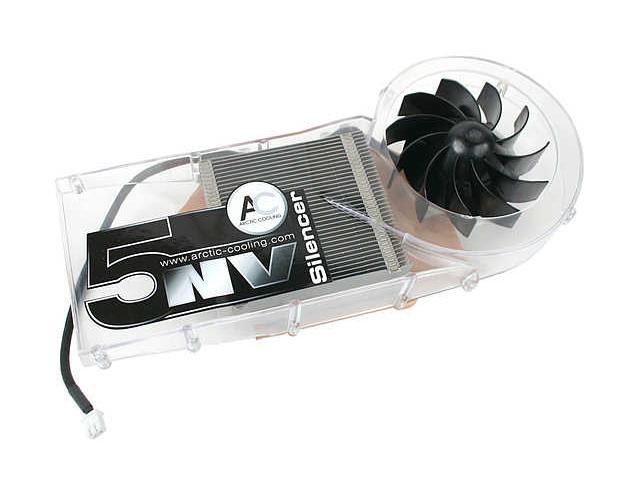
The problem is that its a dual slot design for obvious reasons. This is for people who want to get maximum overclocking outa their systems. Well you can only cool so much efficently in a small confined space of a single slot cooler. Especially when your dealing with the heat that these 6800's put out.
Nvidia actually made a very nice stock cooler with their GT's and 6800's. They work very well for their intended purpose. That being said, its hard for a company to justify to try to make something better that wouldn't cost and arm and a leg and yet still be single slot.
Though Zalman may come up with a new heatpipe solution, until then its pretty much use a NV5 or stick with the stock cooler im afraid.
Thats the drawback to SFF"s, you loose options to stuff like this.
If you really want a 3rd party cooler, your gonna have no choice but to cut the side panel to allow it to fit.
The problem is that its a dual slot design for obvious reasons. This is for people who want to get maximum overclocking outa their systems. Well you can only cool so much efficently in a small confined space of a single slot cooler. Especially when your dealing with the heat that these 6800's put out.
Nvidia actually made a very nice stock cooler with their GT's and 6800's. They work very well for their intended purpose. That being said, its hard for a company to justify to try to make something better that wouldn't cost and arm and a leg and yet still be single slot.
Though Zalman may come up with a new heatpipe solution, until then its pretty much use a NV5 or stick with the stock cooler im afraid.
Thats the drawback to SFF"s, you loose options to stuff like this.
If you really want a 3rd party cooler, your gonna have no choice but to cut the side panel to allow it to fit.
to add: placing the ice system on is tricking people. take it slow and refit it a few times if need be. but testing the temps right after is crutial or you could end up with high temps and smartfan might not work correctlyDarkWind said:Take it slow, read the instructions and double check everything and you'll be fine
Make sure to put on the correct amound of thermal compound on the CPU die. If your not sure on the amount, put a small rice sized grain on the die, spread it out with a small flat edge object and then apply the ICE system. Take it back off and see if it covers the entire surface. If not, wipe off the old compound with rubbing alchohol and cotton swabs and try again..etc etc etc...
whatcha gonna do for the gpu side of the case?