• Some users have recently had their accounts hijacked. It seems that the now defunct EVGA forums might have compromised your password there and seems many are using the same PW here. We would suggest you UPDATE YOUR PASSWORD and TURN ON 2FA for your account here to further secure it. None of the compromised accounts had 2FA turned on.
    Once you have enabled 2FA, your account will be updated soon to show a badge, letting other members know that you use 2FA to protect your account. This should be beneficial for everyone that uses FSFT.

RealTemp: New Intel Core Temp Software

unclewebb

[H]ard|Gawd
Joined
Jun 21, 2006
Messages
1,807
realtempjs9.png


http://www.fileden.com/files/2008/3/3/1794507/RealTemp.zip

Version 2.0 has eliminated the complicated IA32 device driver install and has cleaned things up.
Hopefully this is the first step on the road to a x64 edition.

http://www.xtremesystems.org/forums/showthread.php?p=2809807&posted=1#post2809807
 
I think you did a great job.... works perfectly. Even the ia32 install was painless.
 
Hopefully you check this thread still unclewebb cuz I registered for XS, but they haven't activated me yet.

Here's some info I have for you.

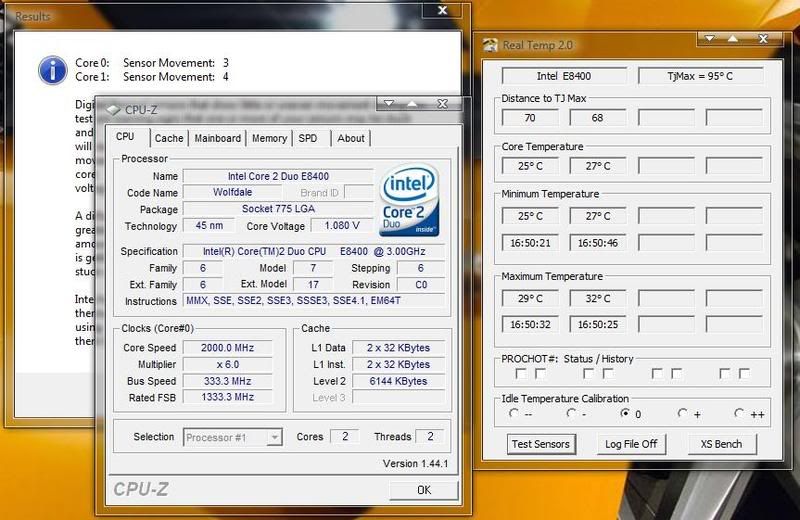
Did a calibration run. Even though I had my mobo set to 6 x 266 and it showed my cpu speed at 1600mhz it wouldn't drop below 2000mhz. It's the Evga 780i. Ambient temps were the same for both 75*F ~24*C. So judging by my calibration should I go to the "+" level or leave it where it is?

IdleCalibration.jpg


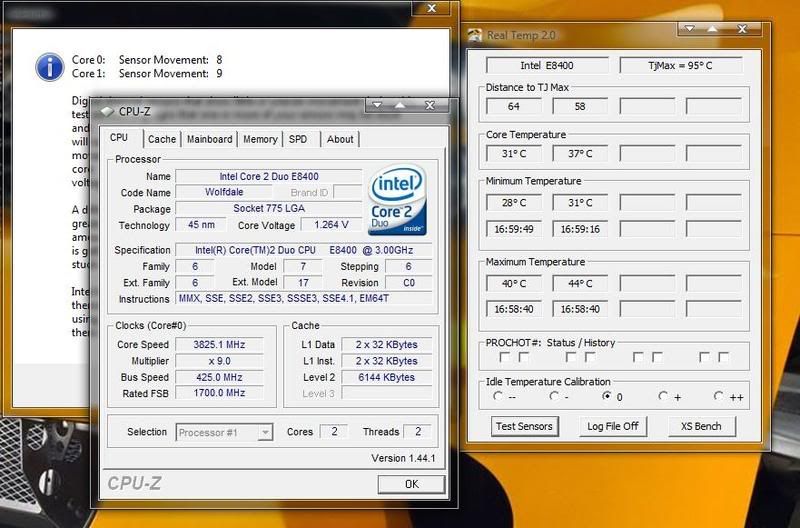
and then here is my pc running at normal speeds. I have a Zalman 9700nt so I think my cooling is fine, I might be able to get my cpu voltage down some to see if I can get the sensor movement down some. But I read that an oc'd cpu would be in the higher range, so it might actually be just fine.

OCd.jpg
 
The sensor movement test is just a quick test where a full load is placed on each core for a brief amount of time and then a comparison is made to make sure the sensors are responding. It was designed to sniff out some of the sensors that are getting stuck on the new 45nm chips. The amount of movement during this test is dependent on how much core voltage you are using, how much MHz and how good a cooler you have.

If you need 100% accurate idle temps then probably a + setting would give you a number closest to the truth but it's really not that important. Having TjMax at the correct 95C will give you very accurate load temps and that's the most important thing RealTemp does for the E8x00 series.
 
So the + and the ++ settings are designed to give you a more accurate idle temp? Not a more accurate overall temp?

Thanks for the info unclewebb. It's been great to see your work.
 
How accurate is the TJ? SpeedFan has my E2160 at 85C it seems. With this it uses 95C so now it 10C hotter. I heard that Intel doesn't actually give out TJ's for the chips and all current values are just guesses.
 
But I looked at his thread and he did it with an 8400. There may be a large difference between the series.

With his code my 10% load temp is 53 while speedfan is 43 which looks more realistic. E2160 at 333FSBx6 can't be that hot.
 
I was thinking of buying an E2160 next week and doing some real world testing with my IR thermometer on it. If you think that my selection of TjMax is wrong for your processor then at least post some RealTemp screen shots of the results at Prime load as well as at idle.

You also need to post ambient temperature, core voltage, MHz type of cooling, fan speed and anything else you can think of that will effect your core temperature readings. I'm willing to work with any user but I need a little bit of help.

My selection of TjMax varies depending on the processor and even the stepping and is not based solely on my E8400 or E6400. Many factors went into my estimations of TjMax. RealTemp is only two weeks old so it's certainly possible that it is not perfectly reporting every Intel Core processor ever made. I know it's doing a better job than SpeedFan or CoreTemp on many processors but if it's screwing up the readings on your processor then it needs to be investigated fully.

I think this is your E2160:
http://processorfinder.intel.com/details.aspx?sSpec=SLA8Z

In RealTemp you can click inside the "TjMax=" box and it will display what your CPUID is. The Intel TCase rating for this processor is pretty much identical with the E8400 and is why I went with the same TjMax value.

http://processorfinder.intel.com/details.aspx?sSpec=SLAPL
 
I was looking at the calibration instructions this morning... How do I find the "ambient" temp which I compare to the core temp at idle? (This is for my E3110 btw)

Assuming it's CPUTIN, that was 25C according to hwmonitor and I needed a "--" correction to make core temp match.

With that setting, running orthos, my cores got as high as 94C at stock speed with the stock cooler. However, the tests are passing so it seems unlikely that is the real core temp.
 
I was thinking of buying an E2160 next week and doing some real world testing with my IR thermometer on it. If you think that my selection of TjMax is wrong for your processor then at least post some RealTemp screen shots of the results at Prime load as well as at idle.

You also need to post ambient temperature, core voltage, MHz type of cooling, fan speed and anything else you can think of that will effect your core temperature readings. I'm willing to work with any user but I need a little bit of help.

My selection of TjMax varies depending on the processor and even the stepping and is not based solely on my E8400 or E6400. Many factors went into my estimations of TjMax. RealTemp is only two weeks old so it's certainly possible that it is not perfectly reporting every Intel Core processor ever made. I know it's doing a better job than SpeedFan or CoreTemp on many processors but if it's screwing up the readings on your processor then it needs to be investigated fully.

I think this is your E2160:
http://processorfinder.intel.com/details.aspx?sSpec=SLA8Z

In RealTemp you can click inside the "TjMax=" box and it will display what your CPUID is. The Intel TCase rating for this processor is pretty much identical with the E8400 and is why I went with the same TjMax value.

http://processorfinder.intel.com/details.aspx?sSpec=SLAPL

That's the chip.

Quick test this morning with OCCT.

room temp 21
Max 70
Before OCCT 48
after OCCT I turned up my case and CPU fan to the max and it dropped to 41
Speedfan is consistently 10C lower

Case, Antec P182, CPU cooler TR ultra-90

Overclock: 333FSB 1.28V
 
I was looking at the calibration instructions this morning... How do I find the "ambient" temp which I compare to the core temp at idle? (This is for my E3110 btw)

That's going to be the temperature inside your house. You can look at your themastat, or I have a little weather station and it tells me inside and outside temps.
 
well crap that is easy enough, I thought it was some magical close-to-but-not-on-the-CPU kind of ambient.

And my temps must be close to correct--RealTemp indicates that the CPU throttling was active! I will have to remount the HSF. I HATE that stock unit, those lame plastic push pins... Not giving me a lot of confidence.
 
according to unclewebb at the low voltage and speed calibrations your cpu temp should show about 3-5* warmer than ambient. I had to give mine a check in the "+" to get that right.
 
The Coretemp .97 and RealTemp both match, as far as the remaining delta to tjmax goes....that's a good sign, since CoreTemp used this way is considered pretty much the most accurate....

I am running both now, seeing how they match up...good job though!
 
Thats odd. I am running both Coretemp 0.97 and RealTemp. RealTemp is showing my cores idling at about 30C or so; Coretemp shows them idling at 43-45C. I am planning to reseat my heatsink this weekend (AC Freezer 7 Pro). I am running a C2D E6300 @ 2.1Ghz in a case with good airflow, so I don't know what the deal is.
 
Thats odd. I am running both Coretemp 0.97 and RealTemp. RealTemp is showing my cores idling at about 30C or so; Coretemp shows them idling at 43-45C. I am planning to reseat my heatsink this weekend (AC Freezer 7 Pro). I am running a C2D E6300 @ 2.1Ghz in a case with good airflow, so I don't know what the deal is.

With Coretemp, DO NOT use the actual temp recording method. Go into options and tick the box that says "show remaing delta to tjunction max" that is the ACCURATE way to see how far your cpu has to go before it hits throttling action. If you keep the cpu at least 15c away or more from this...which isn't hard to do with a decent cooler and moderate airflow...your cpu will be very happy.
 
so for q6600 which one is better to monitor temp, core temp or real temp?
 
I'm curious why you are so adamant that coretemp is more accurate?


Because if you set it to display the DELTA to tjmax....it reports the built in die sensor with NO interpretation...read up how the Intel on die sensor works...you will understand better.....
 
That doesn't make coretemp more accurate. It just means that the data is being displayed unaltered. Now, I don't know about you but I'm not up on my machine code. The data needs o be interpreted by a program with the right algorithm.
 
That doesn't make coretemp more accurate. It just means that the data is being displayed unaltered. Now, I don't know about you but I'm not up on my machine code. The data needs o be interpreted by a program with the right algorithm.

It is MORE accurate than anything else, read up on the Intel docs, if you don't, you just will not understand why. Either read the technical docs, or stay ignorant. :p
 
Realtemp also show the delta to TJMax while showing more realistic idle and load temps. Now I know the Delta to TJMax is important, but I believe Realtemp shows more accurate real time temps making it a better program.

just my 2 cents worth
 
It is MORE accurate than anything else, read up on the Intel docs, if you don't, you just will not understand why. Either read the technical docs, or stay ignorant. :p
I have read the relevant docs. If you'd be willing to explain to me what I'm missing I'd be most appreciative.

If not, I'll just have to stay ignorant.
 
always assume the highest temp is the closest to the truth and you can't go wrong.
 
always assume the highest temp is the closest to the truth and you can't go wrong.

Pretty much spot on, and CoreTemp is usually the highest...some people refuse to get educated and tend to stick to inaccurate reporting software, you know, it increases e-penis size if you think you have lower temps, regardless of whether or not it is even close to accurate. :rolleyes:
 
I have read the relevant docs. If you'd be willing to explain to me what I'm missing I'd be most appreciative.

If not, I'll just have to stay ignorant.

It's your choice, this is the USA after all, and you are allowed to have opinions :cool:
 
Back
Top