![[H]ard|Forum](/styles/hardforum/xenforo/logo_dark.png)
Hi, This was my first attempt at water cooling and I think it went quite well (let me know your thoughts). It was about 25 hours build time.
The computer specs:
Modded 800d case
Asus P6T Deluxe v2 Mobo
i7 920 oc'd to 4.2GHz
6GB 1600MHz RAM
120GB OCZ Vertex 2 SSD
3x 1TB HDD
2x ATI 5870 (reference design)
Blu ray drive
Corsair 1000W PSU
I have also got triple LED screens (3x 24") which makes for some epic gaming:

You can see the original case in this photo which was a Antec P183 case - a good and quiet case but very unsuitable for water cooling.
The water cooling spec:
XSPC 3/8 ID 5/8 OD High flex tubing - red / UV orange
XSPC 5.25 dual drive bay reservoir for two Liang DDC pumps
2x Liang DDC-1T pumps
Swiftech Apogee XT extreme CPU waterblock
XSPC RS Series 360 Radiator (CPU loop)
XSPC RX Series 240 Radiator (GPU loop)
2x XSPC Razor full cover water block for ATI 5870 (reference design only)
Variable Dual Slot SLI & Crossfire VID fitting (black nickel)
5x 1450rpm Gentle Typhoon fans
4x Bitspower 45degree rotary fittings
14x Bitspower compression fittings for 3/8 - 5/8
2x Inner thread T fittings
2x Bitspower blanking plug
Mayhems Ultra Pure H20
PT Nuke
Other stuff:
Arctic cooling MX-3 thermal compound (for GPUs and CPU)
FlexLight SMD UV LED Strips (60cm long)
5mm Twin Ultra bright RED LEDs (for the reservoir)
Magnetic Fan filters (120mm and 140mm)
Lian Li Aluminium DVD Cover (modded)
Some advice for people thinking about doing similar builds:
-There are two types of 5870 out there, reference and non-reference make sure your GPU block matches the type of 5870 you have got.
-Avoid cold cathodes!! I got one and the power inverter that connects molex to the cold cathode burnt out. I have looked online and this is not uncommon, they can sometimes damage other components while they are at it as well. The best alternative is LED strips they do just the same job, are 100% reliable and can connect directly to molex.
-If you are going crossfire/sli get dual loops.
-Make sure you get a t-line or quick disconnects in your loops as they are pretty essential for draining and maintenance.
-Use distilled water with PT Nuke / Silver kill coil, stay away from pre-mixed fluids - they are bad for your loop no matter how cool they look. You can achieve a similar effect through coloured tubing.
-Mobo blocks are basically pointless and just restrict flow, RAM and HDD blocks are even more pointless.
-The 800d case is an awesome case for water cooling loops, I highly recommend it.
The plan:
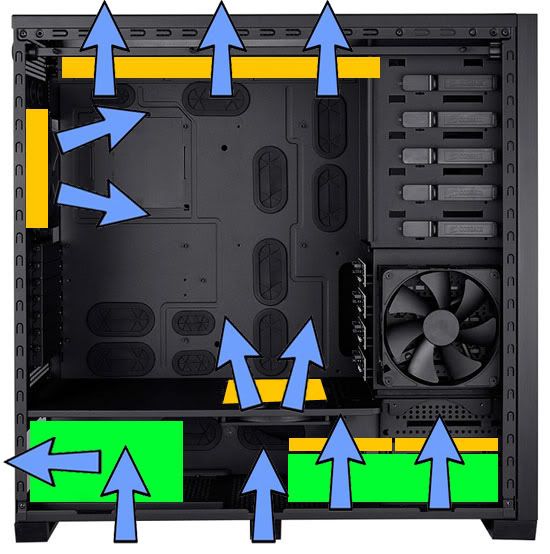
The plan was to use the top 360 rad for the CPU loop and the bottom 240 for the GPU loop with the the reservoir-pump combo taking up two 5.25 bays.
It all comes through in the post:

The 800d next to my P183:

The 5870 water blocks:

The CPU block:

The Reservoir with pumps installed:

The 240 Rad with awesome GT fans attached:

In order to fit the 240 radiator into the bottom, you need to remove the lower hdd bay and cut out a section of the bottom for airflow (bye bye warranty!). This can both be achieved using a dremel and I recommend you follow the instructions here:
http://www.youtube.com/watch?v=a9Ovlo1uwk0
It should look like this when it's done (I forgot to take a photo of mine):
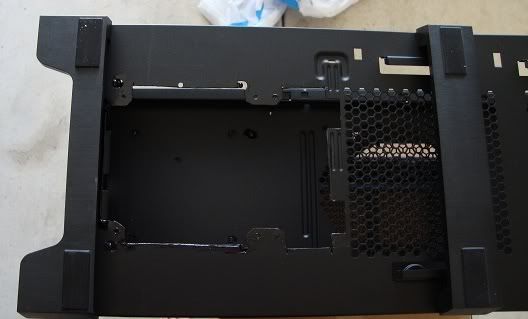
You can just see the cut out here:

At the end of this I used one of the 140mm magnetic fan filters to ensure this intake was filtered.
One of the 5870s stripped down in preparation for attaching the GPU block:

The left overs:

After having looked a lot of water cooling builds on the internet I decided to do something a bit different and put as much of the tubing as I could in what I thought was the cavernous space behind the mobo plate on the 800d.
Here is a pic of me starting off with the tubing:


Note it is essential to have enough tubing that the reservoir can be moved out far enough to allow for refilling.
I then installed the CPU plate onto the mobo:

Makes the mobo look so small!:

Bleeding and leak testing CPU loop:

Installation, bleeding and leak testing the GPU loop as well:

Bleeding and leak testing complete:

Shot of the back (t-lines visible):

Everything else installed:

Notice how the wires are not very visible, I achieved this buy using my trusty permanent marker to colour them all black, it was time consuming but worth it. I think it looks nicer than sleeving.
The back end:

This looked horrible but because of the tubing at the time I didn't have much choice, there turned out to be very little space for everything to fit in.
I then used the computer for about a week before I took it apart. Why? Two reasons:
-I couldn't live with myself for having done such a fantastic wiring job on the front but such a terrible job at the back.
-The 5.25 reservoir-pump combo is a very tight fit into the 800d case and it was vibrating a lot, using the 800d as a sounding board and was disappointingly loud.
This of course meant removing all wiring and draining the loop, boy was I glad I installed those t-lines!
Here is what it looked like afterwards:

This is what I did to the 5.25 bays to ensure the reservoir would stay quiet:

I removed the metal lips for one of the 5.25 bays and added foam strips to where the reservoir would make contact with the case. It is now completely silent and I really have to concentrate to here my desktop running now.
Finishing Touches:
Added the UV LED strips.
I also got the Lian Li Aluminium DVD cover, modded it with my dremel so it would fit inside the 800d to cover the blu ray drive. I think it improved the look of the case.
You can see it below the reservoir:


Temps:
Before all this I had the stock cooling on my 5870 and a h50 with 2 GT 1850rpm fans on it. Average room temps about 18 degrees.
Used to idle about 40 degrees CPU and 55 degrees GPU. Load temps were about 75 degrees CPU and 80 degrees GPU.
Now idles at 28 degrees CPU and 30 degrees GPU (average of the two). Load temps are now 60 degrees CPU and 40 degrees GPU.
Thanks for viewing!!
The computer specs:
Modded 800d case
Asus P6T Deluxe v2 Mobo
i7 920 oc'd to 4.2GHz
6GB 1600MHz RAM
120GB OCZ Vertex 2 SSD
3x 1TB HDD
2x ATI 5870 (reference design)
Blu ray drive
Corsair 1000W PSU
I have also got triple LED screens (3x 24") which makes for some epic gaming:
You can see the original case in this photo which was a Antec P183 case - a good and quiet case but very unsuitable for water cooling.
The water cooling spec:
XSPC 3/8 ID 5/8 OD High flex tubing - red / UV orange
XSPC 5.25 dual drive bay reservoir for two Liang DDC pumps
2x Liang DDC-1T pumps
Swiftech Apogee XT extreme CPU waterblock
XSPC RS Series 360 Radiator (CPU loop)
XSPC RX Series 240 Radiator (GPU loop)
2x XSPC Razor full cover water block for ATI 5870 (reference design only)
Variable Dual Slot SLI & Crossfire VID fitting (black nickel)
5x 1450rpm Gentle Typhoon fans
4x Bitspower 45degree rotary fittings
14x Bitspower compression fittings for 3/8 - 5/8
2x Inner thread T fittings
2x Bitspower blanking plug
Mayhems Ultra Pure H20
PT Nuke
Other stuff:
Arctic cooling MX-3 thermal compound (for GPUs and CPU)
FlexLight SMD UV LED Strips (60cm long)
5mm Twin Ultra bright RED LEDs (for the reservoir)
Magnetic Fan filters (120mm and 140mm)
Lian Li Aluminium DVD Cover (modded)
Some advice for people thinking about doing similar builds:
-There are two types of 5870 out there, reference and non-reference make sure your GPU block matches the type of 5870 you have got.
-Avoid cold cathodes!! I got one and the power inverter that connects molex to the cold cathode burnt out. I have looked online and this is not uncommon, they can sometimes damage other components while they are at it as well. The best alternative is LED strips they do just the same job, are 100% reliable and can connect directly to molex.
-If you are going crossfire/sli get dual loops.
-Make sure you get a t-line or quick disconnects in your loops as they are pretty essential for draining and maintenance.
-Use distilled water with PT Nuke / Silver kill coil, stay away from pre-mixed fluids - they are bad for your loop no matter how cool they look. You can achieve a similar effect through coloured tubing.
-Mobo blocks are basically pointless and just restrict flow, RAM and HDD blocks are even more pointless.
-The 800d case is an awesome case for water cooling loops, I highly recommend it.
The plan:
The plan was to use the top 360 rad for the CPU loop and the bottom 240 for the GPU loop with the the reservoir-pump combo taking up two 5.25 bays.
It all comes through in the post:
The 800d next to my P183:
The 5870 water blocks:
The CPU block:
The Reservoir with pumps installed:
The 240 Rad with awesome GT fans attached:
In order to fit the 240 radiator into the bottom, you need to remove the lower hdd bay and cut out a section of the bottom for airflow (bye bye warranty!). This can both be achieved using a dremel and I recommend you follow the instructions here:
http://www.youtube.com/watch?v=a9Ovlo1uwk0
It should look like this when it's done (I forgot to take a photo of mine):
You can just see the cut out here:
At the end of this I used one of the 140mm magnetic fan filters to ensure this intake was filtered.
One of the 5870s stripped down in preparation for attaching the GPU block:
The left overs:
After having looked a lot of water cooling builds on the internet I decided to do something a bit different and put as much of the tubing as I could in what I thought was the cavernous space behind the mobo plate on the 800d.
Here is a pic of me starting off with the tubing:
Note it is essential to have enough tubing that the reservoir can be moved out far enough to allow for refilling.
I then installed the CPU plate onto the mobo:
Makes the mobo look so small!:
Bleeding and leak testing CPU loop:
Installation, bleeding and leak testing the GPU loop as well:
Bleeding and leak testing complete:
Shot of the back (t-lines visible):
Everything else installed:
Notice how the wires are not very visible, I achieved this buy using my trusty permanent marker to colour them all black, it was time consuming but worth it. I think it looks nicer than sleeving.
The back end:
This looked horrible but because of the tubing at the time I didn't have much choice, there turned out to be very little space for everything to fit in.
I then used the computer for about a week before I took it apart. Why? Two reasons:
-I couldn't live with myself for having done such a fantastic wiring job on the front but such a terrible job at the back.
-The 5.25 reservoir-pump combo is a very tight fit into the 800d case and it was vibrating a lot, using the 800d as a sounding board and was disappointingly loud.
This of course meant removing all wiring and draining the loop, boy was I glad I installed those t-lines!
Here is what it looked like afterwards:
This is what I did to the 5.25 bays to ensure the reservoir would stay quiet:
I removed the metal lips for one of the 5.25 bays and added foam strips to where the reservoir would make contact with the case. It is now completely silent and I really have to concentrate to here my desktop running now.
Finishing Touches:
Added the UV LED strips.
I also got the Lian Li Aluminium DVD cover, modded it with my dremel so it would fit inside the 800d to cover the blu ray drive. I think it improved the look of the case.
You can see it below the reservoir:
Temps:
Before all this I had the stock cooling on my 5870 and a h50 with 2 GT 1850rpm fans on it. Average room temps about 18 degrees.
Used to idle about 40 degrees CPU and 55 degrees GPU. Load temps were about 75 degrees CPU and 80 degrees GPU.
Now idles at 28 degrees CPU and 30 degrees GPU (average of the two). Load temps are now 60 degrees CPU and 40 degrees GPU.
Thanks for viewing!!


