• Some users have recently had their accounts hijacked. It seems that the now defunct EVGA forums might have compromised your password there and seems many are using the same PW here. We would suggest you UPDATE YOUR PASSWORD and TURN ON 2FA for your account here to further secure it. None of the compromised accounts had 2FA turned on.
    Once you have enabled 2FA, your account will be updated soon to show a badge, letting other members know that you use 2FA to protect your account. This should be beneficial for everyone that uses FSFT.

Project: Hp laserjet Computer

Status
Not open for further replies.

Scorpionjwp

2[H]4U
Joined
Jul 14, 2004
Messages
2,094
Well here I am, I just brainstormed combining a Hp laserjet 6L with a mini-itx board. A friend just gave away the printer to me, now I know why, It don't work.

Here is what I have in front of me as of now:

A Hp laserjet 6L printer and a Micro tower with an mini-itx mb in it, which is my linux box.

I am gutting out the printer, leaving the bottom plate and shell, then disassemble my linux box. All the components are going into the shell of the Printer, but I'm not sure of which way I am mounting the drives. I figure it out once I get there.

I started disassembling the printer at 8:00 pm on 9-25-04 and completed gutting it at 9:15pm. It is 9:30pm and I am now disassembling the linux computer, more to come tomorrow morning. I will try to complete the computer either tomorrow or next saturday, I start a new job monday, Try to work on it in the evenings.

Updates to come later and pictures also.
Anyone have any suggestions to help me on my project, I would be very happy to hear them?
 
The only suggestion that I have it to try and keep it looking as stock as possible. This sounds like a kewl idea. Good luck! :)
 
Well this morning, I woke up to see a mess on the table, strewn everywhere was pieces of my linux box. I have just cut out the side of the laserjet6L casing for the backplate for the mb. At about 12:30 I completed cutting the metal out for placing the backplate. 15minutes later, I installed the mb, and was using the dremel to the case.

Around 2:00pm I completed cutting the side out, made sure if it looked ok, which it does. Have the hd bracket and used the heavy duty outdoor foam tape to mount the bracket to the upper part of the printer. The foam will hold up to 5lbs, so it is safe to use, the hd don't weight that much. I also installed the ls-120 drive in the bracket also.

Now I have this problem, I have a regular size dvd drive, and a mini powersupply. I have room on the other side of the mb to place the powersupply, mounting it to the bottom plate creates a problem, I will have to take apart the powersupply, drill holes on the side to get it to mount to the bottom plate.

Please someone answer this question for me, can I mount the dvd drive where the tray slides upward and will the cd still spin or read it I mount it this way? Or should I go the direction of getting a slim cd drive?
Suggestions please!
 
DVD drives don't like being striaght up, they have trouble reading discs that way. They will, however, read discs when they're on their side. If you can't fit horizontally or on its side, you're gonna have to get a slimline drive.
 
Thank you for the tip, I will get back to it next week. I start new job tomorrow, so the latest I will work on it is saturday.
 
If you get this working, send me a PM. I might be able to get it highlited somehow....and maybe nominate it for an award for creativity we have.
 
Well I'm back at working at my project again. I had to remount the parallel port back into the printer, I needed a flat place to put the powersupply, putting it on the bottom plate wasn't doing me to good. I mounted it in using the 3m heavy duty outdoor foam tape.

I looked at it once more to see what more needed to be done. I trimmed some plastic above the parallel port for the opening for the power plug to the powersupply. Just to let you know there is a size difference between the hp laser jet3 and the laserjet 6l. The laserjet3 took up a large area while the 6L took up the same space as a mid tower case. Since we got the size out of the way, I will have to find an alternative way to mount the dvd drive. I have a normal size drive, so this drive will go to another computer and I am getting a slim drive to mount instead.

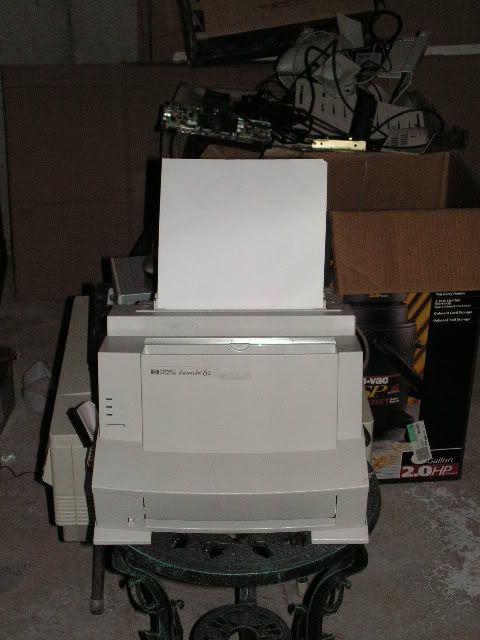
The overall look of the printer, looks as stock as you can get, but it has some modifications to it.
 
As soon as I grab the camera and load the film. I will also take pictures of my quad server mod as well. I will go through the roll of film tomorrow, ok maybe not, I got too busy to see straight.

Well I have found a slim cd-dvd drive, my friend has two, so he let me have one and he will keep the other one. Hey I need an link to someone that sells the laptop cd-rom to ide adapter.
 
Duh. Why didn't I think of this earlier?

I've got a half-dead LaserJet III (blown fuser bulb, not worth replacing) that I've been trying to find a use for.

Umm...permission to steal your idea? Will give credit if I actually do it and start a worklog, of course :)

Good thinking, can't wait to see pics.
 
Not sure if your stealing my idea, I figure I'm not the only one around here to think of it or have done it.
 
Scorpionjwp said:
Not sure if your stealing my idea, I figure I'm not the only one around here to think of it or have done it.

Either way, it'll be fun :)

Is this the printer you'll be using?

http://www.fleamarket.gr/lotimage17/hp_laserjet_6p.jpg

iirc, it's got a snap-shut panel on the bottom front. Great place for drives :D It's been years since I saw one up close, so I'm not sure about that.

If that's the one, it looks a lot like mine:

http://www.andovercg.net/assets/images/prod_images/uni-0002.jpg
 
Scorpionjwp said:
It is neither of the two, it is a HP laserjet 6L, just for starters here is a link to a picture of it:

http://h10010.www1.hp.com/wwpc/us/en/sm/WF10a/18972-236251-236263-14638-236263-25476.html

Now everybody will know what constraints I had to deal with in my mod.

I knew that. I don't know how I managed to forget seeing the L in your first post by the time I posted that. I'm a tard today.

Now I know why the printer is dead. I fixed my mom's 6L about a dozen times before I just refused to fix it again. Those things aren't good for much but modding, or maybe use as a boat anchor.

You're in for a fun mod. Good luck, and by god we want pics :p
 
Ok here is whats now going on, I have decided to not get a slim cd drive but get instead a external case for the dvd drive. They make these cases that take usb so, now I can get somewhere, besides looking everywhere for a cheap slim drive and try to find an adapter for it.

Update: The hp Laserjet mod is full steam ahead and thanks to the assistant of the [H]uman I got a external usb powered case for the dvd drive. The computer is just about completed, I didn't like xp pro on it, the services was hogging my resources, so a reformat and win 2000 will be loaded on it.

It is 11-23-04:
The reformat is completed, win2000 is on it with all the programs I want, I put the dvd drive in the external case and to finish it off, I managed to hide my wireless reciever for the mouse in the printer case. Woot! 2 months to finish up this mod, I am doing good.

Well you may want to know where are the pictures, I will take the pictures tonight, 2 more pictures to finish up a roll of film. I have other rolls of film ready once I run out on this one roll. I promise you it will be sometime next week when we all see pictures of it.

The mod has hit a speedbump, I just have found out that trying to hook up a usb2.0 device to a usb1.0 mini-itx board just doesn't work. I have gotten a pci addon usb2.0 card and will be installling it soon.
The quad xeon mod is now full steam ahead, the one that is posted in the case modding forum. Oh boy, I am working on two mods at once, the quad xeon might actually see the light of day.
 
An update: Pictures will be loaded up sometime tonight, the printer looks as stock as it comes, I had to cut off some pieces of the plastic for the backplate, but overall it looks sweet.

Now how many people do you know, who has a hp laserjet printer that runs windows 2000. The manual paper feed buttom on the printer is now the power button for the computer.
 
In the February 2005 issue of Maximum PC, a guy got Rig of the Month for this. If you can find one, you should check it out. Just pointing that out..
 
I saw the rig of the month on a website displaying the mod in Maximum PC. It looks great, alot of room to work with.

Unlike that mod, I am stretched thin on room in which to work with, hence I have this mod in a HP laserjet 5si.
 
Here is what you all have been waiting for:
I know some of the pictures, I know I still have some finishing up to do, but overall most of this mod is completed.

overall look1.JPG

Backofmod.JPG

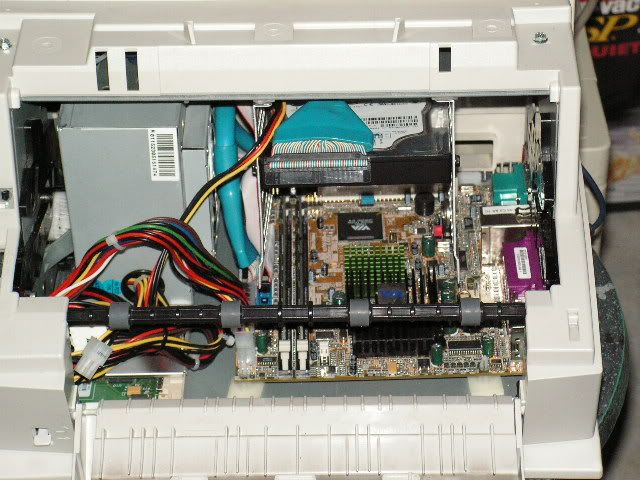
insidepc1.JPG

Backplate.JPG

Tightfit.JPG

poweroutletbk1.JPG

Ledsandpowerbutton.JPG


I welcome your insight into my mod and comments about it.
 
Ok Guys to revive this work log, I am posting the final pictures to complete this log.
Please Note that in order to get a dvd-rom to work with this mod I had to use it externally

miniprinter1.jpg

miniprinter2.jpg

miniprinter3.jpg
 
Sorry... I just don't get it. Why do it if the printer was chucked out? You can do better! Get creative! Put a slot loading dvd vertically into one of the paper trays! Add a 7" LCD to the front so you can use it as a stand alone! Something!!

Otherwise, you've basically got a big junky plastic box with an ITX motherboard rammed in it.

You're not finished... you're just getting started!
 
Sorry I don't know one bit about electronics and about rigging a LCD into the printer box. And if you haven't noticed, I asked how to mount the dvd drive in my work log and quite a few people said I couldn't mount one vertically, that it wouldn't read the discs well.

Also, someone before tried this with another printer, in fact he made it in the PC Maximum magazine for modding a computer into a printer. His looks like mine, gutted out a printer and used the shell to house a computer.

Plus I was making it all while I was thinking about those safes that are embedded into books, thus why it is discuised as a printer, no would even think it was a computer sitting on a desk.
 
I didn't know much about electronics either 'till I built my first PC, had to learn by manuals,web forums, and trial-and-error. You can get 5" and 7" LCD's on ebay for mounting in cars (headrest and visor kits) and they have standard connections. I have seen others with VGA input as well. Just plug them into the power and video and you're set. As for the DVD... you may have some difficulty reading the disc if is not completely vertical (angled like the tray) but It has been done by others. Check out the "MiniG5ized" thread in the worklogs. He mounted his drive vertically. Mac also mounted theirs vertically in the G3 Cube. Lots of potential still left in that case.
 
Sorry about leaving off with a sweet ending with this worklog, but some other life things came around and having no cash to make this mod anymore than it is, I left it and started with my monster of a pc case built from the ground up as a server case.

If I had $100- $200 to purchase a 5" lcd, I would have gotten it already, but each week where I work full time is being saved up to pay off my new car instead of having to make $280.00 each month over the span of 60 months. You can pretty much see, I am trying to save as much as I can, w/o overdoing myself.

Oh you ask, it takes money to start another work log or another computer, ah yes it does, but I have an answer to that. Many things I have gotten free on my second work log, where as free didn't get me far on this mod.
 
Status
Not open for further replies.
Back
Top