![[H]ard|Forum](/styles/hardforum/xenforo/logo_dark.png)
Navigation
Install the app
How to install the app on iOS
Follow along with the video below to see how to install our site as a web app on your home screen.
Note: This feature may not be available in some browsers.
More options
You are using an out of date browser. It may not display this or other websites correctly.
You should upgrade or use an alternative browser.
You should upgrade or use an alternative browser.
Lost core and thread count on i7 3960 cpu
- Thread starter raglafart
- Start date

raglafart
Limp Gawd
- Joined
- Feb 21, 2013
- Messages
- 227
Well, I did try that............... At least I thought I'd tried that!
Clearly I didn't get it correct as you can now see I'm now seeing the full 6 cores and the full 12 threads.
I'm going to have to drop the 3960 back in at some time just to see if I get a full core and thread count on that one.Thank you everyone for your patience with me.
I've never played around with the advanced boot settings so have no idea why the changes occurred.
I had assumed I had damaged the CPU when the AIO H220 pump failed as this was when I last did a CPU-Z check and where I first saw the problem.
So again, thank you everyone and as you can see, the 2nd hand 4930 is running well.
Cheers JG


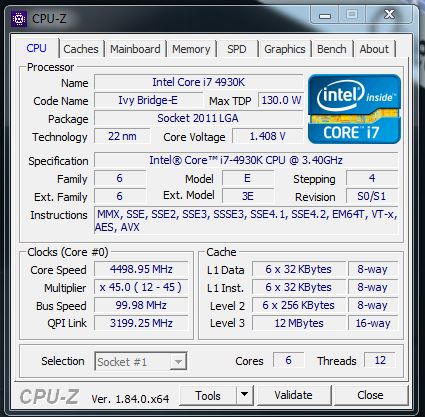
Clearly I didn't get it correct as you can now see I'm now seeing the full 6 cores and the full 12 threads.
I'm going to have to drop the 3960 back in at some time just to see if I get a full core and thread count on that one.Thank you everyone for your patience with me.
I've never played around with the advanced boot settings so have no idea why the changes occurred.
I had assumed I had damaged the CPU when the AIO H220 pump failed as this was when I last did a CPU-Z check and where I first saw the problem.
So again, thank you everyone and as you can see, the 2nd hand 4930 is running well.
Cheers JG

vick1000
2[H]4U
- Joined
- Sep 15, 2007
- Messages
- 2,443
Somehow 3 cores must have been disabled, if only for a single boot, maybe some feature of the BIOS after the heat related from the pump failure. When you said your pump failed, it was not from a leak right?
raglafart
Limp Gawd
- Joined
- Feb 21, 2013
- Messages
- 227
Hi everyone
I'm just about finished doing a clean install and everything is working great again. The boot time is really fast, one of the things that had deteriorated over the years.
I forgot to reset the boot setting after setting up a small disc with Linux from other operating systems back to Windows secure boot, but other than that I've been able to transfer all my files and reload all my programs with out any hassles. So much so I'm seriously thinking of getting a new SSD and doing it all again and reformatting this drive and doing a clean install on my wife's machine.
Vick, no water leaks and I've had an email from Swiftech to let me know the pump/cooling block is on the way back to me which I'll be able to again use on my wife's machine. I suspect your assumption that it was the some form of overheating protection that may have altered the core settings.
I'm just about finished doing a clean install and everything is working great again. The boot time is really fast, one of the things that had deteriorated over the years.
I forgot to reset the boot setting after setting up a small disc with Linux from other operating systems back to Windows secure boot, but other than that I've been able to transfer all my files and reload all my programs with out any hassles. So much so I'm seriously thinking of getting a new SSD and doing it all again and reformatting this drive and doing a clean install on my wife's machine.
Vick, no water leaks and I've had an email from Swiftech to let me know the pump/cooling block is on the way back to me which I'll be able to again use on my wife's machine. I suspect your assumption that it was the some form of overheating protection that may have altered the core settings.
Well, I did try that............... At least I thought I'd tried that!
Clearly I didn't get it correct as you can now see I'm now seeing the full 6 cores and the full 12 threads.
So again what was informed to you in the 1st page of the thread ?
When the 4930 showed only 3 cores I dropped it into my wife's machine, which I've already gone into and it worked fine, all 6 cores and 12 threads.
So, it is 100% a Windows 7 Professional SP1 64 bit error.
A: beacuse it was not running with you wrong settings
B: its not windows 7 error its an user error of not understanding the settings you are messing with.
the solution had been provided to you prior.