• Some users have recently had their accounts hijacked. It seems that the now defunct EVGA forums might have compromised your password there and seems many are using the same PW here. We would suggest you UPDATE YOUR PASSWORD and TURN ON 2FA for your account here to further secure it. None of the compromised accounts had 2FA turned on.
    Once you have enabled 2FA, your account will be updated soon to show a badge, letting other members know that you use 2FA to protect your account. This should be beneficial for everyone that uses FSFT.

Issue with Core 2 Duo CPU's

lelliott731

[H]ard DCOTM April 2017
Joined
Mar 15, 2002
Messages
941
Ok, I'm a little confused at the moment, and maybe you all can help me.

I was given a Dell Inspiron 530s, which came with 4GB of DDR2 RAM & G33 built in graphics.

Initially it had a Core 2 Duo E7200, 2.53GHz, 3MB L2 Cache, 1,066MHz FSB. On a P2665 WU, it was getting 1,211PPD for 239.33PPDpGHz.

Then I decided I could get the Core 2 Duo E8500, because it was the fastest processor in the same thermal envelope, and since the Inspiron 530s is a very small case, I figured I should stay within the original specification.

The Core 2 Duo 8500, 3.16GHz, 6MB L2 Cache, 1,333MHz FSB. On the same P2665 WU, it's getting 1,353PPD for 214.08PPDpGHz.

My question is, why the drop? Shouldn't it be doing AT LEAST the same PPDpGHz as the 7200, if not more since it has double the L2 cache and a faster FSB?


This is very interesting. Since the 8500 does have more L2 cache, I would have expected better results as well.

 
So you swapped the 7200 out for a 8500? Are you sure the bios is recognizing it correctly and running it at the correct speeds?
 
^^^ may need bios update...

or check the temps... I would think coretemp readings are in order... maybe you didn't get a great seating on install?

 
Hmm...I ran CPUz, and it said it was running at 1333FSB, and 3.16GHz. It shows all of the 6MB L2 cache being there. I don't know how to check temperatures in a Dell box, anyone have a tool I could use?
 
This is very interesting. Since the 8500 does have more L2 cache, I would have expected better results as well.


Also capreppy, there's a 633MHz increase in speed per core as well, so a 1.2GHz in speed increase, as well as double the L2 cache, not to mention the 25% speed increase in FSB.


Coretemp should work just fine and it's worth checking for a bios update as Sunin mentioned
 
Yeah, I updated it to the latest & greatest BIOS before I even put in the new CPU.
 
Run cpuz and take a screenshot then post it here. Maybe the bios is a bit crippled (either running the E8500 with the 1066 MHz FSB instead of 1333).

 
Ok, here is all the information I can get from the office. I took screenshots via OneNote, across LogMeIn, that's why they are in black & white.

First up is Core Temp:
Core2DuoTemp.jpg


Now CPUz CPU Screen:
Core2DuoCPUzCPU.jpg


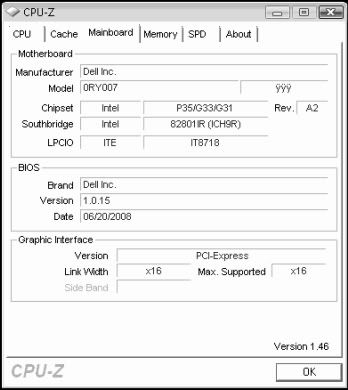
CPUz Mainboard Screen:
Core2DuoCPUzMainboard.jpg


CPUz Memory Screen:
Core2DuoCPUzMemory.jpg


CPUz SPD Screen:
Core2DuoCPUzSPD.jpg


So after seeing all that, does anyone see why I'd be loosing so much??? I'm running Vista x64 with a GPU2 Client on it. The GPU2 Client is only running a 8600GT, so nothing major.
 
Looks fine. You are supposed to get about 1800 ppd out of that box by extrapoling the data I know... Try wiping the SMP install then redo it.

 
It could just be something weird with the windows smp client. I know I've had loads of strange issues with it in the past.
 
Yeah, that is kinda' weird lelliott731 :eek:

I have 2x E6600's, 2xGB's PC6400 RAM and both OC'ed to 3.0 GHz .Both are happily folding 24/7 with the notfred CD. The boxen get about 2,000 ppd apeice (2160, 1989 ATM)

It seems like you should get more ppd, even using windose (I have never used Vista, but even with AC I still prefer using Linux for a dedicated folder :D I hope one of our "resident gurus" can help you :confused:

FOLD ON and "Good Luck"

Edit: OBTW, both boxen have onboard graphics (one G33 the other G31), the watt thing at the wall with a Kill-o-watt meter is a rocking between 206w to 210w's (bein' temp anal I have a couple of 120mm coolin' fans + Zalman 9700 HSF's in each boxen, in fact one boxen is a Antec 900 with that monster top fan, 220mm?)

Oh yeah, the watt reading is sans my electricity guzzling SyncMaster 20GLsi monitor (I know I'd be better off with a LCD, it just cuts into my fojlding money to purchase one :rolleyes:))

 
So after seeing all that, does anyone see why I'd be loosing so much??? I'm running Vista x64 with a GPU2 Client on it. The GPU2 Client is only running a 8600GT, so nothing major.

Are you running a SMP client and a GPU client on the same box ??

If so, it looks like one of the SMP cores is being stalled.
Whats the PpDpGhz figure without the GPU2 client running ??

Luck ............. :D
 
Affinity changer?

Maybe its loading all 4 on one core or 3 on 1 and 1 on another...

 
Ok, I'll checked into the way stuff is set up at home.

FaH GPU2 Client is set to use CPU1 only.
FaH SMP Client is set to use CPU0 & CPU1.

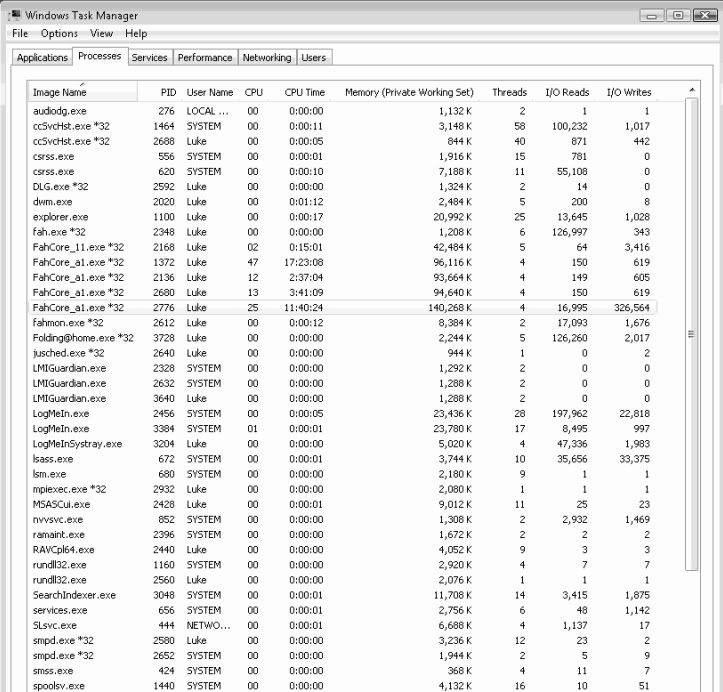
Here is a screenshot of my task manager:

Core2DuoTaskManager.jpg


experiment with the GPU client... you might want to spread that among both cores... are you using XP? or Vista? Still suggesting Affinity Changer.
 
I'm using Vista, and x64 at that. Between jws2346 and Xilikon, I'm running anywhere between 500 & 700PPD less then what I should be, and that doesn't make me feel very good.
 
The # they quoted wa without a gpu... with you bog'n a single core with the gpu... you are probably loading the core that the SMP wants to use as the primary. Play with that gpu affinity... try core 2 or both cores.


Does Affinity Changer work on x64 Vista? I stopped the GPU client and my points shot up 200 or more PPD, but still no where near what the guys are saying.


Yep it works with Vista 64 I know I'm running it :)

 
I'm getting ~ 1450 PPD from a E8400 running stock (3.0ghtz). No GPU client, just the Windows SMP.

 
Yeah, I just turned on Affinity Changer with just the WIndows SMP client, and it's gone from 1530 to 1630PPD, which is great! Now I just need to figure out how to get it to stay that way with GPU2 as well.


Well I turned the GPU2 client on, with the Affinity Changer and the SMP client and it's now working great!!! The SMP client is pumping out 1660PPD, and the GPU client is pumping out 850PPD, for a total of 2,510PPD.

And now I think my PPDpGHz is much better:
E7200 = 239.32PPDpGHz
E8500 = 262.65PPDpGHz

And that's without my GPU2 Client numbers, that's just the SMP Client numbers, so the Affinity Changer really helped out. I wonder why Windows has such a hard time getting the most out of the resources it has by itself?


@lelliott731, like Sunin said, the numbers I quoted are sans GPU, I don't even have a folding capable GPU yet :(

Always remember the ppd is grossly effected according to the particular WU you have. In the pic below the "W' and "B' are diskless/headless E6600's, both OC'ed to 3.0 GHz and both with 1 GB PC6400 RAM. (they're both crunchin' WU 2605)


FOLD ON!

 
Back
Top