Is sli overkill for me?

plionn

n00b
Joined
Aug 27, 2005
Messages
7
Hey, guys I've been reading/searching around and I can't decide which way to go. currently I have an antec neo he 500 +8800gt in a p180 case with sata drives/sata dvdrw. I plan on getting 4gb ram + Q6600. My problem is between choosing a sli motherboard 780i or going single card and going with the abit ip35 pro? unless theres another alternative?

This system would be for gaming and I would like to overclock to 3ghz on air if possible. Been living under a rock since my x2 3800+ s939 system so I don't know whats best. My native res is 1680x1050 and I play strategy/fps like company of heroes,tf2, and hopefully starcraft 2/diablo.

-is it worth getting a sli mobo and getting a second card a year or two from now? Is it overkill and should I going single card with an intel mobo, if so which motherboard?
 
Hey, guys I've been reading/searching around and I can't decide which way to go. currently I have an antec neo he 500 +8800gt in a p180 case with sata drives/sata dvdrw. I plan on getting 4gb ram + Q6600. My problem is between choosing a sli motherboard 780i or going single card and going with the abit ip35 pro? unless theres another alternative?

This system would be for gaming and I would like to overclock to 3ghz on air if possible. Been living under a rock since my x2 3800+ s939 system so I don't know whats best. My native res is 1680x1050 and I play strategy/fps like company of heroes,tf2, and hopefully starcraft 2/diablo.

-is it worth getting a sli mobo and getting a second card a year or two from now? Is it overkill and should I going single card with an intel mobo, if so which motherboard?

At that resolution SLI is WAY overkill. You will see no bennefit from it.
 
a single card will do fine for you, especially for those games. sli is only for the major resolutions, not 1680x1050. get either a abit or gigabyte p35 mobo. remember to get 64bit os since ur getting 4gb (2x2gb) of ram @ 800mhz.
 
At the rate new video cards are released, it's better to run a single card and upgrade more often. The newest single cards are usually as fast/faster than the last generation of SLI.

Also, between the expense and number of problems with SLI, I don't see much value in it. I'm all the time seeing reports that SLI doesn't work correctly (or at all) in Vista, newest games, etc.

SLI FTL!
 
At the rate new video cards are released, it's better to run a single card and upgrade more often. The newest single cards are usually as fast/faster than the last generation of SLI.

Also, between the expense and number of problems with SLI, I don't see much value in it. I'm all the time seeing reports that SLI doesn't work correctly (or at all) in Vista, newest games, etc.

SLI FTL!

SLI works fine in Vista. The earliest drivers for Vista didn't work correctly, but that was quite a while back. You can make SLI work with the newest games. All you need to do is create your own SLI profile. It isn't difficult to do. Typically NVIDIA has new drivers out to support the latest games in less than a week, so again the complaint is virtually a non-issue.

I've been using SLI since the 6800 Ultra days and it has always served me well and done so with very little problems.

As for newer generation cards always being faster than last generations SLI I'm calling bullshit because that isn't how it worked.

It worked out like this:

6800 Ultra SLI > 7800GTX 256MB
7800GTX 256MB SLI > 7800GTX 512MB
7800GTX 512MB SLI > 7900GTX
7900GTX SLI > 7950GX2
7950GX2 Quad-SLI < 8800GTX (Give or take in some games.)
8800GTX SLI > 8800 Ultra
8800GTX/Ultra 2-Way/3-Way SLI will likely be faster than the 9800GX2 if the 9800GX2 is only 30% faster than the 8800 Ultra.

So again, I completely disagree with your statement. Last generations SLI usually still beats a single next generation card. Sometimes the difference in performance is close and I won't deny that the newer cards often have superior image quality and superior feature sets while using less power. The newer card usually features newer technology and therefore a newer single card is often more desireable for a number of reasons. However make no mistake about it newer cards are rarely faster than last generation's SLI configurations. SLI isn't for everyone and typically the bulk of people that actually use it just buy the highest end cards as soon as they are released and buy them in pairs. Thinking of SLI as a worth while upgrade path I think is foolish and that sticks you with an NVIDIA chipset based board that is SLI compatible and that isn't a very appealing situation. So unless you are running a 30" monitor I wouldn't bother with SLI today.
 
Yep, I expected flames....

I would say that your example pool is not very reflective of most real world users.

First of all, 7800 series cards and 7900 series cards are the same generation even though the release of the models was spread out over time. They are both 7 series cards.

In a couple of your examples you are using two "Ultra" cards in SLI to overcome the performance of the next generation. Do a poll and see how many SLI users are running dual ULTRA cards (not many is my bet).

What happens when you compare two 6800 Ultras to a single 7900 Ultra (or whatever the fastest incarnation of the 7 series was)?

I understand that SLI may make more sense if you insist on very high resolutions. I still have no desire to back up a Brinks truck to my house to off-load the cash I need for that bragging right.

I read the forums too and I see all of the complaints about SLI, I am not swayed by your argument as to some huge real world benefit of SLI.

Again, between the expense and number of problems with SLI, I don't see much value in it.
 
Yep, I expected flames....

I would say that your example pool is not very reflective of most real world users.

First of all, 7800 series cards and 7900 series cards are the same generation even though the release of the models was spread out over time. They are both 7 series cards.

In a couple of your examples you are using two "Ultra" cards in SLI to overcome the performance of the next generation. Do a poll and see how many SLI users are running dual ULTRA cards (not many is my bet).

What happens when you compare two 6800 Ultras to a single 7900 Ultra (or whatever the fastest incarnation of the 7 series was)?

I understand that SLI may make more sense if you insist on very high resolutions. I still have no desire to back up a Brinks truck to my house to off-load the cash I need for that bragging right.

I read the forums too and I see all of the complaints about SLI, I am not swayed by your argument as to some huge real world benefit of SLI.

Again, between the expense and number of problems with SLI, I don't see much value in it.

My comparison made more sense than yours. The 7800GTX 256MB was the next generation part that replaced the 6800 Ultra. The first card in the next generation is the one that should be first compared to the last generation. Comparing the last card in a generation to the last card in the previous generation and making judgements about SLI doesn't make much sense when evaluating the value of SLI in comparison to the next generation parts that replace the previous gen cards.

When the 9800GX2 comes out that will be the card that is compared to the previous generations' champion, the 8800 Ultra. Individuals running 8800GTX's or Ultra's in SLI who are looking to go with one 9800GX2 either in the short term or the long term will compare the performance of the FIRST high end 9-Series part to the last high end 8-Series parts.

For all the bitching you hear about SLI or Crossfire there are plenty of people that aren't saying anything because they aren't having problems.
 
thanks for the replies guys, gonna go single card with the abit ip35 pro. Now I just gotta figure out which 4gb ram to get and heatsink/fan combo
 
I guess it's just another one of those cases where you say "tomato" and I say "aardvark". :)

Edit: Good choice plionn. :)
 
thanks for the replies guys, gonna go single card with the abit ip35 pro. Now I just gotta figure out which 4gb ram to get and heatsink/fan combo

If you're getting a Q6600, you don't need anything fancy. Truthfully, you don't need anything more than DDR2 800 RAM for the Q6600:

<=== cut & paste ===>

Stated FSB/4 = Actual FSB
Multiplier x Actual FSB = CPU Speed
2 x Actual FSB = RAM Speed

Q6600:
Multi x FSB, RAM Speed = Clock Speed
9 x 266Mhz, DDR2 533 RAM = 2.4Ghz <== Stock Speeds
9 x 333Mhz, DDR2 667 RAM = 3.0Ghz <== Good OC
9 x 400Mhz, DDR2 800 RAM = 3.6Ghz <== Excellent OC, About the Max

<=== end cut & paste ===>

Outside of synthetic benchmarks, there is virtually no difference between CL4 and CL5 memory. G.Skill and A-DATA are good choices for inexpensive memory (though right now A-DATA is the better choice due to its mail-in rebate).

Additionally, any of the following CPU coolers would be good enough for the Q6600:

Scythe SCNJ-1100P Ninja HSF - $36
Tuniq Tower 120 HSF - $45
Thermalright Ultima-90 HSF - $46 & Panaflo FBA09A12M 92mm Fan - $3
ZEROtherm Nirvana NV120 120mm HSF - $50
Thermalright Ultra-120 Extreme HSF - $57 & Scythe S-Flex SFF21E 120MM Case Fan - $14
 
thanks for the advice. Gonna get the SCNJ-1100P with the s-flex fan and gskill memory you linked = )
 
thanks for the advice. Gonna get the SCNJ-1100P with the s-flex fan and gskill memory you linked = )

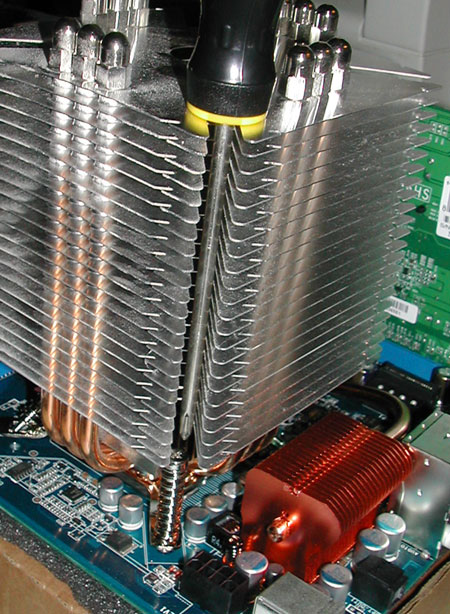
To make it easier to install, I'd suggest the Thermalright LGA775 Bolt-Thru kit, for $7 @ jab-tech.com. Just make sure you have a 5"-long screwdriver.

$7 - Thermalright LGA775 Bolt-Thru-Kit

Here's why you need a 5" long screwdriver w/ the ninja and that bolt thru kit:
ninja_bolt_thru_screwdriver.jpg
 
Back
Top