• Some users have recently had their accounts hijacked. It seems that the now defunct EVGA forums might have compromised your password there and seems many are using the same PW here. We would suggest you UPDATE YOUR PASSWORD and TURN ON 2FA for your account here to further secure it. None of the compromised accounts had 2FA turned on.
    Once you have enabled 2FA, your account will be updated soon to show a badge, letting other members know that you use 2FA to protect your account. This should be beneficial for everyone that uses FSFT.

How to Identify GPU

USMCGrunt

2[H]4U
Joined
Mar 19, 2010
Messages
3,103
I've got a GPU that is skyrocketing in temperature when its loaded and need to find out which one it is. Any utility out there that does temp monitoring also give bus location?

In more detail, when I kick furmark on GPU3 temps immediately jump to 100+ celsius while the other two gradual climb and level off around 50-55C. I guess I need to check to make sure the waterblock is properly seated but I don't know which one GPU3 is. GPU-Z reports it being being 3rd in the list but CCC reports it as being second in its list. I've got 2 XFX cards and 1 Sapphire. GPU-Z at least tells me its an XFX card so I have a 50-50 shot but i'd really like to know which one I should give special attention to.
 
If your motherboard has PCI-e disable DIP switches, that's exactly what they are there for.

GPU-Z should be able to help by IDing the BIOS string?:D
 
Disable crossfire. Test one card at a time (swapping monitor inputs).
 
I will give that a try Tsumi...kind of a duh thing but obviously im not using my head lol. I drained the loop, checked the cards and one of them had a few dryish spots in the middle of the GPU chip so I added more TIM and reseated the waterblock. Temps are a little better but the one card still skyrockets in comparison to the other two. It eventually levels off after about 15-20 minutes at 98-100c while the other two stick around 55-60c.

Also one of the GPU temp probes that GPU-Z picks up says it hit a high temp of 152c...is that bad? I think it was GPU Temp #2.

From my understanding though, furmark loads are not something that we'll see in real world usage? If that's the case I guess im not too worried about it as temps plunge as soon as I reduce the settings in furmark as its running. If I have everything on and its peaking at about 99c, if I turn off the fuzzy effect temps almost immediately drop to 70c and continue to drop till about 65c.
 
I will give that a try Tsumi...kind of a duh thing but obviously im not using my head lol. I drained the loop, checked the cards and one of them had a few dryish spots in the middle of the GPU chip so I added more TIM and reseated the waterblock. Temps are a little better but the one card still skyrockets in comparison to the other two. It eventually levels off after about 15-20 minutes at 98-100c while the other two stick around 55-60c.

Also one of the GPU temp probes that GPU-Z picks up says it hit a high temp of 152c...is that bad? I think it was GPU Temp #2.

From my understanding though, furmark loads are not something that we'll see in real world usage? If that's the case I guess im not too worried about it as temps plunge as soon as I reduce the settings in furmark as its running. If I have everything on and its peaking at about 99c, if I turn off the fuzzy effect temps almost immediately drop to 70c and continue to drop till about 65c.

You should load up your favorite game and see what gives.

My 7970s run at 65C on air (65% fan) so I think that the "good" temps you see are still too high, especially watercooled. Something is amiss there.....and yes 152C is way too high.
What MB do you use?
Again, if the MB has those little switches, you can "turn off" a GPU at a time and see which one is running so darned high.
 
You should load up your favorite game and see what gives.

My 7970s run at 65C on air (65% fan) so I think that the "good" temps you see are still too high, especially watercooled. Something is amiss there.....and yes 152C is way too high.
What MB do you use?
Again, if the MB has those little switches, you can "turn off" a GPU at a time and see which one is running so darned high.

No, I don't have a motherboard with switchable PCIe slots...ill just have to run with eyefinity/xfire disabled and see which one spikes. I really dont want to tear down this loop more then one more time...its not messy thankfully...just time consuming.

Also, your running your fans at 65% which I imagine is pretty loud. Ive got 3 SilenX fans that run about 1600RPM and put out barely more then a whisper pushing about 30CFM each....so faster fans on my end would also help push temps down but I agree...something is amiss.
 
No, I don't have a motherboard with switchable PCIe slots...ill just have to run with eyefinity/xfire disabled and see which one spikes. I really dont want to tear down this loop more then one more time...its not messy thankfully...just time consuming.

Also, your running your fans at 65% which I imagine is pretty loud. Ive got 3 SilenX fans that run about 1600RPM and put out barely more then a whisper pushing about 30CFM each....so faster fans on my end would also help push temps down but I agree...something is amiss.

Oh yes, my 7970s are the loudest thing in the room.

I'm waiting on delivery of Heatkiller blocks and backplates for mine, hopefully this week.

I did a dumb thing......really dumb.......2 weeks ago (yup 2 weeks) I ordered the stuff direct from Watercool in Germany, because no one in the US had the stuff yet and had no clue when they would.......I'm still waiting......:mad:
 
Oh yes, my 7970s are the loudest thing in the room.

I'm waiting on delivery of Heatkiller blocks and backplates for mine, hopefully this week.

I did a dumb thing......really dumb.......2 weeks ago (yup 2 weeks) I ordered the stuff direct from Watercool in Germany, because no one in the US had the stuff yet and had no clue when they would.......I'm still waiting......:mad:

I feel your pain, I ordered one of my waterblocks directly from EK in Slovenia...parts sat in Germany for like two days before moving on.
 
Alright, ive identified the card that's having the thermal issues, its the last card in the chain before the fluid hits the radiator. Is it possible that the heat load from card 1 and 2 is over saturated and not doing its job for card 3? I dont really see it being the case as cards 1 and 2 are chillin at mid 50s under full load and the third is almost double.

This is also the card that I accidently chipped a small corner of the plastic off one of the...voltage regulators (big rectangle block of things to the right of the GPU and memory chip modules) by tightening down the block before insuring it was seated properly. It was a tiny corner of it, nothing is exposed but maybe I did something inside of it? Off to drain the loop again and see if I can spot anything else wrong with it...
 
Alright, ive identified the card that's having the thermal issues, its the last card in the chain before the fluid hits the radiator. Is it possible that the heat load from card 1 and 2 is over saturated and not doing its job for card 3? I dont really see it being the case as cards 1 and 2 are chillin at mid 50s under full load and the third is almost double.

This is also the card that I accidently chipped a small corner of the plastic off one of the...voltage regulators (big rectangle block of things to the right of the GPU and memory chip modules) by tightening down the block before insuring it was seated properly. It was a tiny corner of it, nothing is exposed but maybe I did something inside of it? Off to drain the loop again and see if I can spot anything else wrong with it...

I think that card will be a little warmer due to position, but my money is on the card-block contact. Maybe overtightened and a bit warped or poor TIM spread? I don't think it's the loop's fault.....not to that degree anyway.:D
 
Just noticed this over on OCN. This may be the cause of your problems.
 
Just noticed this over on OCN. This may be the cause of your problems.

Looks like that applies to only the 7970s, ive got 6970s.

Well, just got done tearing down the loop, rechecking the fitment and reinstalling the loop..getting tired of lugging this 50lbs case around to bleed the system. Appears every time I do it though things get better though. Temps are now topping out at 52, 53, and 79 (about 3-4 degrees warmer with the side doors on) with the additional GPU readings in GPU-Z "only" hitting 118C but thats still a savings of about 34C on the chip and vregs. Im done screwing with it today though, its at least at worst stock on that card but enourmously quieter.

Also, I replaced the .5 or 1mm thermal pads that were on the vregs with 1.5mm pads and added a bit of TIM between the pad and block which may also account for the added cooling. I guess its possible that when I improperly tightened the block down the first time and cracked a vreg that I also compressed them all down slightly causing the thermal pads to not make proper contact.
 
Looks like that applies to only the 7970s, ive got 6970s.

Well, just got done tearing down the loop, rechecking the fitment and reinstalling the loop..getting tired of lugging this 50lbs case around to bleed the system. Appears every time I do it though things get better though. Temps are now topping out at 52, 53, and 79 (about 3-4 degrees warmer with the side doors on) with the additional GPU readings in GPU-Z "only" hitting 118C but thats still a savings of about 34C on the chip and vregs. Im done screwing with it today though, its at least at worst stock on that card but enourmously quieter.

Also, I replaced the .5 or 1mm thermal pads that were on the vregs with 1.5mm pads and added a bit of TIM between the pad and block which may also account for the added cooling. I guess its possible that when I improperly tightened the block down the first time and cracked a vreg that I also compressed them all down slightly causing the thermal pads to not make proper contact.

/facepalm

Whoops, my bad, thought you had 7970s.
 
Just noticed this over on OCN. This may be the cause of your problems.

Thanks for the heads up.

My 7970s are some of the first batch reference boards, I'm still waiting on my waterblocks......

this would completely suck.:(
 
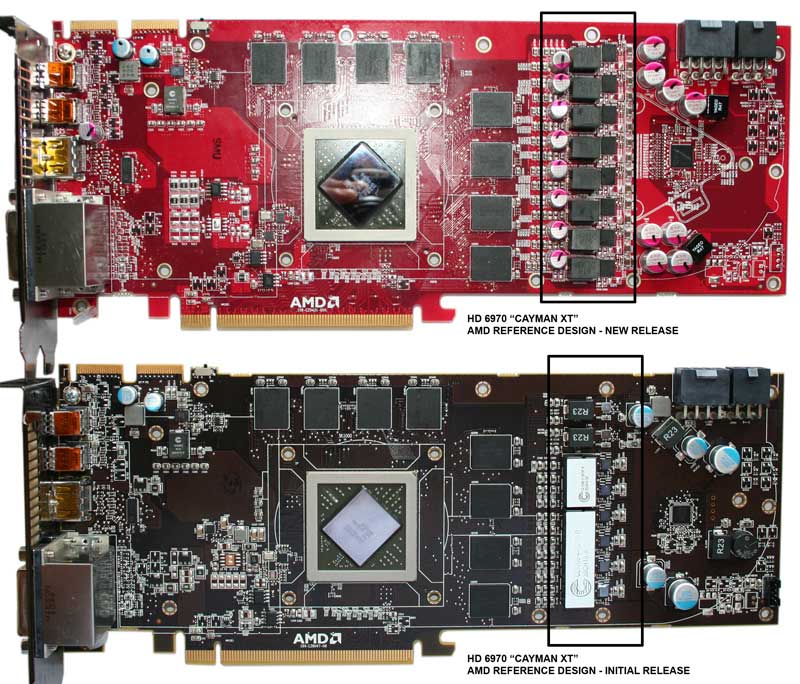
Well I give up. I've torn this loop apart four times now and everything is right. Im pretty confident I fucked something up on the card when I improperly tightened it down the first time. One of the vregs that got over compressed and cracked (labeled R23) actually wiggles a bit so I think I damaged something in there. On the last teardown I replaced all the thermal pads with thicker ones, added TIM to the board's surface and to the surface of the waterblock. Load temps now top off at 75c on that card (though two of the temps in GPU-Z report highs of 105c). Guess i'll just go until the card burns up and then ill be back down to dual crossfire. Hopefully it lasts another year till the 8k series comes along and ill upgrade to that...or maybe just the 7k series..I imagine the drivers should make the cards work properly by then :D

Edit: To visualize, here's a pic of the board I found on the net. On the brown PCB, its the chip at the top of the rectangled area, again, labeled R23
HD-6970-PCB-REVISIONS.jpg
 
There are unscrupulous individuals that would recommend putting the stock cooler back on the card and sending it in for RMA..................

I am not in that crowd.

Sorry to see your work go all FUBAR.

Run it till it drops.:D
 
There are unscrupulous individuals that would recommend putting the stock cooler back on the card and sending it in for RMA..................

I am not in that crowd.

Sorry to see your work go all FUBAR.

Run it till it drops.:D

While I don't hate on people for working the system like that, im much too lazy to do it lol. It works atm, and even if I lose one of the cards, a pair of 6970s is still pretty powerful. Honestly, I originally got the third so I could run BF3 eyefinity with all the eyecandy. Unfortunately, BF3 is slightly bugged in eyefinity so I don't play it as such so the 3rd card is mostly fps insurance...I have BF3 set to render no faster than 100fps and I rarely see it dip under that mark.

Time to turn my attention to the CPU loop and see what kind of overclock I can get out of it.
 
I don't see a cracked choke being the cause of your temp issues. I personally would RMA the card. The choke shouldn't be causing that type of temp spike. Have you checked the voltage on the card? You're sure you've got good contact on the block?
 
I don't see a cracked choke being the cause of your temp issues. I personally would RMA the card. The choke shouldn't be causing that type of temp spike. Have you checked the voltage on the card? You're sure you've got good contact on the block?

Voltage reported by gpu-z is inline with the other two cards, not overclocking at all and I am getting good contact, I even replaced all the thinner thermal pads with thicker ones...from .5mm to 1.5mm and added TIM on chip-thermal pad and thermal pad-block contacts.

What's XFX's RMA policy on removed heatsinks, anyone know? There WERE stickers on the gpu retention bracket that said void if removed.
 
XFX says you can remove the heatsink to change grease, so I don't think they'd void you there, but there is physical dmg to the card. So you've kind of got a 50-50 shot. Only thing it costs is shipping if they say no.
 
Back
Top