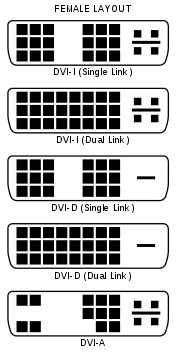
Hi , I can't get my VX2265WM to display 120 hertz when connected to my laptop. The user manual says a 'dual link DVI video card' is required for 120hz, but I have a 8800M GTX, and according to NVIDIA's site it should be dual link as best I can tell... http://www.nvidia.com/object/geforce_8800m_tech_specs.html
When I connect the monitor to my older desktop PC with an ATI card, I have no problems. On my laptop, I have tried reinstalling the monitor driver numerous times, and I've tried many different versions of NVIDIA drivers and refresh rate forcing programs for windows. I've also tried setting a 'custom resolution' of 1680x1050 with 120hz timing in nvidia control panel, but it shows 4 smaller screens with visual artifacts and such when I do.
FYI, I'm also running 32 bit Vista on my desktop and 64 bit Vista on my laptop. I'm setting windows to 'use only one monitor' in nvidia control panel as well but the only options I ever get for monitor hertz are 59, 60, and 100. When I uncheck show modes only safe for this monitor or whatever nothing new is given.
Does anyone have any ideas on how I can fix this...or is it even possible? Is there some reason my laptop can't output 120hz at 1680x1050? Any help would be so greatly appreciated.
When I connect the monitor to my older desktop PC with an ATI card, I have no problems. On my laptop, I have tried reinstalling the monitor driver numerous times, and I've tried many different versions of NVIDIA drivers and refresh rate forcing programs for windows. I've also tried setting a 'custom resolution' of 1680x1050 with 120hz timing in nvidia control panel, but it shows 4 smaller screens with visual artifacts and such when I do.
FYI, I'm also running 32 bit Vista on my desktop and 64 bit Vista on my laptop. I'm setting windows to 'use only one monitor' in nvidia control panel as well but the only options I ever get for monitor hertz are 59, 60, and 100. When I uncheck show modes only safe for this monitor or whatever nothing new is given.
Does anyone have any ideas on how I can fix this...or is it even possible? Is there some reason my laptop can't output 120hz at 1680x1050? Any help would be so greatly appreciated.