• Some users have recently had their accounts hijacked. It seems that the now defunct EVGA forums might have compromised your password there and seems many are using the same PW here. We would suggest you UPDATE YOUR PASSWORD and TURN ON 2FA for your account here to further secure it. None of the compromised accounts had 2FA turned on.
    Once you have enabled 2FA, your account will be updated soon to show a badge, letting other members know that you use 2FA to protect your account. This should be beneficial for everyone that uses FSFT.

HD5000 series HDTV Resolution Problems

SonDa5

Supreme [H]ardness
2FA
Joined
Aug 20, 2008
Messages
7,437
LG 42" 1080p HDTV was working fine for displaying 1920x1080 with my HD4770.
Popped HD5850 in system alone and now at 1920x1080 the edges of the display are chopeed off. Even if I change my TVs image zoom and ratios the edges are gone.

Highest I can go is 1776x1000.

I have tried the HDMI out connection and with HDMI out adaptor and problem persist.

Not sure what the problems is. Any help is appreciated.

Running with the newest Beta 9.11 drivers which were working fine with HD4770.
 
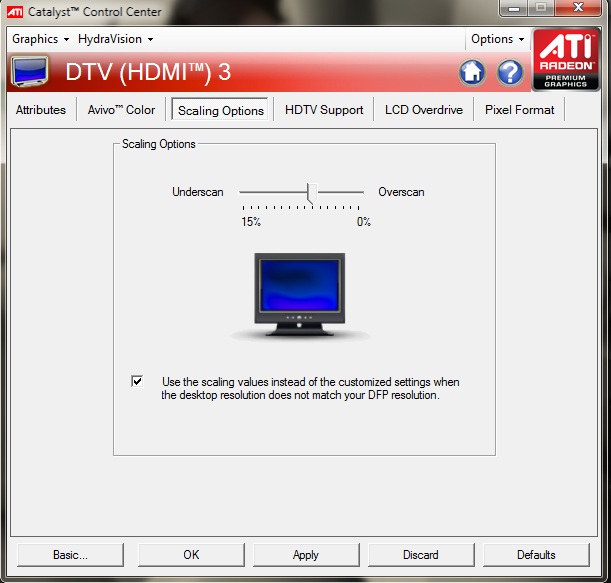
Think you have to look for the scaling option in CCC. That is how I did it with my 4890 on my plasma with hdmi, was driving me nuts for a few minutes cause it worked fine with the supplied vga cable.
 
Think you have to look for the scaling option in CCC. That is how I did it with my 4890 on my plasma with hdmi, was driving me nuts for a few minutes cause it worked fine with the supplied vga cable.

I'm using a HDMI 1.3A cable. It's a sony HDMI cable made for PS3 but works well with computer (in the past it has anyways).
 
Should still work, your problem sounds exactly the same as mine. Black bars all around, and no options on the TV would make it fullscreen, only lowering the res which looked like ass.

Haven't seen 5000 series CCC if it is any different, but for me it is under "Desktops and Displays", then right click on the small icon of your tv, and select configure. Then go to the scaling options tab and slide it around till it is fullscreen and hit apply.
 
I'm dealing with the issues right now. ATI seem much happier with a direct HDMI cable rather than a DVI-HDMI adapter.

I didn't find the overscan options until after I switched to HDMI, but to get there I had to go from "Desktops and Displays" then right-click on the little picture of the monitor in the bottom row and select "Configure...". If you just click the black down-arrow on the big picture of the display you can get "Properties..." which is a completely different menu.

This is all really hilarious because it says "To configure your desktop, click the triangle (picture) on the desktop below"

I'm vastly annoyed by ATI's interface right now.

FWIW, overscan defaulted to 0% when I plugged in the hdmi cable, but was somewhere in the range of 5-10% when I had the DVI->HDMI cable hooked up.
 
Thanks for everyones help.

I found the button on the interface and was able to enter the scaling options and it's working very well now.

:cool:

This is what it looks like.

HD5000HDTVScaling.jpg
 
Back
Top