Some users have recently had their accounts hijacked. It seems that the now defunct EVGA forums might have compromised your password there and seems many are using the same PW here. We would suggest you UPDATE YOUR PASSWORD and TURN ON 2FA for your account here to further secure it. None of the compromised accounts had 2FA turned on.
Once you have enabled 2FA, your account will be updated soon to show a badge, letting other members know that you use 2FA to protect your account. This should be beneficial for everyone that uses FSFT.
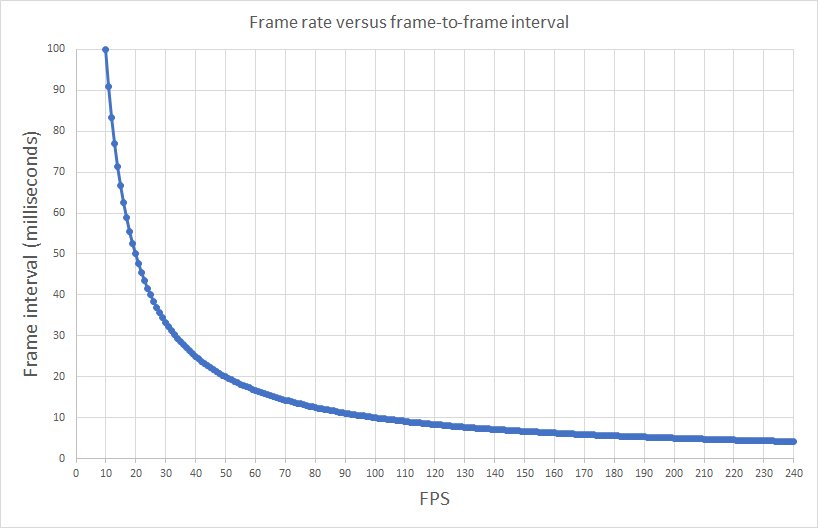
A graph that shows the frame time for a partcular FPS number?
I.e. a 60hz monitor running at 60fps will have a frame time of 16.6 at best. (will dip when FPS dips). (Edit, to clarify 'dip' i mean the number will be higher. Higher the number the higher the perceiveable 'lag' or 'choppyness' of motion. 144hz+ monitors have frame times less than 10ms, which is where things become much 'smoother' to both the eye and 'feel' of movement. I really need a 100hz+ monitor.. Anyone want to sponsor?? ><)
Smartypants. I was explaining frametimes to some guys over on one of our partnered Twitch streamer chats and I needed a visual aid. I grabbed this, an put it here so I could have a link. My damn FTP password did not work....have not used it in a couple months.

![[H]ard|Forum](/styles/hardforum/xenforo/logo_dark.png)
 I was explaining frametimes to some guys over on one of our partnered Twitch streamer chats and I needed a visual aid. I grabbed this, an put it here so I could have a link. My damn FTP password did not work....have not used it in a couple months.