• Some users have recently had their accounts hijacked. It seems that the now defunct EVGA forums might have compromised your password there and seems many are using the same PW here. We would suggest you UPDATE YOUR PASSWORD and TURN ON 2FA for your account here to further secure it. None of the compromised accounts had 2FA turned on.
    Once you have enabled 2FA, your account will be updated soon to show a badge, letting other members know that you use 2FA to protect your account. This should be beneficial for everyone that uses FSFT.

First Time Mini-ITX build

blucable

n00b
Joined
Aug 13, 2011
Messages
28
Hello guys and greetings to everyone,

I am building a mini-itx gaming machine for my personal use and these are the specs:

Case: Silverstone SUGO SG07
Mobo: Asus P8H67-I Deluxe
Processor: Intel Core i7 950 - 3.06 GHz
Ram: Corsair 8GB DDR3 204pin SO-DIMM
Graphics: EVGA NVIDIA GeForce GTX 260 864MB
Hard-Drive: Western Digital 2TB 7200RPM

I am having a little problem; I bought all my parts last week, and so far I have got the case and the motherboard, so last night I was trying to make the connections like PSU, Power led cables and all the cables that go on the motherboard.

I was wondering, will the motherboard power on the whole case fans and everything without the processor and/or ram?

I tried powering it but no fans or anything will come on, just a green light on the motherboard will come on when I plug the power, but when I press the power button, it wont do anything else.
 
Last edited:
wrong mobo if you want to use that processor. the i7 950 is socket 1366, p8h67 is socket 1155


someone correct me if im wrong
 
err, that motherboard is socket 1155 and that processor is socket 1366... don't see that working too well...

oh, and in answer to your question, no... the motherboard won't power anything up (more than led's on the mobo) without a processor / ram :)
 
Thanks for the quick answers, That's weird, the processor is on the recommended processor list
 
What would happen if I plug this processor in my motherboard anyways?

What happens with you put a Square block in a round hole?

Think i learned that one when I was 2?...

CPU has 1366 pins...Motherboard can only support a Proc with 1155 pins....Think about it
 
What would happen if I plug this processor in my motherboard anyways?

divide-by-zero-blog-safe.jpg
 
Whoa that picture is very graphic lol, well I'll have to resell or trade that processor on eBay
 
Aaight guys I just got me this processor, it's an intel core i5-2500 sandy bridge 3.4GHz (3.7GHz TurboBoost, 4x256KB L2 cache, 6MB L3 cache, LGA1155 chipset 95W Quad Core. BTW my Silverstone case is 600W
 
Lol!! Today I get the right processor, I'm here stuck in the window waiting for that ups truck so I can jump on it hahaha
 
So guys I carefully followed the instructions and connected all devices except the video card, I wanna deal with the video card later. When I connect the computer to the power a green light comes on in the motherboard. I don't have mouse Minuit or keyboard connected yet. When I press the power button the computer does nothing, any clues what could be happening?
 
1. Ideally, you need a keyboard and mouse. (What are you going to do otherwise? Test that your computer is booting fine?)

2. Have you plugged in all power cables?
- 24-pin motherboard power
- 4/8-pin motherboard cpu power

3. Have you checked the power switch on the power supply located on the back of the power supply?

4. Have you correctly connected the 2-pin power button to the correct spot on the motherboard?

-- These steps should at least get you power to your computer.
 
I'm surprised nobody caught this, but you didn't put so-dims in it did you? :eek:
 
1. Ideally, you need a keyboard and mouse. (What are you going to do otherwise? Test that your computer is booting fine?)

2. Have you plugged in all power cables?
- 24-pin motherboard power
- 4/8-pin motherboard cpu power

3. Have you checked the power switch on the power supply located on the back of the power supply?

4. Have you correctly connected the 2-pin power button to the correct spot on the motherboard?

-- These steps should at least get you power to your computer.

All those steps, I did them already, just wanting to make sure that the computer at least comes on, there was a switch called "memok" in the motherboard that I turned on and now when I plug it to the power, the power green light is on but another light is red
 
Guys I just checked the package and I do not see the "SO-DIMM" word anywhere in it even though I knew I had to get that kind. It only says 2 x 4GB • DDR3 • 1333MHz
 
Isn't this motherboard supposed to power on itself and other devices and fans even tho the ram is missing or not installed??
 
Isn't this motherboard supposed to power on itself and other devices and fans even tho the ram is missing or not installed??

Varies by board but at minimum you need a CPU and 1 DIMM installed to even POST most motherboards.
 
Oh I see, well I am returning the wrong ram today, and I guess I'll have to wait on the SO-DIMMs to be in my mailbox before I try anything else, I'll keep ya guys posted.
 
Guys, the whole problem I had was, the PSU I bought was broken, the seller is already sending me a replacement. I took the messed up PSU and used an old one and the motherboard powered up even with the non-SO-DIMM rams, so I will keep the rams too.
 
I'm kind of confused here because I'm seeing terms being thrown around.

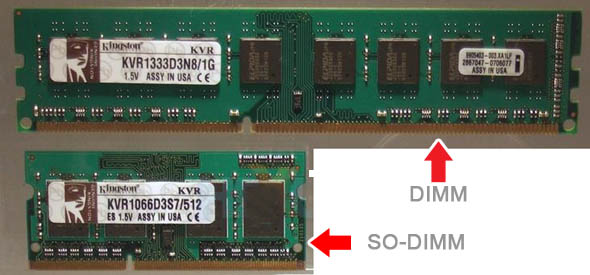
SO-DIMM refers to the smaller, shorter type of RAMs (with less pins as well) than the typical desktop DIMM. SO-DIMM are typically used in laptops and in some cases, small desktop motherboards. So even if the package may not say SO-DIMM, just by looking at it, you should know that the RAMs are SO-DIMM because they're short. Which is exactly what your motherboard needs. So if you are able to plug the new RAMs into the new board, and using your old PSU it boots up, then you got the correct RAMs.

dimm_vs_sodimm.jpg


Good luck with the PSU tho, once you get everything together I think you got yourself a nice mini PC :)
 
I installed a brand new windows 7 ultimate, without the graphics card it gives me 6.0 windows experience index, but processor, ram and hdd have over 7.5 subscore. I also played World of Warcraft using the fair level settings and game runs straight 60fps with no videocard or TurboBoost activated on both processor and motherboard.

As soon as I get my PSU, which comes in the mail today, I will post the results, this machine is super fast, I am loving it.
 
Back
Top