• Some users have recently had their accounts hijacked. It seems that the now defunct EVGA forums might have compromised your password there and seems many are using the same PW here. We would suggest you UPDATE YOUR PASSWORD and TURN ON 2FA for your account here to further secure it. None of the compromised accounts had 2FA turned on.
    Once you have enabled 2FA, your account will be updated soon to show a badge, letting other members know that you use 2FA to protect your account. This should be beneficial for everyone that uses FSFT.

Esxi problem RDM with raid drives

Joined
Dec 27, 2013
Messages
38
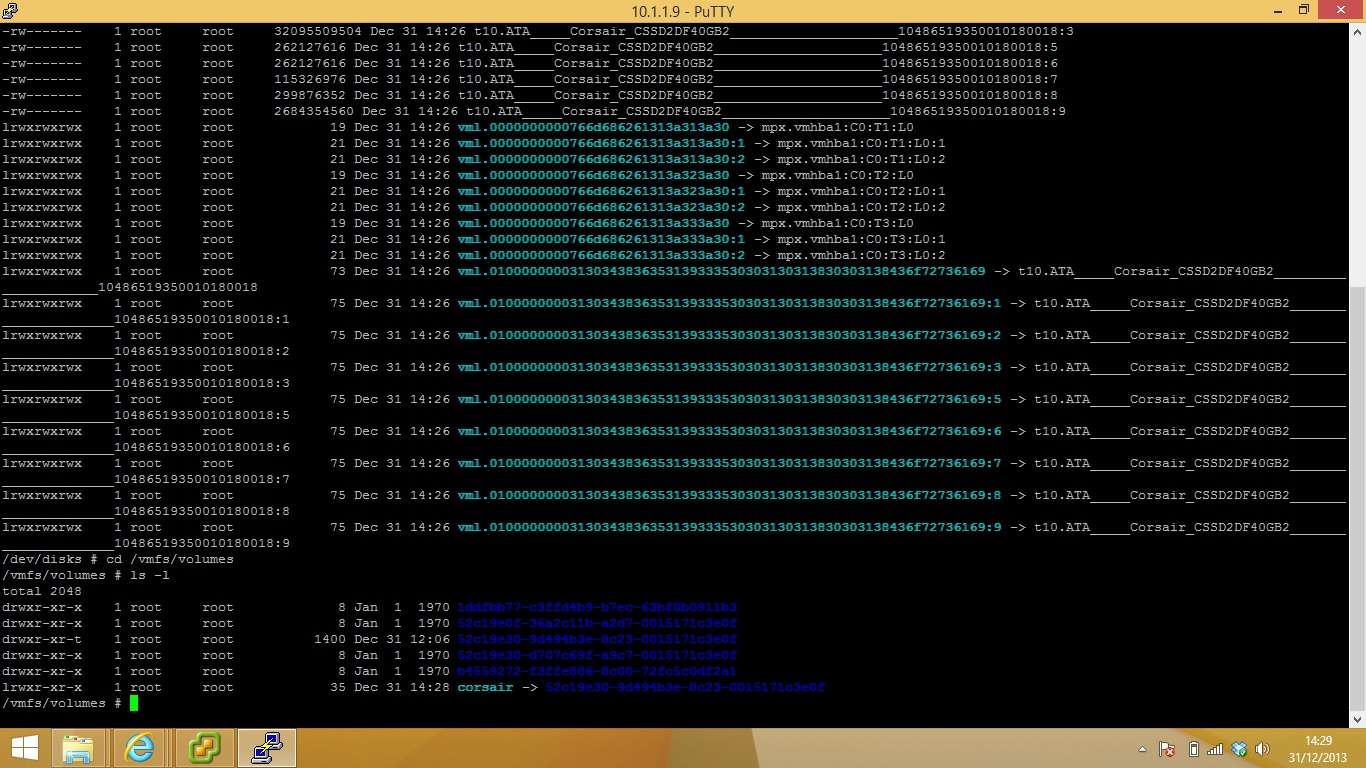
im trying to create RDM's for my 3 raid volumes.

here are my listed disks
wq5x.jpg


ive tried following the relevant posts ive found on google but get invalid argument 1441801 error.

the drives im currently trying to attach are vmhba1

any ideas??
 
Local disks? IT ain't gonna let you do that without some voodoo. ;)
 
Not normally, no - not since 3.0. There are various reasons for that, but mostly it's that they don't support the full SCSI spec that we expect, which can lead to unusual results (given how commands are manipulated).

Now then, those also don't ~look~ like RAID volumes - those look like individual SATA SSDs, and that's a whole 'nother barrel of fun for why it's a bad idea. :) Are those on a real hardware raid card of some kind?
 
its an adaptec 5805 with bbu, 6x 2tb disks arranged into 3 logical drives. I believed creating them that way would be more compatable with different os's if they believed they were physical volumes.

question is, how can I get them into esxi, keep the performance, redundancy and size, and make swapping them out easier.
 
Just use them as datastores, that's how things really work in the virtualized world :) You get the same performance, sharing, and hot-swap works fine on the RAID size - just create virtual disks on the LUs.
 
but how will that work with my array?

I was thinking about dropping 2 drives off my array to backup my data, build a single raid 5 logical drive, create the relevant datastores, transfer the data back to where it needs to be and the attach the last 2 disks and kick off a rebuild to reattach the 2 drives.

should keep the redundancy of the hardware controller and performance, and the flexibility of esxi configuration.
 
I'm very confused about what you think you'll accomplish with that?

How do you think disks in ESXi operate (both for the host, and for the guest)? If I know that, I can probably explain better how it actually works.
 
I don't know how they operate, as much research as ive put into it I haven't found a solution that fits my setup.

I just want to know whats the best way to setup my drives to keep redundancy and performance at a highest, my data is important and even backed up I still wouldn't like to have to restore it all multiple times.
 
Ok, so that's a perfectly fine place to start.

ESX has its own proprietary filesystem for storing virtual machines called VMFS (we're currently on VMFS5). On that filesystem, you'll create virtual machines (made out of files), one or more of those files will be VMDKs (Virtual Machine DisKs, effectively) - the VM itself will see a local scsi device at the same size as you created the file. We abstract away the underlying hardware.

So normally, you'd format those logical units you created with VMFS, and start making virtual machines; it's that simple (a VMFS filesystem is called a datastore) You're still approaching things from the physical space way of doing things.

The guests will never have any knowledge of the underlying raid. In theory, you could carve it up into two logical units and do software raid in the guest to write to both at once, but it'd probably be more reasonable ot pick a good backup software suite (there are several free ones for NFR licensees, I've never checked to see how they work without vCenter though) that can back up to external file shares or the like.

Or you could build an All-in-one to expand past one host later on; depends on your long term goals.

That help?
 
my plan is to create a datstore on my 500gb mirror to store the virtual machines themselves along with install media, drivers etc and create 1 large raid5 array to carve up for individual datastores for each vm.

if that makes sense.
 
You don't carve up the raid 5 array into datastores - it becomes a single datastore and you put vmdks on it - the virtual machines themselves.

VMs are all 100% files. Nothing more, unless you're getting way deeper than you're ready for. Your virtual machine disks will be individual files you place on whatever datastore you format.
 
Back
Top