• Some users have recently had their accounts hijacked. It seems that the now defunct EVGA forums might have compromised your password there and seems many are using the same PW here. We would suggest you UPDATE YOUR PASSWORD and TURN ON 2FA for your account here to further secure it. None of the compromised accounts had 2FA turned on.
    Once you have enabled 2FA, your account will be updated soon to show a badge, letting other members know that you use 2FA to protect your account. This should be beneficial for everyone that uses FSFT.

DT SNIPER CPU block

SonDa5

Supreme [H]ardness
2FA
Joined
Aug 20, 2008
Messages
7,437
Got one of these today. (hope bundymania doesn't mind me using his photo)
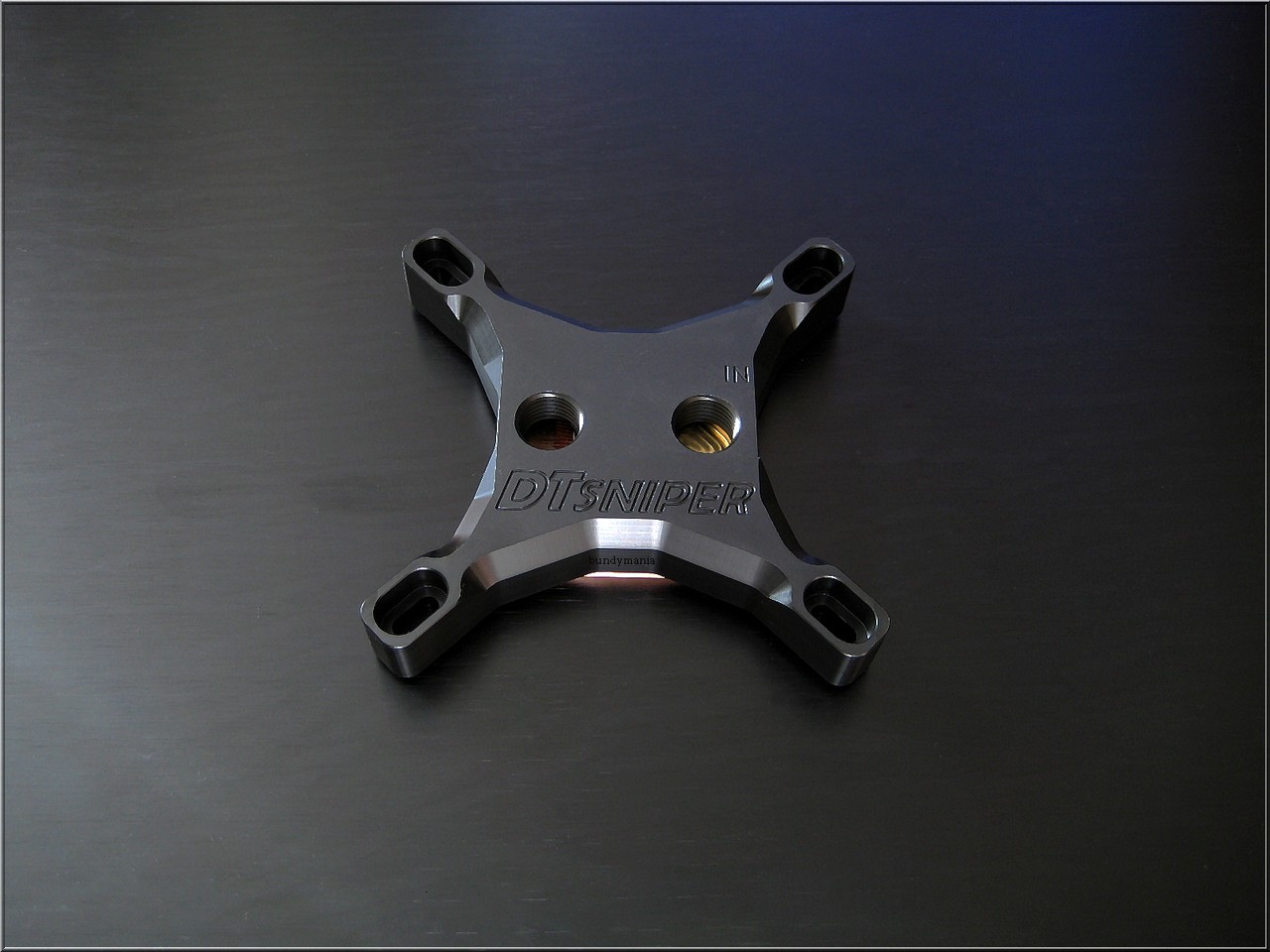
img_7286p7udq.jpg


http://www.dtwaterblocks.com/dt-sniper-black/

Love the look. Love that it is designed and made in the USA.

No major reviews yet but from what I have seen from some small reviews it is one of the best blocks for high flow rates and is close to being the best in terms of raw cooling performance.

Shortly after learning about it last week I fell in love with it and ordered one.


This block is soon to be included in one of the biggest CPU reviews of 2012.


Stren's 2012 CPU Water Block Roundup
 
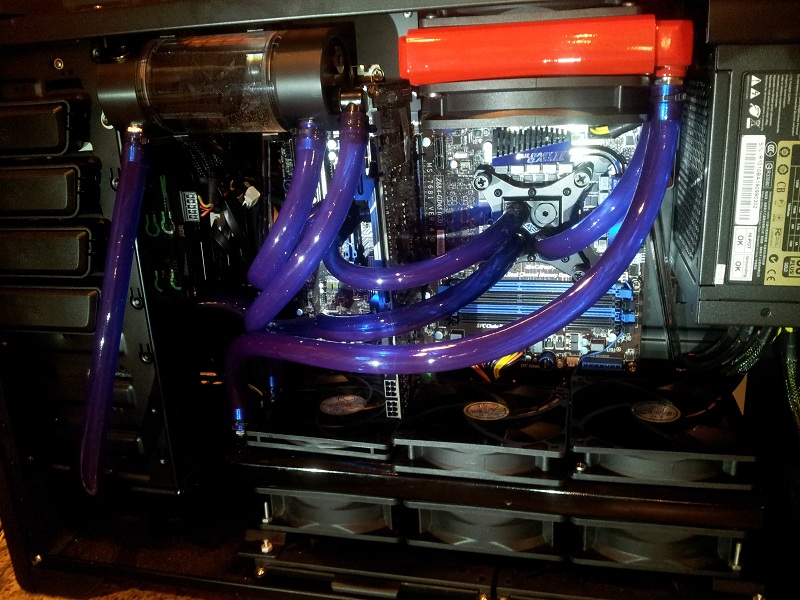
Got mine mounted. This is how my loop flows with it.


DTSNIPERFLOWCONFIG.jpg
 
LinX testing in diagnostic mode.

Ambient Temps 21C.


DTSNIPERICDIAMOND4point5.jpg
 
Nice temps, can you run Prime95 or OCCT to fully load all the cores? You only have 1 core loaded in that picture.
 
Nice temps, can you run Prime95 or OCCT to fully load all the cores? You only have 1 core loaded in that picture.


LinX stress all the cores and memory. That screen shot was taken after the LinX test. Did 20 passes of LinX in diagnostic mode.

It was a fast hot stability test that went on for almost 1 hour and passed.
 
It the picture formatted strangely, or are you running 1.5 inch thick fans on the rad?

Great stuff either way!
 
About the same as good air cooling.

IB is just a hard cpu to cool but this water block is doing a good job. With my Apogee HD block my 2nd core temps were always about 10C hotter than the 3rd core. Temps on the cores are a little more even.

I've thought about taken the IHS off and putting some different TP on it but I'm just not quite ready to do it.

I'm sure I can clean up the voltage and get it to run cooler as well. I'm running it at 1.17v on core, 1.6v pll, 1.05v IO.
 
Holy carp. Thats kinda huge.

They are huge but they do a great job at keeping my over clocked gaming PC cool.

I used to like to run smaller push/pull fan configurations but these Triebwerk TK-123s do a good job with only 1 side of radiator mounted.


What my PC looked like with push/pull fans. (When I was running the Swiftech Apogee HD in parallel)

BattleGTX448inPosition.jpg


With the BIG TRIEBWERK TK-123s....


3xTriebwerkspullhwlab360gtstealth.jpg
 
So did you ask the maker of the sniper why your block doesn't have your name on the side like Bundymania? All joking aside, they are a really good looking block. I might have to replace my Dtek Fuzion and give the Sniper a try. I would just hate to waste more money like I did this year when I purchased a Koolance 370 to see my temps didn't change so I went back to my Fuzion.
 
So did you ask the maker of the sniper why your block doesn't have your name on the side like Bundymania? All joking aside, they are a really good looking block. I might have to replace my Dtek Fuzion and give the Sniper a try. I would just hate to waste more money like I did this year when I purchased a Koolance 370 to see my temps didn't change so I went back to my Fuzion.


I was at a point where the Apogee HD didn't meet my immediate needs being that I needed a less restrictive block and I no longer needed to run a parallel loop configuration which worked decent with the Apogee HD.

I really like the DT Sniper. I was able to sell my Apogee HD to recover some of the expense of getting the DK SNiper.
 
For the last few hours my mind has been running on this back plate. I really don't like how it floats with only 4 small points of contact touching the back of the MB PCB.

1000


LL


The back plate mount didn't include the rubber washers. I added the rubber washers to protect the MB PCB and to help get a snug mount.

I think a better way to mount the back plate would be to place the back plate directly against the MB PCB. This would require non conductive rubber gasket in the exact shape of the back plate to rest directly in contact with the back of the MB PCB and the back plate. Secure the screws from the front of the MB.


Still loving the block but not really digging the back plate as it is. Going to have to modify it some more or do something else about it.
 
Last edited:
For the last few hours my mind has been running on this back plate. I really don't like how it floats with only 4 small points of contact touching the back of the MB PCB.

I think a better way to mount the back plate would be to place the back plate directly against the MB PCB. This would require non conductive rubber gasket in the exact shape of the back plate to rest directly in contact with the back of the MB PCB and the back plate. Secure the screws from the front of the MB.


Still loving the block but not really digging the back plate as it is. Going to have to modify it some more or do something else about it.
Why?

It is common to only have insulated contact at the holes with water blocks. So long as y don't bottom out the fasteners, I don't see the point.
 
Why?

It is common to only have insulated contact at the holes with water blocks. So long as y don't bottom out the fasteners, I don't see the point.


It may be common but there are many high quality block builders that build better back plates. I love the DT SNIPER but I want the best mount possible and this back plate isn't as good as it could be.

Mount is very important to ensure the cpu makes good contact for optimum thermal cooling performance and a good back plate design will also help prevent the MB from bowing.
 
Last edited:
It is common to only have insulated contact at the holes with water blocks.

Also note my post above with the photos. The back plate mounting system didn't come with any rubber bushings. I added the rubber bushings for MB PCB protection and to help get a slightly snugger mount.
 
I'd be willing to bet thats more your IHS then the block.

I hope so. Could also caused by some flex in the MB because of the design of the back plate.

I'm working on a fix the the back plate to ensure a better mount and I am more than likely going to go direct die mount and will post photos of contact pressure with the direct die. This will be after I get some a new back plate in about a week or so.
 
I hope so. Could also caused by some flex in the MB because of the design of the back plate.

I'm working on a fix the the back plate to ensure a better mount and I am more than likely going to go direct die mount and will post photos of contact pressure with the direct die. This will be after I get some a new back plate in about a week or so.

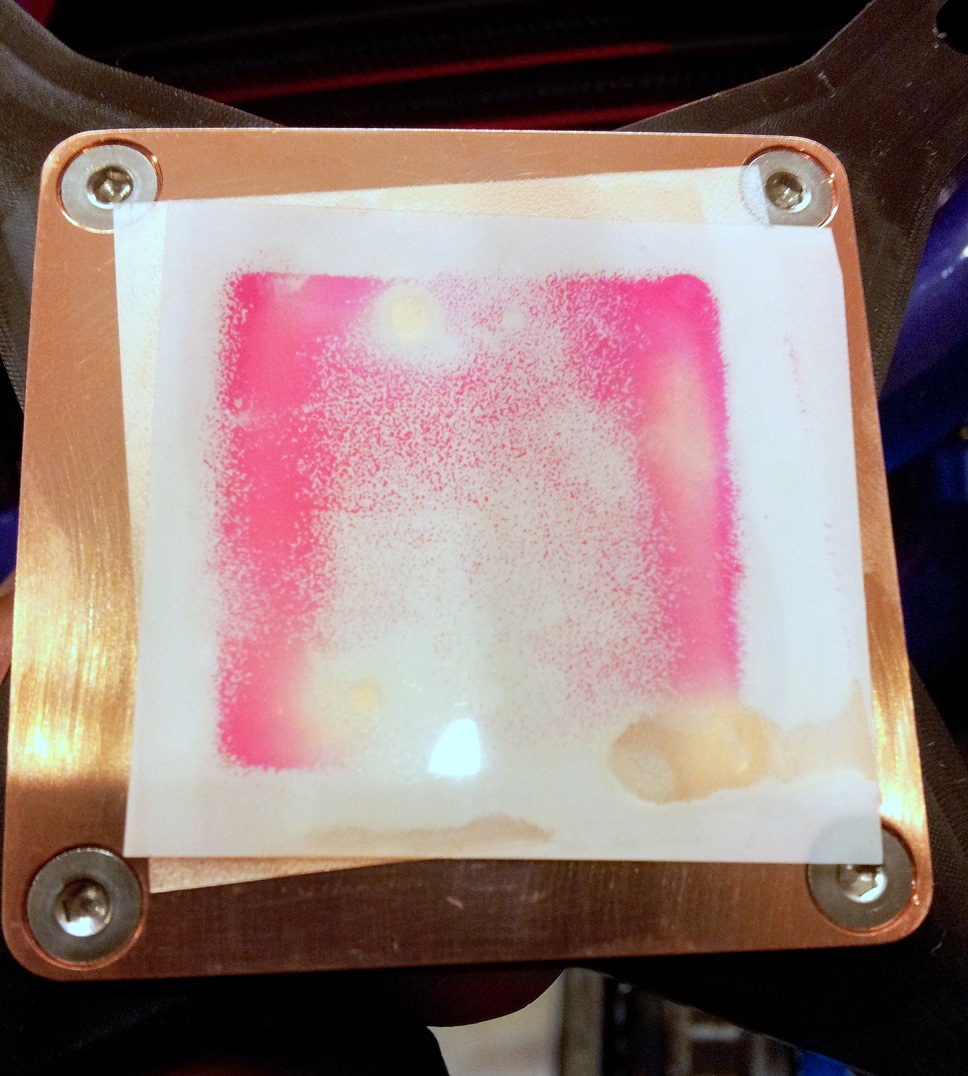
The picture you posted of TIM spread is quite good actually. I don't know why you seem to think it is bad. What is critical in block and IHS bow is that the contact patch is quite thin over where the CPU die is beneath the heat spreader. You have that. You do the same test with a Raystorm, and you'll see a similar contact patch, because it is what you want. Contrary to what you seem to believe, a uniform patch of TIM isn't that good in terms of block mount.

Unless you've over-torqued your hold down screws you shouldn't be seeing warping in the plane of the motherboard....in which case, ease up on the hold downs. Besides IME 1155 is nowhere near as fussy as 1366 was about motherboard warping. Every block is like the Sniper and 5Noz in terms of loading of the board and force being concentrated around the cooler-mount drillouts. You should've had some plastic washers to space and slear the backplate from grounding on the board...I prefer space between backplate and board anyway, as many motherboards have solder contacts sticking through where the backplate is like my M4Gene.
 
What are the goals of these changes, not satisfied with the performance?? You made 2 big changes when you switched from the apologee hd to the sniper. The block and taking those gts rads out of parallel, I thought you didn't mind the performance hit for the cleaner look?
 
What are the goals of these changes.


1. Improve thermal cooling performance.
2. Have best mount possible for proper CPU contact pressure and least possible bowing in the MB PCB.
 
The picture you posted of TIM spread is quite good actually. I don't know why you seem to think it is bad.


I posted photos of the contact paper pressure to share my findings and for feed back.

Based on your comments and others it looks like the contact pressure is good for the block. The stock DT Sniper back plate is still a problem because it is causing my MB PCB to bow a little which isn't good.

By doing this test I also know the optimum orientation for my block to be positioned on the cpu socket to be better aligned with the gpu die. I need to rotate my block mount 90 degrees for best contact.

Ultimately I plan on going direct die contact with this block and that is why I am so concerned with best mount possible.
 
I hope so. Could also caused by some flex in the MB because of the design of the back plate.

I'm working on a fix the the back plate to ensure a better mount and I am more than likely going to go direct die mount and will post photos of contact pressure with the direct die. This will be after I get some a new back plate in about a week or so.

After having such good results with my 3770K, (delidded and direct die cooling), I can't recommend this enough..The stock Intel TIM is terrible, and once you get the lid off and use some quality replacement TIM you will see a HUGE drop in temps, especially if you are in the upper 4Ghz range..

Be prepared to remove the stock retaining bracket, as this is the only way to mount a cpu block directly to to the die..It's very easy to do, just need a Torx bit..I used a stack of 7 small metal washers to keep the spacing proper with the stock Enzotech mounting bracket for my cpu block..

I am currently using Arctic Cooling MX-2, which is an older TIM but has worked so well that I never saw a reason to try anything else..A few guys over @ Anandtech want me to try some IC Diamond, but I am a little worried it might run and drop down onto my gpu..

I am considering making a rubber gasket that will compress and make a "seal" around it, but that is for another day..
 
That EK backplate looks even flimsier than the DT Sniper one. /shrug


DT SNIPER back plate isn't flimsy. DT SNIPER back plate floats above stock S1155 cpu retention back plate at 4 contact points.

The EK TRUE back plate sits completely flush with the MB PCB and it also replaces the stock S1155 cpu retention back plate.

EK TRUE back plate is more stable on MB PCB and better fit and finish. Better mount.
 
Back
Top