• Some users have recently had their accounts hijacked. It seems that the now defunct EVGA forums might have compromised your password there and seems many are using the same PW here. We would suggest you UPDATE YOUR PASSWORD and TURN ON 2FA for your account here to further secure it. None of the compromised accounts had 2FA turned on.
    Once you have enabled 2FA, your account will be updated soon to show a badge, letting other members know that you use 2FA to protect your account. This should be beneficial for everyone that uses FSFT.

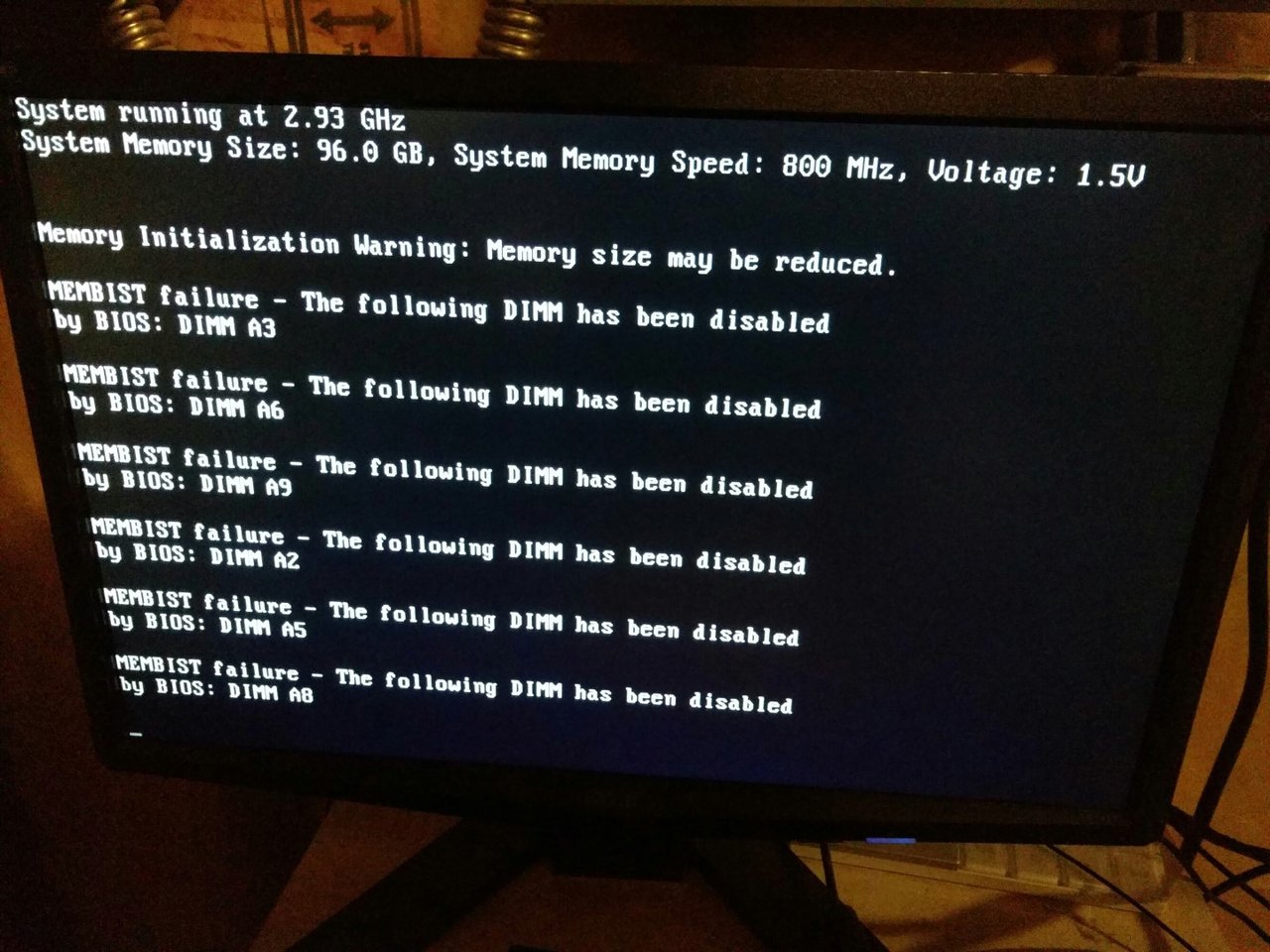
Dell R710 "membist" errors

Flapjack

2[H]4U
2FA
Joined
Apr 29, 2000
Messages
3,210
I just recently purchased two Dell R710s from Ebay, each with 144GB of RAM (18 x 8GB).

When I power it on, I'm getting a host of membist errors telling me the associated DIMMs have been disabled. They are the 2nd and 3rd channels in bank A. All DIMMs in bank B show good.

I know it's not the memory, as I have 18 of the same DIMMs in the other R710. I also have also swapped all 9 sticks on each side from A to B, but the problem resides in bank A.

The only thing I've done with these servers are swap in four (two each) Xeon X5570s, to replace the E5620s that came with them. Could it be a bad CPU?

EDIT: The sticks are: Samsung 8GB 2Rx4 M393B1K70DH0-CH9 PC3-10600R(1333MHz) DDR3 ECC REG Server RAM

See screenshot.
 

Attachments

  • IMG_20160525_220400.jpg
    IMG_20160525_220400.jpg
    186.9 KB · Views: 84
Swap the CPU's and otherwise it's the RAM lanes that are broken. I have had this multiple times with enthousiast boards, but never with servers (we have all the 6x0 series servers and also changed out the ram with no problems).
 
Swap the CPU's and otherwise it's the RAM lanes that are broken. I have had this multiple times with enthousiast boards, but never with servers (we have all the 6x0 series servers and also changed out the ram with no problems).
The system was supposedly tested before shipping, and the seller has an outstanding Ebay rating, so I'm hoping it's one of the X5570s I bought. I will swap the CPUs tonight and see how that goes. If not, motherboard swaps in these things are easy-peasy. Still sucks, because I was hoping to get these guys up and running by the weekend. :(
 
Or you did what's in your signature ;).
Hahaha, I don't even remember when I set that signature. It was years ago. I don't even remember what I broke to motivate me to change it, but I'm sure it was grand.

So, I tried swapping the CPUs last night, and got an error about CPU voltage or something. I pulled the CPUs again, and there was one pin on the socket that looked a little funny, but should've still made contact. I got a pretty good picture, so I'll post it tonight.

At any rate, I told the seller that I believed it was the motherboard. They're dirt cheap on Ebay. Hopefully he has one on hand, otherwise, I'll buy it and ask for a credit.

On a side note, how do you tell what Gen the R710s are? It was easy on the 2950s (right on the front bezel).
 
Back
Top