• Some users have recently had their accounts hijacked. It seems that the now defunct EVGA forums might have compromised your password there and seems many are using the same PW here. We would suggest you UPDATE YOUR PASSWORD and TURN ON 2FA for your account here to further secure it. None of the compromised accounts had 2FA turned on.
    Once you have enabled 2FA, your account will be updated soon to show a badge, letting other members know that you use 2FA to protect your account. This should be beneficial for everyone that uses FSFT.

Cuda vs. 3930K?

tangoseal

[H]F Junkie
2FA
Joined
Dec 18, 2010
Messages
9,775
Quick question for those with experience.

I have a 3930K. I do a lot of heavy video encoding and conversion, especially with my blu-ray collection and have been playing with 2d-3d conversions.

I use my 3930K and software modes to encode/transcode/etc...

I use AMD for GPU so most of the stuff I do doesnt support APP.

Do you think that if I were to install a nVidia cuda based card such as 560ti etc.... that it would be faster than my OC'd 3930K?

What about quality? I never used Cuda encoding before.
 
Have you looked into ImTOO Video Converter Ultimate? It supports AMD GPUs and might give you a real world comparison on 3930 v AMD GPU at the least.
 
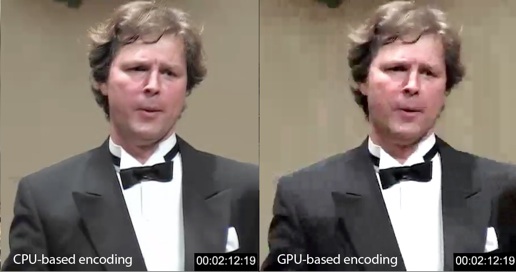
GPU encoding is fast, but it is very low quality.
Example:
images


If you are going for quality, as in, these projects aren't for school or simple presentations, then I would suggest sticking with CPU encoding.

Another thing, GPU encoding programs are very expensive.
I'm not talking about Badaboom, which is a transcoder, but actual encoders.

Many GPU/CUDA encoder programs are also only compatible with a select few Quadro cards, normally the $1500+ models.
GeForce cards will not work with these encoders.

In short, unless you are willing to spend $2000+ for everything, I would stick with CPU encoding if I were you.
 
Too bad the 3930k doesn't support quicksync. That would get you the best speed and quality.
 
GPU encoding is fast, but it is very low quality.
Example:
images


If you are going for quality, as in, these projects aren't for school or simple presentations, then I would suggest sticking with CPU encoding.

Another thing, GPU encoding programs are very expensive.
I'm not talking about Badaboom, which is a transcoder, but actual encoders.

Many GPU/CUDA encoder programs are also only compatible with a select few Quadro cards, normally the $1500+ models.
GeForce cards will not work with these encoders.

In short, unless you are willing to spend $2000+ for everything, I would stick with CPU encoding if I were you.

That's interesting that the GPU is lesser quality. Maybe it's the specific algorithm that was used to encode it.
 
That's interesting that the GPU is lesser quality. Maybe it's the specific algorithm that was used to encode it.

It's been true back to the very beginning of GPU accelerated encoding, so whatever it is isn't something that is likely to be fixed quickly.
 
Forget what I first stated in this post. Adobe Premiere Pro CS5.x, despite its CUDA GPU acceleration hype, actually uses the CPU only for encoding. GPU acceleration is used only for certain operations during the render stage, such as certain effects as well as scaling (downsizing/downconversion or upsizing/upconversion).

Vegas Pro 10+, on the other hand, can use GPU acceleration for encodes made via the Sony AVC encoder. However, that feature can still cause system crashes, and there is little to no improvement in performance and often poorer image quality in that mode compared to the CPU-only mode.
 
Last edited:
GPU encoding is fast, but it is very low quality.
Example:
images


If you are going for quality, as in, these projects aren't for school or simple presentations, then I would suggest sticking with CPU encoding.

Another thing, GPU encoding programs are very expensive.
I'm not talking about Badaboom, which is a transcoder, but actual encoders.

Many GPU/CUDA encoder programs are also only compatible with a select few Quadro cards, normally the $1500+ models.
GeForce cards will not work with these encoders.

In short, unless you are willing to spend $2000+ for everything, I would stick with CPU encoding if I were you.

Thanks. I think I am fine if that is the case. I will stick to my I7 processor haha.
 
Thanks. I think I am fine if that is the case. I will stick to my I7 processor haha.

GPU encoding is fast, but it is very low quality.
Example:
images


If you are going for quality, as in, these projects aren't for school or simple presentations, then I would suggest sticking with CPU encoding.

Another thing, GPU encoding programs are very expensive.
I'm not talking about Badaboom, which is a transcoder, but actual encoders.

Many GPU/CUDA encoder programs are also only compatible with a select few Quadro cards, normally the $1500+ models.
GeForce cards will not work with these encoders.

In short, unless you are willing to spend $2000+ for everything, I would stick with CPU encoding if I were you.

Transferring my reply from the other thread here:
There was an article on another tech site from either Tom's Hardware, Anandtech or similar that tested accelerated video encoding using a Core i7 CPU, AMD GPU and Nvidia GPU. (I think an AMD CPU was tossed in as well, but I don't remember.)

The best quality video in first was actually the Core i7 CPU but the third fastest. (The gap is pretty small with the high end Intel CPU they had.)

The next best quality video with very good speed that came in second in both was the AMD GPU.

The Nvidia GPU-based encoding came last due to bad video quality but the best speed out of the three.

So, that got me thinking: Software that takes advantage of the GPU to do video encoding isn't mature yet, and that the quality and speed of the video depends on manufacturer and developer:
The AMD accelerated video encoding in CCC was very good in quality, decent speed but the GPU lacks support from many video encoders accelerated via the GPU. AMD will have to work on pushing for support in this area.

The Nvidia accelerated video encoding had the worst quality but the best speed and the best support thanks to CUDA being pushed aggressively by Nvidia.

Only the CPU-based encoding had the best support out of the three, the best quality, but the third best speed. (It was probably off by a FPS or two or three FPS behind the Nvidia and AMD GPUs.) However, the gap is closing thanks to high end CPUs coming from Intel with QuickSync. In other review sites that reviewed the AMD FX series shows that even that CPU is very good at video encoding, close to i7 speed if I recall. So, if you want to go this route, the CPU has the best support and quality but you'll need a beefy multi-core CPU to do it.
 
^ Quicksync is certainly a great feature, but obviously it comes at a cost of a high-price, high-performance processor.

The article was right about GPUs though.
The software is still not mature and the quality really is sub-par for anything serious or cinematic, even simple DVD rips.
 
Not only that, but if a software-only encoder is molasses-slow in performance and the quality is extremely low even with the world's fastest CPU, then that particular encoder just plain sucks.
 
Too bad the 3930k doesn't support quicksync. That would get you the best speed and quality.
Is quicksync something that the encoding software must support or is it an 'always on' type feature?
 
Is quicksync something that the encoding software must support or is it an 'always on' type feature?

I don't remember the name of the software used in that article I mentioned above, but I believe it's optional for the software to support it. However, it does help accelerate certain kinds of video encoding tasks. I should find that article again though.
 
That's interesting that the GPU is lesser quality. Maybe it's the specific algorithm that was used to encode it.

It was more a "proof of concept" by both nvidia and ATI, neither of which wanted to be outdone. For them, speed seemed to be more important than quality. But no real developement continued after that by the manufacturers.

Handbrake is still my defacto standard, haven't found any better quality yet.
 
Back
Top