• Some users have recently had their accounts hijacked. It seems that the now defunct EVGA forums might have compromised your password there and seems many are using the same PW here. We would suggest you UPDATE YOUR PASSWORD and TURN ON 2FA for your account here to further secure it. None of the compromised accounts had 2FA turned on.
    Once you have enabled 2FA, your account will be updated soon to show a badge, letting other members know that you use 2FA to protect your account. This should be beneficial for everyone that uses FSFT.

confused with voltages

raident30

n00b
Joined
Mar 2, 2012
Messages
2
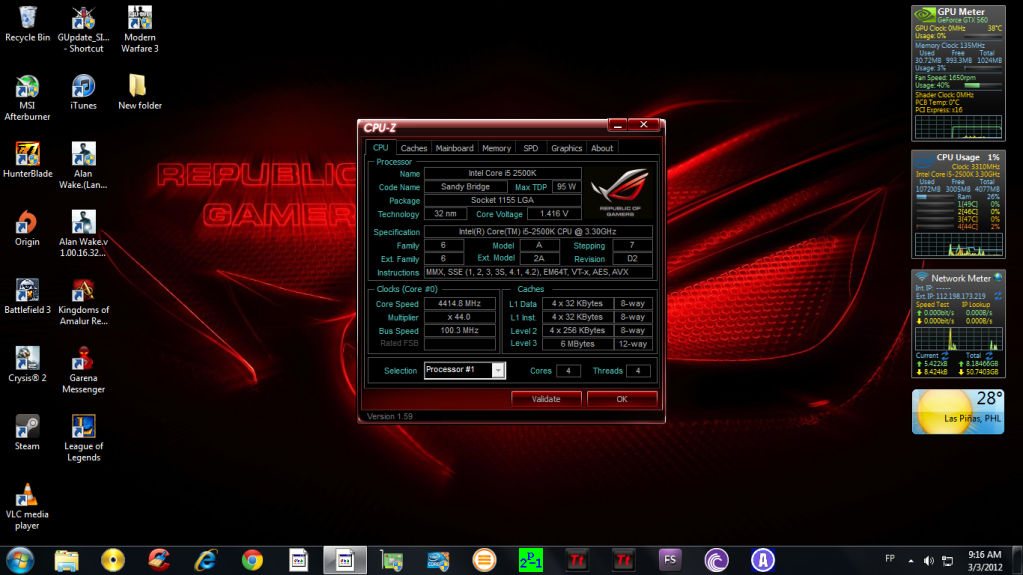
why is it that when i check my bios settings, my CPU voltage is only at 1.25 but when i check it at CPU-Z its a t 1.416.. here are some screen shot of my bios and the CPU-Z...
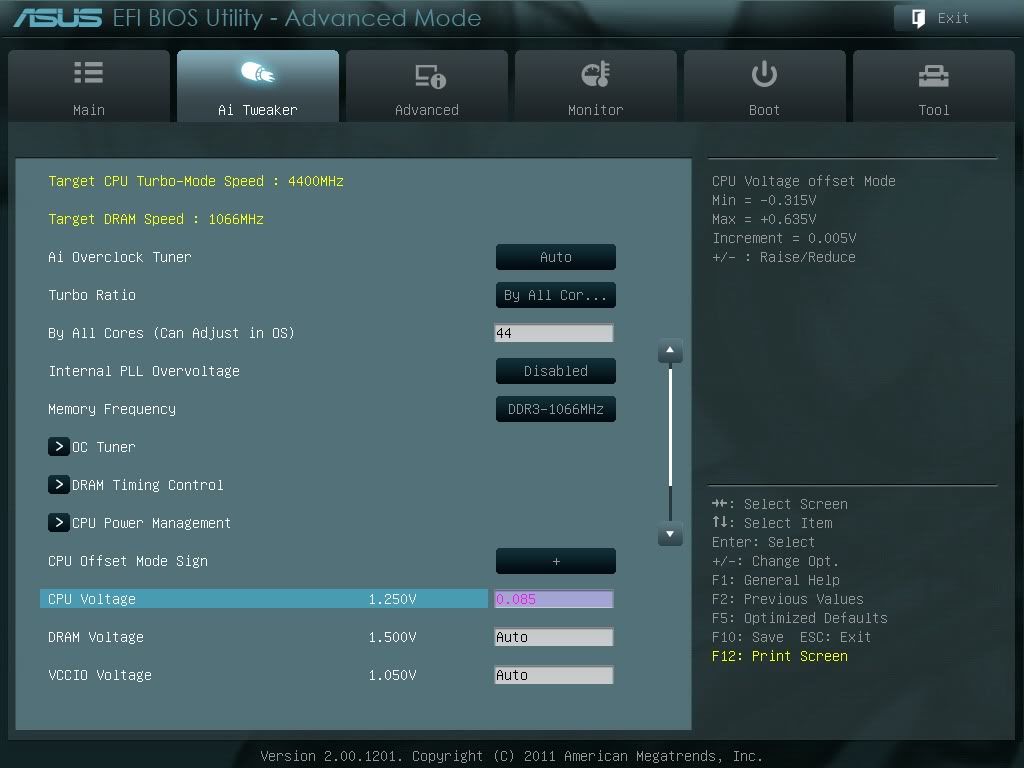
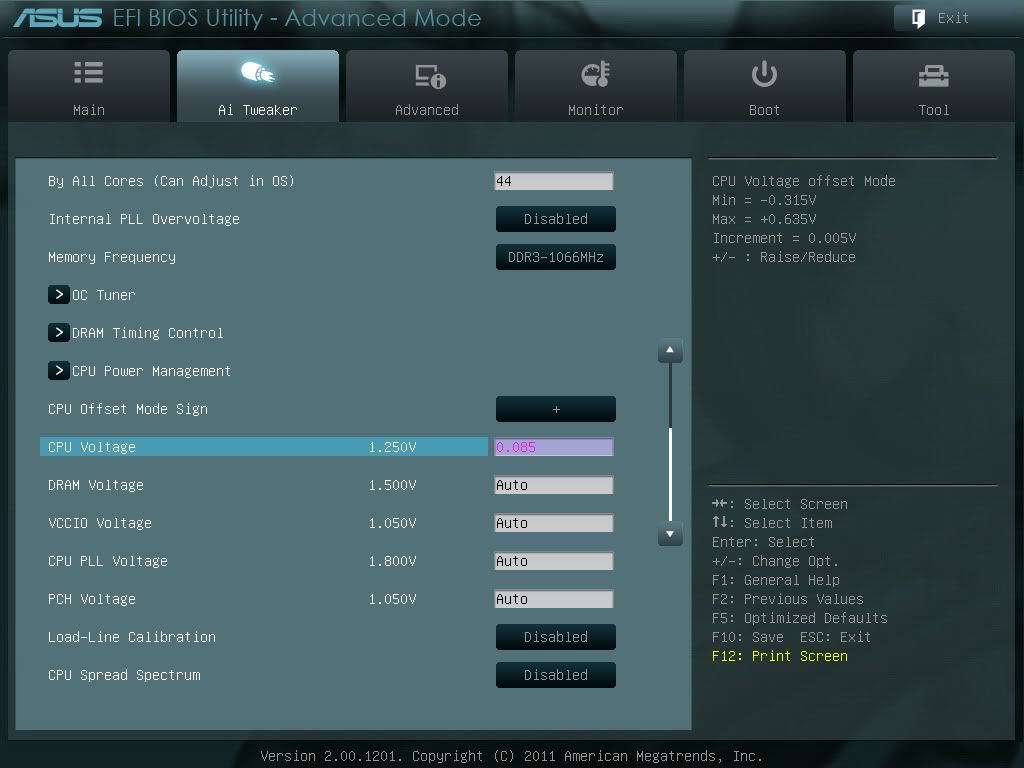
120303091218.jpg

120303091231.jpg

120303091246.jpg

120303091301.jpg

120303091335.jpg

Untitled-9.png


here's what i get on full load
Untitled-10.png


any thoughts? is it possible that the cpu-z and hwmonitor could be misreading my voltages?
 
Your in "offset mode" for your Vcore, not fixed, (not positive, but my Asrock is a bit different then Asus). Essentially your CPU is controlling the voltage it receives and being in "offset mode" and not "fixed" your giving it +.085v MORE then it calls for. This is why your at 1.416v CPU-Z is correct.
 
I think the problem is, that you have set "AI Overclock Tuner: Auto", instead of manual OC...
 
Set AI Overclock to manual.

As pitbully said, your "offset" is adding voltage to the VCore.

In manual you will set the voltage yourself, or in auto with offset off the BIOS will do it for you.

These new BIOS are a bit tricky at first.:D
 
I am having a bit of a problem with this also. I have it set to - for offset, but no matter the number I put as soon as I load the CPU, it jumps to 1.4v+, whats going on here?
 
I am having a bit of a problem with this also. I have it set to - for offset, but no matter the number I put as soon as I load the CPU, it jumps to 1.4v+, whats going on here?

Intel speedstep.It lowers the voltage until the cpu is loaded.
 
Intel speedstep.It lowers the voltage until the cpu is loaded.

Lol, no, sorry for the confusion, I am using offset, to lower voltage. However, with it at auto it runs at 1.416v under load at 4.5GHz, I set offset to - and put in a number (pick anything) and when I load back into windows and load the chip, it jumps right back up to 1.416v, my understanding of offset is that when you use -, whatever number you put in after that is what will be removed from the 1.416v, so say I put in -0.020, I should be at 1.396v at load...But it's not doing anything, load voltage is the same.
 
Which ASUS motherboard do you have? Looking at your BIOS it looks to be either P8Z68-V LE or LX.
You won't have manual voltage settings. I'd Offset for overclocking instead anyways.

If i'm understanding your question correctly... The Core Voltage you see in CPU-Z includes your offset. So if CPU-Z shows 1.416V. with a -0.020 offset your motherboard wants to auto at 1.436V with no offsets.

What I would do is boot into Windows without any offset @ 4.5 ghz or lower and note the voltage in CPU-Z under load w/ Prime95.

Then boot back into the bios and offset that number so it would be 1.25V in CPU-Z. (would be something like -0.186 Offset if your mobo wants to give you 1.436V @ 4.5 ghz)

Boot back into windows and test for stability. Slowly change your offset if your're not stable. You're likely to repeat this process a few times.

It doesn't seem like you'll ever want to touch the + offset, as it'll bring that 1.436V your mobo wants to do even higher. Unless of course you want to achieve an even higher OC and I wouldn't recommend that with your board.

I'd read through this as well, they explain it much better than I have.
http://rog.asus.com/forum/showthread.php?2162-Overclocking-Using-Offset-Mode-for-CPU-Core-Voltage
 
Last edited:
Assuming by the numbers you used, you are replying to me, those screens are from someone else, I was just hijacking, as it was close to my problem. I have a Asus P8Z68-V Pro, 2500k, also the vCore of 1.416v is before any offset, thats with auto settings etc, I then apply the -0.020v offset and there is still no change in load vCore, went as high as -0.100 but got a bsod as windows was booting.
 
I was attempting to address the OP. I used your numbers cause it seemed convenient but ultimately it became confusing.

In your case BlueFireIce, it appears as if you're stuck at 1.416V regardless of what your Offset is. That is rather odd and I don't feel knowledgeable enough on the subject to suggest a fix. What are you using to monitor your voltage? 4.5Ghz @ 1.416V shouldn't bsod either. This might indicate there's something else amiss in your settings.
 
Coretemp, cpuz and OCCT all read the same for vcore. The bsod I am guessing is from idle vcore, as that DOES drop with offset, and with the -0.100 it was something like 0.789 vcore, which is my guess as to what made it bsod. I will be testing and my guess sticking with manual (if it works), I wanted to try and keep the power saving features active, but it looks like its not going to be doable. Going to try updating the BIOS when I get off work also, planned on doing that last night but forgot about it, maybe with any luck that will clear things up a bit, never know, worth a try.
 
So it would offset your Idle vcore but not your load vcore. Might just be it's not outputting the correct voltage during load due to software.

You should also take a look at your LLC settings might help your stability.
I think a BIOS update is definitely the place to start.
 
Last edited:
Yeah, I thought the same thing, I noticed idle would go up with clock speed, but when I set offset voltage to -0.020 it went down by that much, thinking to myself "great", then load with IBT and right back up to 1.416v. I was thinking I was doing something wrong, this being my first SB upgrade from my Q9550, but having searched and read all over, and from what I understand, I am doing it right....It's just not working.
 
I have a AMD CPU. But when you first go to the BIOS see what the voltage is. Then got to the advanced mode to change things. You need to set the Ai Overclock tuner to manual to really be able to change anything. The off set is just that if it is set to + it adds that much to it like 1.00 of set + 0.08 would be around 1.08 if - 0.08 it would be 0.92. Your off set is red so it hasn't be saved yet. Try here for more help http://rog.asus.com/ good help for Asus. This must be your first Asus MB in a while because they have been using the off set a while. To me 0.08 is a big jump. If I use Asus Optimal in the EZ mode I have to manually change everything to get back to normal or use the MB jumper.
Good Luck and God Bless Johnny333 65+++

http://www.youtube.com/watch?v=sw_NISjMv44

http://www.youtube.com/watch?v=_fxXB5iiVS0
 
Last edited:
Keep us updated. Hope you find a solution soon!

Got everything stable last night at 1.3v 4.5ghz, using manual voltage. Need to do some more messing around, see how much higher I can get it, or if I can tweak the voltages lower if not. Whats the common voltage for 4.5ghz on these things? I remember there use to be a list of core2 chip OC's and voltages used etc, but cant find anything like that on the SB line of chips.
 

I know the round about max vcore to use, that's been pretty close to the same for the core2 chips. What I am wanting to know is what kind of voltages are most people using to get stable at 4.5ghz etc. Like with my Q9550, I was at 3.4ghz at 1.1v (undervolted, VID was 1.18v) which was pretty good. It gives you an idea of what to shoot for and what can be expected out of most chips. Like say there is a list of 100 2500k's, all hitting 4.5ghz at 1.26v but someone else with close to the same setup is having to push 1.4v to get stable, lets you know you might be able to get lower vcore, or that you have a bad clocking chip etc.
 
LLC also has a lot to due with your vcore under full load as well. I use lvl 4 LLC for mine at 4.8Ghz. When I drop it to LVL 3, my Vcore goes up to 1.416v, LVL 4 it maxes out at 1.360v (under full load). This with a .070 offset.

The Asrock boards are bit different then the Asus boards I'm sure, but I couldn't get any overclock at all with a "Fixed" Vcore, I had to run "Offset" to get it to do anything.
 
I know the round about max vcore to use, that's been pretty close to the same for the core2 chips. What I am wanting to know is what kind of voltages are most people using to get stable at 4.5ghz etc. Like with my Q9550, I was at 3.4ghz at 1.1v (undervolted, VID was 1.18v) which was pretty good. It gives you an idea of what to shoot for and what can be expected out of most chips. Like say there is a list of 100 2500k's, all hitting 4.5ghz at 1.26v but someone else with close to the same setup is having to push 1.4v to get stable, lets you know you might be able to get lower vcore, or that you have a bad clocking chip etc.

Best thing to do is Google or ixquick and see what other people are getting. All cpu and mb are a little deferent.
 
LLC also has a lot to due with your vcore under full load as well. I use lvl 4 LLC for mine at 4.8Ghz. When I drop it to LVL 3, my Vcore goes up to 1.416v, LVL 4 it maxes out at 1.360v (under full load). This with a .070 offset.

The Asrock boards are bit different then the Asus boards I'm sure, but I couldn't get any overclock at all with a "Fixed" Vcore, I had to run "Offset" to get it to do anything.

Thanks, I will take a harder look at that now since I reflashed, I messed with it a bit, but didn't notice much of a change, but I will change just that and see what kind of effect it has.

Best thing to do is Google or ixquick and see what other people are getting. All cpu and mb are a little deferent.

I have, a good bit, allot of the posts of OC's are people trying to hit a given speed and it ends up with "i got it with a +/- x.xxx offset" never saying what the vcore was to start with, sometimes there are screens that are helpful, but a larger base is always nice to get an idea of an average.
 

Thanks for the link! Just what I was looking for!

Followed a few other links in that and found some interesting info regarding Asus mobos etc, going to have a full night ahead of me testing these out. Was busy sending off my 560Ti for RMA a 2nd time last night so I didn't get to spend as much time as I wanted on this.
 
Back
Top