• Some users have recently had their accounts hijacked. It seems that the now defunct EVGA forums might have compromised your password there and seems many are using the same PW here. We would suggest you UPDATE YOUR PASSWORD and TURN ON 2FA for your account here to further secure it. None of the compromised accounts had 2FA turned on.
    Once you have enabled 2FA, your account will be updated soon to show a badge, letting other members know that you use 2FA to protect your account. This should be beneficial for everyone that uses FSFT.

7970 VRM temps, is 100C normal?

Joined
Feb 17, 2012
Messages
18
I'm overclocking to 1100mhz with my Accelero Xtreme 7970 cooler, the CPU is temps are fine but my VRM temps are shooting to 100C! Is this okay, or should I be worried of them melting?
 
That is main problem with aftermarket coolers and high end GPUs. GPU temP goes down but at higher VRM tem cost. 100C is still in safe zone but is to warm for my taste. Try to lower GPU v..
 
On my lightning at stock clocks which is 1070/1400 my frm temps are mid 50's. When I overclock to 1200/1600 the temps go up to mid 60's at most. I would be pretty concerned if I were you but it is kinda apples vs oranges.
 
Sounds like a faulty install as I recall others with the accelero getting improvements in the VRM temps and a reference 7970 has much cooler temps on the VRMs than 100C.
 
Does it work OK?

Ain't broke, don't fix it. But make sure your heat sinks are firmly placed.:D
 
which software are you using to read the vrm temps ? is it always on 100c ? if so sounds like that isn't a correct reading and yes I would say that is too high i wouldn't be comfortable with my vrm always at 100c.

Exactly which model of card is it ? maybe there vrms are in different places like you get with reference boards and non reference I would double check you have the heatsinks in the right place and have used tim
 
which software are you using to read the vrm temps ? is it always on 100c ? if so sounds like that isn't a correct reading and yes I would say that is too high i wouldn't be comfortable with my vrm always at 100c.

Exactly which model of card is it ? maybe there vrms are in different places like you get with reference boards and non reference I would double check you have the heatsinks in the right place and have used tim

I'm using HWINFO, lots of people use it and seems to be accurate for others. I'm overclocking it to 1150mhz though, its a sapphire stock 7970 with a accelero xtreme 7970 cooler.
 
I'm using HWINFO, lots of people use it and seems to be accurate for others. I'm overclocking it to 1150mhz though, its a sapphire stock 7970 with a accelero xtreme 7970 cooler.

No its not, only GPU tweak can show you correct VRM temps.
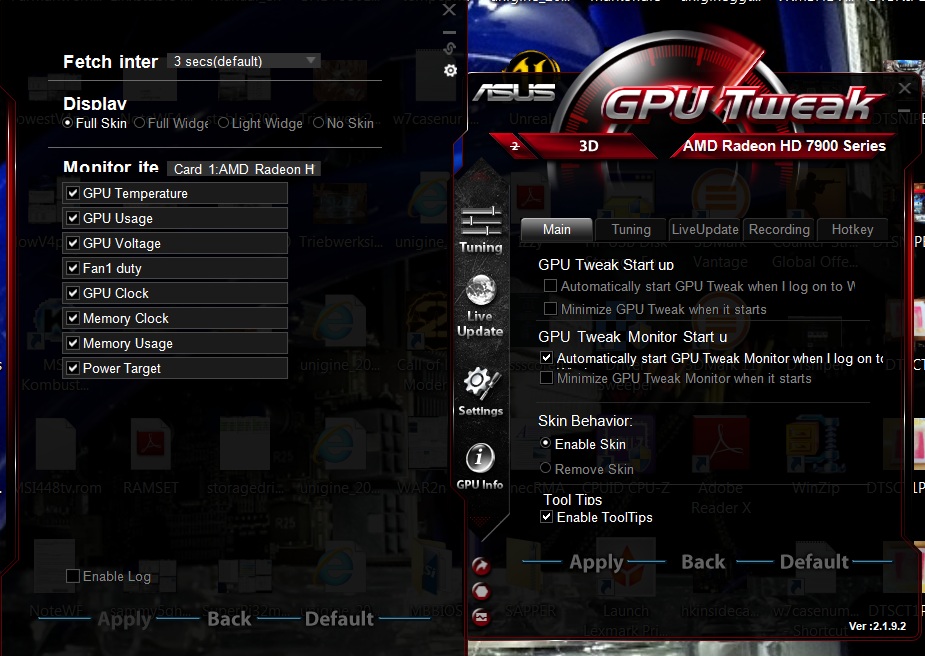
 
No its not, only GPU tweak can show you correct VRM temps.


I don't think it is compatible with Sapphire cards though.

I don't see any options to see the VRM temps on GPU Tweak.

GPUTWEAK.jpg


Also GPU Tweak doesn't allow for higher over clocks than 1100 mhz on my Sapphire HD 7950 950 mhz edition.


HWinfo works for many.

I use HWinfo64 and it seems to work fine.
 
I believe Voltage regulators have a maximum temperature between 120-140* C depending on the specific GPU. You are running within specification right now but you might be shortening the lifespan of the card by running the voltage regulators that hot.

There really isn't much you can do about this. If you like to tinker you could get some copper heatsinks and try them out. Any kind of heatsink with greater mass and greater surface area should work well because there is a 92mm fan blowing air onto it.
 
Back
Top