![[H]ard|Forum](/styles/hardforum/xenforo/logo_dark.png)
Navigation
Install the app
How to install the app on iOS
Follow along with the video below to see how to install our site as a web app on your home screen.
Note: This feature may not be available in some browsers.
More options
-
Some users have recently had their accounts hijacked. It seems that the now defunct EVGA forums might have compromised your password there and seems many are using the same PW here. We would suggest you UPDATE YOUR PASSWORD and TURN ON 2FA for your account here to further secure it. None of the compromised accounts had 2FA turned on.
Once you have enabled 2FA, your account will be updated soon to show a badge, letting other members know that you use 2FA to protect your account. This should be beneficial for everyone that uses FSFT.
You are using an out of date browser. It may not display this or other websites correctly.
You should upgrade or use an alternative browser.
You should upgrade or use an alternative browser.
Lian-Li PC-Q16
- Thread starter dm1179
- Start date
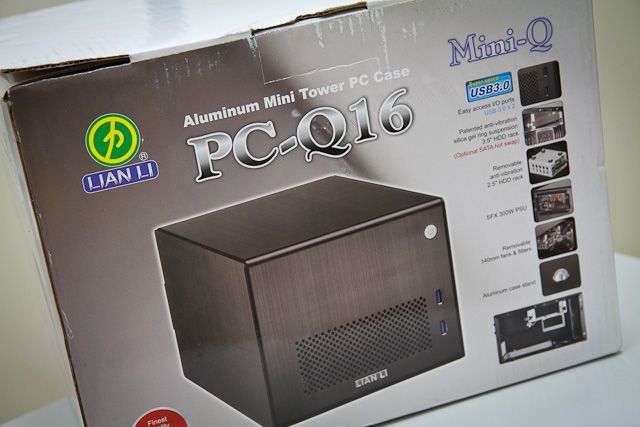
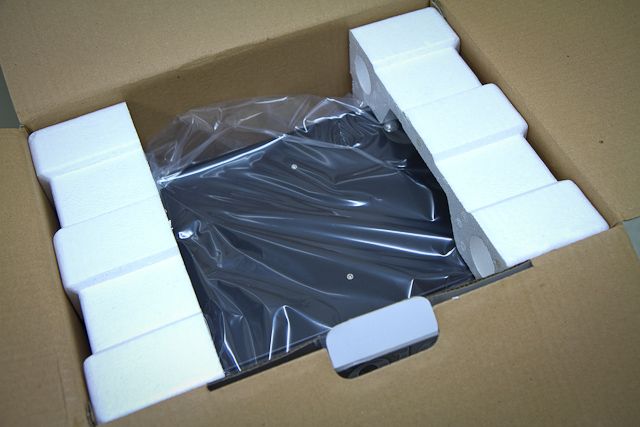
this will be a short review and will use existing hardware from PC-Q02 to test and compare the PC-Q16..
background details, check out separate thread for PC-Q02 here: http://hardforum.com/showthread.php?t=1695887
background details, check out separate thread for PC-Q02 here: http://hardforum.com/showthread.php?t=1695887
the motherboard tray and HDD cages are all removable so easy to install the board and HDD. the PC-Q16 can house 1 x 3.5" and 3 x 2.5" HDD.
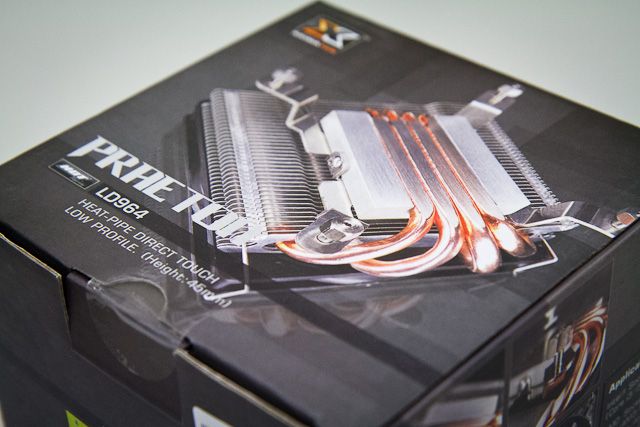
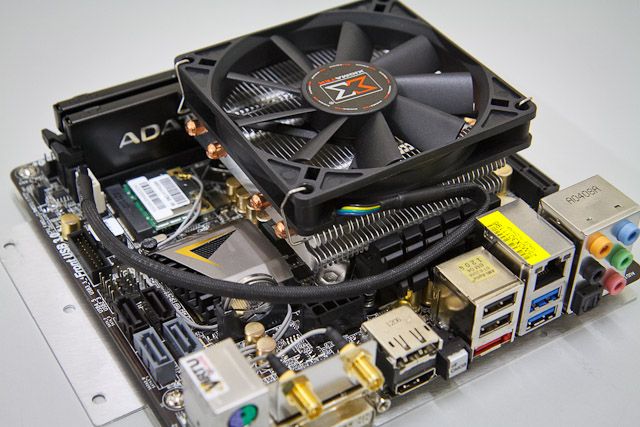
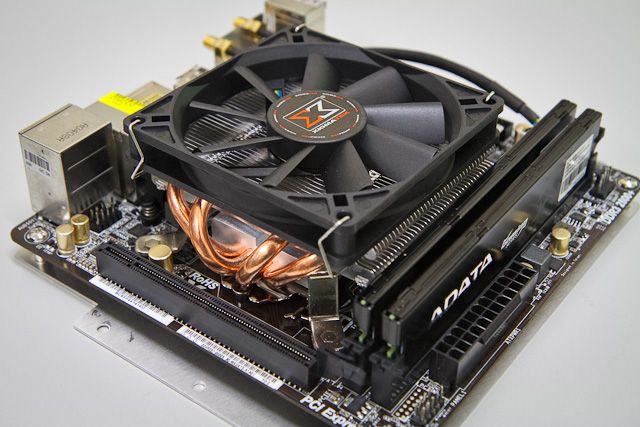
the PSU can be removed through 4 thumbscrews. no tools required. such as the case with PC-Q02, the Xigmatek Praeton is a perfect cooler to fit this case.
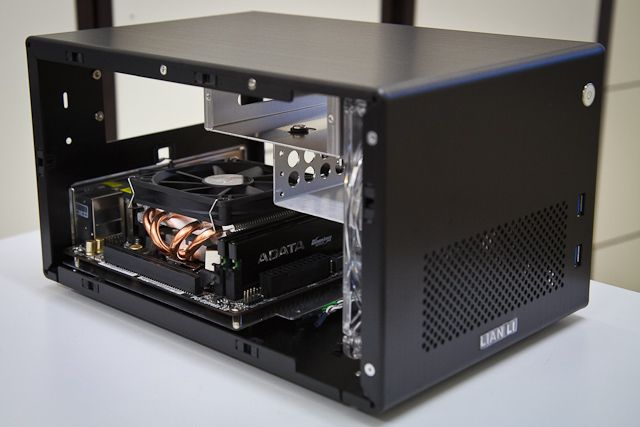

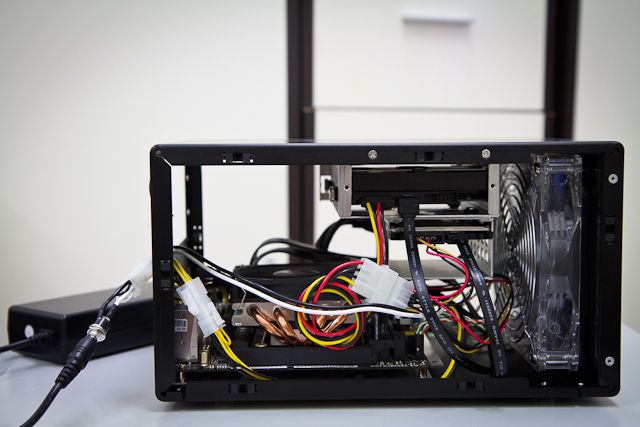
fast forward.. all components back inside. used a few cable ties for wire management..


the PSU can be removed through 4 thumbscrews. no tools required. such as the case with PC-Q02, the Xigmatek Praeton is a perfect cooler to fit this case.
fast forward.. all components back inside. used a few cable ties for wire management..
similar to PC-Q02 and PC-Q03, the PC-Q16 has 2 front USB3.0 cables with male ends, designed to be plugged from the rear USB3.0 ports. there is a hole for the USB3.0 cables at the back of the case..

i had ordered a USB3.0 converter to plug those directly to the motherboard..

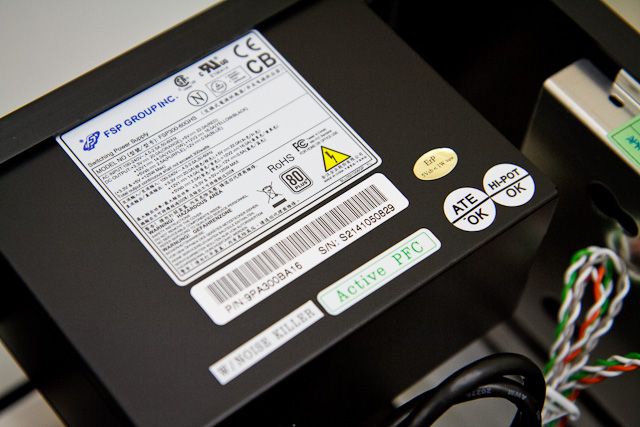
the PC-Q16 comes with FSP 300W 80PLUS PSU. Model Number: FSP300-60GHS. this is the same PSU model used by PC-Q02 and is also utilized by Silverstone SUGO series.
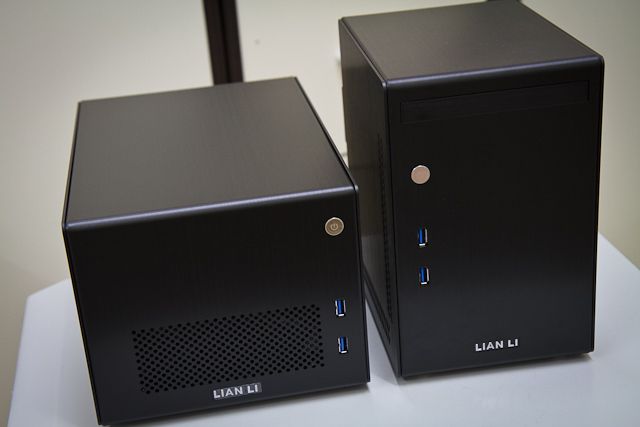
PC-Q16 side-by-side by PC-Q02..
i had ordered a USB3.0 converter to plug those directly to the motherboard..
the PC-Q16 comes with FSP 300W 80PLUS PSU. Model Number: FSP300-60GHS. this is the same PSU model used by PC-Q02 and is also utilized by Silverstone SUGO series.
PC-Q16 side-by-side by PC-Q02..
looks really elegant..

time to do temperature readings.. note, ambient temperature @ 24C..
CPU multiplier to x26.. offset voltage of -0.150V.. then run Prime95..
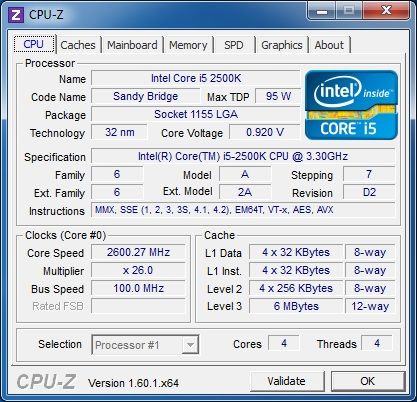
RealTemp: min 30C, max 59C

HWMonitor: min 31C, max 59C
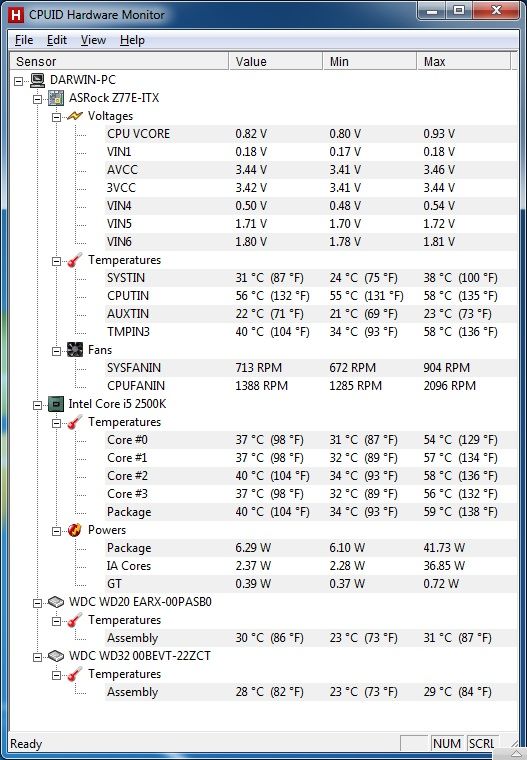
over-all, switching to PC-Q16 lowered the max temp by 4-5C compared with readings from PC-Q02. thanks to the front 140-mm PWM fan.
time to do temperature readings.. note, ambient temperature @ 24C..
CPU multiplier to x26.. offset voltage of -0.150V.. then run Prime95..
RealTemp: min 30C, max 59C
HWMonitor: min 31C, max 59C
over-all, switching to PC-Q16 lowered the max temp by 4-5C compared with readings from PC-Q02. thanks to the front 140-mm PWM fan.
my conclusion will be similar to PC-Q02:
the PC-Q16 is well suited for 65W TDP processors or lower..
if you will use 95W TDP processor like me, you may need to undervolt and/or underclock your processor to lower the temperature.. use appropriate low-profile CPU cooler that suits your particular requirement.
or if your a hobbyist, you may mod the casing to your liking..
both cases are great and offer their own own advantages. which case is right for you? i'll let you decide for yourself.
other consideration:
if you need expansion slot (single) for video card, you could choose PC-Q03 or PC-Q15 instead.
but if you need expansion slot (dual), then you have to go with their older brother PC-Q11.
the PC-Q16 is well suited for 65W TDP processors or lower..
if you will use 95W TDP processor like me, you may need to undervolt and/or underclock your processor to lower the temperature.. use appropriate low-profile CPU cooler that suits your particular requirement.
or if your a hobbyist, you may mod the casing to your liking..
both cases are great and offer their own own advantages. which case is right for you? i'll let you decide for yourself.
other consideration:
if you need expansion slot (single) for video card, you could choose PC-Q03 or PC-Q15 instead.
but if you need expansion slot (dual), then you have to go with their older brother PC-Q11.
How noisy is that SFX PSU? is the fan always on?
If the PSU is binned and replaced with a picoPSU, what size CPU heatsink might fit? I was wondering if an HR02 might be squeezed in (as the HR02 is offset from centre/)
I also wondered if the the 3.5" cage could be removed and the 2.5" attached directly to the top frame? although it wouldn't be a bad compromise to just use 2.5" storage with an adapter in the 3.5" cage.
Looks neat anyway, still waiting for them to show up in Europe - a couple of stores have product pages up, but no ETA.
If the PSU is binned and replaced with a picoPSU, what size CPU heatsink might fit? I was wondering if an HR02 might be squeezed in (as the HR02 is offset from centre/)
I also wondered if the the 3.5" cage could be removed and the 2.5" attached directly to the top frame? although it wouldn't be a bad compromise to just use 2.5" storage with an adapter in the 3.5" cage.
Looks neat anyway, still waiting for them to show up in Europe - a couple of stores have product pages up, but no ETA.
Last edited:
@IanM:
i can't hear the PSU fan at all so i have to say it's really quiet. yup, it is always on.
with the PSU attached, you can use CPU cooler height up to ~57mm to ~58mm. the spec says 60mm but i had tried a Coolermaster GeminII M4 (height = 59mm) and it still hits the PSU.
with the PSU and 2.5" HDD cage removed, you can use CPU cooler height up to ~80mm.
the 2.5" HDD cage cannot be directly connected to top frame. it only attaches to the 3.5" HDD cage.
i can't hear the PSU fan at all so i have to say it's really quiet. yup, it is always on.
with the PSU attached, you can use CPU cooler height up to ~57mm to ~58mm. the spec says 60mm but i had tried a Coolermaster GeminII M4 (height = 59mm) and it still hits the PSU.
with the PSU and 2.5" HDD cage removed, you can use CPU cooler height up to ~80mm.
the 2.5" HDD cage cannot be directly connected to top frame. it only attaches to the 3.5" HDD cage.
What cooler is in the picture?
Here is mine, been @ 100% load for a year now i think. 2500k is a good undervolter. sorry, bad picture. just click an zoom

if you will use 95W TDP processor like me, you may need to undervolt and/or underclock your processor to lower the temperature.. use appropriate low-profile CPU cooler that suits your particular requirement.
Here is mine, been @ 100% load for a year now i think. 2500k is a good undervolter. sorry, bad picture. just click an zoom
new question for you - can you get post the full spec of the PSU?i can't hear the PSU fan at all
fan size?
fan RPM range?
80 plus - presumably basic level? or Bronze?
Thanks!
@IanM: Model Number: FSP300-60GHS. 80PLUS Basic Level. 80mm Fan.
Full Spec: http://www.silverstonetek.com/downloads/CASE/SG05-FSP300-60GHS.pdf
80PLUS Report: http://www.plugloadsolutions.com/psu_reports/SP600_FSP_FSP30060GHS_SFX12V_300W_Report.pdf
Full Spec: http://www.silverstonetek.com/downloads/CASE/SG05-FSP300-60GHS.pdf
80PLUS Report: http://www.plugloadsolutions.com/psu_reports/SP600_FSP_FSP30060GHS_SFX12V_300W_Report.pdf
Last edited:
@dm1179
Would you be interested in doing a little test for me?
I'm curious if 4x 3.5" HD would fit in the place of the stock mounting brackets and have clearance of the motherboard you are using. It's it's possible to unscrew the stock 3.5" mounting bracket, and just see if a stack of hard drives fits in there it would be greatly appreciated. You don't even need to have any space between the drives, I'm just curious of the clearance, if any, with them all on top of one another in relation to the motherboard.
I really want to see if I can turn this case into a replacement for my Synology DS411+. I want something with a little more power for transcoding movies with Plex, but in similar size to the synology. The PC-Q16 would be perfect in size.
Would you be interested in doing a little test for me?
I'm curious if 4x 3.5" HD would fit in the place of the stock mounting brackets and have clearance of the motherboard you are using. It's it's possible to unscrew the stock 3.5" mounting bracket, and just see if a stack of hard drives fits in there it would be greatly appreciated. You don't even need to have any space between the drives, I'm just curious of the clearance, if any, with them all on top of one another in relation to the motherboard.
I really want to see if I can turn this case into a replacement for my Synology DS411+. I want something with a little more power for transcoding movies with Plex, but in similar size to the synology. The PC-Q16 would be perfect in size.
Last edited:
@dm1179
Would you be interested in doing a little test for me?
I'm curious if 4x 3.5" HD would fit in the place of the stock mounting brackets and have clearance of the motherboard you are using. It's it's possible to unscrew the stock 3.5" mounting bracket, and just see if a stack of hard drives fits in there it would be greatly appreciated. You don't even need to have any space between the drives, I'm just curious of the clearance, if any, with them all on top of one another in relation to the motherboard.
I really want to see if I can turn this case into a replacement for my Synology DS411+. I want something with a little more power for transcoding movies with Plex, but in similar size to the synology. The PC-Q16 would be perfect in size.
orgasmic idea: if you take out the front fan and stand your drives up with the plugs up top, then you could probably fit about 6 or 7 drives across the front, then put a couple 100mm (or a 100mm and a 92mm) fans behind them but above the ram for cooling. this is of course assuming you have 3.5" between the very front and the mobo. youd have to cut off that ~.5" tab on the mobo tray and probably use right angle sata connectors.
An alternative to all that, if the stack of hard drives didn't fit would by getting rid of the SFX PSU and going with a pico. would leave a lot more room along the top of the case for a bunch of HD's.
edit: I just ordered one from newegg.. guess I'll find out if there is any way to fit at least 4 x 3.5" HD's.
edit2: I like the form factor and looks of this case a lot. But the 2 glaring design flaws are:
1) 300W SFX PSU - this is total overkill on a system that doesn't even have a PCIe slot accessable for a GPU. Could have gotten away with a picoPSU or other custom variant and created a lot more room for HD's. the most power you need for a system in this case is 150W... and that is if you can squeeze in 4 x 3.5" HD (which use about 7 watts each). So 30 watts for 4 HD's, 65W for a sandy or ivybridge PSU, and a 10W (or whatever it is that the actual motherboard components might draw).
2) there is enough space for a PCI slot in the back of the case - single slot. I may even mod mine for one to fit a tuner card.
edit: I just ordered one from newegg.. guess I'll find out if there is any way to fit at least 4 x 3.5" HD's.
edit2: I like the form factor and looks of this case a lot. But the 2 glaring design flaws are:
1) 300W SFX PSU - this is total overkill on a system that doesn't even have a PCIe slot accessable for a GPU. Could have gotten away with a picoPSU or other custom variant and created a lot more room for HD's. the most power you need for a system in this case is 150W... and that is if you can squeeze in 4 x 3.5" HD (which use about 7 watts each). So 30 watts for 4 HD's, 65W for a sandy or ivybridge PSU, and a 10W (or whatever it is that the actual motherboard components might draw).
2) there is enough space for a PCI slot in the back of the case - single slot. I may even mod mine for one to fit a tuner card.
Last edited:




using a Power meter connected between PSU and AC outlet to measure total power draw..
FSP 300W 80PLUS PSU
AC Idle Power = 30 W
AC Max Power = 70 W (running Prime95 on 4 cores)
160W pico PSU
AC Idle Power = 25 W
AC Max Power = 55 W (running Prime95 on 4 cores)
this shows that pico PSU is more energy efficient.
aside from energy savings you get, using this cute PSU free up more space in you casing. when using mini ITX case specially, this could give you an opportunity to improve case air flow, use a higher/bigger CPU cooler, or add more hardware inside.
FSP 300W 80PLUS PSU
AC Idle Power = 30 W
AC Max Power = 70 W (running Prime95 on 4 cores)
160W pico PSU
AC Idle Power = 25 W
AC Max Power = 55 W (running Prime95 on 4 cores)
this shows that pico PSU is more energy efficient.
aside from energy savings you get, using this cute PSU free up more space in you casing. when using mini ITX case specially, this could give you an opportunity to improve case air flow, use a higher/bigger CPU cooler, or add more hardware inside.
ShinySteelRobot
n00b
- Joined
- Feb 8, 2010
- Messages
- 29
Thanks for the review. This would be my #1 choice for my next build if it had space for a dual slot video card like the SilverStone SG05 has.
Or go with the brand new Lian Li PC-Q18, which happens to fit up to a 340mm / 13 inch video card: http://www.lian-li.com/v2/en/product/product06.php?pr_index=608&cl_index=1&sc_index=0&ss_index=0&g=fbut if you need expansion slot (dual), then you have to go with their older brother PC-Q11.
lillimon04
2[H]4U
- Joined
- Oct 24, 2006
- Messages
- 3,770
Hey do you think if you look out the drive bays that I rad would fit in the front? I would love to put a watercooled gpu in this, its so tiny! Just think of a full covered block on a gtx 670 with a i5 2500k in this little guy! Would also get the new modular 450w Silverstone psu.
chentaoxinglue
n00b
- Joined
- Jun 16, 2012
- Messages
- 5
This looks like a really nice case! Just in time for my HTPC build.
Quickstrike
Weaksauce
- Joined
- Nov 25, 2009
- Messages
- 71
Is this currently for sale anywhere in North America?
Are there any Mini-ITX Intel i3 motherboards that feature Dual-Link DVI output? Or is that a limitation of the Integrated Intel GPU?
Would something like the ATI Radeon HD 5450 fit in this case [if no intel mobos currently support Dual-Link DVI]? I would like to use this case with a 2560x1440 monitor.
Are there any Mini-ITX Intel i3 motherboards that feature Dual-Link DVI output? Or is that a limitation of the Integrated Intel GPU?
Would something like the ATI Radeon HD 5450 fit in this case [if no intel mobos currently support Dual-Link DVI]? I would like to use this case with a 2560x1440 monitor.

vipz
Gawd
- Joined
- Apr 11, 2005
- Messages
- 815
Does the monitor support DisplayPort?
Quickstrike
Weaksauce
- Joined
- Nov 25, 2009
- Messages
- 71
Does the monitor support DisplayPort?
No. It was one of those cheap Korean monitors. Only Dual-link DVI
.The same way they shrunk down PC-Q11 or PC-Q07 to PC-Q02/3, they should do with the PC-Q25.
I want one for a server, needs at least 2, pref 4 really 3.5 HDD bays. Shouldn't be a big deal... There's still inefficiency in space they can capitalize on.
Man I want to like this case. It's like a mini server case, which is what I want, but what kind of server case only makes use of a SINGLE 3.5" HDD?
I want one for a server, needs at least 2, pref 4 really 3.5 HDD bays. Shouldn't be a big deal... There's still inefficiency in space they can capitalize on.
Man I want to like this case. It's like a mini server case, which is what I want, but what kind of server case only makes use of a SINGLE 3.5" HDD?
Last edited:
D
Deleted member 222586
Guest
using a Power meter connected between PSU and AC outlet to measure total power draw..
FSP 300W 80PLUS PSU
AC Idle Power = 30 W
AC Max Power = 70 W (running Prime95 on 4 cores)
160W pico PSU
AC Idle Power = 25 W
AC Max Power = 55 W (running Prime95 on 4 cores)
this shows that pico PSU is more energy efficient.
aside from energy savings you get, using this cute PSU free up more space in you casing. when using mini ITX case specially, this could give you an opportunity to improve case air flow, use a higher/bigger CPU cooler, or add more hardware inside.
What the... ? How is it possible that the difference is so big? Yeah, I get that the pico unit is more power efficient but, that much? You have a 30-35% power consumption decrease @ load, which is insane.
You have a 30-35% power consumption decrease @ load, which is insane.
Not quite so insane. 55W / 70W = 78.6%