• Some users have recently had their accounts hijacked. It seems that the now defunct EVGA forums might have compromised your password there and seems many are using the same PW here. We would suggest you UPDATE YOUR PASSWORD and TURN ON 2FA for your account here to further secure it. None of the compromised accounts had 2FA turned on.
    Once you have enabled 2FA, your account will be updated soon to show a badge, letting other members know that you use 2FA to protect your account. This should be beneficial for everyone that uses FSFT.

Rampage IV Extreme/BF3 - PROBLEM Debug: 00

sururu

n00b
Joined
Feb 6, 2012
Messages
22
Hi there,
I´ve recently bought a Rampage IV Extreme/BF3 and I am having trouble with it getting the debug code error: 00 all the time.
I am not a hardware pc expert, I have read all the post (http://hardforum.com/showthread.php?t=1666942&page=3), but I didn’t understand what I needed to do in order to fix this error.
I also read on some other forums people getting this same error and complaining that this is a BIOS problem, but not reliable information. Others said that could be a pin shorting the board. But at the moment I am trying to boot the machine on my desk.
I bought all the components and sent them to be assembled on a technical assistance, and they got back to me saying that the motherboard was defective. They said they were able to boot once and on the middle of windows installation it gave an error and ever since the motherboard started to give this Debug 00 code.
They also tested every component that I was using on other machines and they work. (Hard disks, Ram modules, graphics card and so on) the only thing they weren’t able to test was the processor (Intel Core i7-3960X 3.3 1 LGA 2011). because they didn't have any LGA 2011 compatible motherboards. Could this error be related to a defective processor?
There is anything I can do to bypass this error? At the moment every time I try to boot the motherboard the screen stays black and I’ve instantaneity get the debug code error 00.
I am a ASUS fan, always used ASUS motherboards on all my computers, home and on work. I would like a suggestion if this is really a motherboard issue, witch motherboard I should get to work with the processor above mentioned, since, if this is a chronic motherboard issue I am afraid to have it replaced for the same motherboard.
Computer Configuration:
Intel Core i7-3960X 3.3 1 LGA 2011
EVGA GeForce GTX 560 Ti 2048 MB GDDR5
Seagate Barracuda XT 3 TB 7200RPM SATA 6 Gb/s
2 of OCZ 120 GB Vertex 3 SATA III
Corsair 32 GB 2x(4 x 4 GB) DDR3 2133 MHz
Corsair Hydro Series H100 Extreme Performance Liquid CPU Cooler (CWCH100)
Corsair Enthusiast Series 750-Watt 80 Plus Bronze Certified Power Supply Compatible with Intel Core i3, i5, i7 and AMD platforms - CMPSU-750TXV2

What I already tried to do:
Change Power Supply,
Boot without graphics card, to see if I would get another error,
Remove the battery for 15 minutes,
Use the second BIOS,
I just use one graphics card, but I tried to plug the 4 pins and 6 pins on the EZ-Connectors

Any ideas would be appreciated,

Thanks in advance,
Sururu
 
Last edited:
I dont understand what you mean by "sent the componenets to be assembled on tech assistance?"
Could you explain?

Who installed the CPU to mobo?

First thing is the Corsair H series watercoolers. The original standoffs are too long. (base wont touch CPU). Have to make sure you have correct shorter 2011 ones. They are free from Corsair.

And as Doug learned, you must not put any fan header on the BLACK 3 pin header on top of mobo - only the 4 pin CPU marked white one

You could try just plugging in any fan that has a 800 min idle speed (not using it for anything) in the 4 pin white CPU FAN header, and plug the Corsair stuff into 3 pin case fan headers

What do you mean by trying it on desk now - out of case?

Fwiw you can flash the bios with PC off using the white USB 2.0 port on I/O plate with a USB 2.0 stick format FAT32 and bios renamed to R4E.rom and holding the flash button for five seconds and then letting it do its thing.

When setting up a new mobo and running into serious trouble (00) you have to go basic - 2 sticks known good 1333 1.5V RAM slots D1 B1, cheap $10 logitech USB 2 wired mouse and KB in known USB 2 ports on I/O plate. Single spinner HDD only.
 
Last edited:
Corsair 32 GB 2x(4 x 4 GB) DDR3 2133 MHz

In addition to what Cisco guy has kindly pointed out above:

4X4GB is 16GB, so are you running 8 modules or 4? 8 sticks at 2133 is quite a mammoth task and certainly not for someone that needs an easy plug and play system.
 
First of all, thank you for the quick reply and the valuable information given. I hope that I can find what is happening here, if anyone has other ideas. I would be glad to try them out.

I dont understand what you mean by "sent the componenets to be assembled on tech assistance?"
Could you explain?
Who installed the CPU to mobo?

I am not experienced enough with hardware, so I sent the components to be built in the case on a assistance, but they said they couldn’t build it because motherboard was defective, but I am trying to figure how to fix it.

First thing is the Corsair H series watercoolers. The original standoffs are too long. (base wont touch CPU). Have to make sure you have correct shorter 2011 ones. They are free from Corsair.

I have the proper LGA 2011 standoffs

And as Doug learned, you must not put any fan header on the BLACK 3 pin header on top of mobo - only the 4 pin CPU marked white one

You could try just plugging in any fan that has a 800 min idle speed (not using it for anything) in the 4 pin white CPU FAN header, and plug the Corsair stuff into 3 pin case fan headers

Will try that.
What do you mean by trying it on desk now - out of case?

Yes out of the case, so I was sure that nothing was shorting out.

Fwiw you can flash the bios with PC off using the white USB 2.0 port on I/O plate with a USB 2.0 stick format FAT32 and bios renamed to R4E.rom and holding the flash button for five seconds and then letting it do its thing.

I will try to update the BIOS like you told me, see if it fixes this error.
When setting up a new mobo and running into serious trouble (00) you have to go basic - 2 sticks known good 1333 1.5V RAM slots D1 B1, cheap $10 logitech USB 2 wired mouse and KB in known USB 2 ports on I/O plate. Single spinner HDD only.

Every component that I am using was tested separately on other machines and worked, only think they did not test was the processor.
 
In addition to what Cisco guy has kindly pointed out above:

4X4GB is 16GB, so are you running 8 modules or 4? 8 sticks at 2133 is quite a mammoth task and certainly not for someone that needs an easy plug and play system.

I am running 8 modules (quad channel) (http://www.corsair.com/memory-by-pr...hannel-ddr3-memory-kit-cmt16gx3m4x2133c9.html)
They were all tested separately and are working fine.
If anything else comes to your mind after the info provided, please let me know.
Regards,
Sururu
 
Since you have the board on the bench, do the following.

Unplug or turn to "off" your PSU.
Remove the MB battery. Clear the CMOS.
Remove all memory sticks except one, in the "single DIMM " appropiate slot.

Replace the battery, turn the PSU on, boot up, if you can.
If successful, populate memory one at a time still using the default BIOS settings.

If you fail to go out of "00" status.......you'll have to RMA the MB.:eek:
 
I am running 8 modules (quad channel) (http://www.corsair.com/memory-by-pr...hannel-ddr3-memory-kit-cmt16gx3m4x2133c9.html)
They were all tested separately and are working fine.
If anything else comes to your mind after the info provided, please let me know.
Regards,
Sururu

Then you are using two separate kits, which will need a lot of UEFI tuning assuming your CPU can handle the load. Testing them separately only confirms the DIMMs are working, it does not mean that all 8 will achieve DDR3-2133 when they are all used at the same time with your CPU. The rated timings for that kit are for 16GB only - NOT 32GB! You may not be able to run the advertised timings. I have a hunch your code 00 issue could be due to this. In which case this is not an motherboard RMA issue but a case of misinformed memory purchasing if you want plug and play operation.


It is ALWAYS wise to buy a single kit that is rated at the speed and density you wish to run.

Get the board to POST with a single DIMM then I would get the system stable with a single kit first before you add the second. Select the XMP profile in Ai Tweaker. If that does not get the kit stable, manually set VTT to 1.20V and VCCSA to 1.25V, and also select the RAW MHz profile in the DRAM timing page - espeically if you add the second kit into the mix.
 
Last edited:
Since you have the board on the bench, do the following.

Unplug or turn to "off" your PSU.
Remove the MB battery. Clear the CMOS.
Remove all memory sticks except one, in the "single DIMM " appropiate slot.

Replace the battery, turn the PSU on, boot up, if you can.
If successful, populate memory one at a time still using the default BIOS settings.

If you fail to go out of "00" status.......you'll have to RMA the MB.:eek:

Tried to do that unfortunately it didn’t work, still get the Debug error: 00
 
Then you are using two separate kits, which will need a lot of UEFI tuning assuming your CPU can handle the load. Testing them separately only confirms the DIMMs are working, it does not mean that all 8 will achieve DDR3-2133 when they are all used at the same time with your CPU. The rated timings for that kit are for 16GB only - NOT 32GB! You may not be able to run the advertised timings. I have a hunch your code 00 issue could be due to this. In which case this is not an motherboard RMA issue but a case of misinformed memory purchasing if you want plug and play operation.


It is ALWAYS wise to buy a single kit that is rated at the speed and density you wish to run.

Get the board to POST with a single DIMM then I would get the system stable with a single kit first before you add the second. Select the XMP profile in Ai Tweaker. If that does not get the kit stable, manually set VTT to 1.20V and VCCSA to 1.25V, and also select the RAW MHz profile in the DRAM timing page - espeically if you add the second kit into the mix.

Hi there unfortunately this has nothing to do with the RAM memory. I tried to boot this motherboard with a single DIM, regular 1333Mhz ones as suggested, tried to use only slot B1 and D1 and the problem still remain.
If you have other ideas, please let me know.
 
What I meant was WHO specifically you used for a build service?
Did you pay them?
How much? (if I can ask)
So, I assume that they installed the CPU in the socket, right?
Can you spot the two bent (out of line) LGA pins in these 2 dif magnification pics?

http://i.imgur.com/g2va3.jpg
http://i.imgur.com/BUCci.jpg

Yes CPU was installed properly on the socket, but I removed it, in order to take the picture that you requested.
I already tried to do everything you guys suggested, only thing I wasn’t able to do yet was BIOS upgrade without booting the motherboard, I didn’t understand the process yet, since I don’t think I have any flash button, please help me to identify it.
Yes I paid for the service 40 USD, but since it didn’t work they gave me the money back.
If anyone has other ideas with what might be wrong so I can fix it, Please let me know and I will try it out.

I took some pictures so you guys could have more info to help me out. I already tried all that were suggested.
I tried all the components again that are being used on this motherboard, and all work separately.

http://img35.imageshack.us/img35/945/dsc00250xa.jpg
http://img208.imageshack.us/img208/7782/dsc00252vi.jpg
http://img849.imageshack.us/img849/9224/dsc00254nd.jpg
http://img819.imageshack.us/img819/3363/dsc00243tm.jpg
http://img338.imageshack.us/img338/5299/dsc00245em.jpg
http://img600.imageshack.us/img600/7931/dsc00248vm.jpg
http://img818.imageshack.us/img818/6129/dsc00249yg.jpg
http://img3.imageshack.us/img3/8585/dsc00251yf.jpg
http://img844.imageshack.us/img844/2754/dsc00253q.jpg
http://img513.imageshack.us/img513/9797/dsc00255b.jpg
http://img638.imageshack.us/img638/9166/dsc00256x.jpg

I will probably be replacing this motherboard since its defective, and somehow since I saw many people with building issues with this motherboard I am afraid to replace it for the same board. So if you guys have any suggestion for a good motherboard for this new LGA2011 processors please let me know.
 
I have this board and it works just fine. Sorry to hear you are having issues.
 
RMA the board to your retailer if it's less than 30 days.

Ask for a refund.

Buy the ASUS Rampage IV Formula instead.
Much the same board,pretty much the same BIOS, less memory slots, good Overclocker, less complicated.
 
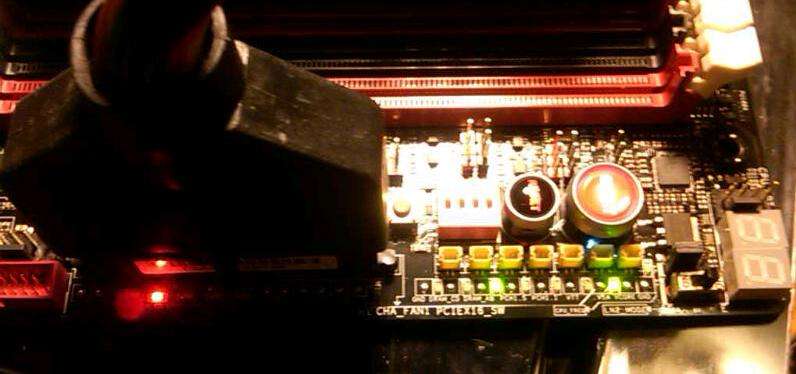
You have the slow switch as ON and the LN2 jumper enabled = 12X multi at boot
Undo that
IMHO ASUS is stark raving mad to put this on a retail mobo.
Murphys law.

So I will ask you for the third time WHO assembled your stuff
If this is a secret, just say it

Also on your LGA grid extreme left lower seems to be one missing
cant really tell

SQ6D5.jpg
 
Yes CPU was installed properly on the socket, but I removed it, in order to take the picture that you requested.
I already tried to do everything you guys suggested, only thing I wasn’t able to do yet was BIOS upgrade without booting the motherboard, I didn’t understand the process yet, since I don’t think I have any flash button, please help me to identify it.
Yes I paid for the service 40 USD, but since it didn’t work they gave me the money back.
If anyone has other ideas with what might be wrong so I can fix it, Please let me know and I will try it out.

I took some pictures so you guys could have more info to help me out. I already tried all that were suggested.
I tried all the components again that are being used on this motherboard, and all work separately.

http://img35.imageshack.us/img35/945/dsc00250xa.jpg
http://img208.imageshack.us/img208/7782/dsc00252vi.jpg
http://img849.imageshack.us/img849/9224/dsc00254nd.jpg
http://img819.imageshack.us/img819/3363/dsc00243tm.jpg
http://img338.imageshack.us/img338/5299/dsc00245em.jpg
http://img600.imageshack.us/img600/7931/dsc00248vm.jpg
http://img818.imageshack.us/img818/6129/dsc00249yg.jpg
http://img3.imageshack.us/img3/8585/dsc00251yf.jpg
http://img844.imageshack.us/img844/2754/dsc00253q.jpg
http://img513.imageshack.us/img513/9797/dsc00255b.jpg
http://img638.imageshack.us/img638/9166/dsc00256x.jpg

I will probably be replacing this motherboard since its defective, and somehow since I saw many people with building issues with this motherboard I am afraid to replace it for the same board. So if you guys have any suggestion for a good motherboard for this new LGA2011 processors please let me know.


Put the memory in a red slot if only using one module or one module per channel, no X79 board will POST with a single module in the primary slots (ASUS, MSI, Gigabyte, budget, extreme, simple or complex, it's a chipset limitation). Please read the instructions before doing anything with the board. Also disable the LN2 and slow mode jumpers, you only need those for benchmarking, they are for Extreme users who are benchmarking the board with sub-zero cooling.


-Raja
 
Last edited:
Thank you for the details on how to flash the BIOS, will try it.
So I will ask you for the third time WHO assembled your stuff
If this is a secret, just say it

I think I had already covered that, there is a computer assistance near my home, and I paid them to assemble the components on the case for me, since I don’t have much experience with hardware. I paid 40 USD, but they refunded me since they claimed that the motherboard was broken and that I should replace it.
About the slow mode, I was playing with the configs to see if the motherboard would boot up, probably I forgot to disable it.
Thanks once again for the help,
Will try to flash a new BIOS and let you guys know the results.
If there is anything else that can be done let me know.
Would also like some advice for other motherboards that would work well with this 3960x LGA2011 processor and my other components.
Regards,
 
Put the memory in a red slot if only using one module or one module per channel, no X79 board will POST with a single module in the primary slots. Please read the instructions before doing anything with the board. Also disable the LN2 and slow mode jumpers, you only need those for benchmarking, they are for Extreme users who are benchmarking the board with sub-zero cooling.


-Raja

Thank you for the info RAJA, I will disable this configurations and set memory on the proper slots. But like I said on previous post I was messing with this configs to see if I would be able to boot up this motherboard.
I also tested with 1333Mhz RAM DIMNS on B1 and D1 and also tested every combination with this RAM DIMS that you can imagine.
 
Thank you for the info RAJA, I will disable this configurations and set memory on the proper slots. But like I said on previous post I was messing with this configs to see if I would be able to boot up this motherboard.
I also tested with 1333Mhz RAM DIMNS on B1 and D1 and also tested every combination with this RAM DIMS that you can imagine.

The slot you are using in the picture can never POST, only the red ones will work when there is one DIMM per channel. These boards generally work fine, not sure what has happened in your case, it sounds like misadventure of sorts.

-Raja
 
You have the slow switch as ON and the LN2 jumper enabled = 12X multi at boot
Undo that
IMHO ASUS is stark raving mad to put this on a retail mobo.
Murphys law.

So I will ask you for the third time WHO assembled your stuff
If this is a secret, just say it

Also on your LGA grid extreme left lower seems to be one missing
cant really tell

SQ6D5.jpg

I’ve updated the BIOS to the (Rampage-IV-Extreme-ASUS-1101.ROM) renamed the file to R4E.ROM and the whole process is quite easy unfortunately it didn’t work.
I´ve updated both BIOS 1 and BIOS 2 the process apparently worked fine, BIOS light blinks for a minute then stops.
Turned off the Slow mode and moved the LN2 jumper.
I´ve used the 2 RAM DIMS on the RED spots, and unfortunately all that didn’t work.
It’s a shame, I can’t think on a motherboard better than this one for this computer.
 
I see no connector to "CPU_FAN" 4 pin header, or CPU_FAN_OPTional (second fan if running 2)
Avt1c.jpg

kcxHa.jpg


I assume you know if nothing is plugged in the CPU fan header mobo wont boot - its a safety factor that you wont turn on PC with no CPU fan running. And should have fan that runs higher than 800 min during setup phase, esp if you cant get into bios to change min

And nothing to the black 3 pin VRM voltage test header if its there
Would be nice to have a pic from above top of mobo downwards

5CHJa.jpg


And I dont remember if theres supposed to be a one pin gap in lower left of grid, and have nothing on hand to check it
dnQZZ.jpg
 
Last edited:
Same problem, but debug led in my case is totally off.

Hope my 3930K C2 is ok, don't really care with the board.

RMA the board and bought another RIVE:(

screenshot083k.jpg
 
Last edited:
Thank you for taking the time to look deeply to the pics. I already tried to Boot with a Cooler there and still got the Debug: 00 error. Only think I aint sure is if the cooler had 800RPM or not. I will buy another cooler to try.
Thank you once again.

I see no connector to "CPU_FAN" 4 pin header, or CPU_FAN_OPTional (second fan if running 2)
Avt1c.jpg

kcxHa.jpg


I assume you know if nothing is plugged in the CPU fan header mobo wont boot - its a safety factor that you wont turn on PC with no CPU fan running. And should have fan that runs higher than 800 min during setup phase, esp if you cant get into bios to change min

And nothing to the black 3 pin VRM voltage test header if its there
Would be nice to have a pic from above top of mobo downwards

5CHJa.jpg


And I dont remember if theres supposed to be a one pin gap in lower left of grid, and have nothing on hand to check it
dnQZZ.jpg
 
Same problem, but debug led in my case is totally off.

Hope my 3930K C2 is ok, don't really care with the board.

RMA the board and bought another RIVE:(

I am afraid to buy this same board, if anyone could suggest another motherboard would be glad.
Regards
 
^^ I did rma the board for refund and get an "open box" RIVE.

Imo, RIVE is the best board for my overclocking use, no other X79 mobo can compete...for now
 
Back
Top