• Some users have recently had their accounts hijacked. It seems that the now defunct EVGA forums might have compromised your password there and seems many are using the same PW here. We would suggest you UPDATE YOUR PASSWORD and TURN ON 2FA for your account here to further secure it. None of the compromised accounts had 2FA turned on.
    Once you have enabled 2FA, your account will be updated soon to show a badge, letting other members know that you use 2FA to protect your account. This should be beneficial for everyone that uses FSFT.

NEC PA241w testing - the next step

albovin

[H]ard|Gawd
Joined
Feb 16, 2008
Messages
1,653
NEC PA241w went through various tests next to a reference NEC 2490wuxi.
This is not a full review since PA241w has been reviewed already by several internet resources.
Just a few observations including some of those that were not covered or ignored in other reviews.
90r2is.jpg


The reference unit has better built quality.

PA241 has a minor cooler-to-warmer tone shift on white (removed by hardware calibration).

PA241 has an improved stand that allows to place the panel lower than it was on 2490 and provides for more convenient rotation.

2nteglj.jpg


PA 241w got slender.

27y6adg.jpg


Both have excellent viewing angles.
PA241w has no A-TW polarizer. Some LCD glow can be noticed from diagonal angle in darker environement.
No problem viewing head on.
No problem from horizontal angles.

117fbee.jpg


PA241 displays very good contrast and black black on movies - a little bit better (head on only) than 2490.

Responsiveness of both is good for universal use at home.

PA 241w: bluray was flawless at 60Hz, 50Hz both NTSC and PAL.
PA 241w unexpectedly failed to display 24p bluray (the reference monitor had no problem). An isolated incident?

PA241w has the full range of wide gamut issues from photos to movies (red faces, chemical colors).

sRGB support.
PA 241w has sRGB emulation preset that out of box represents a dramatic improvement in colors over its "native" wide gamut presentation, but still not up to the reference sRGB monitor.
After hardware calibration PA241w in sRGB emulation mode displays very good colors almost equal to the reference monitor (more precise calibration will give you practically good sRGB).

After HW calibration lower brightness will give you lower CR.
What does it say to you?
What did professional reviews say about this?
They said nothing.
To prevent this decrease in contrast simply disable ColorComp using MultiProfiler. (Thank you ArtMarshall)


AG coating. Sorry, there is no 2490WUXi-like AG coating on PA 241w.
PA241w has more crystalline effect and reading texts from it is less pleasant than from the reference monitor.

PA241w is absolutely wonderful for pro users, but this is my last concern.

Unfortunately, this top product form NEC turned out to be less friendly for regular users that it used to be.

PA241w vs 2490WUXi:
Pros
Better mechanics (stand)

Cons
Real sRGB colors achieved only through HW calibration.
After hardware calibration, brightness control is accessible only through Multiprofiler (a software that imitates OSD controls), autobrightness is not accessible.
AG coating is more noticeable.
No A-TW polarizer.

PA241w vs other 24":
One of two best available 24" monitors (with 2490WUXi2)

We still need fully sRGB capable high end monitors.
 
Last edited:
Thank you very much for your mini-review Al, I look forward to an in-depth review from you on this monitor?

Sad to see the loss in contrast while in sRGB mode.

If I could still find a new 2490WUXi somewhere, I'd buy it. I don't want to settle for a refurb.
 
What did professional reviews say about this?
sRGB mode is just a fixed setting for the internal color space emulation (sRGB primaries relative to D65), D65 white and sRGB gradation. There was no further reduction in white level that go over ColorComp impacts and white point customising with our test model (and there is no other contributor to a lowered white-level in this case) but due a HD failure I haven't extensive test data here (only for PA271W and PA301W). Therefore I will try to get access to a PA241W again. A little pitfall is the METAMERISM option that is active in some cases. It was intended as a comfort feature for a "non calibration dual screen setup" with a non WCG-CCFL screen (=> observer metamerism) - but I would suggest a visual adjustment even in this case to account for the personal perception.

To achieve maximum contrast in sRGB emulation you would have to disable color comp and choose the native whitepoint - which lies quite far away from the blackbody curve and therefore isn't very neutral. Don't forget to adapt the desired primaries chromatically from D65 to this whitepoint.

Best regards

Denis
 
Last edited:
There was no further reduction in white level that go over ColorComp impacts and white point customising with our test model

Yes, but current bundled calibration solution seems to force ColorComp on (it used to be optional).
Outside HW calibration CR is quite stable high.
 
Thank you very much for your mini-review Al, I look forward to an in-depth review from you on this monitor?

Sad to see the loss in contrast while in sRGB mode.

You are welcome. No, there is no need in another "in depth" review. The PA 241w is already reviewed in detail.
I pointed out some things that are important to me.

The loss in contrast is not too bad. For photos it's just perfect.
Could be better for movies.
Uncalibrated sRGB has practically no loss in CR.
But overall there seems to be too many conditions to get a normal sRGB picture.
 
Now look at this.
Birghtness control and measured contrast ratio in sRGB emulation mode (HW calibrated).

How is the CR affected when not in sRGB emulation mode?

The higher-end NEC displays seem to keep their backlights at full power when decreasing brightness, which leaves a constant black level and means the CR will decrease. I have not been able to test a PA241w in person to see if this is true. This could (if true) be a Godsend for people who are sensitive to backlight flicker, so maybe they did this on purpose?
 
CR is stable.
Black level decreases with brightness so CR is not affected (both uncalibrated sRGB and Native).
As far as flickering is concerned, I looked at it.
The PA 241w has different than 2490 flickering pattern. I cannot measure the frequency, I cannot say what is better (both seem to be non-issue) but it is different.
 
Let me not be confused.

In order to constrain the color space to sRGB, you MUST use the sRGB preset, then calibrate? Or can you use the user or custom preset and use calibration to attain sRGB, thus retaining higher/regular contrast ratio?

I am new to calibration so I do not know.
 
Yes. The only way to get sRGB is sRGB preset.
Then if needed you calibrate it.

The main way to calibrate NECs is hardware calibration (automatically, corrections loaded in the monitor) vs software or manual calibration (correcting data in the videocard). Of course, in both cases a colorimeter and calibration software are involved.
Automatically means that you set the desirable parameters and push one button - the rest is done by the technology.
Manual means that you have to adjust various controls manually many times and go through several test patterns until you get the result.
Hardware calibration is more precise, convenient and powerful.
You can create several calibration scenarios, store them in a library and retreive as needed.

This technology has been designed with pro users in mind.
But regular users can benefit from convenience of hardware calibration too. It's easy. It extends the monitor capability.
A hardware calibrated monitor (corrections stored in the monitor) can be used as a stand alone device for video and games. A regular monitor can be used as a stand alone too, but the calibration will be lost (stored in the videocard).
PA241w can be paired with SpectraView (hardware) calibration kit designed specifically for NECs and adjusted for wide color gamut.

A pro user would scream if someone changes any parameter after calibration.
I am not a pro user. I use monitors for "regular" work, hobbies, entertainment, etc. And I test monitors from a regular user point of view first of all.
So I don't hesitate to change brightness after calibration. Colors remain excellent for my purposes.
In the older SpectraView/NEC bundles all OSD controls were accessible on hardware calibrated monitor.

You could brush up colors and still be able to change brightness (or activate autobrightness). The use of ColorComp (the NEC's pro feature that makes minor screen imperfections neutral but somewhat reduces CR) was optional.
In case of PA241w+"special" SpectraView software I observed ColorComp being forcefully activated and OSD controls disabled after calibration.
I performed hardware calibration of the reference monitor with the same software. The OSD remained accessible and ColorComp remained disabled (at least so is indicated).
ColorComp (the new name is Uniformity) activation seems to be what causes CR decrease with hardware calibration. From the pro point of view it's OK, from a regular user point of view it is not.

I don't have much time to play with this unit calibration.
Maybe I missed something (how to get rid of ColorComp), so any comments are welcome.

In a few words: CR is high in "raw" sRGB mode; you can calibrate it manually (cannot comment on the results because I don't calibrate NEC's manually); the most desirable hardware calibration so far seems to lead to a lower CR.

We'll see if someone gives us a hint.
 
The higher-end NEC displays seem to keep their backlights at full power when decreasing brightness, which leaves a constant black level and means the CR will decrease.
As albovin said the NECs PA have quite big backlight regulation range. A "curvy" contrast characteristic inside this range can be observed due to the absolute (and quite precise) brightness setting. If you have enabled ColorComp and the desired brightness can't be achieved with the actual level it is gradually lowered (which means that contrast ratio climbs - see last table in the first posting). At the highest brightness settings it's therefore always off (the OSD doesn't reflect the actual state but renders the ColorComp field in magenta).

We'll see if someone gives us a hint.
You could try to deactivate it after calibration via MultiProfiler.

Best regards

Denis
 
Last edited:
Thanks again for the detailed information. I own two NEC 2090UXi's and will likely be buying the Spectraview II kit directly from NEC. I wonder if the version sold on their website is adjusted for standard or wide gamut?
 
. I wonder if the version sold on their website is adjusted for standard or wide gamut?
The probe still has the internal CCFL correction (72% NTSC) and therefore behaves like a normal EOD2 outside SV II. It is quite probable (they could also have overwritten the CRT correction but I don't think so) that SV II corrects the measurement data on software side in the case of accordant display and probe.So the answer is: You should be able to achieve correct results inside SV II with CCFL and WCG-CCFL screens.

Best regards

Denis
 
I wonder if the version sold on their website is adjusted for standard or wide gamut?

I believe you had a reasonable answer above.

The next is my opinion only.
As the PA241w goes to its owner, I will uninstall the latest version of SV. I am not so happy with numbers I get on the 2490 with this addition.
To be on the safe side I will return to the original version that came with the monitor and gives good colors and better numbers.
LaCie software also works perfectly (hardware calibration) with some older NECs + Eye One D2 colorimeter. A couple of years it could be requested for free directly from LaCie (their monitors were actually modified NECs). They had a famous 21" twin brother from NEC. Not sure about 20".
 
Thanks. I myself have seen good results with Lacie's software, and I like the way that the calibration reports are formatted and displayed, very easy to read. I also believe that it shows more information in the calibration report than the i1D2's software or NEC's software?
 
To achieve maximum contrast in sRGB emulation you would have to disable color comp and choose the native whitepoint - which lies quite far away from the blackbody curve and therefore isn't very neutral.

Is there any sense in buying a 1000€ monitor and than disable color comp?
schwarz2.jpg


helligkeit1.jpg
 
that backlight looks like SHIT. mine are perfect without colorcomp. granted diff model but...
 
that backlight looks like SHIT. mine are perfect without colorcomp. granted diff model but...

every model reviewed on the net has the same "problem", probably you are really lucky or probably you aren't able to see the problem due to low brightness on monitor or high illuminated room.
 
Is there any sense in buying a 1000€ monitor and than disable color comp?
For CEPS surely not. But when for example gaming or looking a film one could at least think of deactivating such compensation functions. Btw: When looking at the first picture (taken with long exposure time): They can't correct illumination issues.

Best regards

Denis
 
For CEPS surely not. But when for example gaming or looking a film one could at least think of deactivating such compensation functions.

Best regards

Denis

You are right but gaming with a 1000€ monitor and see a big backlight bleeding like that is at least very boring.
I'm not bashing this monitor since I don't know if it is possible to buy a better monitor for only 1000€ but personally I'm sure that I will leave color comp on also for gaming if I had one of this jewel.
 
I agree, in that particular case, for €1000 it is just not acceptable, and i would personally have returned it immediately.
Here's my 2490 as a comparison... My camera is very slow, and i lost my tripod a few months ago, but it's nearly what it looks like in real life.. I don't notice the slight unevenness though, so maybe it is caused by vignetting.
http://users.telenor.dk/~dsl35822/P1010542.JPG

And btw. colorcomp does not work for black, since the off-state of IPS panels is "blocking", just like VA. TN is non-blocking.

Thanks for the comparison Albovin! If it's really true about the use of perfoming a bit of "blocking" light in order to maintain an sRGB profile in order to decreasing brightness - it's not a good sign. However, i'm almost sure there must be some way to avoid this (although it isn't very obvious to me).
 
You are right but gaming with a 1000€ monitor and see a big backlight bleeding like that is at least very boring..
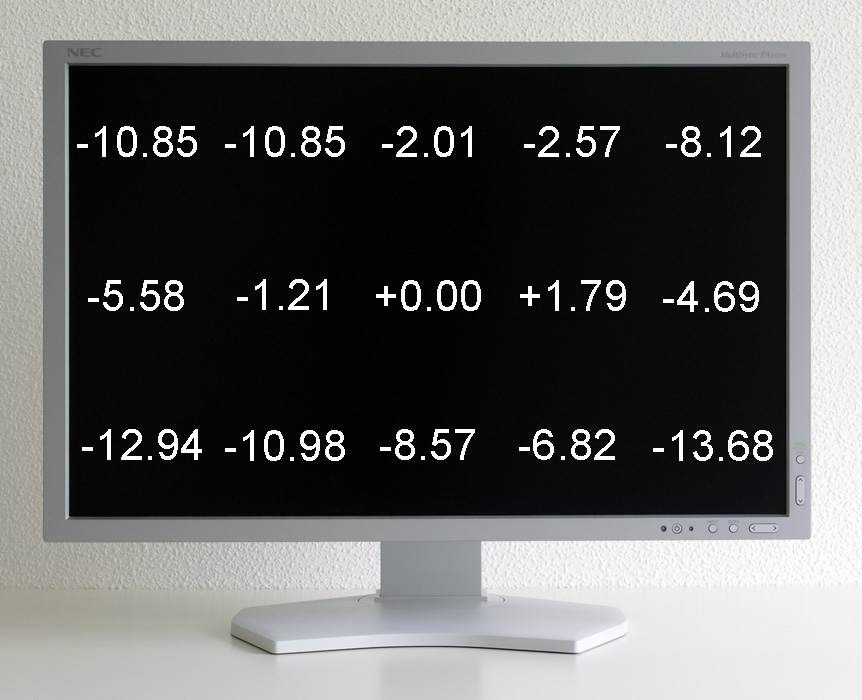
The picture above is a "synthetic" one with long exposure time (8sec, f/11, ISO-200). So that's absolutely unproblematic in this case. Brightness distribution and image homogeneity were more problematic without ColorComp but excellent with enabled function. The loss in contrast due to reduced whitelevel is a minor trade off regarding the quality gain.

i'm almost sure there must be some way to avoid this (although it isn't very obvious to me).
As mentioned above: I couldn't make out any further reduction (over: ColorComp, whitepoint adjustment) in whitelevel when using color space emulation - nor blacklevel was raised.

Best regards

Denis
 
Last edited:
I enjoyed the review. Covered some very important things despite being short others have not. If NEC had a clue they'd just continue to make the 2490 and a 24" version of the highly overdriven glossy WGMX2 for gamers. The orginals had to sell well and they'd still sell well. I own both and pray they don't fail anytime soon with dearth of selections avail.
 
Last edited:
every model reviewed on the net has the same "problem", probably you are really lucky or probably you aren't able to see the problem due to low brightness on monitor or high illuminated room.

my monitors are a diff model, 2090uxi. and they are perfect in a completely dark room, high or low brightness
 
Is there any sense in buying a 1000€ monitor and than disable color comp?

I *love* ColorComp. It's very effective and the resulting perfect uniformity really makes the display stand out as exceptional (at least to me).

All displays will have some backlight variations unless compensation is used. Some will be worse than others, of course - both model and individual unit.
 
id imagine the pa241w has the same heavy AG coat as all the other newer IPS models.

i'm not sure how my 2090uxi which is an older IPS model compares, but the AG coating isnt THAT bad on my monitor. It is definitely noticeable, a bit of crystal pattern on white images, but i'm not that sensitive to it. and it certainly doesnt make the overall picture dull at all.

to me the antiglare issues that are a dealbreaker for some are to me a moot point.

if you hate it that much, there ARE ways to remove it if you are that determined. either that or get a glossy apple cinema display.
 
Hi albovin,

Thanks for the detailed set of findings. I saw that you had a couple of issues and it seems that you're using the US SpectraViewII version.

The OSD lock can be controlled under the SpectraViewII Preferences (Edit->Preferences, Display Tab).

Maybe I missed something (how to get rid of ColorComp), so any comments are welcome.

The easiest way was mentioned before - use MultiProfiler after calibration to disable ColorComp / Uniformity.

-- Art
 
Hi albovin,

Thanks for the detailed set of findings. I saw that you had a couple of issues and it seems that you're using the US SpectraViewII version.

The OSD lock can be controlled under the SpectraViewII Preferences (Edit->Preferences, Display Tab).


The easiest way was mentioned before - use MultiProfiler after calibration to disable ColorComp / Uniformity.

-- Art

Hi ArtMarshall,
Yes, I disabled ColorComp in Multiprofiler. Thank you.
However, OSD is locked after HW calibration despite "do not lock" (as always) in SV settings.

I would appreciate your comment on this (1080p 24p movie from a bluray player):

6ojsqe.jpg


Thank you.
 
Hi albovin,

However, OSD is locked after HW calibration despite "do not lock" (as always) in SV settings.

I'll look into this for you. What version of SpectraViewII are you using?

I would appreciate your comment on this (1080p 24p movie from a bluray player):
Regarding the 1080p not working, try changing the "EDID EXTENSION" to "ENHANCED" in the Advanced Menu, Tag 6. The User Manual describes the process for going into the advanced menu. http://www.necdisplay.com/documents/UserManuals/PA_Series_UserManual.pdf
 
As it seems like all IPS panes have basically the same hardware, it is amazing to me the difference of the effect of AG coating on the PA241W compared to the Dell U2410. I didn't put them side by side, but it is much better on the Nec, don't ask me why. It's more than acceptable to me (the Dell isn't - I find it bloody unnatural and distracting).

I'm so pleased I just ordered another monitor.
 
So albovin, since I can't get my hands on a new 2490wuxi anymore, is there anything better (for the same price or less even) than the PA241W for color critical work and general use?
 
Back
Top