Need RTX 4090 repair advice

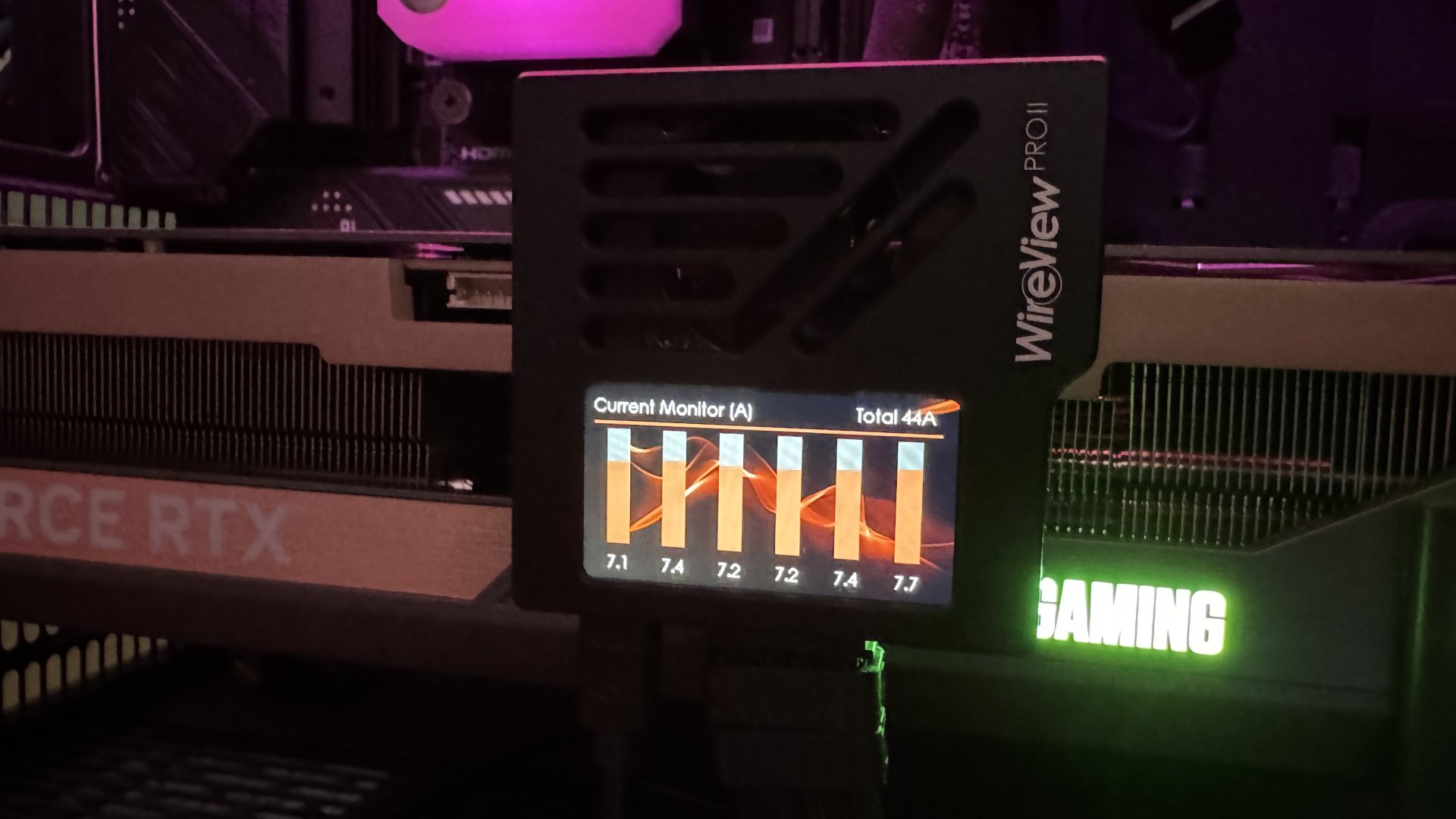
You can also monitor everything with the Wireview in HWconfig even without the TG app (which is portable, no install needed). And the device keeps logs internally for a pretty long time, in case you don't want to monitor 24/7.

Really makes no sense to replace a high quality and working PSU unless you need more capacity or something.
 
You can also monitor everything with the Wireview in HWconfig even without the TG app (which is portable, no install needed). And the device keeps logs internally for a pretty long time, in case you don't want to monitor 24/7.

Really makes no sense to replace a high quality and working PSU unless you need more capacity or something.
My math was:

$200 more money for the right, native ATX 3.1 solution (my PSUs are Seasonic Prime Platinum 1300W, Corsair AX1000, AX1600i)
Better protection

In a world of GPUs with rising values every day, I enjoy the full peace of mind.
 
I considered the $400 MSI MPG Ai1300TS but I ordered the $140 WVIIPro for the 4-year-old 4090 in my sim racing PC instead because I also didn't want to change the Seasonic TX1000 PSU I already have. I keep on reading about "additional points of failure" about the WireView especially on Reddit. Frankly, I don't really mind since the device has thermal sensors within each of those connectors to take that into account.

The wireview app is pretty lightweight but even then, I only run it when I need to configure something or check the device logs.


​

 
The current imbalance alarm on the WireView II Pro should catch the problem well before a thermal alarm, unless one doesn't have airflow in their case. That imbalance alarm saved my 5090 before the temps were remotely a problem.
 
The current imbalance alarm on the WireView II Pro should catch the problem well before a thermal alarm, unless one doesn't have airflow in their case. That imbalance alarm saved my 5090 before the temps were remotely a problem.
It just saved my 5090 last night. I added one and it instantly went to Alarm with pin 4 being 9-10 amps while the others where 4-5. Had to change the cable that was less then a year old and unplugged twice.

My first impression of the vw2 is it's shows the problem before it becomes a melted plug and I'm not worried about it anymore
 
AI1300TS in HWiNFO alongside the Astral 5080 per-pin. PSU will first scale back power (75%) - then shutdown GPU - https://www.msi.com/blog/introducin...gpu-protection-on-msi-next-gen-power-supplies. I love not having to have another app. Can be tuned with MSI Afterburner, as well.

5080_astrai_ai1300ts.png
 
It's also possible to show the Wireview Pro II and MSI AI1300TS sensors in the RTSS in game OSD. The only thing is that HWiNFO64 has to be running in the background too.

Screenshot 2026-10-31 074603.png
Screenshot 2026-10-31 074647.png
Metro  Last Light Redux Screenshot 2026.10.31 - 07.56.41.19.jpg
 
So I just got my WP2 installed and it's throwing a current imbalance warning, but from what I read as long as all pins are under 10.5 amps then it should be fine? My cable and GPU still look super pristine after over a year of heavy us.

1793737195384.png
1793737206141.png

1793737235718.png


I did try reseating everything twice but it didn't improve from the imbalance of 5/9.
 
And here's my 4090 which has gone through 4 years of use.

1793737332644.png
1793737342149.png


It's also throwing a pin imbalance, but this time it's only 5/7 so I'm not really worried about that at all.

1793737375639.png
 
So I just got my WP2 installed and it's throwing a current imbalance warning, but from what I read as long as all pins are under 10.5 amps then it should be fine? My cable and GPU still look super pristine after over a year of heavy us.

View attachment 834592View attachment 834593
View attachment 834594


I did try reseating everything twice but it didn't improve from the imbalance of 5/9.
Cable is bad. Mine did the same thing pin 4 was 9-10 amps other was 5. Cable was less then a year old and only unplugged twice on the GPU side looked good but my PSU came with a spare swapped it and it was a perfect 7.8-8
 
I think basically they have pegged the cable as the problem in almost all of these cases. So just have a couple on hand. For around $20 each - worth it.
 
I think basically they have pegged the cable as the problem in almost all of these cases. So just have a couple on hand. For around $20 each - worth it.

Any recommended cable brands? I'm using a Corsair RM1000e.

EDIT: Nevermind I see the official Corsair one is $20, I'll get one right now.
 
Any recommended cable brands? I'm using a Corsair RM1000e.
I'm partial to getting your OEM PSU cable. If you have an MC nearby they stock Corsair ones - if not you can get them pretty quick off of Amazon and I think Corsair direct.
 
Thanks guys went ahead and bought it off Amazon for $20 it'll be here tomorrow. Crazy, I would have never known my cable was going bad without the WP2.
 
It works, doesn’t it?

For sure, I'm just concerned about longevity with this thing, pulling 9-10amps might be OK short term but perhaps the thermal stress over the years will eventually cause it to fail. My 4090 on the other hand went a solid 4 years without issue and the WP2 pretty much confirmed it's running as expected, just a 2 amp max difference between the pins.
 
The 12VHPWR cables are basically the problem with the whole thing. Seasonic themselves only warrants the cables for 50 re-connections. That is a good amount - but compare to your Molex that's like nothing, at least for me who changes cards A LOT.

12vhpwr_seasonic.png

Source: https://seasonic.com/native-12v-2x6-cable/ > User Manual (PDF download)
 
I've only plugged in my 5090 once when I got it and then it's been plugged in for the last 16 months and never touched. I'm wondering if it was actually operating totally fine the entire time then only when I unplugged it for the very first time and plugged it into the WP2 maybe the wiggling back and fourth to get it out is what messed it up. What a turd of a cable this 16 pin is lol.
 
I've only plugged in my 5090 once when I got it and then it's been plugged in for the last 16 months and never touched. I'm wondering if it was actually operating totally fine the entire time then only when I unplugged it for the very first time and plugged it into the WP2 maybe the wiggling back and fourth to get it out is what messed it up. What a turd of a cable this 16 pin is lol.

Yeah the other guidance is to not bend the cable close to the connection. It’s a special snowflake.
12vhpwr_seasonic2.png
 
Last edited:
I've only plugged in my 5090 once when I got it and then it's been plugged in for the last 16 months and never touched. I'm wondering if it was actually operating totally fine the entire time then only when I unplugged it for the very first time and plugged it into the WP2 maybe the wiggling back and fourth to get it out is what messed it up. What a turd of a cable this 16 pin is lol.
Folks that have never touched their cable after fully plugging it in have had it burn up over a year later. 5090s and even 5070 Tis.
 
Folks that have never touched their cable after fully plugging it in have had it burn up over a year later. 5090s and even 5070 Tis.

Yeah which is why I'm replacing the cable since I'm sure long term the current one will eventually run into issues. That one pin pulling 9 amps is probably fine for now but later down the line maybe it's going to reach 10amps or more then eventually melt.
 
Folks that have never touched their cable after fully plugging it in have had it burn up over a year later. 5090s and even 5070 Tis.
Yes there are multiple factors - which is why you must:

- Monitor (Per pin 12VHPWR monitoring via Astral or WP2 or PSU)
- Prevent (WP2 or PSU)
- Connect firmly
- Don't bend
- Don't connect more than 50 times (lol)
- Have spare cables
 
Last edited:
Folks that have never touched their cable after fully plugging it in have had it burn up over a year later. 5090s and even 5070 Tis.
My RTX 4090, which had a 4 -> 1 dongle that was never unplugged for 4 years, melted. It's a truly awful plug design.
 
Back
Top