Need RTX 4090 repair advice

madpistol

[H]ard|Gawd
2FA
Joined
May 17, 2020
Messages
1,305
IMG_6314.jpeg


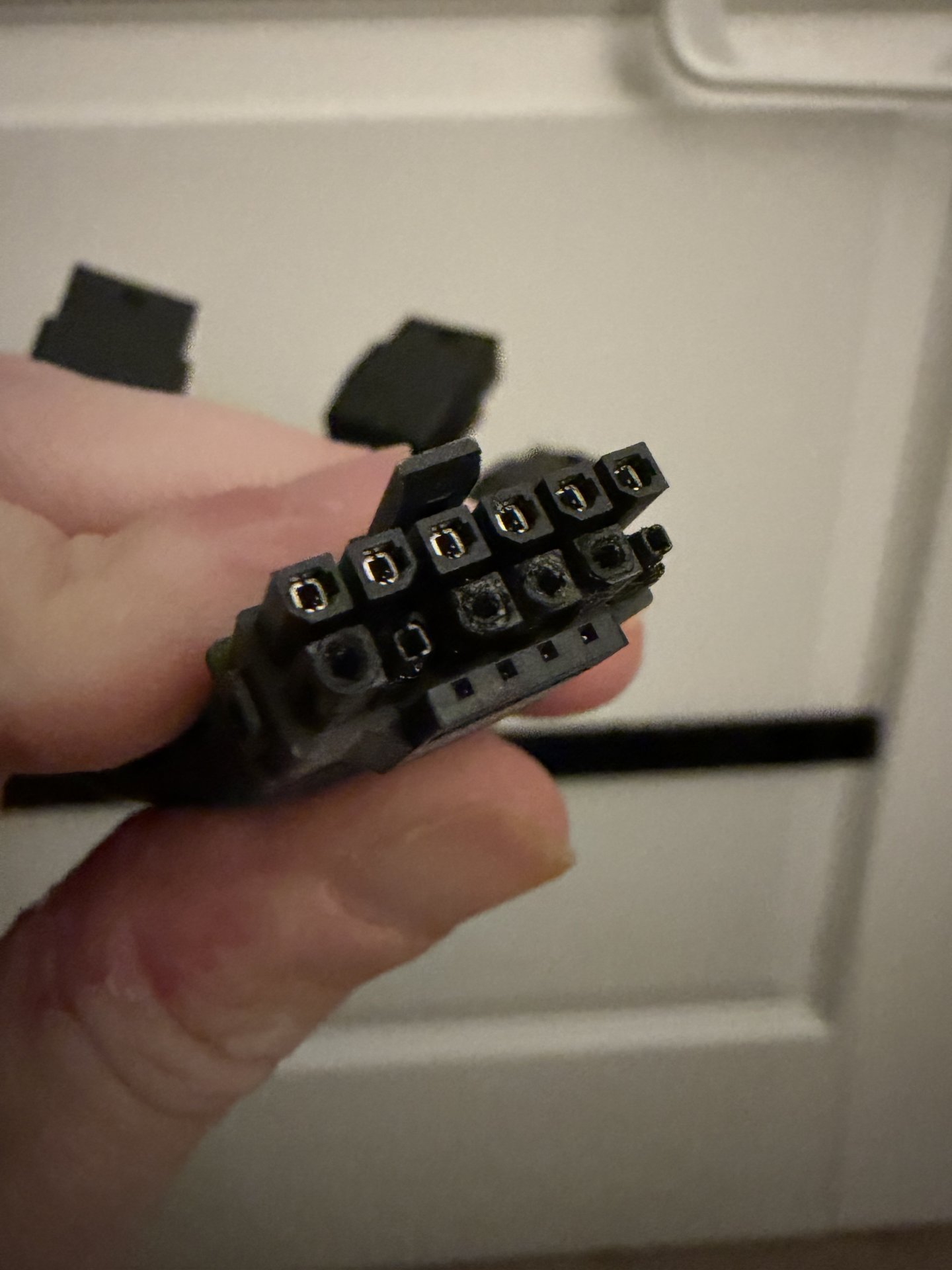
My RTX 4090 power connector has burned and melted onto the 12vhpwr plug. I need recommendations on what to do here.

The GPU posts and boots to windows. It immediately crashes as soon as I attempt to start a game of any sort. The CPU still appears to be processing, but there is no image. My conclusion is that the GPU still works.

What do I do now? It’s out of warranty, and I either need to have it repaired or sell it. Any recommendations?
 
Maybe that youtube guy at northwestrepair?

I'm thinking if you look around there are repair services for changing that connector. Compared to a lot of the fixes the northwest guy does, changing one of these connectors is relatively easy. Something like this could even be DIY if one has the tools and soldering skills, and one can source the replacement connector.

ETA: Here he is removing and replacing one: How to replace a 12vhpwr GPU connector
 
Last edited:
Maybe that youtube guy at northwestrepair?

I'm thinking if you look around there are repair services for changing that connector. Compared to a lot of the fixes the northwest guy does, changing one of these connectors is relatively easy. Something like this could even be DIY if one has the tools and soldering skills, and one can source the replacement connector.

If you send it out send it to someone who can definitely fix it. You're going to pay thru the nose either way just do it right the first time.
 
If you send it out send it to someone who can definitely fix it. You're going to pay thru the nose either way just do it right the first time.
If one is reasonably handy, the tool cost here isn't that high. I added a video link to my post. He is using about $120 worth of tools, maybe a bit more. Probably less than the cost of paying someone to fix it.

The key thing is, as stated in the video, patience. The next key thing is flux. When soldering, flux is magical.
 
If one is reasonably handy, the tool cost here isn't that high. I added a video link to my post. He is using about $120 worth of tools, maybe a bit more. Probably less than the cost of paying someone to fix it.

The key thing is, as stated in the video, patience. The next key thing is flux. When soldering, flux is magical.

These cards have extremely thick PCBs that wick a lot of heat. If you don't have a preheater and hot air you're way more likely to make a mess of it. Just saying.
 
View attachment 826788

My RTX 4090 power connector has burned and melted onto the 12vhpwr plug. I need recommendations on what to do here.

The GPU posts and boots to windows. It immediately crashes as soon as I attempt to start a game of any sort. The CPU still appears to be processing, but there is no image. My conclusion is that the GPU still works.

What do I do now? It’s out of warranty, and I either need to have it repaired or sell it. Any recommendations?
Same thing happened to my RTX 4090
first stop using your GPU.
Replace your PSU
and take your vid card to an expert technician to change the power connector and to check if there is further damage

Also, get a WireView 2
 
These cards have extremely thick PCBs that wick a lot of heat. If you don't have a preheater and hot air you're way more likely to make a mess of it. Just saying.
One would have to be handy and follow the instructions to the letter. There are many ways to screw this up. It looks like the Northwest guy got away with using hot air as a preheater then when at it with a big soldering iron and a lot of flux. He also used low melt solder.

This is not a beginner's soldering project, but given the track record of 4090s and 5090s, I have a feeling that in the next few years lots of people are going to get good at this.

OP, watch the video. If you understand all of it, and think you can do it, go for it. Don't short any of the tools, don't crank up the temp, and have patience. If things are not working well, stop. Otherwise, just pay a guy to fix it.

Do you see a windows desktop? If so, it's likely the card is good. Crashes on starting a game could be due to the damaged connector.
 
I wouldn't attempt to repair this myself. I just have no experience fixing vid cards, and I wouldn't start with a 4090.

I'd have a look at the PCB. One reason connectors melt is uneven current distribution. So... see any PCB damage? It's possible the PCB could fail first, effectively disconnect one or more lines, then the others get overloaded and melt the connector. On a good day this isn't the cause, but it's something to check for before sending the card out for repair.

Hopefully it's just a melted connector that can be replaced along with doing whatever else you can to keep the problem from recurring. If that's the case it should be fixable. But there's always that chance the board is damaged.

Even a damaged board isn't a total death sentence. I keep seeing these articles about Chinese companies desoldering chips from 4090s, 5090s, etc. and mounting them on a new board with more vram. Lately they've even been doing it to 3080s to make better gaming cards. 3080 20GB. Of course that would be more $ than just having a repair shop just replace the connector. Still, given current prices it'd likely be worth the cost. 4090 is the second fastest card and 5090s are nearly sold out and ~$5k if you find one due to companies buying them by the pallet for AI.
 
Same thing happened to my RTX 4090
first stop using your GPU.
Replace your PSU
and take your vid card to an expert technician to change the power connector and to check if there is further damage

Also, get a WireView 2
The PSU is only about a year old. It’s a Corsair HX1000i with ATX 3.1 support. Do I still need to send it in for repair?
 
It likely still works. A repair will likely cost you at least $120, not including shipping. Maybe as high as $200. You can always try that, and if not, you can always sell for parts. I see a lot of graphics cards sold for parts on eBay.
 
The PSU is only about a year old. It’s a Corsair HX1000i with ATX 3.1 support. Do I still need to send it in for repair?

The gpu needs repair
The PSU not necessarily, but it has to be checked to be sure. You dont want to gamble the life of your expensive GPU, right?

Me being paranoic, i just replaced my psu to a new bigger one. But thats just me
 
The PSU is only about a year old. It’s a Corsair HX1000i with ATX 3.1 support. Do I still need to send it in for repair?
The PSU itself is likely fine, but you will have to replace that burned up cable/connector.
 
I sent off the GPU to ZapFixers in Florida. They got glowing reviews and pricing seems reasonable considering that the 4090 is now around $3K (!!!) on eBay. How the heck did the RTX 4090 become a long term investment… 10 years ago, we would have just gotten a new GPU. Now, it’s much cheaper to just repair it.

I’ll keep you updated!
 
Last edited:
I sent off the GPU to ZapFixers in Florida. They got glowing reviews and pricing seems reasonable considering that the 4090 is now around $3K (!!!) on eBay. How the heck did the RTX 4090 become a long term investment… 10 years ago, we would have just gotten a new GPU. Now, it’s much cheaper to just repair it.
Because Claude is a hungry, hungry boy that eats all the GPUs and memory.
 
I sent off the GPU to ZapFixers in Florida. They got glowing reviews and pricing seems reasonable considering that the 4090 is now around $3K (!!!) on eBay. How the heck did the RTX 4090 become a long term investment… 10 years ago, we would have just gotten a new GPU. Now, it’s much cheaper to just repair it.

I’ll keep you updated!
Out of curiosity how much did they quote you to fix?
 
Got an email today saying the GPU is fixed. Cost was $450. I’ll let you know when I get the GPU back.
 
It was $400 + shipping including insurance.
Ouch! Considering the value of that card, the $50 for the insurance sounds like a deal.

At its core, swapping this connector out should be cheap, but the absurd values on these boards complicates that. When considering this from the business perspective, there is small, but non-zero chance the tech could screw this up, and if they are honest, they would now owe you the value of the board.

You willing to risk it to earn $100? $200? Apparently $400 is the magic number. Generally speaking, tech work is billed at $100-$125/hr.

It does rub salt into the wound of Nvidia's poor PCB design as this problem is actually there, the connector is just the symptom.
 
Ouch! Considering the value of that card, the $50 for the insurance sounds like a deal.

At its core, swapping this connector out should be cheap, but the absurd values on these boards complicates that. When considering this from the business perspective, there is small, but non-zero chance the tech could screw this up, and if they are honest, they would now owe you the value of the board.

You willing to risk it to earn $100? $200? Apparently $400 is the magic number. Generally speaking, tech work is billed at $100-$125/hr.

It does rub salt into the wound of Nvidia's poor PCB design as this problem is actually there, the connector is just the symptom.
Still way cheaper than getting a new, comparable GPU. Just have to accept that this is our new reality.

I ordered a Wireview Pro II as well. Hopefully that will prevent this from happening again.
 
Still way cheaper than getting a new, comparable GPU. Just have to accept that this is our new reality.

I ordered a Wireview Pro II as well. Hopefully that will prevent this from happening again.
Smart. I have a Wireview Pro, has temp sensing and an alarm, but not per pin sensing of load....Itching at the idea of swapping it to a Wireview Pro II just be cautious. Although I did take a AC/DC clamp meter and ensured I was getting even distribution along all my cables with a furmark 100% load. So holding off for now and tempting fate. Safe to say, if I ever move the computer, replug it, or touch the wires....I test it again just to be safe...lol. Man, how the hell did we get to this point, surprised they stuck with this catastrophe of a connector on 5090's -_-. Considering 5090's are EoL now, treating mine like gold, so may jump to a wireview pro 2.
 
Man, how the hell did we get to this point, surprised they stuck with this catastrophe of a connector on 5090's -_-. Considering 5090's are EoL now, treating mine like gold, so may jump to a wireview pro 2.
Enshittification my friend, enshittification.

Don't have one of these boards, but I would go with per pin current monitoring as it is likely to detect an issue long before the connector melts.

A melting power connector is an epic engineering fail, this isn't a trivial thing. Hence my earlier SMH comments about needed fans on connectors - that's the very definition of a clusterf.
 
  • Like
Reactions: Ikasu
like this
An even better thing that monitoring would be for the protection device itself to limit the current on each pin. More complex, but it should not ever fail. This function used to be on the video card itself, but apparently reduced the number of leather jackets per quarter.
 
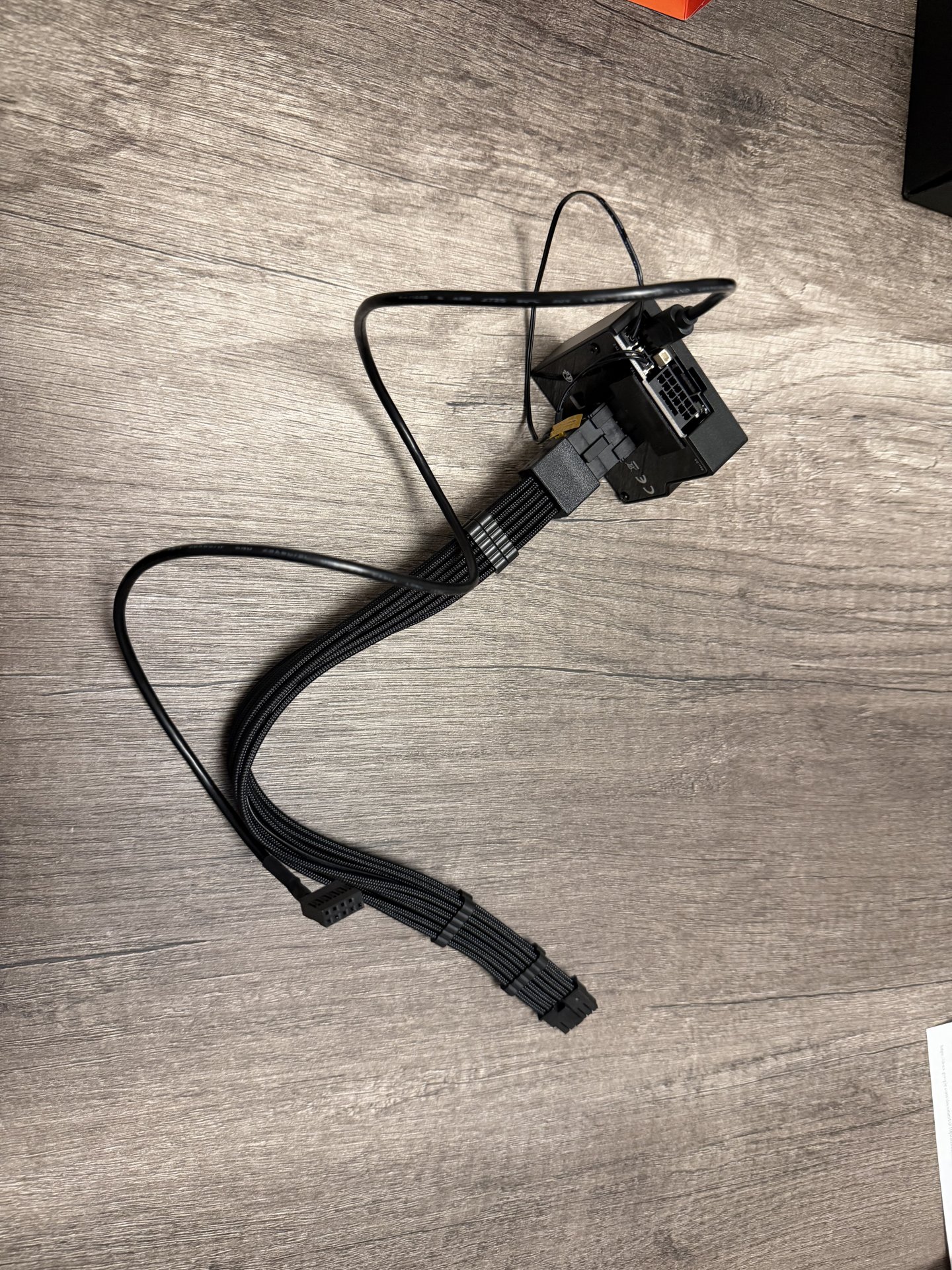
RTX 4090 is back, and the Wireview Pro II was delivered. Unfortunately, the Wireview Pro II doesn't fit (grumble), and the wired version of the Wireview Pro II appears to be out of stock everywhere (grumble, again). So I'm trying to make the best of it; I've ordered a 12vhpwr extension cable and some Kapton tape to attach the temperature sensors from the WPII to both ends of the cable. It's not the best solution, but it does not appear I have any other choice.

I also need to test my RTX 4090, but now I'm seriously scared to plug the native 12vhpwr cable that came with my Corsair HX1000i directly into the GPU without the WPII. This sucks...
 
RTX 4090 is back, and the Wireview Pro II was delivered. Unfortunately, the Wireview Pro II doesn't fit (grumble), and the wired version of the Wireview Pro II appears to be out of stock everywhere (grumble, again). So I'm trying to make the best of it; I've ordered a 12vhpwr extension cable and some Kapton tape to attach the temperature sensors from the WPII to both ends of the cable. It's not the best solution, but it does not appear I have any other choice.

I also need to test my RTX 4090, but now I'm seriously scared to plug the native 12vhpwr cable that came with my Corsair HX1000i directly into the GPU without the WPII. This sucks...
I sold my BNIB wired Wireview Pro II for cheap. If I come across any more, I'll let you know.

If you don't care about color, the white ones are in stock.
 
As an Amazon Associate, HardForum may earn from qualifying purchases.
I sold my BNIB wired Wireview Pro II for cheap. If I come across any more, I'll let you know.

If you don't care about color, the white ones are in stock.
Unfortunately, that's the same version as the black one I already have. I need one that has a wire connection to the 12vhpwr connection on the GPU. The one that fits flush to the GPU does not work with my 4090.
 
As an Amazon Associate, HardForum may earn from qualifying purchases.
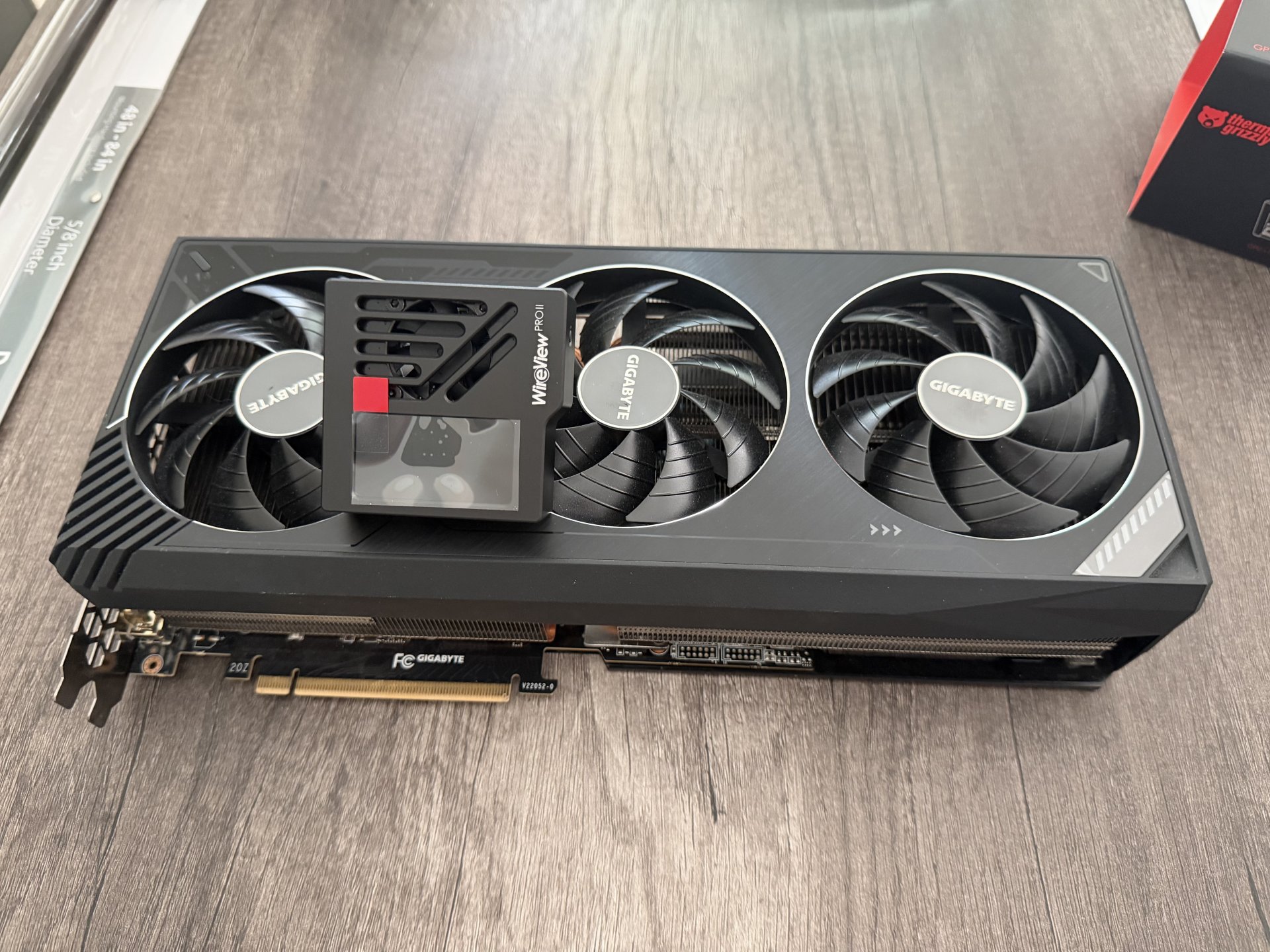
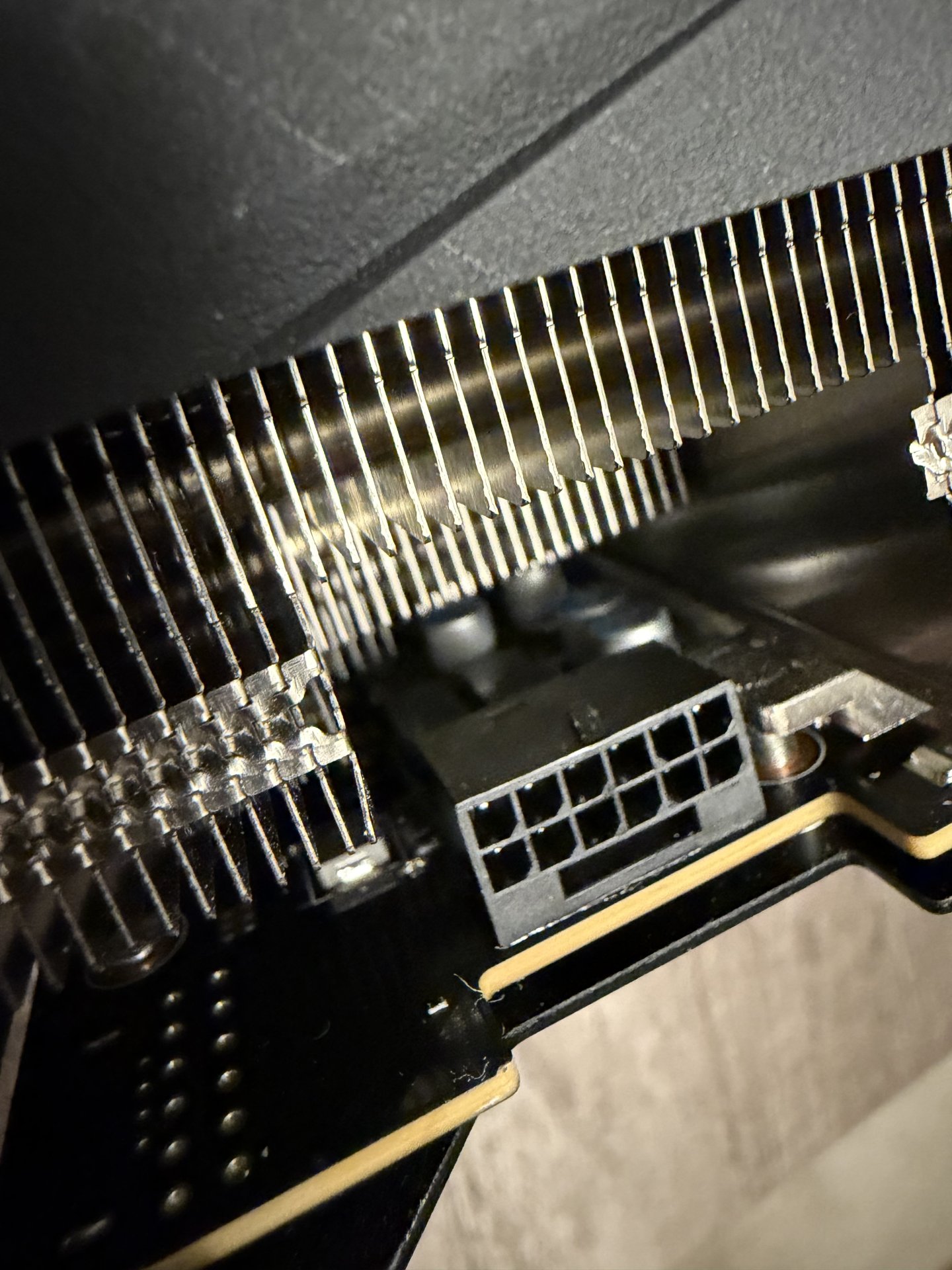
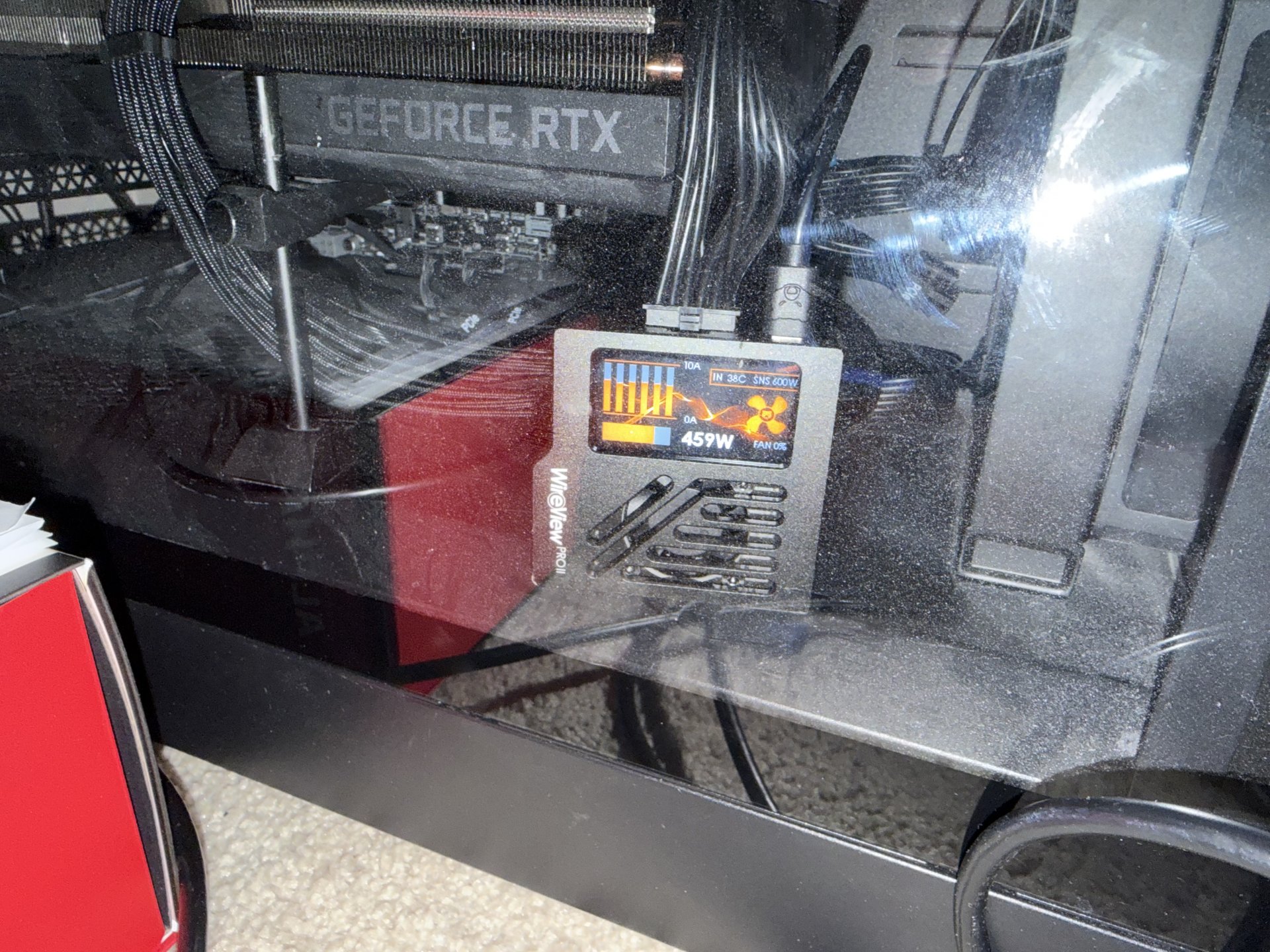
I finally got the Wireview Pro II setup and running on my RTX 4090. It was a pain to be sure, but everything looks good. Kept it running overnight on FAH to check stability, and it passed with flying colors.

IMG_6462.jpeg


IMG_6470.jpeg


IMG_6486.jpeg


IMG_6487.jpeg
 
I sent off the GPU to ZapFixers in Florida. They got glowing reviews and pricing seems reasonable considering that the 4090 is now around $3K (!!!) on eBay. How the heck did the RTX 4090 become a long term investment… 10 years ago, we would have just gotten a new GPU. Now, it’s much cheaper to just repair it.

I’ll keep you updated!
Nvidia asked me if I wanted the 5090FE version. I had a week ro respond. I said yes. I purchased the card on my credit card. Turned around and sold the 4090 on a local reddit IT event for $2400 and made a few hundred bucks. Went to a nice dinner that night and some driks and paid the CC back the following afternoon after I deposited th cash. And to think I was gonna say NO originally.
 
this is well spent knowing a full replacement card would costs many thousands.
$3K currently on ebay. The RTX 4090 and 5090 might as well be solid bars of gold at this point. People don't seem to understand that these GPUs are no longer disposable if they stop working. It is significantly cheaper to pay to have them repaired, when possible.

1793177797983.png
 
Because Claude is a hungry, hungry boy that eats all the GPUs and memory.
That may be over soon.
AI inference is slowly moving into ASIC, just like it happened with Bitcoin mining back in the day. Once all inference it done in ASIC, we should not only have 10x better LLM models available, but GPU prices should drop slightly, or stop increasing at least.
Not so bright future about RAM chips though, they are still needed in everything.

My RTX 4090 power connector has burned and melted onto the 12vhpwr plug. I need recommendations on what to do here.

The GPU posts and boots to windows. It immediately crashes as soon as I attempt to start a game of any sort. The CPU still appears to be processing, but there is no image. My conclusion is that the GPU still works.

What do I do now? It’s out of warranty, and I either need to have it repaired or sell it. Any recommendations?
That's just terrible, sorry for you. No one is blaming "user error" anymore. It's just completely shit design. IDK how people can buy Nvidia GPUs right now knowing this, that their 3k or even 5k investment can melt away randomly at any moment.
 
That's just terrible, sorry for you. No one is blaming "user error" anymore. It's just completely shit design. IDK how people can buy Nvidia GPUs right now knowing this, that their 3k or even 5k investment can melt away randomly at any moment.

Because the alternative sucks. If you want the fastest GPU that does NOT use the 16 pin connector then you're left with the 9070 XT since the RTX 4090/5080/5090 all use this connector. So while I don't like this connector one bit, I would never use a 9070 XT over a 5090.
 
so far my 4090 hasn't melted.....but I'm also not pushing it all day long. it gets some gaming a few hours day otherwise its just idle.

its at least good knowing repairs aren't that awful. I always fear it dying because there is no alternative path if repair is impossible.
 
WPII is good - but for anyone reading this - consider the cost of a WPII versus power supplies that are out (and coming out) that have detection and protection built-in with ATX 3.1.

I have replaced all of my PSUs with the MSI AI1300TS which is $400 MSRP. I felt it was worth it for the extra $200 to get better and more native protection for my 12VHPWR cards.

There are models coming from Corsair, Seasonic, and others very soon. I much prefer those brands but the reviews for the AI1300TS (and the bigger dog AI1600TS) are great and it is made by CWT. Wanted protection now in a world where GPUs are going up in value daily.
 
I just ordered two WPII's, one for my 4090 and one for my 5090, not taking any chances in this current market lol.
If you still have time to cancel - read my post above. I did the same thing - but got it canceled.
 
Yeah I saw but I'm not really keen on spending $800+ for two PSUs especially when they have been rock solid, just seems like a huge waste to get rid of 2 perfectly fine PSUs and going with two WPII is much cheaper.
Just consider that the WPII is an adapter and adding more 12VHPWR connections to the equation. Also - in the future having a more modern PSU that allows you to monitor everything via apps (like HWiNFO) is beneficial. I am selling my old PSUs so yeah, it sucks but you get some money recouped. Other than that - totally understand.
 
Last edited:
Back
Top