Alienware AW3926QW Glossy 39" 5K2K 165Hz w/ RGB Stripe

<.....>

I tried 330hz mode. I still can't tell the difference above 120. on ufotest I can make out 165 vs 330 at certain speeds, barely, but toggling max fps to 120 or 330 in cs2 I can't tell at all. CS2 in 4k ultrawide though, now that's something.

<....>

You'd have to be feeding it 300fps+, but the ufotest should max it out, yes. Higher fpsHz rates cut the sample-and-hold blur by half every time the fpsHz doubles (and it increases the motion definition.. "dots per dotted line curve shape" motion articulation, animation action states shown, appreciably to at least 500fpsHz). The sample and hold blur reduction by half compared to 165hz should be appreciable when moving your FoV around in a game at speed, where the whole game world is blurring.


Considering DLSS5, path tracing/ray tracing in games' stress on gpus at high resolutions like 4k or higher, 165fpsHz peak is probably fine, even 120fpsHz is for a lot of games. Personally I have no interest in low rez tradeoff for higher than 120 - 165 hz on screens, or screens with lower PQ traded off for one trait (like a curve, or pulsar, or whatever it might be).


<....> maybe frame gen depending on the title.

You might have meant that as in "you might find increased input lag suffered from using framgen more acceptable in single player story based games", not sure. However, taken as "the actual amount of input lag from frame gen may vary depending on the title" also sounds accurate from what I've been seeing and reading. The actual amount of increased input lag hit also varies not just by title, but most critically by what your base frame rate is you are feeding framegen with (the higher the better) and that can also vary, what fps base you are getting, depending on the game title. There are a lot of options, including disabling path tracing if willing to (or are forced to due to your screen's rez), because that is a huge hit on your base frame rate.

.
 
Last edited:
There is, but you'd have to use more intense DLSS settings in some games and consider framegen. Something like this, even with high end cards, if very often going to be a "needs DLSS performance" kind of affair.

The higher rez a monitor gets, the harder you'll have to lean in to upscaling. We just can't brute force this shit, we are already pushing GPUs to insane levels, it isn't like we are suddenly going to have ones that can handle super high rez and high FPS native.

So, DLSS performance, possibly even ultra performance, but I'd stick with performance and then maybe frame gen depending on the title.

It's also possible to run at 4K instead of 5K2K in games where you want higher frame rates. I find that the wider image doesn't add much to the experience with fast-moving games like shooters. My attention is focused in the middle anyway. I don't really notice what's going on at the edges. The 32" 4K experience is fine, and you can get it with this monitor.
 
This monitor is very tempting, but I really enjoy getting 100+ frames and very high quality settings.

Is there any hope to game at 90-100fps on this thing with a lowly 4090 using DLSS? If not, I'd rather have the 34".
4090 still such a beast. Was messing with things and with 5k2k DLSS performance looked much better than when I ran the AW3423DW 3440x1440 DLAA. Tried to run both as duplicated while gaming however you are limited to the lower in-game resolution (each monitor runs native resolution still). In which case, was pleasantly surprised how the 5k2k rendered 3440x1440 games. There is a hint of softness and distant objects lose clarity but it still works.
 
What the Dell?

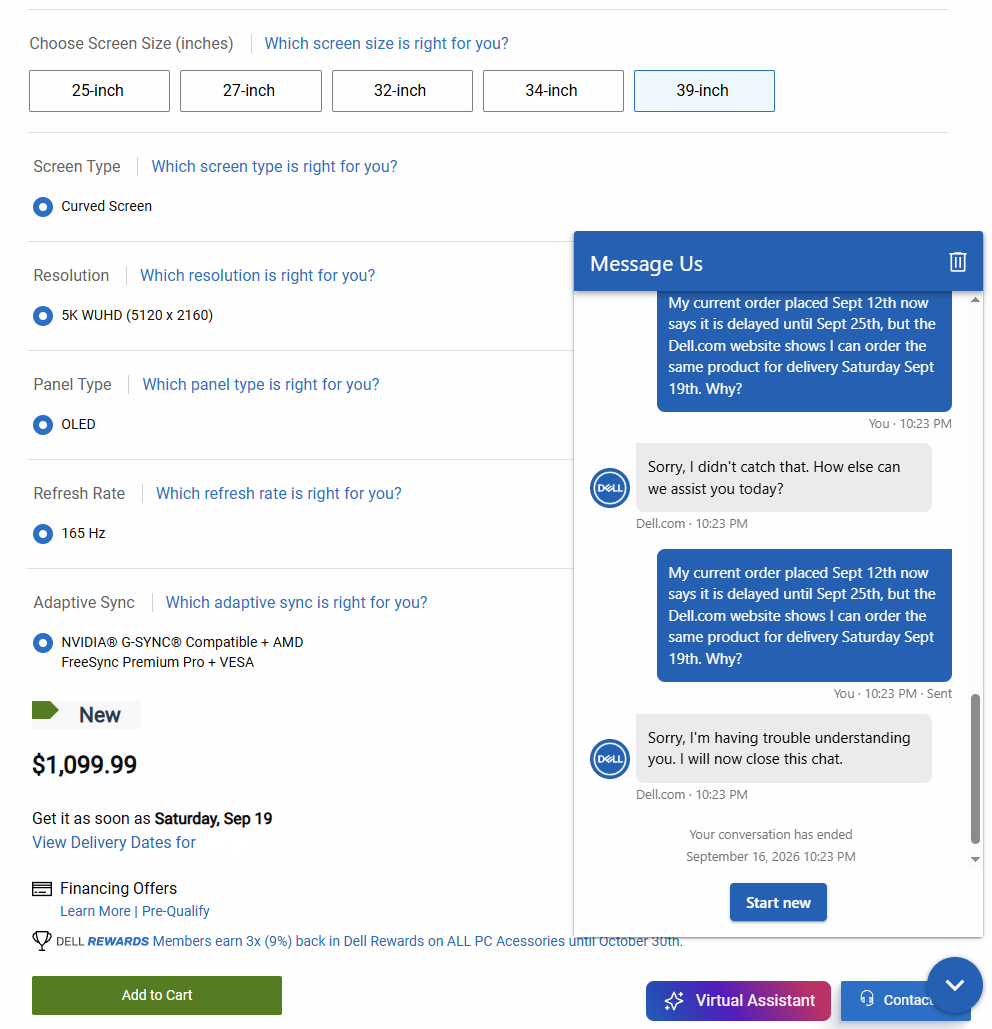
I tried to order one. It said it would be delivered the 17th, right up until it didn't ship by the night of the 16th and I got a notice it was delayed until the 25th; but you can still buy one for delivery on the 19th? o_O

Dell dumb.PNG
 
What the Dell?

I tried to order one. It said it would be delivered the 17th, right up until it didn't ship by the night of the 16th and I got a notice it was delayed until the 25th; but you can still buy one for delivery on the 19th? o_O

View attachment 826226
For the US your best chance was before they opened up for EU. Not sure if it’s changed but some of them have Dec ship dates
 
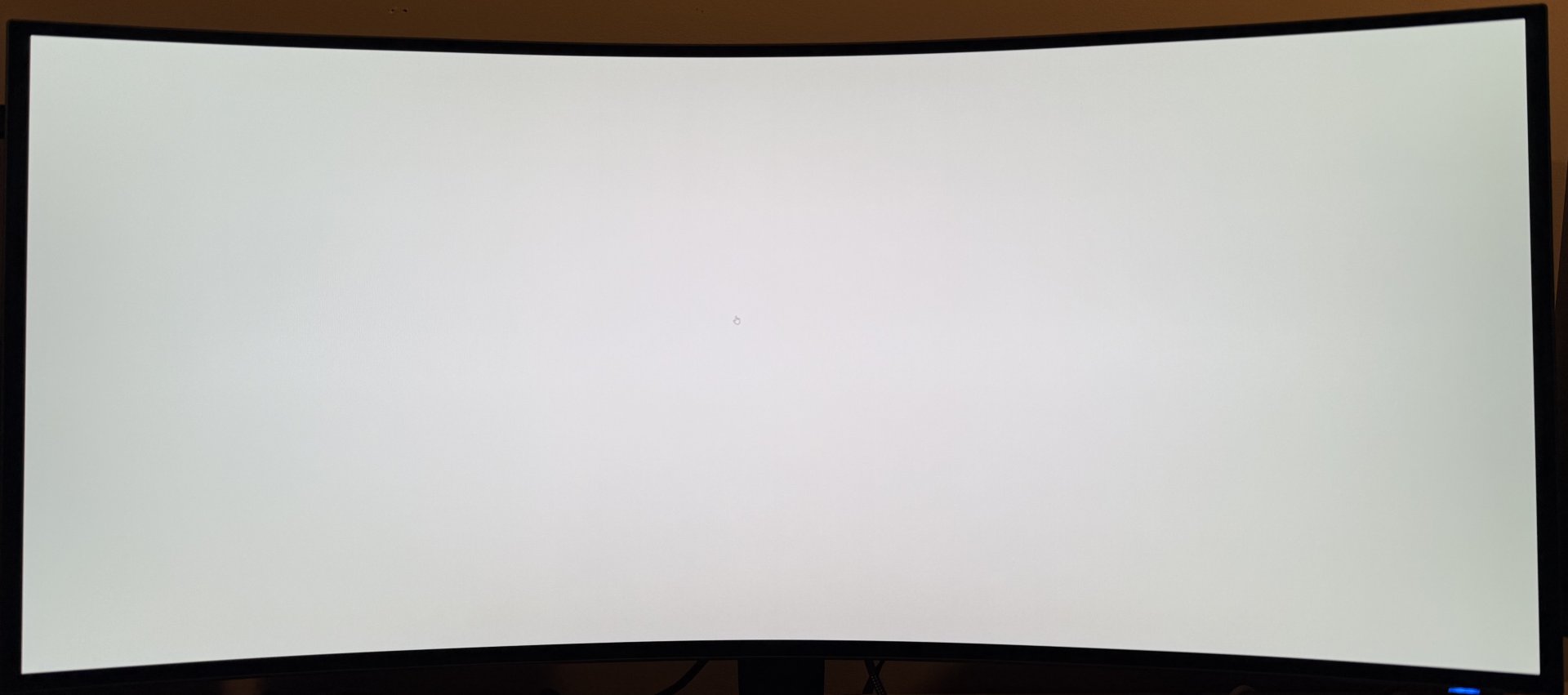
Starting to notice a bit of color uniformity trouble on the bottom 1/5 of the screen. There is definitely a hit of a green shift when viewed at an angle, or closer than ~36". Mostly noticeable on predominantly white or grey backgrounds. Not sure how I feel about it, yet. The AW3426DW seemed considerably better in terms of uniformity.
 
I'm not sure if this is placebo, or I'm just starting to notice it more. I updated my Nvidia drivers from a very old/stable version(566.x) to 610.88 yesterday, and today the brightness gradient from center to edge is horrible. I can't see why the graphics driver would affect CPC, my color settings are the same as before.

If I switch back and forth from custom to creator mode, or turn the monitor off an on again it goes away for about 3 minutes.

I will be returning this display if a fix is not released in the next week.

AW3926QW - Creator mode DCI-P3, 60% brightness,
IMG_0797.jpeg


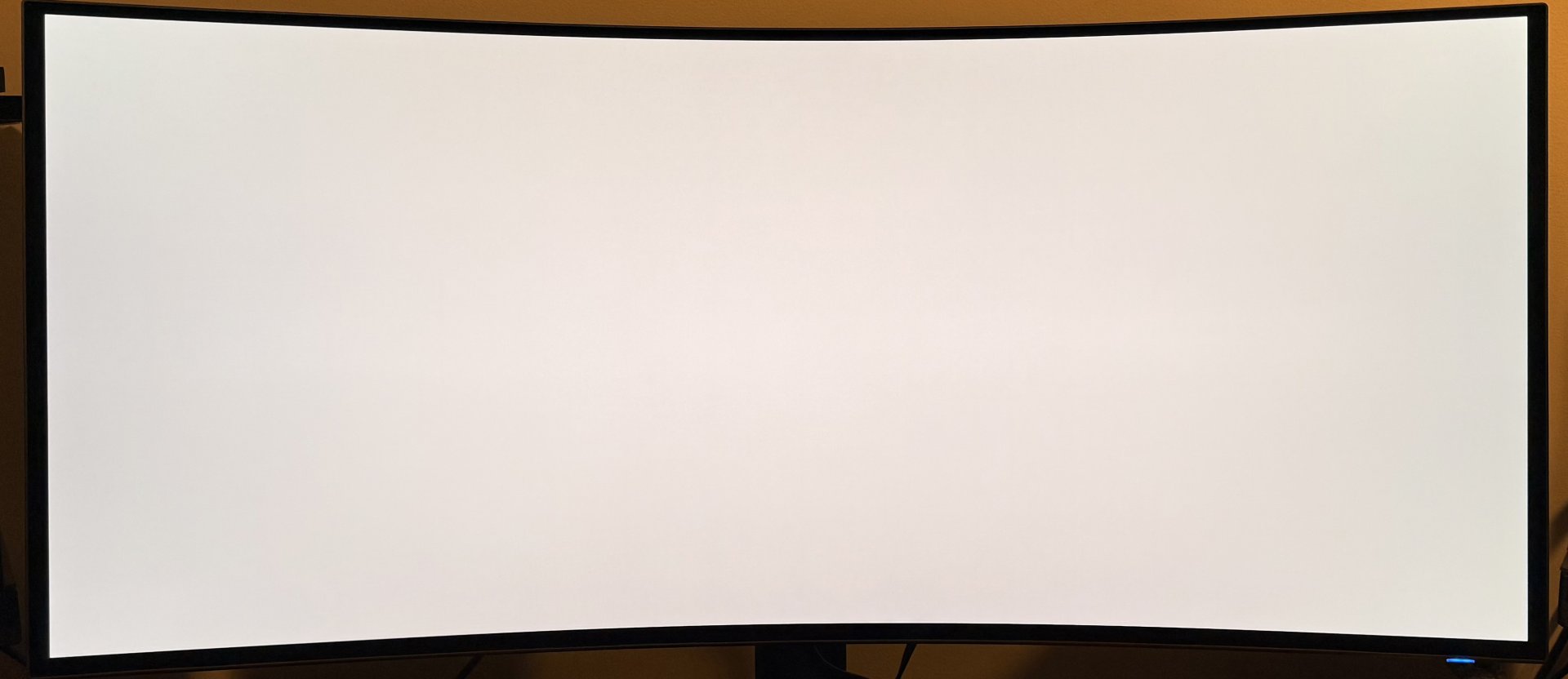
AW3426DW - Creator mode DCI-P3, 55% brightness.
IMG_0804.jpeg
 
Last edited:
That was a very fast honeymoon period lol.
Right. At first the clarity and color of the OLED and semi gloss screen were just overwhelmingly beautiful (I was coming from an Acer Predator X35 VA panel).

Of course, the first thing I did was fire up some games and what not. But once I started to use it for productivity and typical desktop use the CPC and resultant uniformity issue started to emerge rather quickly.

It is strange that I didn't notice it as much on day 1 though, because I was checking for it and getting it set up the way I wanted color-wise. It seems like the CPC got progressively more aggressive just in the last day of use. The ambient temp hasn't changed, nor has the duration of daily use. My office is kept at 68F at all times.
 
Last edited:
I decided to switch my browser and other apps to dark mode to see if I could mitigate the issue. While watching a YT video I noted some weird flicker, especially in the video details section. Either I got a poor unit, or this model has some serious issues in general.
 
Last edited:
The monitor is now available at Best Buy. I picked it up Sunday. It's a July build. The 60 day return period helped push the decision. So far it looks good. I'm not noticing the issues I've read other users have experienced. This monitor would replace a PG32UQX and an XG27UCDMG.
 
The monitor is now available at Best Buy. I picked it up Sunday. It's a July build. The 60 day return period helped push the decision. So far it looks good. I'm not noticing the issues I've read other users have experienced. This monitor would replace a PG32UQX and an XG27UCDMG.
Good to know. Maybe I ought to grab a second one and compare before making a final decision on this.

Aside from the slight uniformity issue from left to right and the CPC making edges look dim and less brilliant, the panel is otherwise pretty great.

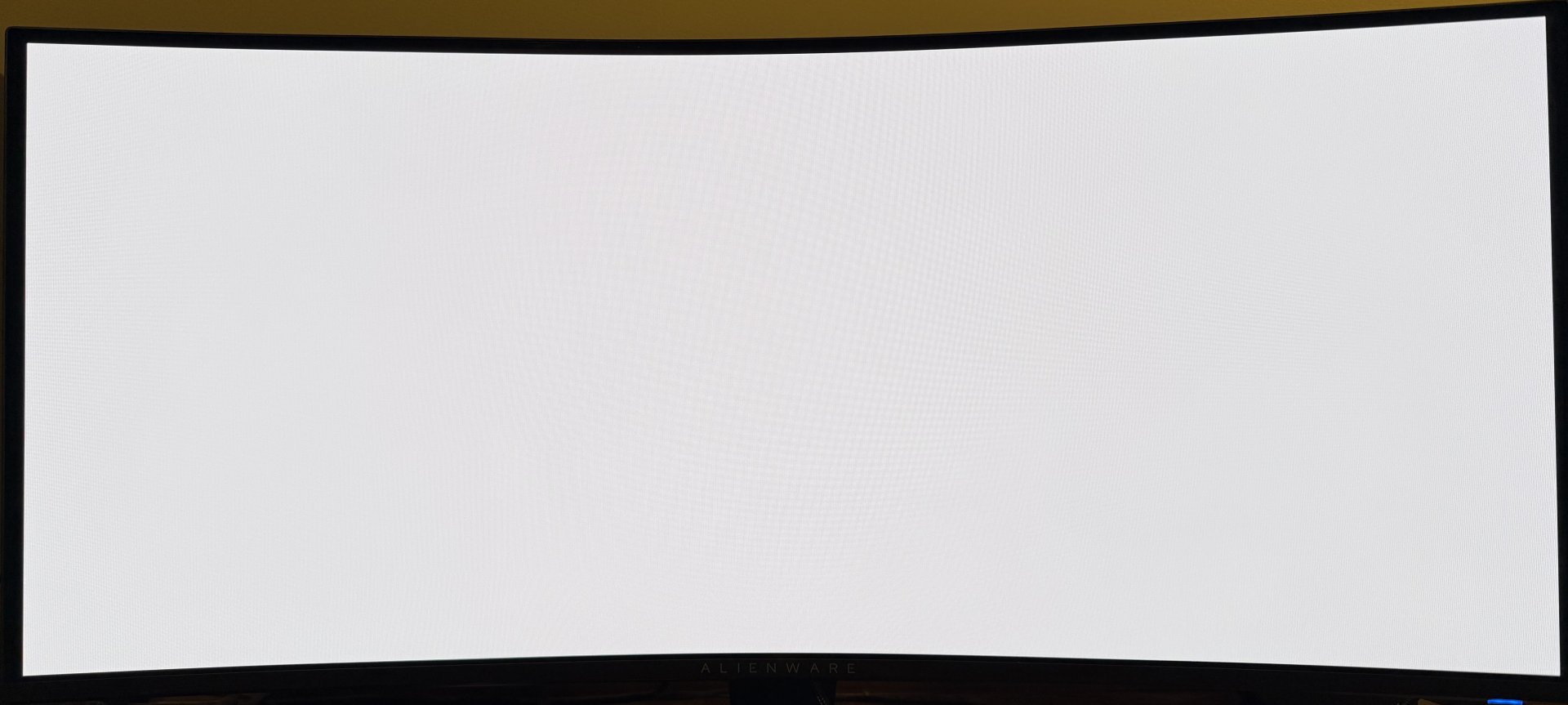
I found something very interesting. The monitor has a built-in self-test mode to check for uniformity issues and dead pixels. It seems like the CPC function is disabled during this self-test mode. Note the difference in edge uniformity:

IMG_0850.jpeg


Curious that they would build in a means to show what the panel is capable of doing without fancy algorithms, but then nerf it otherwise. This panel almost never looks this uniform during normal use, except for maybe within a minute of turning on for the day.
 
Last edited:
One thing that bothers me with this monitor more than I thought initially is the reduced size. For example, losing that 1" when compared to a 40" 5K2K monitor is pretty noticeable, not to mention 45" 5K2K.
 
What HDR settings have others settled on? I initially used Custom HDR with contrast set to 100 and saturation set to 60 which I picked up from YouTube reviewer Viktor's Reality.

I've changed to the settings in the following Reddit post:
https://www.reddit.com/r/pcmasterra...6qw_hdr_modes_anyone_else_landed_on_a_custom/

Using Peak 1300 Bright, contrast in the Nvidia app set to 105, and digital vibrancy set to 55. So far it's looking good.
 
On the desktop I'm using SDR Creator mode sRGB, 60% brightness and 55% contrast with Windows and most apps in dark mode. Any higher brightness or contrast and eye-strain increases quickly.

For HDR gaming, I've found True Black 500 to be my favorite in Witcher 3.

This panel looks great in darker-themed games, but I can't recommend it for productivity and everyday desktop use. I'm trying to get used to using dark mode everywhere I can, and get over the fact that anything broadly white is going look like ass.

I am nervous to play something that has brighter scenes as I'll probably start to notice the CPC issues and get annoyed again. I've been considering picking up the LG 39" to compare, I think I've still got a week or so in my return period.
 
I am nervous to play something that has brighter scenes as I'll probably start to notice the CPC issues and get annoyed again. I've been considering picking up the LG 39" to compare, I think I've still got a week or so in my return period.
I think LG forces CPC on for all their monitors with no option to disable (check though). ASUS allows you to disable CPC, or at least they do on my WOLED. No idea what long term harm that has, but I decided the tradeoff was worth it because ya, pisses me off.
 
I think LG forces CPC on for all their monitors with no option to disable (check though). ASUS allows you to disable CPC, or at least they do on my WOLED. No idea what long term harm that has, but I decided the tradeoff was worth it because ya, pisses me off.
Good to know. I've read you can temporarily disable it in the control menu on the LG 39", but it comes back on after each power cycle. It seems like if you were responsible and aware you could use dark mode settings for most use cases and mitigate some of the impact of disabling CPC for situations where it was causing noticeable uniformity problems.
 
Good to know. I've read you can temporarily disable it in the control menu on the LG 39", but it comes back on after each power cycle. It seems like if you were responsible and aware you could use dark mode settings for most use cases and mitigate some of the impact of disabling CPC for situations where it was causing noticeable uniformity problems.
Near as I can tell CPC has a fairly minor effect on longevity, you are much better off just not running the screen as bright, and having it use a proximity sensor to turn off when you aren't at it. Those help way more than CPC.
 
Near as I can tell CPC has a fairly minor effect on longevity, you are much better off just not running the screen as bright, and having it use a proximity sensor to turn off when you aren't at it. Those help way more than CPC.
Exactly.

Which is why it is so annoying that Dell won't let people who understand this turn it off.
 
Exactly.

Which is why it is so annoying that Dell won't let people who understand this turn it off.
It is because it helps prolong panel life and many people don't notice it since many LCDs also have the same sort of issue with gradual dimming towards edges. Dell has to service the warranties, so they want to do what they can to extend the life of the panel. Mostly matters for people who have their screens turned up bright on the desktop... but that's a lot of people.

Not saying I agree and for me it isn't something I want, but that's the logic. Brightness + time is what kills OLED. To prolong their life you either use them less, or reduce brightness. Hence most of the anti-burn-in tech is around doing one of those two things. The proximity sensor ASUS offers is the "use less" where if you walk away from the monitor, it goes black. No display = no life reduction so turn it off when not needed. All the various dimming, like CPC, are the second: Make the display as dim as possible as often as possible to extend the life.

Also of note is that damage from brightness scales exponentially so running a panel at 250nits is about 4x as much life reduction as running at 120nits.

There's no solution to this that has yet been found, new panels that have more layers (the 4 layer WOLEDs with R+G+2xB and the 5xB QD-OLEDs) CAN last longer since each layer has to emit less light at a given brightness... but they can be run brighter and if you do then they'll degrade just as fast or faster. That's why you get lots of protection tech, and why in some cases they don't let you disable it. TVs like to do all kinds of global dimming including ASBL where they dim if the average picture level stays the same, even if the actual image isn't static, and usually won't allow it to be disabled outside of a hidden service menu.

It's the real downside of OLEDs at this point.
 
Right. At first the clarity and color of the OLED and semi gloss screen were just overwhelmingly beautiful (I was coming from an Acer Predator X35 VA panel).

Of course, the first thing I did was fire up some games and what not. But once I started to use it for productivity and typical desktop use the CPC and resultant uniformity issue started to emerge rather quickly.

It is strange that I didn't notice it as much on day 1 though, because I was checking for it and getting it set up the way I wanted color-wise. It seems like the CPC got progressively more aggressive just in the last day of use. The ambient temp hasn't changed, nor has the duration of daily use. My office is kept at 68F at all times.

MUB actually had the same thing happen to him so you are not alone:


View: https://youtu.be/JYnmu6ULg9g?is=b2UmgoNA4Cy_qacj

Edge dimming got worst for him over time. He first wrote it off as a non issue but fast forward today and it's very noticeable to him. Seems like quite the bait and switch if the monitor performs one way at first then changes it's behavior later.
 
For my usage, it's really hard to see so agree about gaming specific. When I do use for non-gaming, don't have any windows/apps taking up full screen so it doesn't present itself. For those who do use it for photo/video editing could see this as a return easily.
 
New firmware allows you to turn off CPC!

https://www.dell.com/support/product-details/en-sg/product/aw3926qw-monitor/drivers

Fixes & Enhancements​

1. Adding EDGE-DIMMING on/off function under OLED Panel Maintenance for switching panel CPC
2. Adding game console timing support under 32" (16:9) 3840x2160, 165Hz mode.
Wow!

I just ordered mine from Best Buy and it should be here tomorrow. The CPC issue had me concerned, but figured the only way to know was to try it. Placed the order last night, and find out they made a fix.

It will be replacing an OG Odyssey G9 that failed after 3 years of use (tcon).

I am driving it with a 7900xtx which I have concerns about framerate in some games, but figure that I can run it in 4K mode or centered 5120x1440.

I purchased with the BB 4 year warranty $169, but I have been reading good things about Dell warranty service so perhaps it is not necessary? I am a developer and if the monitor dies, I need to be up and running quickly and can't wait an extended period for a replacement.

I was surprised to see it still in stock at BestBuy so perhaps many people have been cautious. Based on initial positive press, figured it would fly off shelves OOS.

Edit: BTW, I tried a replacement Odyssey G9 (non OLED) and the panel quality is horrible compared to the OG. It was darker, had bad colors, and even with the aggressive curve there are off-axis viewing problems. They had used a Quantum Dot filter on the original. I suspect all the non-oled 49s are this cheap samsung panel. Never buy Samsung! Only 1yr warranty and you are paying premium price for junk.
 
I notice absolutely no difference going back and forth on a fully white screen. Others say the same, it's still a bit dimmer on the sides, people are saying it's green, I can't tell for sure but it never bothered me to begin with. Some on reddit are in the same boat.
 
I notice absolutely no difference going back and forth on a fully white screen. Others say the same, it's still a bit dimmer on the sides, people are saying it's green, I can't tell for sure but it never bothered me to begin with. Some on reddit are in the same boat.
You are misinformed on what CPC applies to. TFT central video linked above has more details about content this applies to but solid White/color screens are not part of it. Your issue is panel uniformity which will vary.
 
I just got this monitor today, and the text clarity is... fine. Features are good. Great overall picture and colors. OSD is meh. But it is 95% going back. I did not remove the protective film so that may influence my opinion on the screen, but not my primary complaint.

The edge banding is... whatever. I can see it, but it doesn't bother me; and if it did I could install the firmware.

The problem is the 5K2K format; I just don't like it. This is coming from 3 years using an OG Odyssey G9 (which died recently).

This is for 80/20 productivity(software dev)/gaming and it feels more like a television screen than it does a computer monitor. There is too much height, such that looking at the top of the screen requires a big move from the eyes. So going from code in the middle to the task bar at top loses the immediate feel I'm used to. (While I haven't booted any games, having to look up another 2 inches for hud elements is going to be a drag.) Scrolling between sections of code has never been an issue on a shorter screen, displaying more lines is not of any great benefit.

And it lacks the immersion of the 49" G9. Unfortunately, it is also too big to have another side monitor.

There are more pixels than the G9, so it has the potential for more real estate. So if I forced myself to keep using this, I could have more terminals open in side bars.

The 1500R radius is a good choice for this monitor size, but any larger than this would demand more curve. I can already tell I would dislike 1800R on a 49" as used in the Odyssey G9 Oled.

If your primary genre is MOBA, I can see having extra vertical height as an advantage, but for any first/thrid person game, 32:9 is much better.

AS I'm typing this, I'm not 100% sure the text clarity is at the level I'm accustomed to. Since my G9 died, I've been using the screen on my Lenovo Legion Pro 7i 16" laptop. That is a beautiful screen with much higher ppi. This screen doesn't have the same pop. I don't know what oled tech Lenovo is using, but it is glossy with vibrant whites, and because of the pixel density I have never detected any issues with text clarity.

Whites are just not great on the aw3926. Apps with a white background, don't pop, they don't look crisp. I think the same is true to a degree of white text on grey background. Colors however appear very accurate.

It doesnt get that bright. In my home office, it feels ok around 65% brightness contrast. I would run the OG G9 at 20-25%. That was a much brighter monitor. This is not deficient in brightness for normal use, but it doesn't have much in reserve, probably bad in sunny rooms.

I am returning this 100%. I'm going back to SUW. 32:9 needs an aggressive curve, so I'm going to skip the Samsung oled panels which are all 1800R and sadly am going to be stuck with ugly VA. (I tried the recent VA G9 and they did not incorporate QD tech like they did in the original G9, it is a severe downgrade in every way.) Perfect monitor for me is a 49" neo G9 mini-led (or OG G9), but sadly no longer available.

Summary of the AW3926qm (in my opinion)

* This is more of a gaming monitor than productivity. Extra height requires you to sit farther back with more scaling which means you lose alot of the size advantage.
* It is more "expansive" than it is "immersive". Better suited for moba and action rpg than first person.
* Whites kinda suck (this includes white screens, text, icons, etc...) Even if running dark mode, there are going to be white screens, its just too common to avoid. White screens are common and pervasive and a high dollar monitor needs to provide clean,crisp,clear,intense whites. This does not. Final answer. It's pretty obvious to me why Dell is only charging $1100. (It's an $1100 monitor, no more)
* This monitor may solve the problem of text clarity in oleds, but not having a white subpixel really gimps it for productivity, and makes this more of a niche (moba, gaming) display. I see this as a dead end for oled panel technology.

Edit: I just returned the AW3926 and picked up an Odyssey G9 OLED G93SD from local Best Buy $999, 3yr warranty. The color uniformity and quality of whites is much better on the Samsung. Yes, there is text fringing, but so far at 150% scaling it is not something that is immediately bothering me. The Samsung seems to get a little brighter too, and I've already gotten used to the 1800r. Aspect ratio and pixel density aside, if the AW3926 is fixing text fringing at the expense of color uniformity and clean/crisp whites, that is not a trade I am willing to make. I don't think the Samsung is endgame panel, I would be happier with a Neo G9 49, but we take what we can get.
 
Last edited:
I just got this monitor today, and the text clarity is... fine.

According to Rtings this has the best text clarity of any OLED monitor tested, coming in at 9.0 out of 10 across all panel types tested.

Now that the CPC can be toggled off my only complaint about the panel is resolved, and I'm back to being very happy about the purchase.

I certainly wouldn't buy this for 80% productivity. It is definitely a gaming monitor first, casual browsing and content consumption second, and anything else 3rd. If was spending 80% of my time on a panel for productivity, I could only accept IPS. I use a pair of Asus ProArt for coding, design, and reviewing engineering drawings for work.
 
According to Rtings this has the best text clarity of any OLED monitor tested, coming in at 9.0 out of 10 across all panel types tested.

Now that the CPC can be toggled off my only complaint about the panel is resolved, and I'm back to being very happy about the purchase.

I certainly wouldn't buy this for 80% productivity. It is definitely a gaming monitor first, casual browsing and content consumption second, and anything else 3rd. If was spending 80% of my time on a panel for productivity, I could only accept IPS. I use a pair of Asus ProArt for coding, design, and reviewing engineering drawings for work.
It does have sharp text, until you compare it to a 2560x1600 16" lenovo legion screen with 188ppi. I think higher pixel density is a better solution than stacked rgb.

Because of the screen height, you have to push it back a little farther and use more scaling. At that distance, the text clarity difference is not noticeable. Because it has substandard whites, white text on dark background lacks contrast, and black text on white looks washed. If you are coming from a low quality ips or va, you might not immediately notice.


Imo, this is perfect monitor for arpg, moba, strategy, rts...any game where you need lots of detailed information over a large area, where you have top down view and want to see more map. Also great for content consumption. For first person, it doesn't do the same trick as the g9, where it fills you entire field if vision. Feels more like using a television.

Its a good $1100 monitor for the right user. but it also makes it clear why most oleds have a white subpixel.subtitle.

Edit.. for programming exclusively, two high density 4k displays would be great, but i am a power toys fancy zones "power user," and the ability to free form adjust layouts, have window wherever you want them on a large canvas... not going to give that up. Also a single screen solves alot of issues when connecting multiple computers, like a work laptop and gaming pc. Can have audio routed through monitor for both machines, do pip, etc. Im a big fan of 3:29. 5k2k not my cup of tea.
 
Last edited:
According to Rtings this has the best text clarity of any OLED monitor tested, coming in at 9.0 out of 10 across all panel types tested.

Now that the CPC can be toggled off my only complaint about the panel is resolved, and I'm back to being very happy about the purchase.

I certainly wouldn't buy this for 80% productivity. It is definitely a gaming monitor first, casual browsing and content consumption second, and anything else 3rd. If was spending 80% of my time on a panel for productivity, I could only accept IPS. I use a pair of Asus ProArt for coding, design, and reviewing engineering drawings for work.
Agree, the clarity is amazing on this especially coming from 3440x1440p. That vertical resolution is something I can't live without now. Tried 32:9 and definitely not my cup of tea especially for FPS. Aside from VR headsets, closest thing for immersion is the 45" GX9 from LG but highly prefer the AW39 as an all-purpose.
 
It does have sharp text, until you compare it to a 2560x1600 16" lenovo legion screen with 188ppi.

Yeah, The lenovo legion is pretty good; until you compare it to the Iphone 18 pro at 460ppi... Apples to Crescent wrenches.

A large format ultrawide with greater than ~140ppi just isn't doable right now, because you'd need something better than a 5090 to even hope for decent frame rates.

This thread is about the AW3926QW and it's comparable alternatives. A laptop isn't really one of those.
 
Yeah, The lenovo legion is pretty good; until you compare it to the Iphone 18 pro at 460ppi... Apples to Crescent wrenches.

A large format ultrawide with greater than ~140ppi just isn't doable right now, because you'd need something better than a 5090 to even hope for decent frame rates.

This thread is about the AW3926QW and it's comparable alternatives. A laptop isn't really one of those.
I mentioned it because I see the AW3926qw approach to oled as an eventual dead end as pixel density gets higher over time. When the pixel density is high enough, it solves any text fringing problems, and at that point you definitely want a white subpixel. That is why I see the aw3926 as a niche product. It is 100% a gaming monitor, and the text clarity will really benefit games with lots of text information. (Having two small 4K oled monitors with white subpixel has the same density as my lenovo, someone just needs to put two of them together into an 8K screen.)

However, the 1100 price got alot of people really interested. It is readily in stock at Best Buy so it didn't fly off the shelves like I thought it would. A guy did a youtube video comparison with the Alienware next to the comparable LG Ultragear Evo and you can see how yellow the whites are in comparison to the LG. If anyone sets up the Alienware next to the LG in a store, consumers are going to immediately see why this is priced at 1100. Its a good buy, maybe a great buy for the right use case, but the whites are substandard.

BTW, I am going on about this because I see it as a public service to inform potential buyers. The influencers were all sent one of these and are giving glowing reviews, so I'm trying to counterbalance. The poor whites and lack of color uniformity makes it look like a cheaper monitor when used for productivity, and I have to belive that many of the people who can afford this monitor also care about that.
 
Yeah, The lenovo legion is pretty good; until you compare it to the Iphone 18 pro at 460ppi... Apples to Crescent wrenches.

A large format ultrawide with greater than ~140ppi just isn't doable right now, because you'd need something better than a 5090 to even hope for decent frame rates.

This thread is about the AW3926QW and it's comparable alternatives. A laptop isn't really one of those.
Witcher 3 Remastered on this is so beatiful and the PPI makes the texture pop even more. Dark areas really give you that sense of doom and entering the light areas the whites are insanely accurate too!
 

Attachments

  • w3d.jpg
    w3d.jpg
    186.9 KB · Views: 0
  • w3l.jpg
    w3l.jpg
    262.7 KB · Views: 0
It's so hard to find these in store for pickup. Best Buy has them available for shipping but no local pickup near me. My concern is having one shipped and dealing with another cracked monitor like my first.

Does anybody know if the "ship to store" option is safer in terms of handling than having it shipped to home? Or is it going to be manhandled by UPS / FedEx either way?
 
Back
Top