![[H]ard|Forum](/styles/hardforum/xenforo/logo_dark.png)

- Joined
- May 5, 2006
- Messages
- 5,781
I didn't see anyone post a dedicated thread to the 48 C6 here yet, like the "old" LG 48CX thread.
I hope it's not just the lift that the gx950a was doing, which stretched the HDR 400/600 curve up to get to 1300nit on that model when you set that model to "high" brightness mode in the OSD. I didn't think that made a good look as an end result on the gx950a that I had. Will have to see details about the overall HDR PQ when more reviews are out on the 48 C6 (usa model specifically, other locales might differ).
. . People in replies have also have reminded that even if it is tandem, the difference between the levels a G6 gets might be explained by the fact that the 48 C6 has no panel heatsink where the G6 has one.
. . It's also worth noting that owners of the G6 and C6 have been saying that the aggressive diagonal dithering lines which are visible when viewing near for PC gaming are not visible on the G6 and the 48 C6.
Key features
Specs per BB:
. .
Web search blurb :
. . .
More details about LG's "brightness boost" tech from a search listed below.
Note that #1 is in relation to a panel heatsink on the G6, which the C6 doesn't have.
Also, #3, the processor software "diverts power from darker areas of the screen" - (does that ever make those areas more dim/dull than they should be? - seemed like something like that was happening on my gx950a but I can't be certain).
"
LG 48C6 OLED48C6PUA evo AI C6 4K Smart TV 2026
- Some early owners are showing charts measuring higher than expected peak HDR brightness on the 48 C6, including in game mode.
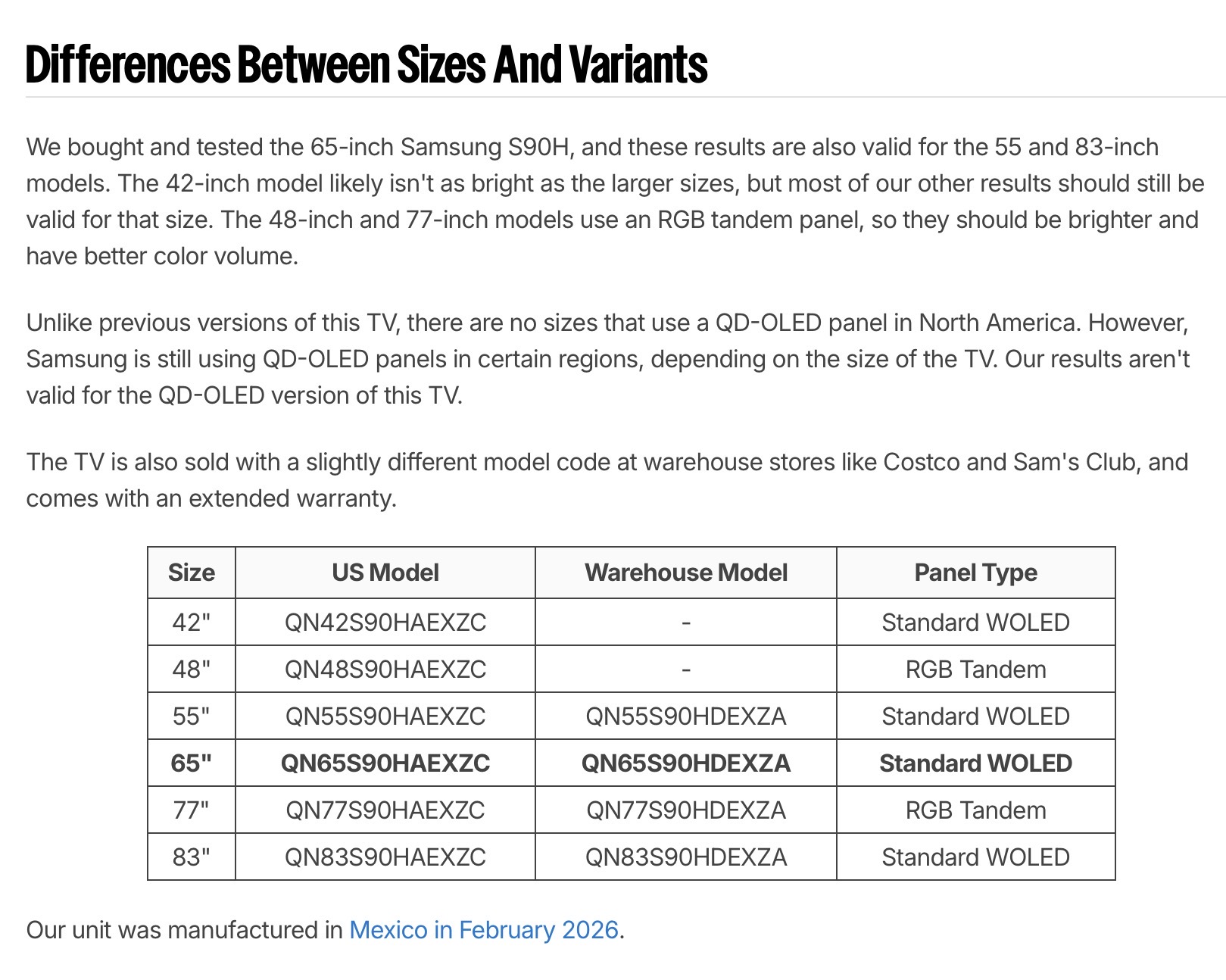
- Currently there is optimistic speculation (or cautious doubt) that the 48 C6 is using tandem panel tech like the G6.
- There are people mentioning that the 48 C6 features a "brightness boost" tech though, which is separate from tandem layer tech.
I hope it's not just the lift that the gx950a was doing, which stretched the HDR 400/600 curve up to get to 1300nit on that model when you set that model to "high" brightness mode in the OSD. I didn't think that made a good look as an end result on the gx950a that I had. Will have to see details about the overall HDR PQ when more reviews are out on the 48 C6 (usa model specifically, other locales might differ).
. . People in replies have also have reminded that even if it is tandem, the difference between the levels a G6 gets might be explained by the fact that the 48 C6 has no panel heatsink where the G6 has one.
. . It's also worth noting that owners of the G6 and C6 have been saying that the aggressive diagonal dithering lines which are visible when viewing near for PC gaming are not visible on the G6 and the 48 C6.
Key features
- Our Brightness Booster technology magnifies each individual pixel for luminous quality that shines with every detail
- Over 8.3 million self-lit smart pixels with Perfect Black and Perfect Color technology¹
- Alpha 11 AI Processor Gen3 LG’s most powerful Dual AI Engine for the ultimate picture and speed
- Enjoy movie magic from home with Dolby Vision®, Dolby Atmos® & FILMMAKER MODE™ with Ambient Light Technology
- Ultimate Gaming with 165Hz Refresh Rate³, NVIDIA G-Sync, AMD FreeSync Premium and 0.1ms response time
- You can watch on and on with confidence and peace of mind with OLED Care
- Powered by Google Gemini & Microsoft Copilot, LG’s Smart TV platform, webOS 2026, delivers a smarter TV experience⁴
Specs per BB:
- Display Type
OLED
Resolution
4K (2160p)
Screen Size Class
48 inches
High Dynamic Range (HDR)
Yes
High Dynamic Range Format
Dolby Vision, HDR 10, Hybrid Log-Gamma (HLG)
OLED Technology
OLED EVO
Refresh Rate
120Hz
Motion Enhancement Technology
OLED Motion
Specific Manufacturer Technologies
Brightness Booster, α11 AI Processor Gen 3, LG ThinQ AI, webOS 26, LG Channels
Smart Platform
webOS
Featured Streaming Services
Netflix, HBO Max, Disney+, YouTube, Prime Video, ESPN+, Apple TV
Number of HDMI Inputs (Total)
4
TV Tuner Type
ATSC, Clear QAM
Works With
Google Home, Apple Home
Voice Assistant Built-in
OtherGeneral
Brand
LG
Model Number
OLED48C6PUA
Product Name
48" Class C6 Series OLED evo AI 4K Smart webOS TV (2026)
Series
OLED evo - C6 series
Model Year
2026Dimensions
Product Height With Stand
26.6 inches
Product Width
42.2 inches
Product Depth With Stand
9.1 inches
Product Height Without Stand
24.4 inches
Product Depth Without Stand
1.8 inches
Product Weight With Stand
36.8 pounds
Product Weight Without Stand
32.8 pounds
Stand Width
18.5 inches
Stand Depth
9.1 inches
Adjustable Stand Width
NoDisplay
Display Type
OLED
Resolution
4K (2160p)
Screen Size
48.2 inches
Screen Size Class
48 inches
High Dynamic Range (HDR)
Yes
High Dynamic Range Format
Dolby Vision, HDR 10, Hybrid Log-Gamma (HLG)
Picture Quality Enhancement Technology
Dynamic Tone Mapping Ultra
OLED Technology
OLED EVO
Curved Screen
No
Refresh Rate
120Hz
Motion Enhancement Technology
OLED Motion
Maximum Contrast Ratio (Native)
Infinite
Synchronization Technology
G-SYNC Compatible (NVIDIA Adaptive Sync), FreeSync (AMD Adaptive Sync)
Closed Captioning
YesFeatures
Remote Control Type
Magic
Specific Manufacturer Technologies
Brightness Booster, α11 AI Processor Gen 3, LG ThinQ AI, webOS 26, LG Channels
Smart Capable
Yes
Smart Platform
webOS
Featured Streaming Services
Netflix, HBO Max, Disney+, YouTube, Prime Video, ESPN+, Apple TV
Screen Mirroring
Yes
Screen Mirroring Technology
Apple AirPlay, Google Cast
Content Sharing
Mobile to TV
Indoor Or Outdoor Use
Indoor
Text-To-Speech
Yes
V-Chip
No
TV Tuner
DigitalConnectivity
Number of HDMI Inputs (Total)
4
Display Connector(s)
4 x HDMI 2.1
Network Connector(s)
1 x LAN
Audio Only Outputs
1 x Optical digital audio
USB Ports
2 x USB-A 2.0
HDMI Audio Return Channel (ARC)
eARC
Wireless Connectivity
Wi-Fi, Bluetooth
TV Tuner Type
ATSC, Clear QAM
RF Antenna Input
Yes
Number Of USB Port(s) (Total)
2
Wireless Networking Standard
Wi-Fi 5
Bluetooth Version
5.3
Headphone Jack
YesCompatibility
VESA Wall Mount Standard
300mm x 200mm
Works With
Google Home, Apple Home
Voice Assistant Built-in
OtherAudio
Built-In Speakers
Yes
Built-in Speaker Type
Downward firing
Surround Sound Supported
Dolby Atmos
Number of Audio Channels
2.2Power
ENERGY STAR Certified
Yes
EPEAT Qualified
No
Estimated Annual Operating Cost
22 United States dollars
Estimated Annual Electricity Use
138 kilowatt hoursIncluded
Wall Mount Included
No
Stand Included
Yes
. .
Web search blurb :
"In 2026, LG’s OLED "brightness boost" technology, branded as Hyper Radiant Color Technology and Brightness Booster Ultra, utilizes a second-generation Primary RGB Tandem OLED panel and the Alpha 11 Gen 3 processor to increase brightness by up to 20% over the previous year's G5. It is primarily implemented on G6 and C6 series, offering up to 3.9x the brightness of conventional OLEDs"
. . .
More details about LG's "brightness boost" tech from a search listed below.
Note that #1 is in relation to a panel heatsink on the G6, which the C6 doesn't have.
Also, #3, the processor software "diverts power from darker areas of the screen" - (does that ever make those areas more dim/dull than they should be? - seemed like something like that was happening on my gx950a but I can't be certain).
"
1. Advanced Heat Dissipation (Hardware)
Standard OLED panels are limited in brightness because running them too "hot" (high voltage) speeds up pixel degradation and increases burn-in risk.
2. Micro Lens Array (Hardware - "Max" Only)
- Heat Dissipation Layer: High-end models (like the G-series) include a dedicated physical heat sink or specialized dissipation material behind the panel.
- The Benefit: By pulling heat away more efficiently, the TV can safely drive pixels with higher voltage for longer periods, achieving much higher peak and sustained brightness without damaging the organic material.
Featured in "Brightness Booster Max" models (G3, G4, and later), Micro Lens Array (MLA) technology uses billions of microscopic lenses on top of the OLED pixels.
- Light Redirection: Normally, a significant amount of light produced by OLED pixels is lost through internal reflections within the panel.
- Efficiency: These tiny lenses catch that "trapped" light and direct it straight toward the viewer. This drastically increases brightness efficiency—meaning the TV gets much brighter using the same amount of power.
3. Light-Boosting Algorithms (Software)
The (Alpha) processor (e.g., Alpha 11 or Alpha 9) uses AI-driven algorithms to manage the "light budget" of the screen in real-time.
"
- Luminance Mapping: The processor analyzes each frame to identify where peak highlights are needed. It diverts power from darker areas of the screen to those specific highlights.
- Detail Retention: Instead of just blowing out the whole image, the algorithm ensures that boosting brightness doesn't wash out colors or crush shadow details, maintaining a "punchy" HDR look.
Last edited: